Minecraft version
Back to mods 
Modrinth · Minecraft mod
Quick World Settings
You can easily change the time, weather, and night vision settings!
Choose a version Pick your version below, then grab the matching file.
Quick answer
Which Quick World Settings release should I use?
Latest stable file 1.2.1
Game version 26.2
Loader Fabric
Quick World Settings 1.2.1 targets 26.2 with Fabric. Installation on the client is optional. Installation on the dedicated server is optional. No extra mods listed for this file.
Where it goes
Is Quick World Settings required on the client, server, or both?
Installation on the client is optional. Installation on the dedicated server is optional.
Client Optional
Dedicated server Optional
Loader for this release Fabric
Required install it here Optional supported, not mandatory Not supported do not install here Source doesn’t say do not assume
The source marks this as usable on both the client and server.
What else does Quick World Settings 1.2.1 need?
1.2.1. Change the file and its required mods may change too.
This file does not list any required mods. Do not add a library just because a different file uses it.
This file does not list any required or optional mods.
Before you install it
Add Quick World Settings without breaking your instance.
Built for Quick World Settings 1.2.1. Pick another file and the loader, install side or required mods may change.
- 01
Stick to this file
Use 1.2.1. It targets 26.2 with Fabric; another release may have different loader, side or dependency requirements.
- 02
Bring the mods it needs
This file does not list any required mods. Do not add a library just because a different file uses it.
- 03
Put it on the correct side
Installation on the client is optional. Installation on the dedicated server is optional.
- 04
Pick the file you checked
Use the “Get this file” button beside 1.2.1. It opens that exact file at the source.
About this project
What does Quick World Settings add?
A simple utility mod that lets you quickly change the time, weather, and night vision settings.
Key Features of Version 1.2.1
- You can change the time using keyboard shortcuts.
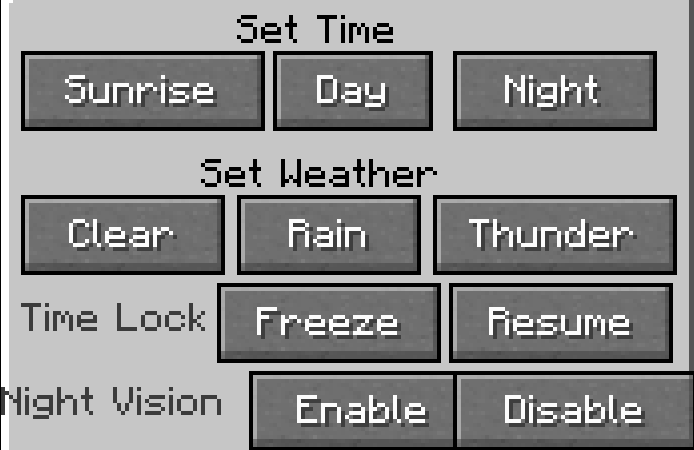
- You can use the GUI to change the time, lock the time, control the weather, and toggle night vision.
- A chat message will appear when you enable or disable features such as time locking or night vision. (Japanese only)
How to Use
- Press the U key to make it morning.
- Press the I key to make it daytime.
- Press the O key to make it nighttime.
Press the P key to open the settings screen.
Supported Languages
- English (en_us)
- Japanese (ja_jp) [Note: Japanese is only available in version 1.2.1 and later.]
Versions in which Japanese text is confirmed to display properly
- 1.20.1 v1.2.1
- 1.21.1 v1.2.1
Known Issues
- Due to a bug, Japanese may not be displayed correctly.
Requirements
- Fabric API (Required only for Fabric/Quilt versions)
| Version | Fabric | Forge | NeoForge | Quilt |
|---|---|---|---|---|
| 26.2 | v1.2.1 | -- | v1.2.2 | -- |
| 26.1.2 | v1.2.1 | -- | v1.2.1 | -- |
| 1.21.8 | v1.2.1 | -- | v1.2.1 | v1.2.1 |
| 1.21.4 | -- | -- | v1.2.1 | -- |
| 1.21.1 | -- | -- | v1.2.1 | -- |
| 1.20.6 | -- | -- | v1.2.1 | -- |
| 1.20.4 | -- | -- | v1.2.1 | -- |
| 1.20.1 | -- | v1.2.1 | v1.2.2 | -- |
| 1.18.2 | -- | v1.0.0 | -- | -- |
Project description from Modrinth.
Pick your setup
Quick World Settings by Minecraft version and loader
Choose the version and loader you play, then open the matching release.
Minecraft version
26.1.2
2 loader buildsMinecraft version
1.21.8
3 loader buildsMinecraft version
1.21.4
1 loader buildMinecraft version
1.21.1
1 loader buildMinecraft version
1.20.6
1 loader buildMinecraft version
1.20.4
1 loader buildMinecraft version
1.20.1
1 loader buildMinecraft version
1.18.2
1 loader buildCheck the dependencies, then try the file in a copied instance before changing a world you care about.
Recent files
Quick World Settings versions and loaders
1.2.2-beta
quick_world_settings-1.2.2-beta-neoforge-26.2.jar
16 Sept 2026
Client Optional Server Optional Dependencies No extras listed Listed on Release listing
Check the 26.2 · NeoForge setup 26.2NeoForge beta
1.2.1
quick_world_settings-1.2.1-fabric-26.2.jar
26 Aug 2026
Client Optional Server Optional Dependencies No extras listed Listed on Release listing
Check the 26.2 · Fabric setup 26.2Fabric release
1.2.2
quick_world_settings-1.2.2-beta-forge-1.20.1.jar
22 Aug 2026
Client Optional Server Optional Dependencies No extras listed Listed on Release listing
Check the 1.20.1 · Forge setup 1.20.1Forge beta
1.2.1
quick_world_settings-1.2.1-fabric-26.1.2.jar
20 Jul 2026
Client Optional Server Optional Dependencies No extras listed Listed on Release listing
Check the 26.1.2 · Fabric setup 26.1.2Fabric release
1.2.1
quick_world_settings-1.2.1-neoforge-26.1.2.jar
20 Jul 2026
Client Optional Server Optional Dependencies No extras listed Listed on Release listing
Check the 26.1.2 · NeoForge setup 26.1.2NeoForge release
1.2.1
quick_world_settings-1.2.1-neoforge-1.20.6.jar
8 Jul 2026
Client Optional Server Optional Dependencies No extras listed Listed on Release listing
Check the 1.20.6 · NeoForge setup 1.20.6NeoForge release
1.2.1
quick_world_settings-1.2.1-neoforge-1.20.4.jar
8 Jul 2026
Client Optional Server Optional Dependencies No extras listed Listed on Release listing
Check the 1.20.4 · NeoForge setup 1.20.4NeoForge release
1.2.1
quick_world_settings_-1.2.1-fabric-26.1.2.jar
3 Jul 2026
Client Optional Server Optional Dependencies 1 required · 1 unchecked Listed on Release listing
Check the 26.1.2 · Fabric setup 26.1.2Fabric release
1.2.1
quick_world_settings_-1.2.1-fabric-1.21.8.jar
2 Jul 2026
Client Optional Server Optional Dependencies 1 required · 1 unchecked Listed on Release listing
Check the 1.21.8 · Fabric setup 1.21.8FabricQuilt release
1.2.1
quick_world_settings_-1.2.1-neoforge-1.21.1.jar
24 Jun 2026
Client Optional Server Optional Dependencies No extras listed Listed on Release listing
Check the 1.21.1 · NeoForge setup 1.21.1NeoForge release
1.2.1
quick_world_settings_-1.2.1-neoforge-26.1.2.jar
18 Jun 2026
Client Optional Server Optional Dependencies No extras listed Listed on Release listing
Check the 26.1.2 · NeoForge setup 26.1.2NeoForge release
1.2.1
quick_world_settings_-1.2.1-neoforge-1.21.8.jar
18 Jun 2026
Client Optional Server Optional Dependencies No extras listed Listed on Release listing
Check the 1.21.8 · NeoForge setup 1.21.8NeoForge release
Looking for an older file? The official Modrinth project page is in Resources.
 mod
mod CurseForge + Modrinth · Minecraft
Homabric
🏠 Little yet powerful homes management mod for Fabric with GUI support
 mod
mod Modrinth · Minecraft
Higher Heights
A datapack & mod that changes the build height limit to 4064 blocks in The Overworld & End, and 2032 blocks in The Nether
 mod
mod Modrinth · Minecraft
TropiHunterBoard
Mod client that adds a HUD overlay for the Tropimon server's hunt board. Includes a complete in-game Cobblemon wiki.