Fabric API Needed by Underlay [26.2] Underlay v1.0.3
requiredMatching file found Matched file: [26.2] Fabric API 0.156.0+26.2
CurseForge · Minecraft mod
Place any block (such as carpets) inside anything!
Quick answer
Underlay [26.2] Underlay v1.0.3 targets 26.2 with Fabric. The project page does not say whether this file belongs on the client, dedicated server, or both. All 1 required mods have matching files.
Where it goes
The project page does not say whether this file belongs on the client, dedicated server, or both.
The source does not explicitly classify this release as client-only or server-only.
[26.2] Underlay v1.0.3. Change the file and its required mods may change too.
Install Fabric API first. We found matching files for this game-version and loader setup.
We only count dependency files that match this setup. A file for another loader does not fill the gap.
Before you install it
Built for Underlay [26.2] Underlay v1.0.3. Pick another file and the loader, install side or required mods may change.
Use [26.2] Underlay v1.0.3. It targets 26.2 with Fabric; another release may have different loader, side or dependency requirements.
Install Fabric API first. We found matching files for this game-version and loader setup.
The project page does not say whether this file belongs on the client, dedicated server, or both.
Use the “Get this file” button beside [26.2] Underlay v1.0.3. It opens that exact file at the source.
About this project
Underlay is a Minecraft mod that lets you place carpets (and anything else) under any block with space beneath it (e.g. chests, beds, signs, torches, etc.)!
Just right click a block face with a block to place it, (for example, under an upside-down stair), and you're done! Right click again with another item to replace it quickly, or left click it to remove it. Works in Survival too!
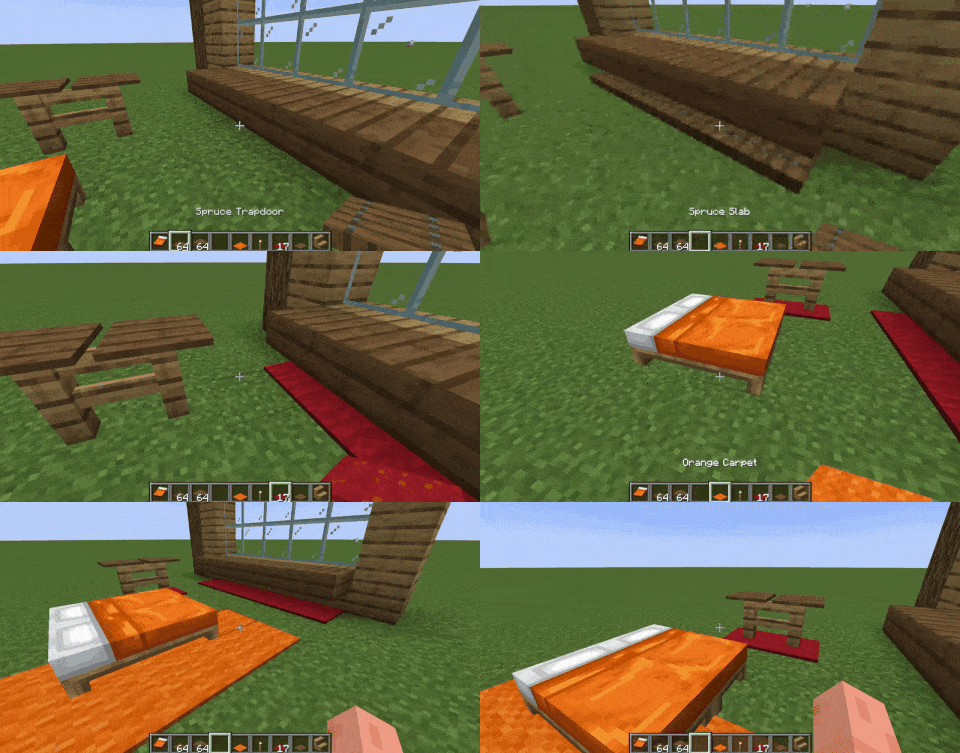
By default, you can place the following blocks as overlays: carpets, trapdoors, buttons, rails, slabs and pressure plates. To expand this to other blocks, such as grass, see "How to add support for more blocks (or exclude some)".
They are not block entities! Underlay adds these things called "overlays" but they're really more like underlays xd, essentially they are fake versions of the item you place - which lets you place two things in the same block space!
In your Minecraft folder you can find config/Underlay/underlay.json. Use overlay_blocks to add blocks, exclude_blocks to exclude them, and to not allow overlays to be placed on certain blocks use target_exclude_blocks, like this:
{
  "overlay_blocks": [
    "minecraft:short_grass",
    "mymod:shiny_block"
  ],
  "exclude_blocks": [
    "minecraft:oak_button",
    "minecraft:rail"
  ],
  "target_exclude_blocks": [
    "minecraft:oak_door",
    "minecraft:spruce_door"
  ]
}
Some versions of Underlay include integration with Create, Jade and Flashback.
Project description from CurseForge.
Pick your setup
Choose the version and loader you play, then open the matching release.
Showing the newest 12 of 20 game versions. Older files are in the list below.
Check the dependencies, then try the file in a copied instance before changing a world you care about.
Recent files
underlay-1.0.3-fabric-mc26.2.jar
11 Jul 2026
underlay-1.0.3-fabric-mc26.1.jar
11 Jul 2026
underlay-1.0.3-fabric-mc1.21.11.jar
11 Jul 2026
underlay-1.0.3-neoforge-mc1.21.1.jar
11 Jul 2026
underlay-1.0.3-fabric-mc1.21.jar
11 Jul 2026
underlay-1.0.3-forge-mc1.20.1.jar
11 Jul 2026
underlay-1.0.3-fabric-mc1.20.1.jar
11 Jul 2026
underlay-1.0.2-fabric-mc26.1.jar
6 Jun 2026
underlay-1.0.2-fabric-mc1.21.11.jar
6 Jun 2026
underlay-1.0.2-fabric-mc1.21.jar
6 Jun 2026
underlay-1.0.2-neoforge-mc1.21.1.jar
6 Jun 2026
underlay-1.0.2-fabric-mc1.20.1.jar
6 Jun 2026
Looking for an older file? The official CurseForge project page is in Resources.
 mod
modAllows modpack developers to define default server properties. Typically used for things like a default level type.
 mod
modUnofficial CreateFly / Fabric port of Create: Copycats+ 3.0.7 with public source and permission from the Copycats+ team.
 mod
modSimple library mod with helpful data attaching and networking utilities including attaching data to entities, chunks, players, and worlds with low boilerplate code. Its own system built from the ground up for multiloader support.
