Fabric API Needed by Underlay 1.0.1
requiredMatching file found Matched file: [1.21.2] Fabric API 0.106.1+1.21.2
CurseForge · Minecraft mod
Place any block (such as carpets) inside anything!
Quick answer
Underlay 1.0.1 targets 1.21.2, 1.21.3, 1.21.4 with Fabric. Installation on the client is optional. Installation on the dedicated server is optional. All 1 required mods have matching files.
Where it goes
Installation on the client is optional. Installation on the dedicated server is optional.
The source marks this as usable on both the client and server.
1.0.1 on 1.21.2. Every mod below is checked against that same setup.
Install Fabric API first. We found matching files for this game-version and loader setup.
We only count dependency files that match this setup. A file for another loader does not fill the gap.
Before you install it
Built for Underlay 1.0.1 on 1.21.2. Pick another file and the loader, install side or required mods may change.
Use 1.0.1. It targets 1.21.2, 1.21.3, 1.21.4 with Fabric; another release may have different loader, side or dependency requirements.
Install Fabric API first. We found matching files for this game-version and loader setup.
Installation on the client is optional. Installation on the dedicated server is optional.
Use the “Get this file” button beside 1.0.1. It opens that exact file at the source.
About this project
Underlay is a Minecraft mod that lets you place carpets (and anything else) under any block with space beneath it (e.g. chests, beds, signs, torches, etc.)!
Just right click a block face with a block to place it, (for example, under an upside-down stair), and you're done! Right click again with another item to replace it quickly, or left click it to remove it. Works in Survival too!
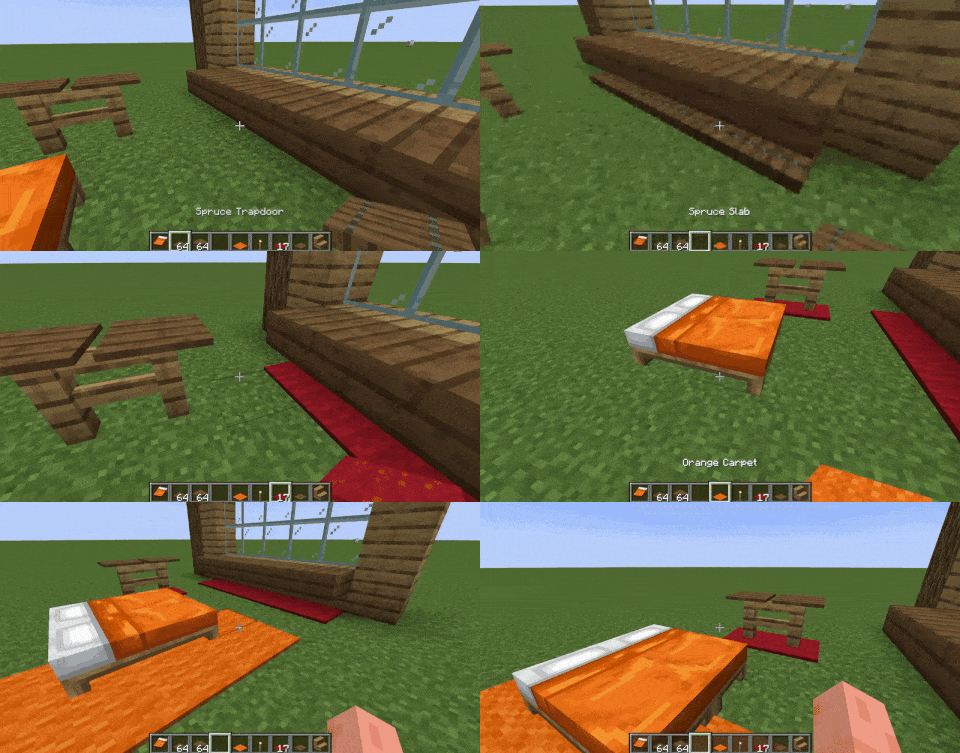
By default, you can place the following blocks as overlays: carpets, trapdoors, buttons, rails, slabs and pressure plates. To expand this to other blocks, such as grass, see "How to add support for more blocks (or exclude some)".
They are not block entities! Underlay adds these things called "overlays" but they're really more like underlays xd, essentially they are fake versions of the item you place - which lets you place two things in the same block space!
In your Minecraft folder you can find config/Underlay/underlay.json. Use overlay_blocks to add blocks, exclude_blocks to exclude them, and to not allow overlays to be placed on certain blocks use target_exclude_blocks, like this:
{
  "overlay_blocks": [
    "minecraft:short_grass",
    "mymod:shiny_block"
  ],
  "exclude_blocks": [
    "minecraft:oak_button",
    "minecraft:rail"
  ],
  "target_exclude_blocks": [
    "minecraft:oak_door",
    "minecraft:spruce_door"
  ]
}
Some versions of Underlay include integration with Create, Jade and Flashback.
Project description from CurseForge.
Pick your setup
Choose the version and loader you play, then open the matching release.
Showing the newest 12 of 20 game versions. Older files are in the list below.
Check the dependencies, then try the file in a copied instance before changing a world you care about.
Recent files
underlay-1.0.1-fabric-mc1.21.2.jar
1 Apr 2026
underlay-1.0.0-hotfix.1-fabric-mc1.21.2.jar
21 Feb 2026
underlay-1.0.0-fabric-mc1.21.2.jar
17 Feb 2026
underlay-0.9.9-fabric-mc1.21.2.jar
10 Dec 2025
underlay-1.21.2-v0.9.8.jar
25 Nov 2025
underlay-1.21.2-v0.9.7.jar
31 Aug 2025
Looking for an older file? The official CurseForge project page is in Resources.
 mod
Additional shapes for any block, including modded ones
 mod
Allow newer Java Edition clients to connect to older servers.
 mod
Records the cumulative playtime at which you first obtain each of your own goal items — perfect for ATM Star hunts in ATM10.
