Minecraft version
Back to mods 
Modrinth · Minecraft mod
Soyjak Spotter
It outlines everything on the screen that you’ve selected to track. Such as ores, blocks, dropped items, entities, players, idk, arrows? Customizable in a way, that you can overlay an image of a screaming Soyjak turning on the siren, for fun
Choose a version Pick your version below, then grab the matching file.
Quick answer
Which Soyjak Spotter release should I use?
Latest stable file 1.2.0-1.21.11
Game version 1.21.11
Loader NeoForge
Soyjak Spotter 1.2.0-1.21.11 targets 1.21.11 with NeoForge. It must be installed on the client. Do not install it on the dedicated server. No extra mods listed for this file.
Where it goes
Is Soyjak Spotter required on the client, server, or both?
It must be installed on the client. Do not install it on the dedicated server.
Client Required
Dedicated server Not supported
Loader for this release NeoForge
Required install it here Optional supported, not mandatory Not supported do not install here Source doesn’t say do not assume
This file is marked client-only.
What else does Soyjak Spotter 1.2.0-1.21.11 need?
1.2.0-1.21.11. Change the file and its required mods may change too.
This file does not list any required mods. Do not add a library just because a different file uses it.
This file does not list any required or optional mods.
Before you install it
Add Soyjak Spotter without breaking your instance.
Built for Soyjak Spotter 1.2.0-1.21.11. Pick another file and the loader, install side or required mods may change.
- 01
Stick to this file
Use 1.2.0-1.21.11. It targets 1.21.11 with NeoForge; another release may have different loader, side or dependency requirements.
- 02
Bring the mods it needs
This file does not list any required mods. Do not add a library just because a different file uses it.
- 03
Put it on the correct side
It must be installed on the client. Do not install it on the dedicated server.
- 04
Pick the file you checked
Use the “Get this file” button beside 1.2.0-1.21.11. It opens that exact file at the source.
About this project
What does Soyjak Spotter add?


Beware, mortal
This mod watches your screen for whatever you tell it to watch for, ores, blocks, dropped items, mobs, players, words in chat, arrows if you're into that, and slaps a marker on it the second it's actually visible. Doesn't see through walls, so no, you can't use this to cheat, your eyes still have to do their job first, you little ADHD affected human

 Blocks Any block, even from other mods. Ore presets are already there |
 Dropped items For that one diamond you lost in the grass |
 Mobs and entities Mobs, minecarts, boats, whatever has an id |
 Players Just pick nicknames from the tab list |
 Words in chat Circles your words right in the chat |
 Your inventory Circles tracked items in your slots, chests and hotbar |
Boring stuff gets a plain red circle. Rare stuff gets a screaming soyjak and a siren. You decide which is which

On a player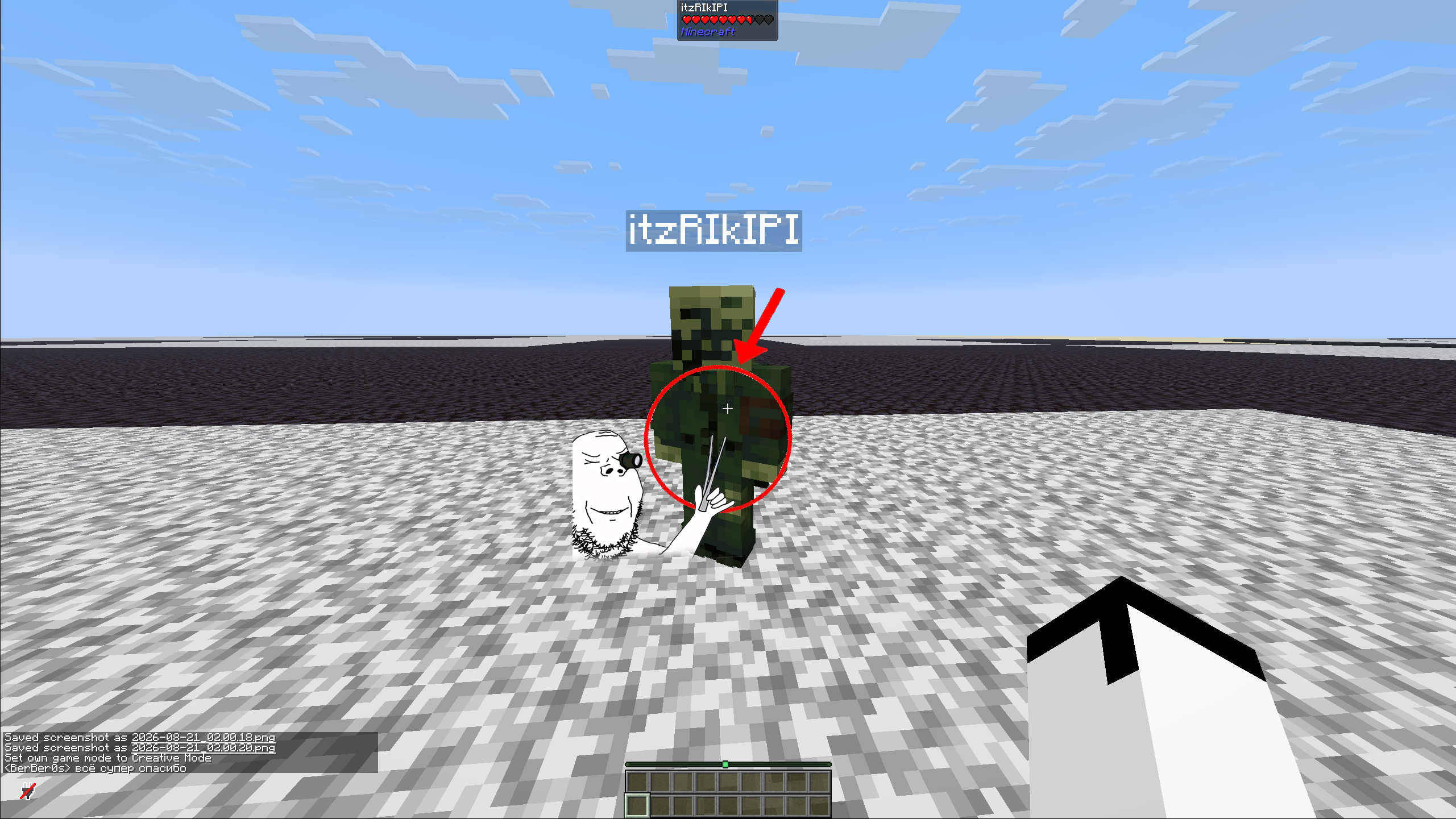
Ancient debris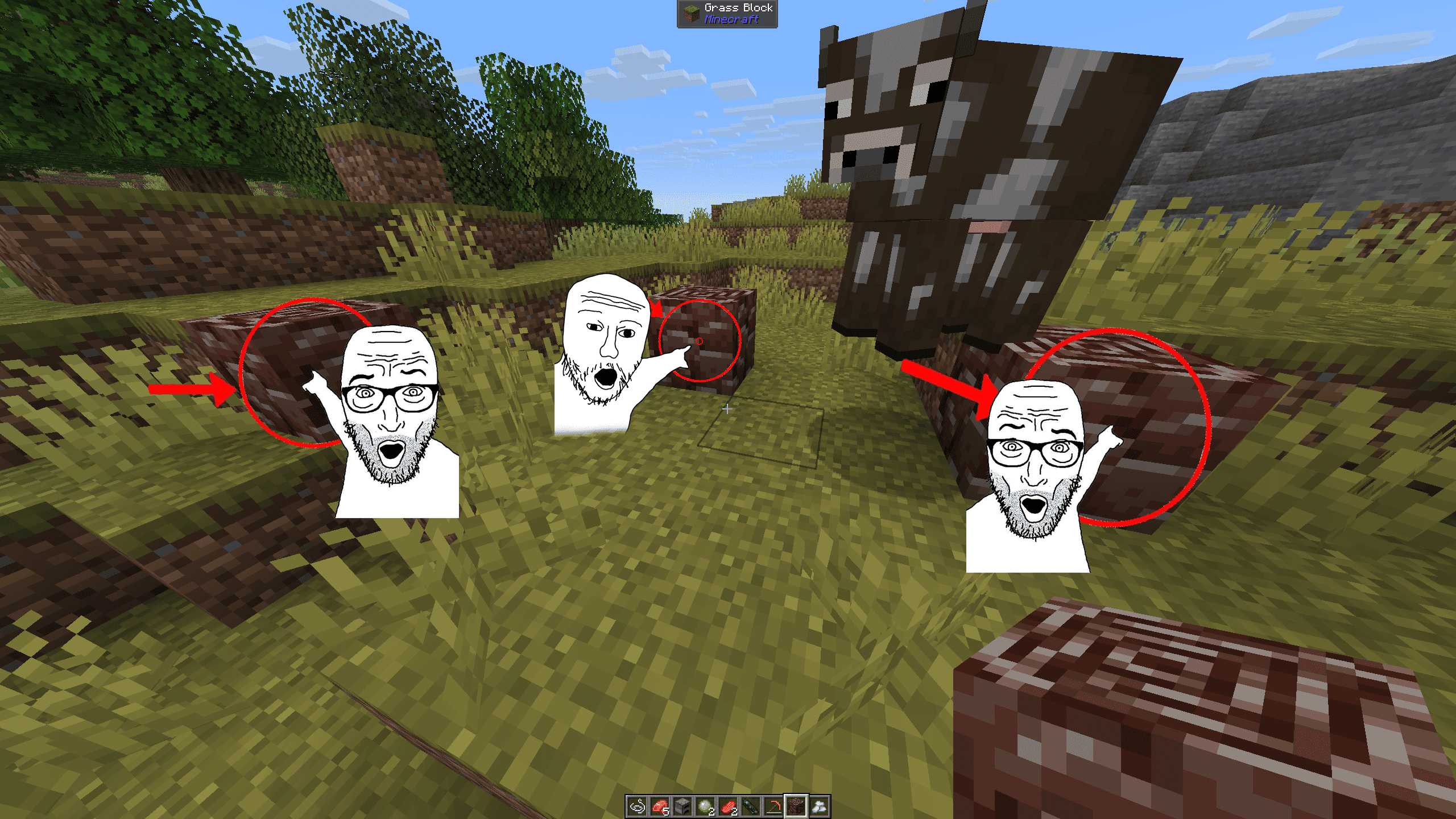
Ores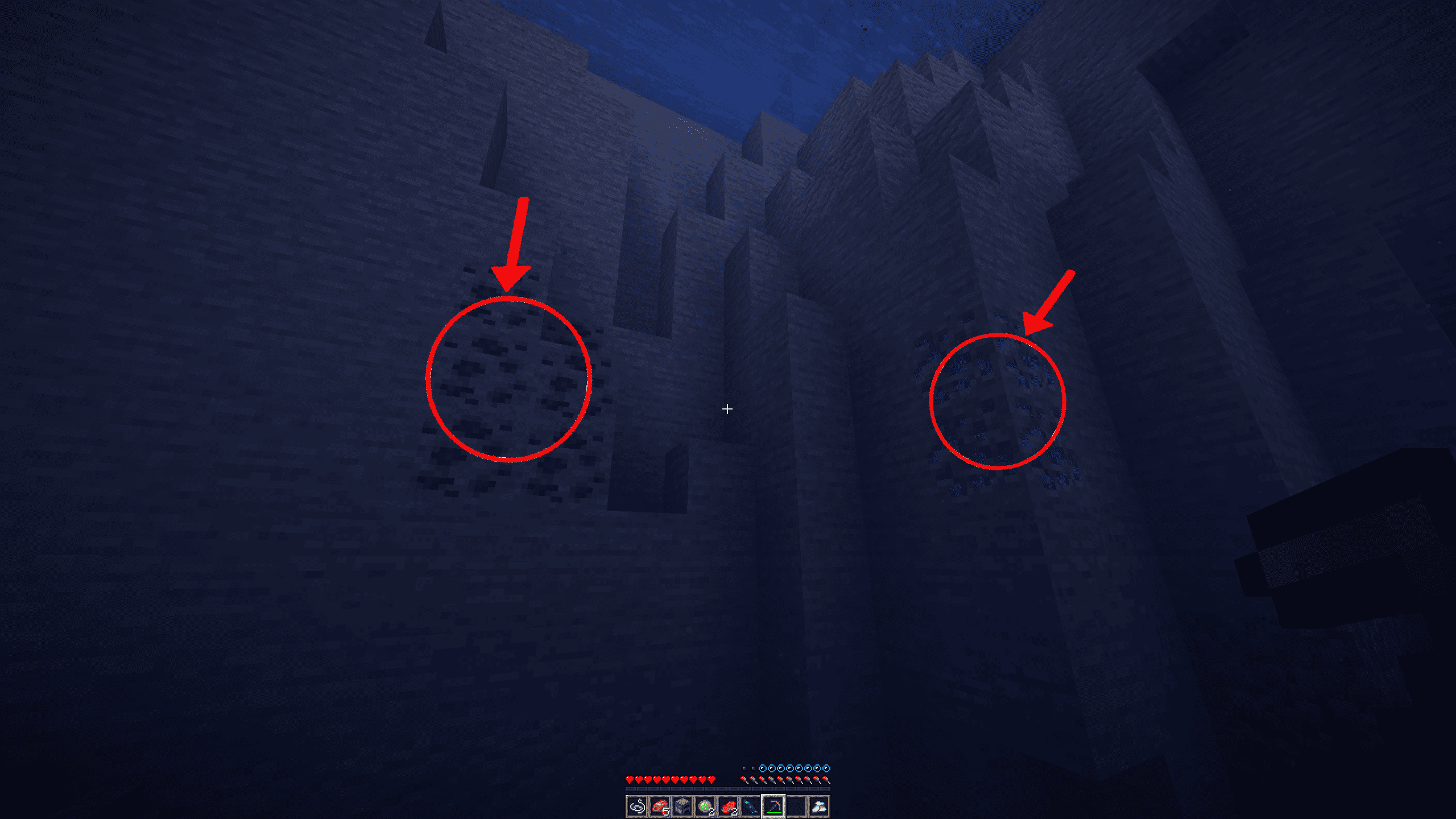


It only marks what you can actually see. Buried ore, mobs behind walls, invisible stuff and things too far away get nothing. Glass, ice, slime and honey count as see-through, solid blocks, leaves and lava don't. Darkness doesn't matter though, if you're looking at ore in a dark cave it still gets marked


You can swap in your own soyjak pictures, siren sounds and even the circle. Just drop files in a folder, no JSON or resource packs needed
config/soyjak_spotter/packs/<pack name>/
  soyjaks/*.png    pictures (png or jpg), as many as you want
  sounds/*.ogg     sounds, as many as you want
  circle.png       your own circle, if you want one
  pack.json        if you want, see Details below
There's already an example_pack folder you can use as a template. Throw your stuff in, hit Reload packs and pick it in Settings > Packs & presets > Pack, the Open packs folder button is right there too. Whatever your pack is missing comes from the built-in one, and if you don't want the built-in soyjaks or sirens at all, you can turn them off on the same page

 | Search filters A row doesn't have to be one exact id, it can be a search like diamond | emerald, ore -deepslate, @create or $c:ingots. Works in any game language and doesn't care much about typos |
 | Quick track Hover over an item and press Y to start or stop tracking it. Works in any inventory and in JEI too |
 | Presets Save your whole setup, share it as text, undo if you didn't like it. Comes with Miner, Loot hunter and Memes |
 | Random pointers Off by default. Every now and then it just circles something random near you. For no reason |
 | Fine-tuning Marker size, opacity, spin speed, how many markers at once, distance labels, siren volume, markers in third person |
You can open the settings with the circle button next to Back to Game, through Mod Menu, or with a key you bind yourself

| Minecraft | Fabric | NeoForge |
|---|---|---|
| 26.3 | Yes | Yes |
| 1.21.11 | Yes | Yes |
| 1.21.1 | Yes | Yes |
| 1.20.1 | Yes | Yes |
| 1.19.2, 1.18.2 | only old 1.0.1 | No |
Client-side only. On Fabric you need Fabric API, Mod Menu and JEI are optional

Search filter cheat sheet
| Write | Meaning |
|---|---|
diamond ore |
every word has to match the name or the id, any game language works |
diamond | emerald |
either one |
ore -deepslate |
everything except this |
"deepslate ore" |
this exact phrase |
@create |
mod id or mod name |
$ores, $c:ingots |
anything with this tag (you need to be in a world) |
diamond, help, Steve |
only for the Chat list, words or phrases split by commas |
Words with 4+ letters forgive a typo or two. Exclusions, phrases, @ and $ have to be exact
pack.json
{
  "name": "My pack",
  "description": "Screaming, but louder",
  "author": "me",
  "soyjak": { "height": 256, "pivotU": 0.5, "pivotV": 0.5 }
}
Every field is optional. Pictures should point to the right, the mod flips them randomly anyway. Max 64 pictures (2048 px, 4 MB each) and 32 sounds (5 MB each) per pack
Presets
A preset saves your block, item, inventory and entity lists plus how everything looks and behaves. Your player list and volumes never go in there, so it's safe to share. Hit Export, paste it in Discord, and your friend hits Import from clipboard and then Apply
Config files
Everything is in config/soyjak_spotter/, that's general.json, blocks.json, items.json, inventory_items.json, entities.json, players.json, chat.json, plus the packs/ and presets/ folders. Edit the JSON by hand or just use the settings screen
The siren uses the vanilla Interface volume slider, so if that's at 0% you won't hear it

If you SPOT a bug or a glitch, or got an idea, just write me
bandicooteroof@gmail.com OR find my Boosty

Project description from Modrinth.
Pick your setup
Soyjak Spotter by Minecraft version and loader
Choose the version and loader you play, then open the matching release.
Minecraft version
1.21.11
2 loader buildsMinecraft version
1.21.1
2 loader buildsMinecraft version
1.20.1
2 loader buildsMinecraft version
1.19.2
1 loader buildMinecraft version
1.18.2
1 loader buildCheck the dependencies, then try the file in a copied instance before changing a world you care about.
Recent files
Soyjak Spotter versions and loaders
1.2.0-26.3
soyjak-spotter-1.2.0+neoforge-26.3.jar
10 Nov 2026
Client Required Server Not supported Dependencies No extras listed Listed on Release listing
Check the 26.3 · NeoForge setup 26.3NeoForge beta
1.2.0-1.21.11
soyjak-spotter-1.2.0+neoforge-1.21.11.jar
10 Nov 2026
Client Required Server Not supported Dependencies No extras listed Listed on Release listing
Check the 1.21.11 · NeoForge setup 1.21.11NeoForge release
1.2.0-1.21.1
soyjak-spotter-1.2.0+neoforge-1.21.1.jar
10 Nov 2026
Client Required Server Not supported Dependencies No extras listed Listed on Release listing
Check the 1.21.1 · NeoForge setup 1.21.1NeoForge release
1.2.0-1.20.1
soyjak-spotter-1.2.0+neoforge-1.20.1.jar
10 Nov 2026
Client Required Server Not supported Dependencies No extras listed Listed on Release listing
Check the 1.20.1 · NeoForge setup 1.20.1NeoForge release
1.2.0-26.3
soyjak-spotter-1.2.0+fabric-26.3.jar
10 Nov 2026
Client Required Server Not supported Dependencies 1 required · 1 unchecked Listed on Release listing
Check the 26.3 · Fabric setup 26.3Fabric release
1.2.0-1.21.1
soyjak-spotter-1.2.0+fabric-1.21.1.jar
10 Nov 2026
Client Required Server Not supported Dependencies 1 required · 1 unchecked Listed on Release listing
Check the 1.21.1 · Fabric setup 1.21.1Fabric release
1.2.0-1.20.1
soyjak-spotter-1.2.0+fabric-1.20.1.jar
10 Nov 2026
Client Required Server Not supported Dependencies 1 required · 1 unchecked Listed on Release listing
Check the 1.20.1 · Fabric setup 1.20.1Fabric release
1.2.0
soyjak-spotter-1.2.0.jar
10 Nov 2026
Client Required Server Not supported Dependencies 1 required · 1 unchecked Listed on Release listing
Check the 1.21.11 · Fabric setup 1.21.11Fabric release
1.1.0-26.3
soyjak-spotter-1.1.0+neoforge-26.3.jar
2 Oct 2026
Client Required Server Not supported Dependencies 1 required · 1 unchecked Listed on Release listing
Check the 26.3 · NeoForge setup 26.3NeoForge release
1.1.0-1.21.11
soyjak-spotter-1.1.0+neoforge-1.21.11.jar
2 Oct 2026
Client Required Server Not supported Dependencies 1 required · 1 unchecked Listed on Release listing
Check the 1.21.11 · NeoForge setup 1.21.11NeoForge release
1.1.0-1.21.1
soyjak-spotter-1.1.0+neoforge-1.21.1.jar
2 Oct 2026
Client Required Server Not supported Dependencies 1 required · 1 unchecked Listed on Release listing
Check the 1.21.1 · NeoForge setup 1.21.1NeoForge release
1.1.0-1.20.1
soyjak-spotter-1.1.0+neoforge-1.20.1.jar
2 Oct 2026
Client Required Server Not supported Dependencies 1 required · 1 unchecked Listed on Release listing
Check the 1.20.1 · NeoForge setup 1.20.1NeoForge release
Looking for an older file? The official Modrinth project page is in Resources.
 mod
CurseForge + Modrinth · Minecraft
Crate Delight: Croptopia
Useful crates and bags for Croptopia that will save you storage and look great.
 mod
GitHub · Minecraft
modpacks-ch-github-test
Disposable public fixture for testing the Modpacks.ch GitHub catalogue flow
 mod
Modrinth · Minecraft
Toby's Camera
Capture and share Minecraft moments with a client camera and companion server plugin