Minecraft version
Back to mods 
Modrinth · Minecraft mod
Death Chest
Safely store your inventory in a death barrel with precise coordinate logging.
Choose a version Pick your version below, then grab the matching file.
Quick answer
Which Death Chest release matches 26.1?
Best match for your filters 0.2+mod
Game version 1.21.11, 26.1, 26.1-pre-1
Loader Fabric, Forge, NeoForge
Death Chest 0.2+mod targets 1.21.11, 26.1, 26.1-pre-1 with Fabric, Forge, NeoForge. Installation on the client is optional. Installation on the dedicated server is optional. No extra mods listed for this file.
Where it goes
Is Death Chest required on the client, server, or both?
Installation on the client is optional. Installation on the dedicated server is optional.
Client Optional
Dedicated server Optional
Loader for this release Fabric, Forge, NeoForge
Required install it here Optional supported, not mandatory Not supported do not install here Source doesn’t say do not assume
The source marks this as usable on both the client and server.
What else does Death Chest 0.2+mod need?
0.2+mod on 26.1. Every mod below is checked against that same setup.
This file does not list any required mods. Do not add a library just because a different file uses it.
This file does not list any required or optional mods.
Before you install it
Add Death Chest without breaking your instance.
Built for Death Chest 0.2+mod on 26.1. Pick another file and the loader, install side or required mods may change.
- 01
Stick to this file
Use 0.2+mod. It targets 1.21.11, 26.1, 26.1-pre-1 with Fabric, Forge, NeoForge; another release may have different loader, side or dependency requirements.
- 02
Bring the mods it needs
This file does not list any required mods. Do not add a library just because a different file uses it.
- 03
Put it on the correct side
Installation on the client is optional. Installation on the dedicated server is optional.
- 04
Pick the file you checked
Use the “Get this file” button beside 0.2+mod. It opens that exact file at the source.
About this project
What does Death Chest add?


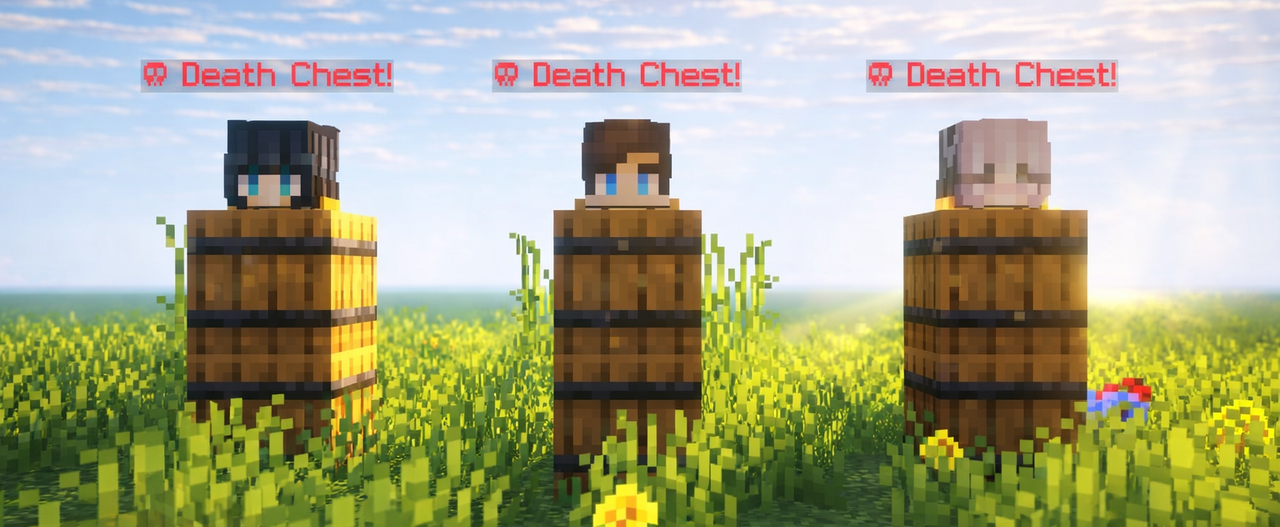
Death Chest is a lightweight, ultra-performance-optimized system that securely preserves your inventory inside a localized barrel container upon death. It instantly captures your exact coordinates and handles data dynamically to prevent clashing or server strain. Built for seamless multiplayer scaling, it provides clear chat logging to guide you right back to your lost gear.

- Fast, stable, and secure item storage Automatically stores your items inside a barrel when you die, keeping your inventory safe.
- Barrel-based storage system Uses barrels instead of chests for easier access and reduced server lag.
- Blacklist system Prevent abuse by blocking specific players from using the death chest system
/tag <player_name> add death_chest_blacklisted. - Death chest tracking compass Easily locate your death chest using a compass.
- Death location notification Sends your death coordinates directly to you in chat.
- Collectible death items Stores the player's head on death inside the hotbar barrel.
- Smart overflow handling Automatically separates stored items across multiple barrels:
- One barrel stores your hotbar and crafting inventory.
- Another barrel stores the rest of your inventory.


What does Death Chest do?
Death Chest automatically saves your items when you die by storing them safely inside barrels, preventing you from losing your inventory.Why does it use barrels instead of chests?
Barrels provide easier access and help keep the system lightweight by avoiding unnecessary chest usage.What happens if my inventory is full?
The system automatically handles overflow by splitting your items between multiple barrels. Hotbar + crafting inventory are stored in one barrel. Remaining inventory items are stored in another barrel.How do I find my Death Chest?
After dying, you will receive your death coordinates in chat and can use the tracking compass to locate your Death Chest.Can players abuse the Death Chest system?
No. The built-in blacklist system allows server owners to block specific players from using Death Chest if they abuse the system.Does it support multiplayer servers?
Yes. Death Chest is designed for multiplayer environments and supports multiple players at the same time.Will this create server lag?
The datapack is optimized to be lightweight and uses barrels instead of large chest systems to reduce unnecessary lag and more.Are my armor and offhand items saved?
Yes. Your equipment and inventory items are safely stored when the Death Chest is created.What happens to the player's head?
The player's head is stored as a collectible item inside the hotbar barrel after death.Does it support modded inventories?
Partially. It supports modded items inside the standard inventory. Entirely new slots (like Curios API) are unrecognized by vanilla commands. This means those items won't be saved to the block, but they are completely safe from being cleared and will stay with the player.Are experience levels saved?
No, unfortunately. The mod/datapack is designed to stay as close to vanilla Minecraft as possible, keeping the original death system while preventing the frustration of permanently losing your items.

Datapack (Singleplayer / Server)
- Download the datapack.
- Place it in your world's datapacks folder.
- Exit and rejoin the world. Search on YouTube ↗
- Tip: Use
/datapack listto verify that it is installed correctly.

Mod Version (Client / Server)
- Install the mod file into your
modsfolder. - Launch the game or server with a compatible mod loader.
- No additional setup required. Search on YouTube ↗
- Tip: It will appear in the mod menu if installed correctly.
Project description from Modrinth.
Pick your setup
Death Chest by Minecraft version and loader
Choose the version and loader you play, then open the matching release.
Minecraft version
26.2-snapshot-8
5 loader buildsMinecraft version
26.2-snapshot-7
5 loader buildsMinecraft version
26.2-snapshot-6
5 loader buildsMinecraft version
26.2-snapshot-5
5 loader buildsMinecraft version
26.2-snapshot-4
5 loader buildsMinecraft version
26.2-snapshot-3
5 loader buildsMinecraft version
26.2-snapshot-2
5 loader buildsMinecraft version
26.2-snapshot-1
5 loader buildsMinecraft version
26.2-rc-2
5 loader buildsMinecraft version
26.2-rc-1
5 loader buildsMinecraft version
26.2-pre-6
5 loader buildsShowing the newest 12 of 69 game versions. Older files are in the list below.
Check the dependencies, then try the file in a copied instance before changing a world you care about.
Recent files
Death Chest versions and loaders
0.2+mod
death_chest-0.2.jar
24 Jun 2026
Client Optional Server Optional Dependencies No extras listed Listed on Release listing
Check the 26.1 · Fabric setup 1.21.1126.126.1.126.1.2 alpha
0.2
Death_Chest_PlayerName_1.21.11+.zip
24 Jun 2026
Client Optional Server Optional Dependencies No extras listed Listed on Release listing
Check the 26.1 · datapack setup 1.21.1126.126.1.126.1.2 alpha
0.2+mod
bib-death-chest-0.2.jar
20 Jun 2026
Client Optional Server Optional Dependencies No extras listed Listed on Release listing
Check the 26.1 · Fabric setup 1.21.1126.126.1-pre-126.1-pre-2 release
0.2
Death_Chest_1.21.11+.zip
19 Jun 2026
Client Optional Server Optional Dependencies No extras listed Listed on Release listing
Check the 26.1 · datapack setup 1.21.1126.126.1-pre-126.1-pre-2 release
Looking for an older file? The official Modrinth project page is in Resources.
 mod
CurseForge + Modrinth · Minecraft
Carpet TIS Addition
A Carpet mod (fabric-carpet) extension, a collection of carpet mod style useful tools and interesting features
 mod
Modrinth · Minecraft
PolyCompose
Library mod for building Minecraft screens and HUDs with Jetpack Compose. Made by Polyfrost. Formerly known as Compose Multiplatform.
 mod
Modrinth · Minecraft
Chat Remastered
Transform your Minecraft chat into a Discord-like experience — share images, animated GIFs, reply to messages, adjust chat height, and let server admins control.