Effortless Building Optional for One Tick One Block 1.2.0
optionalMatching file found Matched file: 4.3

Modrinth · Minecraft mod
Adds new tools that are perfect for convenient world editing, map creation, and pure chaos!
Quick answer
One Tick One Block 1.2.0 targets 26.2 with NeoForge. Installation on the client is optional. Installation on the dedicated server is optional. No extra mods listed for this file.
Where it goes
Installation on the client is optional. Installation on the dedicated server is optional.
The source marks this as usable on both the client and server.
1.2.0 on 26.2. Every mod below is checked against that same setup.
This file does not list any required mods. Do not add a library just because a different file uses it.
We only count dependency files that match this setup. A file for another loader does not fill the gap.
Before you install it
Built for One Tick One Block 1.2.0 on 26.2. Pick another file and the loader, install side or required mods may change.
Use 1.2.0. It targets 26.2 with NeoForge; another release may have different loader, side or dependency requirements.
This file does not list any required mods. Do not add a library just because a different file uses it.
Installation on the client is optional. Installation on the dedicated server is optional.
Use the “Get this file” button beside 1.2.0. It opens that exact file at the source.
About this project
⁉️ How the mod works:
Press G to open the function menu, and press H to stop the currently active function. Both keybinds can be changed in the settings.
Fully customizable tick frequency (20 game ticks = 1 second)
Customizable number of blocks affected per game tick
Customizable radius, where a radius of 1 means 1 chunk — the chunk the player is currently standing in. If the radius is set to 2, a total of 9 chunks will be affected: the player's current chunk plus the 8 surrounding chunks. See the image below ⬇️
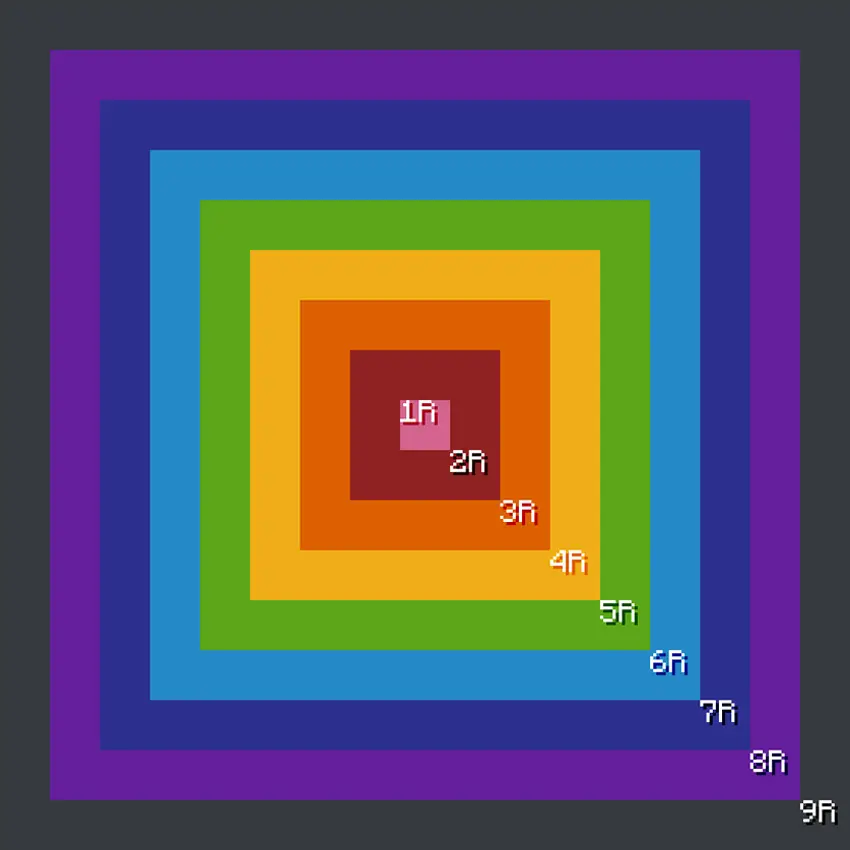
You can choose specific blocks for the mod to interact with. This includes absolutely anything that can be placed: blocks, torches, paintings, doors, saplings, and more.
Blocks from other mods are supported as well.
There are no limits on numerical values.
If FPS drops to 0, the active function will automatically stop after 10 seconds.
For optimization purposes, the mod skips block state checks.
❗️THE LIGHTING ISSUE CAN BE FIXED BY REJOINING THE WORLD❗️
📌 The mod adds 4 functions, each performing a different action:
⚙️ Delete
Allows you to choose how frequently blocks will be DELETED from the chunk. Blocks are deleted randomly.
Example:
Every 1 game tick, 10 blocks will be deleted within a radius of 1 chunk
This means that 10 blocks will be DELETED in 1 chunk every tick, or 200 blocks will be DELETED in 1 chunk every second.
To DELETE random blocks, leave the block selection field empty.
⚙️ Replace
Allows you to choose how frequently blocks will be REPLACED within the chunk.
Example:
Every 1 game tick, 10 blocks of minecraft:stone will be replaced within a radius of 1 chunk with minecraft:bedrock
This means that every tick, 10 random stone blocks will be REPLACED with 10 bedrock blocks in 1 chunk, or 200 stone blocks will be REPLACED with bedrock every second.
To make the REPLACEMENT completely random, leave the block selection fields empty.
You can REPLACE:
a specific block with a random block
a random block with a specific block
a random block with another random block
a specific block with another specific block
Replacement also works with blocks from other mods.
⚙️ Create
Allows you to choose how frequently blocks will be CREATED within the chunk.
Example:
Every 1 game tick, 10 blocks of minecraft:bedrock will be created within a radius of 1 chunk
This means that 10 bedrock blocks will be CREATED in 1 chunk every tick, or 200 bedrock blocks will be CREATED in 1 chunk every second.
Blocks are CREATED from the bottom upward.
To CREATE random blocks, leave the block selection field empty.
You can also CREATE an entire chunk using only one type of block, such as dirt, sand, or even torches.
Creation also works with blocks from other mods.
⚙️ Swap
Allows you to choose how frequently blocks within the chunk will SWAP PLACES with each other.
Example:
Every 1 game tick, 10 blocks will swap places with each other within a radius of 1 chunk
This means that 10 random blocks will SWAP PLACES every tick in 1 chunk, or 200 random blocks will SWAP PLACES every second.
To make swapping completely random, leave the block selection fields empty.
Blocks from other mods can also be swapped.
⚠️ BEFORE EDITING YOUR MAIN WORLD, I HIGHLY RECOMMEND MAKING A BACKUP FIRST ⚠️
📌 Notes
As the mod develops — if it does, of course lol — the existing functions will be expanded, and NEW ones may possibly be added in the future!
Project description from Modrinth.
Pick your setup
Choose the version and loader you play, then open the matching release.
Check the dependencies, then try the file in a copied instance before changing a world you care about.
Recent files
ONE TICK ONE BLOCK 26.2 NeoForge v1.2.0.jar
31 Jul 2026
ONE TICK ONE BLOCK 26.2 Fabric v1.2.0.jar
31 Jul 2026
Looking for an older file? The official Modrinth project page is in Resources.
 mod
modAn in-game editor for Minecraft crafting recipes. Disable recipes, tweak existing ones, or build brand-new ones on the fly — no datapacks, no restarts. Changes take effect immediately.
 mod
modShared - health, hunger, XP, effects, advancements, pets, inventory and ender chest are pooled, and if one player dies, everyone dies.
 mod
modEpicWands Reforged brings powerful magical wands to Minecraft, each with its own unique spells, effects, sounds, and playstyle. Master the Empire, Hades, Zeus, and Power Wands