JamLib Needed by Sort It Out! 1.5.0+26.3.x
requiredMatching file found Matched file: 2.3.1+26.3.x

Modrinth · Minecraft mod
A capable inventory sorting mod that works either client-side or server-side
Quick answer
Sort It Out! 1.5.0+26.3.x targets 26.3 with NeoForge. Installation on the client is optional. Installation on the dedicated server is optional. All 1 required mods have matching files.
Where it goes
Installation on the client is optional. Installation on the dedicated server is optional.
The source marks this as usable on both the client and server.
1.5.0+26.3.x. Change the file and its required mods may change too.
Install JamLib first. We found matching files for this game-version and loader setup.
We only count dependency files that match this setup. A file for another loader does not fill the gap.
Before you install it
Built for Sort It Out! 1.5.0+26.3.x. Pick another file and the loader, install side or required mods may change.
Use 1.5.0+26.3.x. It targets 26.3 with NeoForge; another release may have different loader, side or dependency requirements.
Install JamLib first. We found matching files for this game-version and loader setup.
Installation on the client is optional. Installation on the dedicated server is optional.
Use the “Get this file” button beside 1.5.0+26.3.x. It opens that exact file at the source.
About this project

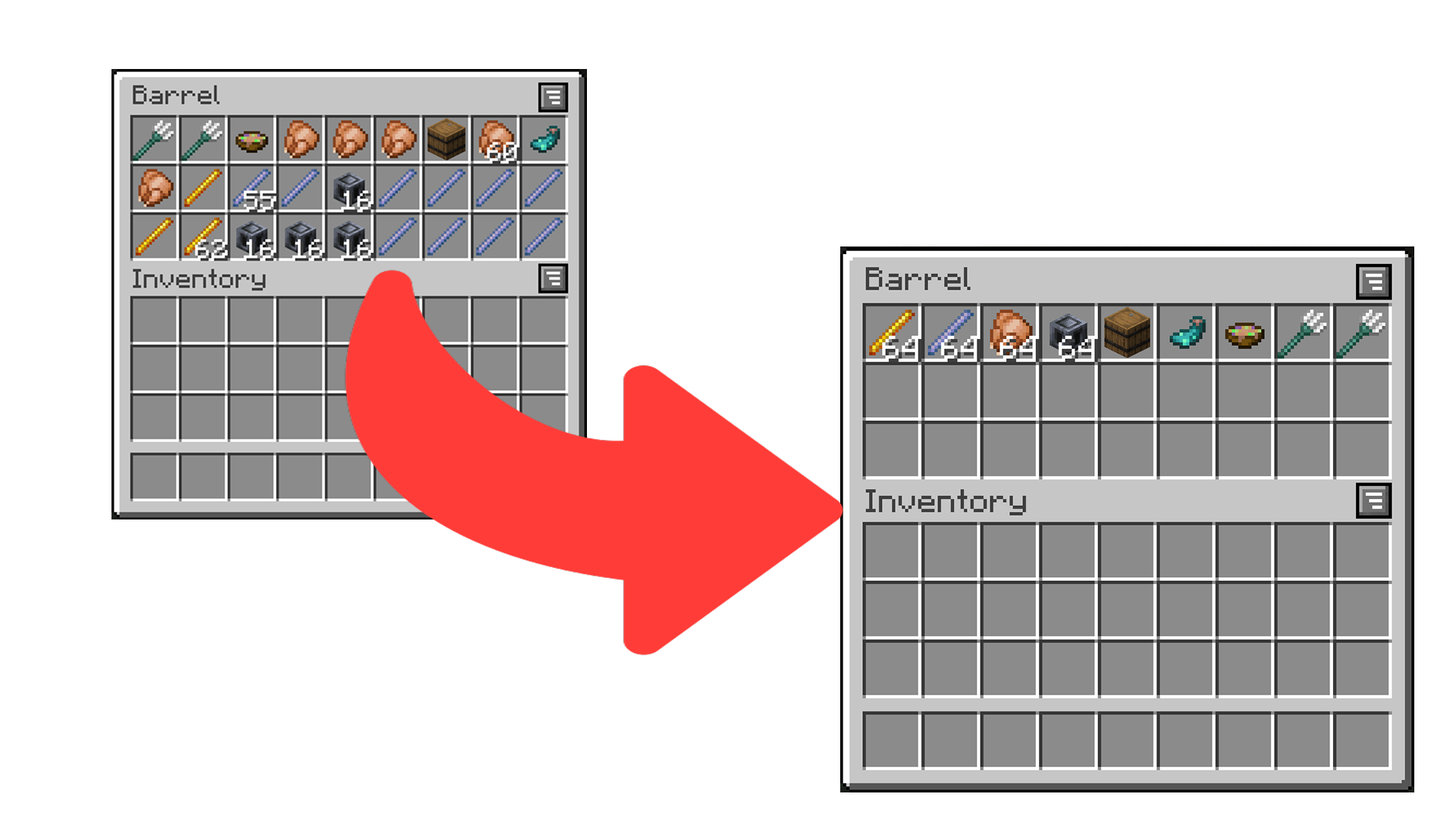
Sort It Out! is an inventory sorting mod that:
There are multiple ways to trigger sorting:
I) (client only).Sort It Out! can be configured via an in-game configuration screen which can be accessed in Mod Menu (Fabric/Quilt) or the mods screen (Forge/NeoForge). In the case that the mod is not installed on the clientside, players can use the /sortitout preferences command to view and update their preferences (which will persist across rejoins and server restarts).
Packet Send Interval: defines the interval, in ticks, at which packets are sent when sorting on the client side (this will not take effect if the mod is installed on the serverside). Too low of an interval may cause a server to kick you.Invert Sorting: whether to invert the sorting order.Comparators: a list of comparators to use when comparing item stacks. If the first comparator states that the stacks are equal, the second will be used to break the tie (and so on).Slot Sorting Trigger: the action to use to trigger a sort by clicking on a slot. Defaults to double clicking an empty slot, but can be set to clicking the offhand key when hovering a slot.Sort It Out! works in any configuration - as long as the mod is installed on one of the server or the client.
/sortitout to change their preferences.See the docs page here.
Report any issues you find on the GitHub issue tracker.
Project description from Modrinth.
Pick your setup
Choose the version and loader you play, then open the matching release.
Showing the newest 12 of 18 game versions. Older files are in the list below.
Check the dependencies, then try the file in a copied instance before changing a world you care about.
Recent files
sort_it_out-neoforge-1.5.0+26.3.x.jar
18 Sept 2026
sort_it_out-fabric-1.5.0+26.3.x.jar
18 Sept 2026
sort_it_out-forge-1.5.0+1.20.1.jar
22 Jul 2026
sort_it_out-fabric-1.5.0+1.20.1.jar
22 Jul 2026
sort_it_out-neoforge-1.5.0+1.21.1.jar
22 Jul 2026
sort_it_out-fabric-1.5.0+1.21.1.jar
22 Jul 2026
sort_it_out-neoforge-1.5.0+1.21.11.jar
22 Jul 2026
sort_it_out-fabric-1.5.0+1.21.11.jar
22 Jul 2026
sort_it_out-neoforge-1.5.0+26.1.x.jar
22 Jul 2026
sort_it_out-fabric-1.5.0+26.1.x.jar
22 Jul 2026
sort_it_out-neoforge-1.5.0+26.2.x.jar
22 Jul 2026
sort_it_out-fabric-1.5.0+26.2.x.jar
22 Jul 2026
Looking for an older file? The official Modrinth project page is in Resources.
 mod
Adds a system for integrating AE2 and Replication
 mod
Disposable public fixture for testing the Modpacks.ch GitHub catalogue flow
 mod
New advanced way of admin shops and playershops. ShopShelves and PlayerShelves