Minecraft version
Back to mods 
Modrinth · Minecraft mod
Happy Ghasts
Adds the Dried Ghast, Ghastling, and Happy Ghast from Minecraft Live!
Choose a version Pick your version below, then grab the matching file.
Quick answer
Which Happy Ghasts release should I use?
Latest stable file 2.3+mod
Game version 1.21.4, 1.21.5
Loader Fabric, Forge, NeoForge
Happy Ghasts 2.3+mod targets 1.21.4, 1.21.5 with Fabric, Forge, NeoForge. Installation on the client is optional. Installation on the dedicated server is optional. No extra mods listed for this file.
Where it goes
Is Happy Ghasts required on the client, server, or both?
Installation on the client is optional. Installation on the dedicated server is optional.
Client Optional
Dedicated server Optional
Loader for this release Fabric, Forge, NeoForge
Required install it here Optional supported, not mandatory Not supported do not install here Source doesn’t say do not assume
The source marks this as usable on both the client and server.
What else does Happy Ghasts 2.3+mod need?
2.3+mod. Change the file and its required mods may change too.
This file does not list any required mods. Do not add a library just because a different file uses it.
This file does not list any required or optional mods.
Before you install it
Add Happy Ghasts without breaking your instance.
Built for Happy Ghasts 2.3+mod. Pick another file and the loader, install side or required mods may change.
- 01
Stick to this file
Use 2.3+mod. It targets 1.21.4, 1.21.5 with Fabric, Forge, NeoForge; another release may have different loader, side or dependency requirements.
- 02
Bring the mods it needs
This file does not list any required mods. Do not add a library just because a different file uses it.
- 03
Put it on the correct side
Installation on the client is optional. Installation on the dedicated server is optional.
- 04
Pick the file you checked
Use the “Get this file” button beside 2.3+mod. It opens that exact file at the source.
About this project
What does Happy Ghasts add?
Experience the Happy Ghast early!
With the power of datapacks, you can use the Dried Ghast, Ghastling, and Happy Ghast in vanilla minecraft before any snapshots have even been released.
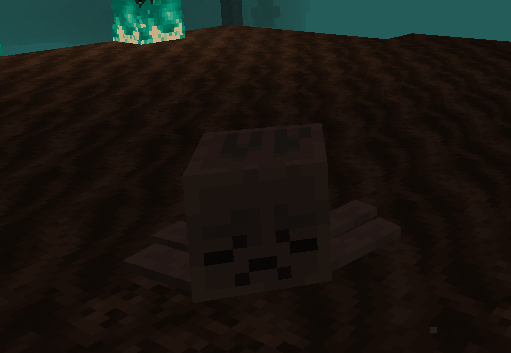
Find the Dried Ghast in Soul Sand Valleys...
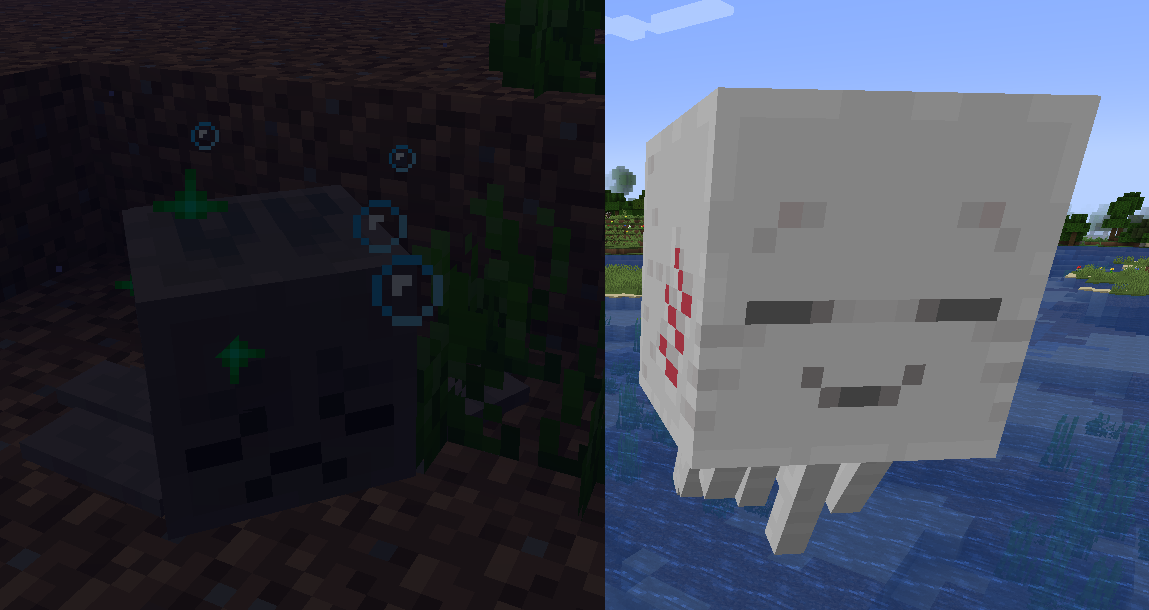
Rehydrate them in the Overworld so they become a peaceful Ghastling...
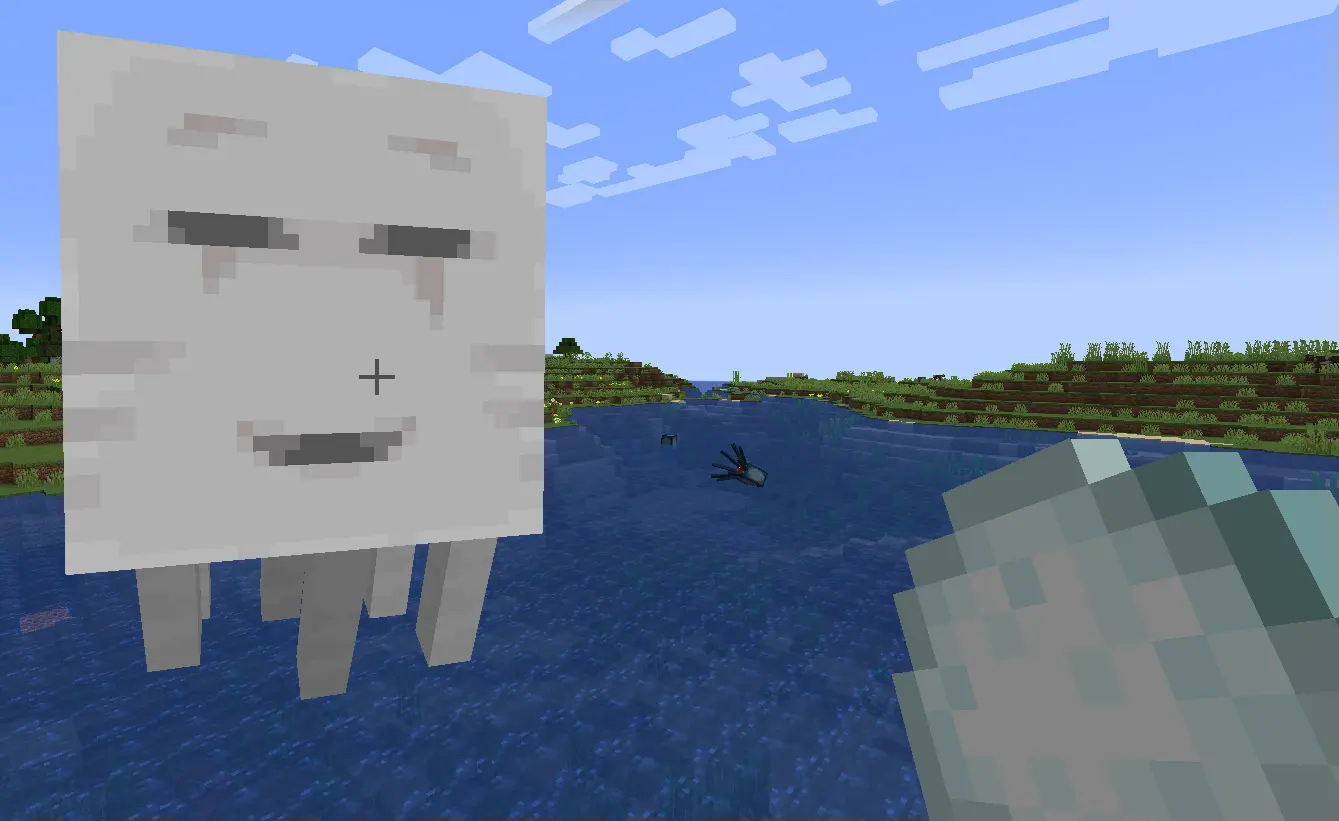
And feed them their favorite food until you get a ridable Happy Ghast!!

(Plus, tons of custom items)

💾 How to Install as Datapack(1.21.4 and 1.21.5)
1. Click the latest version's Datapack + Resources
2. Download the Datapack, marked as Primary

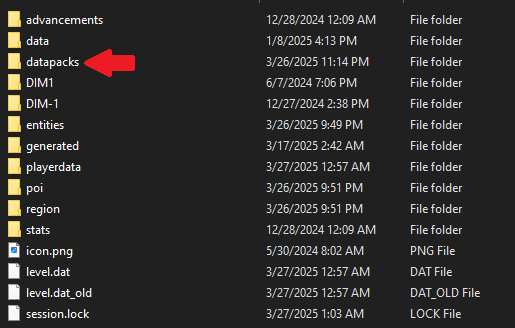
3. Add the Datapack to a world by hitting Singleplayer -> Select World -> Edit -> Open World Folder -> datapacks and placing it into the folder
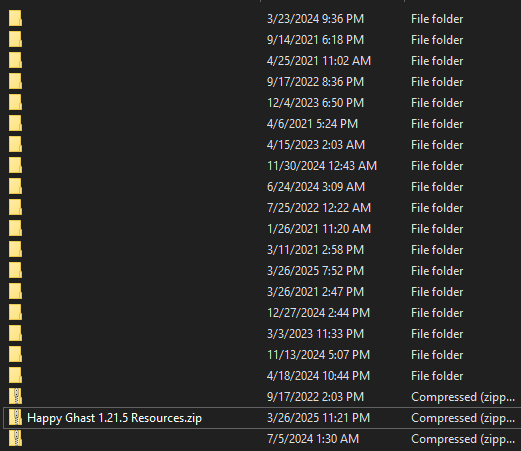
4. Download the Resource Pack, marked as Required

5. Add the Resource Pack to Minecraft by hitting Options -> Resource Packs -> Open Pack Folder and placing it into the folder
❓ Frequently Asked Questions
Q: How do you pilot a Happy Ghast?A: W/S for forward and back, A/D to turn, Jump to ascend and Sprint to descend.
Q: How do I get a Dried Ghast back to the Overworld?
A: Use a lead!
Q: Why can't I harness the Happy Ghast?
A: Right click the top of its head, not its face!
Q: Why can't I find the items in the Creative Inventory?
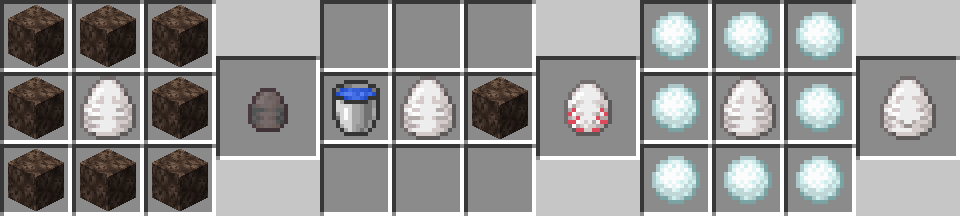
A: Sadly, Mojang made it so Datapacks can't add new Creative tabs. Use a crafting table and these recipes:
Enjoy!!!
(Report any bugs on the GitHub)
Project description from Modrinth.
Pick your setup
Happy Ghasts by Minecraft version and loader
Choose the version and loader you play, then open the matching release.
Minecraft version
1.21.4
5 loader buildsCheck the dependencies, then try the file in a copied instance before changing a world you care about.
Recent files
Happy Ghasts versions and loaders
2.3+mod
happy-ghasts-sage-2.3.jar
10 Jun 2025
Client Optional Server Optional Dependencies No extras listed Listed on Release listing
Check the 1.21.5 · Fabric setup 1.21.41.21.5FabricForge release
2.3
Happy Ghast 1.21.4-1.21.5 Datapack.zip
10 Jun 2025
Client Optional Server Optional Dependencies No extras listed Listed on Release listing
Check the 1.21.5 · datapack setup 1.21.41.21.5datapack release
2.2+mod
happy-ghasts-sage-2.2.jar
17 May 2025
Client Optional Server Optional Dependencies No extras listed Listed on Release listing
Check the 1.21.5 · Fabric setup 1.21.41.21.5FabricForge release
2.2
Happy Ghast 1.21.4-1.21.5 Datapack.zip
17 May 2025
Client Optional Server Optional Dependencies No extras listed Listed on Release listing
Check the 1.21.5 · datapack setup 1.21.41.21.5datapack release
2.1+mod
happy-ghasts-sage-2.1.jar
9 May 2025
Client Optional Server Optional Dependencies No extras listed Listed on Release listing
Check the 1.21.5 · Fabric setup 1.21.41.21.5FabricForge release
2.1
Happy Ghast 1.21.4-1.21.5 Datapack.zip
9 May 2025
Client Optional Server Optional Dependencies No extras listed Listed on Release listing
Check the 1.21.5 · datapack setup 1.21.41.21.5datapack release
2.0
Happy Ghast 1.21.4-1.21.5 Datapack.zip
13 Apr 2025
Client Optional Server Optional Dependencies No extras listed Listed on Release listing
Check the 1.21.5 · datapack setup 1.21.41.21.5datapack release
1.7
Happy Ghast 1.21.4-1.21.5 Datapack.zip
3 Apr 2025
Client Optional Server Optional Dependencies No extras listed Listed on Release listing
Check the 1.21.5 · datapack setup 1.21.41.21.5datapack release
1.6
Happy Ghast 1.21.4-1.21.5 Datapack.zip
31 Mar 2025
Client Optional Server Optional Dependencies No extras listed Listed on Release listing
Check the 1.21.5 · datapack setup 1.21.41.21.5datapack release
1.5
Happy Ghast 1.21.5 Datapack.zip
31 Mar 2025
Client Optional Server Optional Dependencies No extras listed Listed on Release listing
Check the 1.21.5 · datapack setup 1.21.5datapack release
1.4.1
Happy Ghast 1.21.5 Datapack.zip
30 Mar 2025
Client Optional Server Optional Dependencies No extras listed Listed on Release listing
Check the 1.21.5 · datapack setup 1.21.5datapack release
1.4
Happy Ghast 1.21.5 Datapack.zip
30 Mar 2025
Client Optional Server Optional Dependencies No extras listed Listed on Release listing
Check the 1.21.5 · datapack setup 1.21.5datapack release
Looking for an older file? The official Modrinth project page is in Resources.