Mod Menu Needed by Model Changer mc+26.1
requiredMatching file found Matched file: 18.0.2
Modrinth · Minecraft mod
A fabric mod change player models to 3D Models with .glb format
Quick answer
Model Changer mc+26.1 targets 26.1, 26.1.1, 26.1.2 with Fabric. It must be installed on the client. Do not install it on the dedicated server. All 4 required mods have matching files.
Where it goes
It must be installed on the client. Do not install it on the dedicated server.
This file is marked client-only.
mc+26.1 on 26.1. Every mod below is checked against that same setup.
Install Mod Menu, Cloth Config API, Text Placeholder API, Fabric API first. We found matching files for this game-version and loader setup. 2 come through another mod in the chain.
2 extra mods were pulled in by other dependencies. Indented rows show who needs each one. We only count dependency files that match this setup. A file for another loader does not fill the gap.
Before you install it
Built for Model Changer mc+26.1 on 26.1. Pick another file and the loader, install side or required mods may change.
Use mc+26.1. It targets 26.1, 26.1.1, 26.1.2 with Fabric; another release may have different loader, side or dependency requirements.
Install Mod Menu, Cloth Config API, Text Placeholder API, Fabric API first. We found matching files for this game-version and loader setup. 2 come through another mod in the chain.
It must be installed on the client. Do not install it on the dedicated server.
Use the “Get this file” button beside mc+26.1. It opens that exact file at the source.
About this project
ModelChanger is a client side Fabric mod that lets you use custom 3D .glb models in Minecraft.
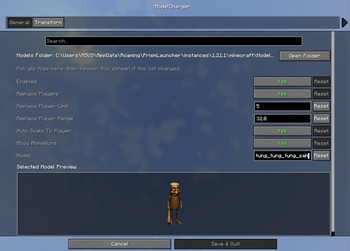
Place your models in the minecraft/ModelChanger folder, open the config screen, and select the model you want to use. The mod includes a live preview, player replacement support, and full transform controls so you can fine-tune your model directly in game.
Features
.glb models from a local folderModelChanger folder on first launchConfiguration
Transform Settings
Model Folder
.minecraft/ModelChanger.glbProject description from Modrinth.
Pick your setup
Choose the version and loader you play, then open the matching release.
Showing the newest 12 of 15 game versions. Older files are in the list below.
Check the dependencies, then try the file in a copied instance before changing a world you care about.
Recent files
ModelChanger-mc26.1.jar
6 May 2026
Looking for an older file? The official Modrinth project page is in Resources.
 mod
A core mod adding a few items and blocks, serving as the foundation for addons.
 mod
A realism mod that introduces speed-of-sound physics to Minecraft. Lightning strikes are no longer heard instantly; instead, the thunder reaches you with a delay based on your distance from the strike. It also features dynamic volume scaling and realistic
 mod
Place any item on any block side, up to 4 on one side