Fabric Language Kotlin Needed by Iconographic 1.0.0-beta.6+b83b318a
requiredMatching file found Matched file: 1.14.2+kotlin.2.4.21
Modrinth · Minecraft mod
Remodels your Hypixel SkyBlock Tooltip to look more fancy
Quick answer
Iconographic 1.0.0-beta.6+b83b318a targets 26.3 with Fabric. It must be installed on the client. Do not install it on the dedicated server. All 2 required mods have matching files.
Where it goes
It must be installed on the client. Do not install it on the dedicated server.
This file is marked client-only.
1.0.0-beta.6+b83b318a. Change the file and its required mods may change too.
Install Fabric Language Kotlin, Fabric API first. We found matching files for this game-version and loader setup.
We only count dependency files that match this setup. A file for another loader does not fill the gap.
Before you install it
Built for Iconographic 1.0.0-beta.6+b83b318a. Pick another file and the loader, install side or required mods may change.
Use 1.0.0-beta.6+b83b318a. It targets 26.3 with Fabric; another release may have different loader, side or dependency requirements.
Install Fabric Language Kotlin, Fabric API first. We found matching files for this game-version and loader setup.
It must be installed on the client. Do not install it on the dedicated server.
Use the “Get this file” button beside 1.0.0-beta.6+b83b318a. It opens that exact file at the source.
About this project
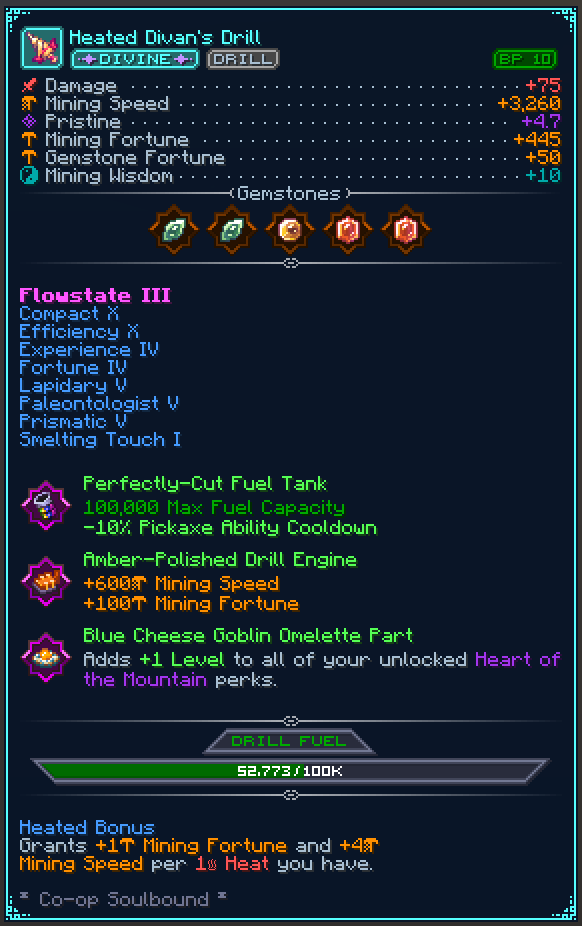
Remodel your Hypixel SkyBlock item tooltips completely to look much more fancy and organized.
Tired of walls of plain text? Instead, look at beautiful icons, progress bars, perfectly aligned stats, and custom categorized tags in your tooltips.
You can configure all features to how you like it using the config at /iconographic or /ttt for short.
As Minecraft's system is limited, other mods need to add their own Compatability with Iconographic
to have their Tooltips be rendered with Iconographic applied.
Are you a mod dev trying to add compatability? Read here.
Project description from Modrinth.
Pick your setup
Choose the version and loader you play, then open the matching release.
Check the dependencies, then try the file in a copied instance before changing a world you care about.
Recent files
iconographic-1.0.0-beta.6-26.3+b83b318a.jar
3 Nov 2026
iconographic-1.0.0-beta.6-26.2+b83b318a.jar
3 Nov 2026
iconographic-1.0.0-beta.5-26.2+d76258ce.jar
27 Aug 2026
iconographic-1.0.0-beta.5-26.1+d76258ce.jar
27 Aug 2026
iconographic-1.0.0-beta.4-26.2+9632b6e8.jar
31 Jul 2026
iconographic-1.0.0-beta.4-26.1+9632b6e8.jar
31 Jul 2026
iconographic-1.0.0-beta.3-26.1+29e7c8a8.jar
31 Jul 2026
iconographic-1.0.0-beta.3-26.2+89717d3e.jar
31 Jul 2026
iconographic-1.0.0-beta.2-26.2+afce0b75.jar
17 Jul 2026
iconographic-1.0.0-beta.2-26.1+afce0b75.jar
17 Jul 2026
iconographic-1.0.0-beta.1-26.2+9f0bc5ee.jar
13 Jul 2026
iconographic-1.0.0-beta.1-26.1+9f0bc5ee.jar
13 Jul 2026
Looking for an older file? The official Modrinth project page is in Resources.
 mod
moda creative mod that have different varieties of blocks and items.
 mod
modThis is a pvp/helpful lunar kind of like mod/client! made to make your experince cool.
 mod
modTransfer files and folders up to 50MB directly to other players in chat with the ability to add a comment.