Rose Bush Needed by DebugGUIScale 1.3.1
requiredMatching file found Matched file: 1.4

Modrinth · Minecraft mod
Allows players to customize the F3 menu & "Always On" scaling separately from the built-in GUI Scale
Quick answer
DebugGUIScale 1.3.1 targets 26.2 with Fabric. It must be installed on the client. Do not install it on the dedicated server. All 1 required mods have matching files.
Where it goes
It must be installed on the client. Do not install it on the dedicated server.
This file is marked client-only.
1.3.1. Change the file and its required mods may change too.
Install Rose Bush first. We found matching files for this game-version and loader setup.
We only count dependency files that match this setup. A file for another loader does not fill the gap.
Before you install it
Built for DebugGUIScale 1.3.1. Pick another file and the loader, install side or required mods may change.
Use 1.3.1. It targets 26.2 with Fabric; another release may have different loader, side or dependency requirements.
Install Rose Bush first. We found matching files for this game-version and loader setup.
It must be installed on the client. Do not install it on the dedicated server.
Use the “Get this file” button beside 1.3.1. It opens that exact file at the source.
About this project
Debug GUI Scale is a Fabric mod that allows players to adjust the Debug menu's scale independently of the GUI Scale. Customize the Debug menu's size to your preference without affecting the rest of your game's interface!
This mod depends on the library mod Roselib!
DebugGUIScale will likely not be updated to Minecraft versions past 26.2, This is because Mojang has added THIS exact feature in 26.3 Snapshot 4, Making DebugGUIScale no longer applicable or useful... and simply for the lack of available time and resources.
DebugGUIScale will be ported to lower versions or loaders at some point as i migrate all of my projects over to Stonecutter.
Thanks all for using DebugGUIScale while it lasted!
Simmiliarly to RemoveAmbientFOV, The mod integrates directly into Minecraft’s Accessibility Options menu, exposing two sliders:
Each option can be enabled or disabled independently and is saved to a simple JSON config file:
.minecraft/config/DebugGUIScale.json

ModMenu is no longer required to modify DebugGUIScale in favor of the Vanilla Options API Introduced in Rose Bush 1.3.1
Support for ModMenu might be dropped in a later release (game drop), DebugGUIScale 1.2 still supports ModMenu and does support the new values added.
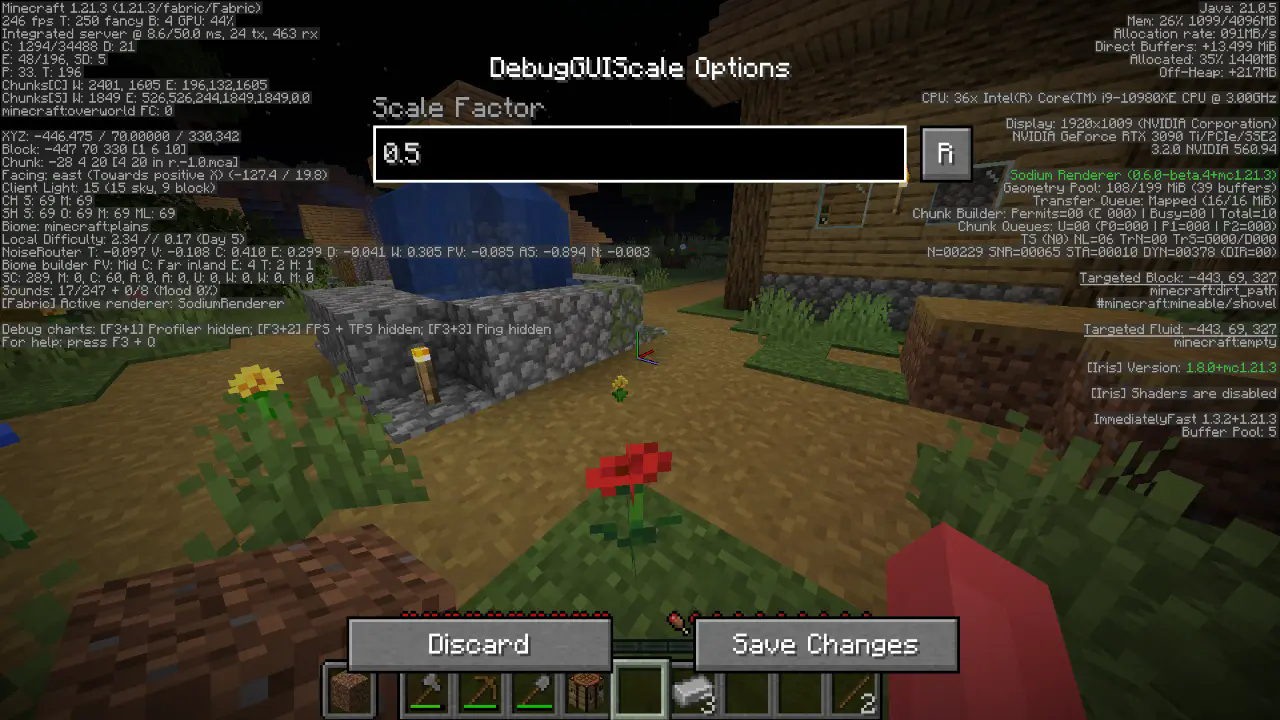
All options should be straightforward, so go nuts!
Quick Documentation JSON:
{
  "scale": 0.95 // this is the scale, yes it supports decimals up to 2 digits precision.
}
Project description from Modrinth.
Pick your setup
Choose the version and loader you play, then open the matching release.
Showing the newest 12 of 15 game versions. Older files are in the list below.
Check the dependencies, then try the file in a copied instance before changing a world you care about.
Recent files
DebugGUIScale-1.3.1.jar
20 Jun 2026
DebugGUIScale-1.3.jar
5 Apr 2026
DebugGUIScale-1.2.jar
9 Jan 2026
DebugGUIScale-1.1.1.jar
25 Dec 2025
DebugGUIScale-1.1.jar
18 Jun 2025
DebugGUIScale-1.0.jar
5 Dec 2024
Looking for an older file? The official Modrinth project page is in Resources.
 mod
Terraria Cart in Minecraft, Right click track and have fun!
 mod
Well-rounded client-side optimization mod. Extremely compatible Vulkan backend for 1.21.11-26.1.2. By Polyfrost, best with OneClient.
 mod
Disposable public fixture for testing the Modpacks.ch GitHub catalogue flow