Fabric API Needed by Create: Fluid Burner createfluidburner-fabric-26.1.2-1.26.6.2.jar
requiredMatching file found Matched file: [26.2] Fabric API 0.161.0+26.2

CurseForge · Minecraft mod
Makes blaze burner accept configured fluids as fuel. (A Create Fly addon)
Quick answer
Create: Fluid Burner createfluidburner-fabric-26.1.2-1.26.6.2.jar targets 26.1.2, 26.2, 26.3 with Fabric. The project page does not say whether this file belongs on the client, dedicated server, or both. All 2 required mods have matching files.
Where it goes
The project page does not say whether this file belongs on the client, dedicated server, or both.
The source does not explicitly classify this release as client-only or server-only.
createfluidburner-fabric-26.1.2-1.26.6.2.jar on 26.2. Every mod below is checked against that same setup.
Install Fabric API, Create Fly first. We found matching files for this game-version and loader setup.
We only count dependency files that match this setup. A file for another loader does not fill the gap.
Before you install it
Built for Create: Fluid Burner createfluidburner-fabric-26.1.2-1.26.6.2.jar on 26.2. Pick another file and the loader, install side or required mods may change.
Use createfluidburner-fabric-26.1.2-1.26.6.2.jar. It targets 26.1.2, 26.2, 26.3 with Fabric; another release may have different loader, side or dependency requirements.
Install Fabric API, Create Fly first. We found matching files for this game-version and loader setup.
The project page does not say whether this file belongs on the client, dedicated server, or both.
Use the “Get this file” button beside createfluidburner-fabric-26.1.2-1.26.6.2.jar. It opens that exact file at the source.
About this project
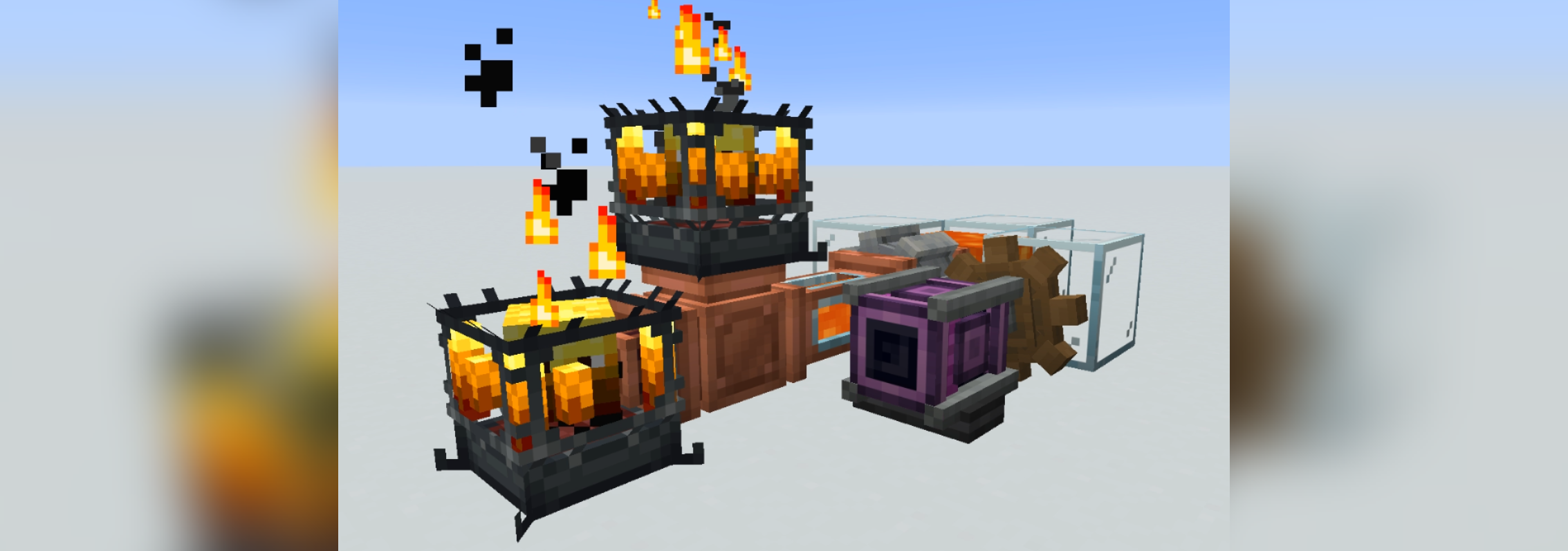
Create Fluid Burner allows Blaze Burners to natively accept fluid fuels via standard fluid transfer systems, such as pipes or mechanical pumps. It integrates directly with Create's internal behaviors, automatically consuming valid fluids and adjusting heat levels without requiring mechanical arms or solid items. Blaze burner will also accept fuels through most modded pipes.
The mod is configured via a JSON file generated at config/create_fluid_burner.json.
Each entry uses the fluid's registry name as the key and contains three parameters:
burntime: The duration (in ticks) the burner remains in the standard "Heated" state (20 ticks = 1 second).superheattime: The duration (in ticks) the burner remains in the "Superheated" state. Set to 0 for standard fuels.amountRequired: The amount of fluid consumed per cycle (e.g., 81000 droplets for one standard Fabric bucket i.e 1000 mB of fluid).Below is an example config using Lava for standard heat, and an example modded fluid for superheating.
{
  "minecraft:lava": {
    "burntime": 5000,
    "superheattime": 0,
    "amountRequired": 81000
  },
  "tconstruct:blazing_blood": {
    "burntime": 1000,
    "superheattime": 6400,
    "amountRequired": 81000
  }
}
Project description from CurseForge.
Pick your setup
Choose the version and loader you play, then open the matching release.
Showing the newest 12 of 23 game versions. Older files are in the list below.
Check the dependencies, then try the file in a copied instance before changing a world you care about.
Recent files
29 Jun 2026
Looking for an older file? The official CurseForge project page is in Resources.
 mod
A growing collection of quality-of-life tweaks, bug fixes, and cross-mod integrations for modpack creators!
 mod
Glasscraft adds a Glasscutter that lets you safely harvest glass, glass panes, glowstone and sea lanterns
 mod
A lightweight utility for replacing one block with another, both during worldgen and afterward.