Minecraft version
Back to mods 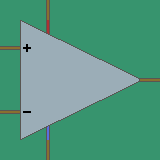
Modrinth · Minecraft mod
CircuitSim
CircuitSim is a Minecraft Forge mod for version 1.20.1 that lets you build and simulate real electronic circuits inside the game. Place component blocks in the world, connect them with wires, and run a full SPICE simulation powered by ngspice.
Choose a version Pick your version below, then grab the matching file.
Quick answer
Which CircuitSim release matches 1.20.1 Forge?
Best match for your filters 1.5.0
Game version 1.20.1, 1.20.2, 1.20.3
Loader Forge
CircuitSim 1.5.0 targets 1.20.1, 1.20.2, 1.20.3 with Forge. Installation on the client is optional. Installation on the dedicated server is optional. No extra mods listed for this file.
Where it goes
Is CircuitSim required on the client, server, or both?
Installation on the client is optional. Installation on the dedicated server is optional.
Client Optional
Dedicated server Optional
Loader for this release Forge
Required install it here Optional supported, not mandatory Not supported do not install here Source doesn’t say do not assume
The source marks this as usable on both the client and server.
What else does CircuitSim 1.5.0 need?
1.5.0 on 1.20.1 Forge. Every mod below is checked against that same setup.
This file does not list any required mods. Do not add a library just because a different file uses it.
This file does not list any required or optional mods.
Before you install it
Add CircuitSim without breaking your instance.
Built for CircuitSim 1.5.0 on 1.20.1 Forge. Pick another file and the loader, install side or required mods may change.
- 01
Stick to this file
Use 1.5.0. It targets 1.20.1, 1.20.2, 1.20.3 with Forge; another release may have different loader, side or dependency requirements.
- 02
Bring the mods it needs
This file does not list any required mods. Do not add a library just because a different file uses it.
- 03
Put it on the correct side
Installation on the client is optional. Installation on the dedicated server is optional.
- 04
Pick the file you checked
Use the “Get this file” button beside 1.5.0. It opens that exact file at the source.
About this project
What does CircuitSim add?
CircuitSim — A Minecraft Circuit Simulation Mod
This mod was built entirely with AI assistance.
CircuitSim is a Minecraft Forge mod for version 1.20.1 that lets you build and simulate real electronic circuits inside the game. Place component blocks in the world, connect them with wires, and right-click the Simulate Block to run a full SPICE simulation powered by ngspice.
Features
Passive & basic components
- Resistor, Capacitor, Inductor
- Voltage sources: DC, sinusoidal (SIN), pulse (PULSE)
- Current source
- Diode
- Wire and Ground
Controlled (dependent) sources
- VCVS — voltage-controlled voltage source (E)
- VCCS — voltage-controlled current source (G)
- CCVS — current-controlled voltage source (H)
- CCCS — current-controlled current source (F)
IC / PDK components
- IC Resistor, IC Capacitor
- IC NMOS4, IC PMOS4 (4-terminal MOSFETs)
- SKY130A PDK support with
.libpath configuration, plus a generic placeholder PDK and a free-form.includemode for custom libraries
Multi-cell blocks
- Amplifier — 5×5 op-amp subcircuit with selectable 5-pin or 7-pin (offset-null) variants and a vertical-mirror toggle for swapping inverting/non-inverting inputs and supply rails
Measurement
- Voltage Probe — labelled, measures node voltage
- Current Probe — placed in series to measure branch current
Simulation control
- Simulate Block — runs the analysis. Supported types:
.OP— DC operating point.AC— frequency sweep (start/stop/points-per-decade, log-frequency axis).TRAN— transient analysis (time step, stop time)
- Temperature — single value (e.g.
27) or sweep spec (e.g.20:40:5or20,30,40) for one run per temperature - ngspice compat modes:
hsa,psa,lt,ki,va - Parametric Block — sweeps a target component's parameter (value, W, L, mult, nf) across runs
- Commands Block — multi-line block of raw ngspice commands injected verbatim into the netlist
.controlsection - Sim Link Block — bridges two physically-disconnected sub-circuits into the same netlist without unioning their nodes (useful for routing a CCVS/CCCS controlling source from a remote region)
Output
- Graph screen — plot up to two probes simultaneously (stacked), with hover tooltips showing exact values; log10 X axis for AC sweeps
- SPICE simulation via ngspice as a subprocess — real node voltages and branch currents
.OPresults printed to the in-game chat- In-game GUI for every component to configure values with SI-suffix parsing (p, n, u, m, k, M, …)
Requirements
- Minecraft 1.20.1
- Minecraft Forge 47.3.0
- Java 17
- ngspice installed and available on your system
PATH
Installation
Method 1: Just take it
- Install Java 17 and Minecraft Forge 47.3.0 for Minecraft 1.20.1.
- Install ngspice and make sure
ngspice_con(Windows) orngspice(Linux/Mac) is accessible from your terminal. - Grab the Latest Release
- Put the mod into your Minecraft
mods/folder
Method 2: Build it yourself
- Install Java 17 and Minecraft Forge 47.3.0 for Minecraft 1.20.1.
- Install ngspice and make sure
ngspice_con(Windows) orngspice(Linux/Mac) is accessible from your terminal. - Clone this repository:
git clone https://github.com/Dank0v/circuitsim.git cd circuitsim - Build the mod using the Gradle wrapper:
# Windows gradlew.bat build # Linux / Mac ./gradlew build - Find the compiled
.jarinbuild/libs/— it will be named something likecircuitsim-x.x.x.jar. - Drop that
.jarinto your Minecraftmods/folder. - Launch the game.
How to Use
- Open the Circuit Simulator creative tab to find all blocks.
- Place component blocks and connect them with Wire blocks. Every circuit needs at least one Ground block.
- Right-click any component to open its configuration GUI and set its value.
- Place a Simulate Block anywhere connected to the circuit.
- Right-click the Simulate Block to run the simulation. Results appear in chat.
Probes
- Voltage Probe — place adjacent to a wire node. Right-click to give it a label. The simulation will report the voltage at that node.
- Current Probe — place in series (between two wires) to measure current through that branch.
Known Issues / TODO
License
GPL-3.0 — see LICENSE.
Project description from Modrinth.
Pick your setup
CircuitSim by Minecraft version and loader
Choose the version and loader you play, then open the matching release.
Minecraft version
1.20.5
1 loader buildMinecraft version
1.20.4
1 loader buildMinecraft version
1.20.3
1 loader buildMinecraft version
1.20.2
1 loader buildMinecraft version
1.20.1
1 loader buildCheck the dependencies, then try the file in a copied instance before changing a world you care about.
Recent files
CircuitSim versions and loaders
1.5.0
circuitsim-1.5.0.jar
7 Jul 2026
Client Optional Server Optional Dependencies No extras listed Listed on Release listing
Check the 1.20.1 · Forge setup 1.20.11.20.21.20.31.20.4 release
1.4.0
circuitsim-1.4.0.jar
17 Jun 2026
Client Optional Server Optional Dependencies No extras listed Listed on Release listing
Check the 1.20.1 · Forge setup 1.20.11.20.21.20.31.20.4 release
1.3.0
circuitsim-1.3.0.jar
8 Jun 2026
Client Optional Server Optional Dependencies No extras listed Listed on Release listing
Check the 1.20.1 · Forge setup 1.20.11.20.21.20.31.20.4 release
1.2.0
circuitsim-1.2.0.jar
24 May 2026
Client Optional Server Optional Dependencies No extras listed Listed on Release listing
Check the 1.20.1 · Forge setup 1.20.11.20.21.20.31.20.4 release
Looking for an older file? The official Modrinth project page is in Resources.
 mod
Modrinth · Minecraft
XNet
A highly optimized networking cable system for items, energy, fluids, information, etc.
 mod
Modrinth · Minecraft
Create: Radars
Adding Radars (& more) to Create!
 mod
CurseForge · Minecraft
Fast Horse Potion and Breeding
Fast Horse , Breeding Horse, Horse Potion,Horse Zero Fall Damage