










Minecraft version
Back to mods 
Modrinth · Minecraft mod
Export Stats
Adds a button to the statistics screen to export data to a text file.
Choose a version Pick your version below, then grab the matching file.
Quick answer
Which Export Stats release matches 26.2-rc-2?
beta file 1.3.0-beta.2+26.2-pre-2
Game version 26.2-pre-2, 26.2-pre-3, 26.2-pre-4
Loader Fabric
Export Stats 1.3.0-beta.2+26.2-pre-2 targets 26.2-pre-2, 26.2-pre-3, 26.2-pre-4 with Fabric. The project page does not say whether this file belongs on the client, dedicated server, or both. No extra mods listed for this file.
Where it goes
Is Export Stats required on the client, server, or both?
The project page does not say whether this file belongs on the client, dedicated server, or both.
Client Source doesn’t say
Dedicated server Source doesn’t say
Loader for this release Fabric
Required install it here Optional supported, not mandatory Not supported do not install here Source doesn’t say do not assume
The source does not explicitly classify this release as client-only or server-only.
What else does Export Stats 1.3.0-beta.2+26.2-pre-2 need?
1.3.0-beta.2+26.2-pre-2 on 26.2-rc-2. Every mod below is checked against that same setup.
This file does not list any required mods. Do not add a library just because a different file uses it.
This file does not list any required or optional mods.
Before you install it
Add Export Stats without breaking your instance.
Built for Export Stats 1.3.0-beta.2+26.2-pre-2 on 26.2-rc-2. Pick another file and the loader, install side or required mods may change.
- 01
Stick to this file
Use 1.3.0-beta.2+26.2-pre-2. It targets 26.2-pre-2, 26.2-pre-3, 26.2-pre-4 with Fabric; another release may have different loader, side or dependency requirements.
- 02
Bring the mods it needs
This file does not list any required mods. Do not add a library just because a different file uses it.
- 03
Put it on the correct side
The project page does not say whether this file belongs on the client, dedicated server, or both.
- 04
Pick the file you checked
Use the “Get this file” button beside 1.3.0-beta.2+26.2-pre-2. It opens that exact file at the source.
About this project
What does Export Stats add?

ExportStats
Adds a button to the statistics screen to export data to a text file.
About
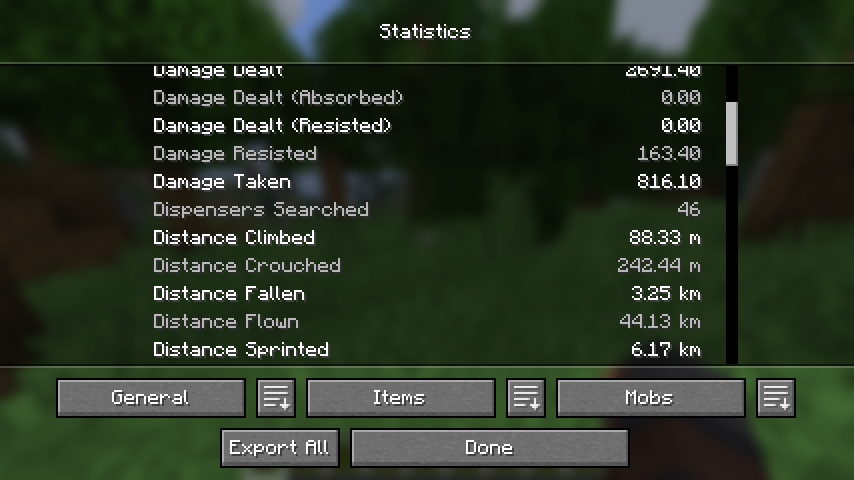
Simply click the relevant button and your statistics will be exported to a file for later viewing.
 |
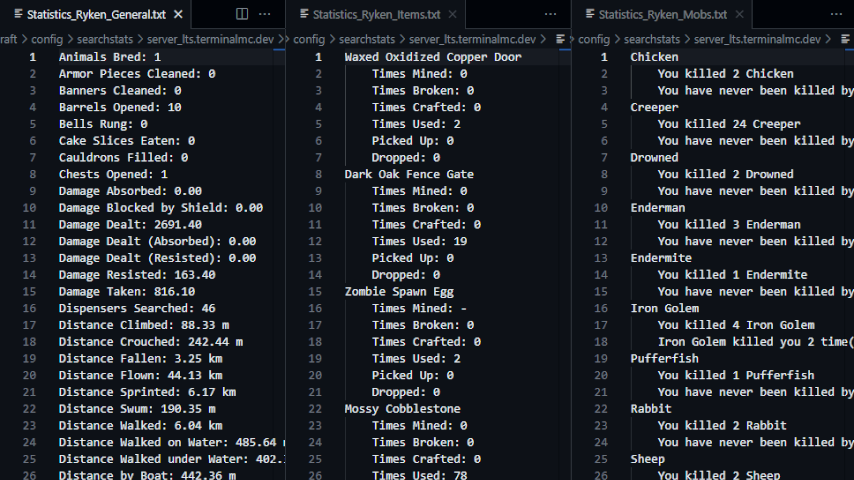 |
- File contents are translated according to your in-game language.
- When you click the export button, a new folder (named for the world or server that you are
currently in) is created in the.minecraft/config/exportstatsfolder, and the data files are
placed in the created folder. - If you click the export button again while in the same world or server, the old files will be
replaced with new ones.
Related
- SearchStats by TerminalMC
- Adds a search bar to the statistics screen to quickly find specific entries.
- Better Statistics Screen by TheCSDev
- Completely overhauls the statistics screen and makes it more useful.
Contact
Project description from Modrinth.
Pick your setup
Export Stats by Minecraft version and loader
Choose the version and loader you play, then open the matching release.
Minecraft version
26.2-rc-1
1 loader buildMinecraft version
26.2-pre-5
1 loader buildMinecraft version
26.2-pre-4
1 loader buildMinecraft version
26.2-pre-3
1 loader buildMinecraft version
26.2-pre-2
1 loader buildMinecraft version
26.2
1 loader buildMinecraft version
26.1.2
2 loader buildsMinecraft version
26.1.1
2 loader buildsMinecraft version
26.1
2 loader buildsMinecraft version
1.21.11
2 loader buildsMinecraft version
1.21.10
2 loader buildsShowing the newest 12 of 24 game versions. Older files are in the list below.
Check the dependencies, then try the file in a copied instance before changing a world you care about.
Recent files
Export Stats versions and loaders
1.3.0-beta.2+26.2-pre-2
exportstats-fabric-1.3.0-beta.2+26.2-pre-2.jar
1 Jun 2026
Client Source doesn’t say Server Source doesn’t say Dependencies No extras listed Listed on Release listing
Check the 26.2-rc-2 · Fabric setup 26.2-pre-226.2-pre-326.2-pre-426.2-pre-5 beta
Looking for an older file? The official Modrinth project page is in Resources.
 mod
mod Modrinth · Minecraft
IG: Durability Multiplier
Complete control over item durability in Minecraft 26.1+. Multiply durability by any factor or make items completely unbreakable — all through GameRules. Works automatically with modded items via vanilla tags. Part of the Instant Gratification Collection.
 mod
mod Modrinth · Minecraft
Collapsible gamerules screen
Makes the GameRules UI screen collapsible by category. Tired of scrolling? Clean up your world settings.
 mod
mod Modrinth · Minecraft
VO: Agrarian Reform
a pastoral immersion mod that transforms Minecraft's agriculture from a proximity-based machine into a living, breathing ecosystem.