Minecraft version
Back to mods 
Modrinth · Minecraft mod
*NEW* VM computers
This project adds working computers as virtual machines in Minecraft, this is a fan made port of original VM computers by Delta2Force
Choose a version Pick your version below, then grab the matching file.
Quick answer
Which *NEW* VM computers release should I use?
Latest stable file 1.4.15-1.20.1-fabric
Game version 1.20.1
Loader Fabric
*NEW* VM computers 1.4.15-1.20.1-fabric targets 1.20.1 with Fabric. Installation on the client is optional. Installation on the dedicated server is optional. No extra mods listed for this file.
Where it goes
Is *NEW* VM computers required on the client, server, or both?
Installation on the client is optional. Installation on the dedicated server is optional.
Client Optional
Dedicated server Optional
Loader for this release Fabric
Required install it here Optional supported, not mandatory Not supported do not install here Source doesn’t say do not assume
The source marks this as usable on both the client and server.
What else does *NEW* VM computers 1.4.15-1.20.1-fabric need?
1.4.15-1.20.1-fabric. Change the file and its required mods may change too.
This file does not list any required mods. Do not add a library just because a different file uses it.
This file does not list any required or optional mods.
Before you install it
Add *NEW* VM computers without breaking your instance.
Built for *NEW* VM computers 1.4.15-1.20.1-fabric. Pick another file and the loader, install side or required mods may change.
- 01
Stick to this file
Use 1.4.15-1.20.1-fabric. It targets 1.20.1 with Fabric; another release may have different loader, side or dependency requirements.
- 02
Bring the mods it needs
This file does not list any required mods. Do not add a library just because a different file uses it.
- 03
Put it on the correct side
Installation on the client is optional. Installation on the dedicated server is optional.
- 04
Pick the file you checked
Use the “Get this file” button beside 1.4.15-1.20.1-fabric. It opens that exact file at the source.
About this project
What does *NEW* VM computers add?
THIS IS A FAN MADE PORT OF VM COMPUTERS BY Delta2Force
Transfers VM Computers to modern Minecraft version (1.20.1)
Original Mod
Check out the original VM Computers mod by Delta2Force:
https://www.curseforge.com/minecraft/mc-mods/vm-computers
Thanks to KuanogenMod for testing some of the versions!
If you have problems with this port, please submit them to my GitHub.
Join the vmcomputers Discord Server!
Donate to the original creator (Delta2Force)
Note: Only accepts Bitcoin and BitcoinCash
BTC: 3GubEkHV69gCkjWhRgRWYqWqyjcWW3gxFFBCH:
bitcoincash:qq6jttzlvgj68lvecnh75pt3znezj4vx6sysfvj3j5
Dependencies
- Minecraft 1.20.1
- VirtualBox 6.1
How to use
Ordering
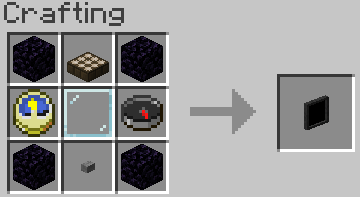
- Craft an ordering tablet (as seen below)
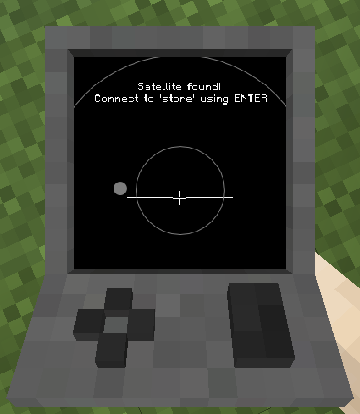
- Wait until it detects a satellite (they appear quite often)
- The rest is (hopefully) self-explanatory
Creating a Hard Drive / Importing an ISO disk image
Virtual Hard Drives are created by pressing the use button (right-click) while holding an hard drive in your hand. It doesn't matter if it has been assigned to a disk image or not as it will always open the menu. You can either use an existing hard drive (located in .minecraft/vm_computers/vhds) or create a new one.
ISO images are CDs / DVDs but as files. They are stored at .minecraft/vm_computers/isos. Once you place them in the folder, you can select them in the PC case menu.
Building the computer
You will need the following items (which can be bought from the Ordering Tablet):
- PC Case,
- Motherboard,
- RAM,
- GPU, and
- Monitor
To insert a hard drive, you will need to create one by right-clicking with a hard drive in your hand.
It doesn't matter if it is already assigned to a disk image or not.
- Place down the case
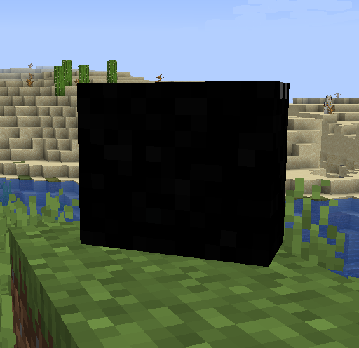
- Press the use button (right-click) on the case
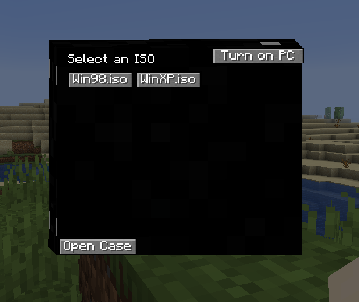
- (Optional) Select an ISO image from the list
- Open the case
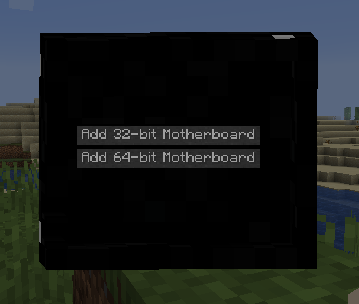
Note: The buttons will be disabled if you do not have the item in your inventory. - The rest (hopefully) is self-explanatory
Using the computer
To turn on the computer, press the Power On button in the PC case menu. To interact with the computer, press the use button (right-click) on the monitor.
Note: Pressing Alt+F4 will close the game, not the window you are on in the virtual machine.
To stop interacting with the computer, press the keys mentioned in the top-right corner of the screen when interacting with the monitor.
Contributing
If you'd like to contribute to this project, please fork the master branch, make your changes and create a pull request to have the changes reviewed. If you plan to contribute larger changes, please create a issue to discuss the major changes that you were planning to make.
I don't like rules, but to keep consistency and readability of the code please follow these guidelines:
- Use lambda expressions when appropriate
- You'll find that it is faster to write
() -> {}, just saying :) - Try to follow the code style of the project
- Makes everyone's life so much easier when it comes to making changes and understanding the code
- Commit messages should describe the change well without being too short
- Where it says 'Update [insert file name here]' should be replaced with a short overview of what was changed. Use the optional extended description to explain the specific changes that were made.
- When making a pull request, make sure that you have made all of the changes you have wanted to before posting the pull request.
- It gets messy when you create a pull request and continue to make changes after the fact.
Project description from Modrinth.
Pick your setup
*NEW* VM computers by Minecraft version and loader
Choose the version and loader you play, then open the matching release.
Minecraft version
1.20.6
1 loader buildMinecraft version
1.20.5
1 loader buildMinecraft version
1.20.4
1 loader buildMinecraft version
1.20.3
1 loader buildMinecraft version
1.20.2
1 loader buildMinecraft version
1.20.1
2 loader buildsCheck the dependencies, then try the file in a copied instance before changing a world you care about.
Recent files
*NEW* VM computers versions and loaders
(VMWARE_HOTFIX)1.4.15-1.21.1-uni
newvmcomputers-1.4.15-1.21.1-universal.jar
4 Aug 2026
Client Optional Server Optional Dependencies No extras listed Listed on Release listing
Check the 1.21.1 · Fabric setup 1.21.1FabricNeoForge beta
(VMWARE_HOTFIX)1.4.15-1.20.1-uni
newvmcomputers-1.4.15-1.20.1-universal.jar
4 Aug 2026
Client Optional Server Optional Dependencies No extras listed Listed on Release listing
Check the 1.20.1 · Fabric setup 1.20.1FabricForge beta
(VMWARE)_1.4.15-1.20.1-universal
newvmcomputers-1.4.15-1.20.1-universal.jar
3 Aug 2026
Client Optional Server Optional Dependencies No extras listed Listed on Release listing
Check the 1.20.1 · Fabric setup 1.20.1FabricForge beta
(VMWARE)_1.4.15-1.21.1-universal
newvmcomputers-1.4.15-1.21.1-universal.jar
3 Aug 2026
Client Optional Server Optional Dependencies No extras listed Listed on Release listing
Check the 1.21.1 · Fabric setup 1.21.1FabricNeoForge beta
1.4.15-1.21.1-fabric
newvmcomputers-1.4.15-1.21.1-fabric.jar
12 Jun 2026
Client Optional Server Optional Dependencies No extras listed Listed on Release listing
Check the 1.21.1 · Fabric setup 1.21.1Fabric alpha
1.4.15-1.21.1-neoforge
mcvmcomputers-1.4.15-1.21.1-neoforge.jar
12 Jun 2026
Client Optional Server Optional Dependencies No extras listed Listed on Release listing
Check the 1.21.1 · NeoForge setup 1.21.1NeoForge alpha
1.4.15-1.20.1-forge
newvmcomputers-1.4.15-1.20.1-forge.jar
12 Jun 2026
Client Optional Server Optional Dependencies No extras listed Listed on Release listing
Check the 1.20.1 · Forge setup 1.20.1Forge alpha
1.4.15-1.20.1-fabric
newvmcomputers-1.4.15-1.20.1-fabric.jar
12 Jun 2026
Client Optional Server Optional Dependencies No extras listed Listed on Release listing
Check the 1.20.1 · Fabric setup 1.20.1Fabric alpha
(DEPRECATED)1.4.151.21.1neopppa
mcvmcomputers-1.4.15-1.21.1-neoforge.jar
7 Jun 2026
Client Optional Server Optional Dependencies No extras listed Listed on Release listing
Check the 1.21.1 · NeoForge setup 1.21.1NeoForge alpha
(DEPRECATED1.4.15-1.21.1fab-pppa
newvmcomputers-1.4.15-1.21.1-fabric.jar
6 Jun 2026
Client Optional Server Optional Dependencies No extras listed Listed on Release listing
Check the 1.21.1 · Fabric setup 1.21.1Fabric alpha
1.4.15-1.20.1-fabric-vbox7+-hf2
newvmcomputers-1.4.15-1.20.1-fabric.jar
1 Jun 2026
Client Optional Server Optional Dependencies No extras listed Listed on Release listing
Check the 1.20.1 · Fabric setup 1.20.1Fabric beta
(DEPRECATED1.4.15-1.20.1vbox7hf1
newvmcomputers-1.4.15-1.20.1-fabric.jar
17 May 2026
Client Optional Server Optional Dependencies No extras listed Listed on Release listing
Check the 1.20.1 · Fabric setup 1.20.1Fabric beta
Looking for an older file? The official Modrinth project page is in Resources.
 mod
mod CurseForge + Modrinth · Minecraft
Glow Ink Plus
Add more functions to the glow ink, in this mod you can make the wool and carpets glow
 mod
mod CurseForge + Modrinth · Minecraft
Create: Kinetic
An addon for Create Aeronautics and VS2, Adds many useful blocks and items, aiming to improve the experience with minimal bloat.
 mod
mod CurseForge + Modrinth · Minecraft
Quacked SMP - Server Management Panel
Browser-based web panel for full server and player management. Modular features: Land claims, RPG skills & abilities, chat filter, anti-grief, custom dimension, edit mods and do backups. Optional integrations: Votifier, Discord, BlueMap, Simple Voice Chat.