Minecraft version
Back to mods 
Modrinth · Minecraft mod
Challenges
A mod that adds new challenges to minecraft.
Choose a version Pick your version below, then grab the matching file.
Quick answer
Which Challenges release should I use?
Latest stable file 1.3.0
Game version 26.3
Loader Fabric
Challenges 1.3.0 targets 26.3 with Fabric. Do not install it on the client. It must be installed on the dedicated server. No extra mods listed for this file.
Where it goes
Is Challenges required on the client, server, or both?
Do not install it on the client. It must be installed on the dedicated server.
Client Not supported
Dedicated server Required
Loader for this release Fabric
Required install it here Optional supported, not mandatory Not supported do not install here Source doesn’t say do not assume
This file is marked server-only.
What else does Challenges 1.3.0 need?
1.3.0. Change the file and its required mods may change too.
This file does not list any required mods. Do not add a library just because a different file uses it.
This file does not list any required or optional mods.
Before you install it
Add Challenges without breaking your instance.
Built for Challenges 1.3.0. Pick another file and the loader, install side or required mods may change.
- 01
Stick to this file
Use 1.3.0. It targets 26.3 with Fabric; another release may have different loader, side or dependency requirements.
- 02
Bring the mods it needs
This file does not list any required mods. Do not add a library just because a different file uses it.
- 03
Put it on the correct side
Do not install it on the client. It must be installed on the dedicated server.
- 04
Pick the file you checked
Use the “Get this file” button beside 1.3.0. It opens that exact file at the source.
About this project
What does Challenges add?
Minecraft Challenges Mod
A mod that adds new challenges to minecraft.
Installation
The mod is currently server side only. Download the packaged jar and install it in your servers mod folder.
Usage
If the mod was loaded successfully, you will have the following commands available (assuming you are OP on the server):
| command | Description | Note |
|---|---|---|
/challenge config |
Configure which challenges should be active | You can also configure an active challenge after it was started and (de-)activate challenges |
/challenge start |
Starts the challenge and the associated timer | Make sure to configure the challenges before! |
/challenge pause |
Pause the timer of the challenge | |
/challenge resume |
Resume the timer of the challenge | |
/challenge stop |
Stop a running challenge |
| Challenge configuration interface with no challenges active | Challenge configuration interface with Hardcore, Slay Enderdragon, Scrambled Mob Drops and Destroy Blocks on Break enabled |
|---|---|
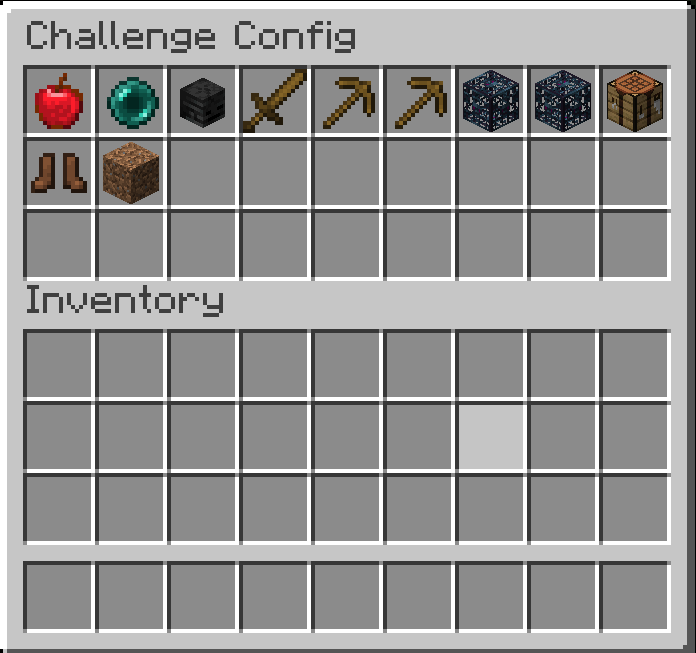 |
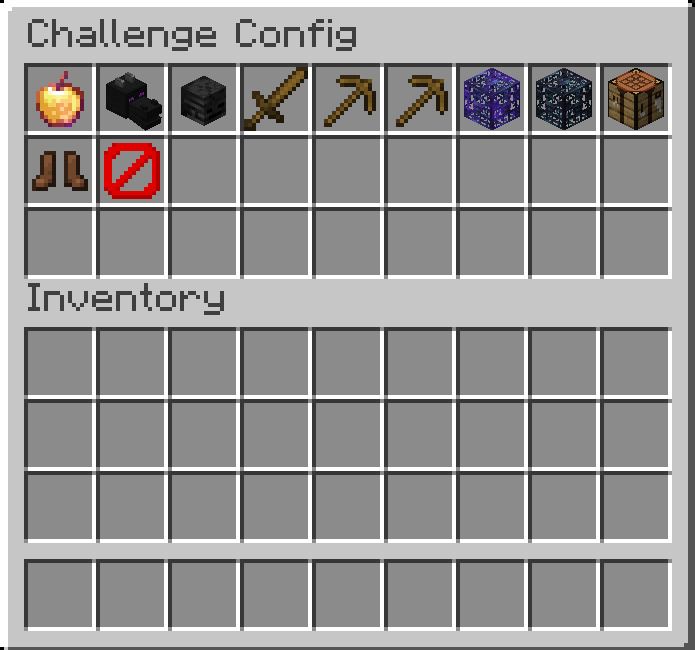 |
Challenges
| Challenge | Description | End Condition |
|---|---|---|
| Hardcore | Similar to vanilla hardcore, only that if one player dies, all other players also die and the challenge is lost. | Loose: Death of at least one player |
| Slay Enderdragon | Challenge goal to finish minecraft (i.e. slay the Enderdragon). | Win: A player kills the ender dragon in the end |
| Slay Wither | Challenge goal to kill the Wither. | Win: A player kills the wither |
| Slay Warden | Challenge goal to kill the Warden. | Win: A player kills the warden |
| Scrambled Mob Drops | If a mob is killed by a player, the mob drops a random item. If the same player kills the same mob, they will always drop the same item (e.g. a cow killed by player x will always drop dirt, while a cow killed by player y will always drop cobblestone). | / |
| Random Mob Drops | If a mob is killed by a player, the mob drops a random item. | / |
| Scrambled Block Drops | If a player mines a block, the drops are scrambled on a per player and block basis. | / |
| Random Block Drops | If a player mines a block, the drops are randomized. | / |
| Random Mobs on Damage | If a player damages a mob, the mob will be replaced by a random other mob. | / |
| Scrambled Mobs on Damage | If a player damages a mob, the mob will be replaced by a scrambled other mob. | / |
| No Crafting Tables | Players cannot use crafting tables. | / |
| Random Mob Speed | Newly spawned mobs will spawn with a random speed modifier, which can make them slower or faster then they normally would be. | / |
| Delete Block on Break | If a player breaks a block, a 3x3x3 matrix around that block will also be broken, but no items are dropped. | / |
A Note on Randomizers and Scramblers
- Randomizer: A randomizer always selects a random item/block/mob for every player. E.g. if player x first hits a cow, it is replaced by a chicken. If player x hits a second cow it is replaced by a zombie.
- Scrambler: A scrambler will pre-randomize all items/blocks/mobs for each player and then deterministically select the same item/block/mob for each input element. E.g. if player x hits a cow, the cow will always be replaced by a chicken, while if player y hits a cow, the cow will always be replaced by a wither.
Project description from Modrinth.
Pick your setup
Challenges by Minecraft version and loader
Choose the version and loader you play, then open the matching release.
Minecraft version
26.2
1 loader buildMinecraft version
26.1.2
1 loader buildMinecraft version
26.1.1
1 loader buildMinecraft version
26.1
1 loader buildMinecraft version
1.21.11
1 loader buildMinecraft version
1.21.10
1 loader buildMinecraft version
1.21.9
1 loader buildMinecraft version
1.21.8
1 loader buildMinecraft version
1.21.7
1 loader buildMinecraft version
1.21.6
1 loader buildMinecraft version
1.21.5
1 loader buildShowing the newest 12 of 16 game versions. Older files are in the list below.
Check the dependencies, then try the file in a copied instance before changing a world you care about.
Recent files
Challenges versions and loaders
1.3.0
challenge-1.3.0.jar
2 Nov 2026
Client Not supported Server Required Dependencies No extras listed Listed on Release listing
Check the 26.3 · Fabric setup 26.3Fabric release
1.2.0
challenge-1.2.0.jar
18 Jul 2026
Client Not supported Server Required Dependencies No extras listed Listed on Release listing
Check the 26.2 · Fabric setup 26.2Fabric release
1.1.4
challenge-1.1.4.jar
3 May 2026
Client Not supported Server Required Dependencies No extras listed Listed on Release listing
Check the 26.1.2 · Fabric setup 26.126.1.126.1.2Fabric release
1.1.3
challenge-1.1.3.jar
22 Dec 2025
Client Not supported Server Required Dependencies No extras listed Listed on Release listing
Check the 1.21.11 · Fabric setup 1.21.11.21.101.21.111.21.2 release
1.1.2
challenge-1.1.2.jar
20 Dec 2025
Client Not supported Server Required Dependencies No extras listed Listed on Release listing
Check the 1.21.11 · Fabric setup 1.21.11.21.101.21.111.21.2 release
1.1.2
challenge-1.1.2.jar
31 Oct 2025
Client Not supported Server Required Dependencies No extras listed Listed on Release listing
Check the 1.21.10 · Fabric setup 1.21.11.21.101.21.21.21.3 release
1.1.2
challenge-1.1.2.jar
5 Aug 2025
Client Not supported Server Required Dependencies No extras listed Listed on Release listing
Check the 1.21.7 · Fabric setup 1.21.7Fabric release
1.1.1
challenge-1.1.1.jar
16 Apr 2025
Client Not supported Server Required Dependencies No extras listed Listed on Release listing
Check the 1.21.5 · Fabric setup 1.21.11.21.21.21.31.21.4 release
1.1.0
challenge-1.1.0.jar
23 Feb 2025
Client Not supported Server Required Dependencies No extras listed Listed on Release listing
Check the 1.21.4 · Fabric setup 1.21.11.21.21.21.31.21.4 release
1.0.0
challenge-1.0.0.jar
12 Oct 2024
Client Not supported Server Required Dependencies No extras listed Listed on Release listing
Check the 1.21.1 · Fabric setup 1.21.1Fabric release
Looking for an older file? The official Modrinth project page is in Resources.
 mod
Modrinth · Minecraft
Overgrown's Origins: Elemental Bendings
Adds a second Origins layer that let's every player pick an origin and a bending style from Avatar: The Last Airbender, Avatar: Legend of Korra, Avatar: Seven Havens on top of it.
 mod
Modrinth · Minecraft
Thematic Superheroes
Team up as Batman or Wonder Woman on Thematic’s official server! Craft gadgets, resize with Pehkui, and roleplay with friends in Minecraft 1.20.1. Featuring Mr Fantastic, Superman, Invincible, Batman, Deadpool
 mod
Modrinth · Minecraft
More Cloud Layers
This mod adds extra layers of clouds above the vanilla cloud layer.