Cloth Config API Needed by KeybindsGalore (HVB007) 1.8.0
requiredMatching file found Matched file: 26.2.155+neoforge
Modrinth · Minecraft mod
Resolves Minecraft keybind conflicts: when two actions share a key, choose the one you meant.
Quick answer
KeybindsGalore (HVB007) 1.8.0 targets 26.2 with NeoForge. It must be installed on the client. Do not install it on the dedicated server. All 1 required mods have matching files.
Where it goes
It must be installed on the client. Do not install it on the dedicated server.
This file is marked client-only.
1.8.0 on 26.2. Every mod below is checked against that same setup.
Install Cloth Config API first. We found matching files for this game-version and loader setup.
We only count dependency files that match this setup. A file for another loader does not fill the gap.
Before you install it
Built for KeybindsGalore (HVB007) 1.8.0 on 26.2. Pick another file and the loader, install side or required mods may change.
Use 1.8.0. It targets 26.2 with NeoForge; another release may have different loader, side or dependency requirements.
Install Cloth Config API first. We found matching files for this game-version and loader setup.
It must be installed on the client. Do not install it on the dedicated server.
Use the “Get this file” button beside 1.8.0. It opens that exact file at the source.
About this project
Opens a selection menu when multiple actions are bound to the same key, so you choose which
action actually runs.
Minecraft's default behaviour is to pick one binding and silently ignore the rest. Usually you
find out by walking into a wall because a mod stole Space. KeybindsGalore intercepts the
conflict instead of guessing.
Available for both Fabric and NeoForge.
Conflict selection - Press a contested key and a menu opens listing every action bound to
it. Point at the one you meant, and the others are released for that press.
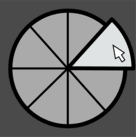
Pie menu and list menu - The pie is the default. A plain list menu is also available if you
prefer something conventional, switchable in the config.
GPU-rendered pie - Wedges are drawn through Minecraft's deferred GUI render pipeline using
a custom RingRenderer, so the pie composites correctly with the rest of the interface. No
external rendering library is bundled or needed.
Priority system - For keys you never want to be asked about. Set Space to always jump and
it jumps, even when something else is bound to it.
K-key priority capture - Press K, press the key you want to lock down, pick the action. No
file editing.
Live conflict detection - Conflicts are re-scanned on startup, on joining a world, when you
close the vanilla Controls screen, when you save your config, and when priorities change.
Category filters - Exclude entire categories from detection if you never want to be asked
about them.
Mouse support - Works with conflicting mouse button bindings, not just keyboard.
In-game configuration - A full settings screen through Cloth Config, with sliders, colour
fields with alpha, and tooltips on every entry.
Public API - A small versioned API lets other mods register their actions so their bindings
take part in conflict detection.
Now available on NeoForge as well as Fabric. The 26.2 NeoForge build is the same mod on the
NeoForge loader: same menus, same priority system, same config screen. It needs no Fabric
Loader, no Fabric API, and no ModMenu.
Minecraft 26.3 support on Fabric. The 26.3 build ports the mod to 26.3, where the client
moved from GLFW to SDL3 and rendering moved to the newer RenderPipeline API.
The config screen works on 26.2. The previous 26.2 build shipped with a known issue where
the config screen failed, because the Cloth Config version available at the time referenced a
Minecraft class that no longer exists. That is resolved.
Beyond that, this release rebuilds how conflicts are detected and how the pie is drawn:
Pick the row that matches your loader.
Fabric
NeoForge
Java 25 or newer on both. Client-side only: not for dedicated servers.
The in-game settings screen is the recommended way to configure the mod, and it edits the sameconfig/keybindsgalore.properties file you can edit by hand, so you can use either. On Fabric
the screen appears in ModMenu; on NeoForge it appears in the mod list.
Four tabs:
Colours are entered as ARGB hex values such as C0606060. The Cloth Config release this mod
uses provides a hex field rather than an RGB slider widget.
Setting a priority by hand looks like this:
PRIORITY_KEYBINDS=[key.jump:key.keyboard.space]
PRIORITY_CATEGORIES=[Movement]
An action priority always beats a category priority.
Portions of this mod's code were written with the assistance of AI tools. All AI-generated code
has been reviewed, tested, and verified for functionality by the developer.
Project description from Modrinth.
Pick your setup
Choose the version and loader you play, then open the matching release.
Showing the newest 12 of 23 game versions. Older files are in the list below.
Check the dependencies, then try the file in a copied instance before changing a world you care about.
Recent files
keybindsgalore-1.8.0+26.2-neoforge.jar
27 Sept 2026
keybindsgalore-1.8.0+26.2.jar
26 Sept 2026
keybindsgalore-1.7.2+26.2.jar
19 Jun 2026
Looking for an older file? The official Modrinth project page is in Resources.
 mod
Allows players to adjust their flight speed in Creative and Spectator modes with dynamic mouse-scroll tuning, sprint momentum, and anti-rubberbanding.
 mod
Bed Chat Hider is a client-only Fabric mod that adds a simple "Hide Chat" / "Show Chat" toggle button next to the "Leave Bed" button while sleeping.
 mod
Enhances vanilla wolves with unique personalities (Aggressive, Pacifist, Normal), smarter AI, safety behaviors, and combat improvements.