Touhou Little Maid Needed by WoodlandFoxVerses 1.2.0-neoforge+mc1.21.1
requiredMatching file found Matched file: 1.5.3-neoforge+mc1.21.1

Modrinth · Minecraft mod
A poetic kitsune mod
Quick answer
WoodlandFoxVerses 1.2.0-neoforge+mc1.21.1 targets 1.21.1 with NeoForge. Installation on the client is optional. Installation on the dedicated server is optional. All 1 required mods have matching files.
Where it goes
Installation on the client is optional. Installation on the dedicated server is optional.
The source marks this as usable on both the client and server.
1.2.0-neoforge+mc1.21.1. Change the file and its required mods may change too.
Install Touhou Little Maid first. We found matching files for this game-version and loader setup.
We only count dependency files that match this setup. A file for another loader does not fill the gap.
Before you install it
Built for WoodlandFoxVerses 1.2.0-neoforge+mc1.21.1. Pick another file and the loader, install side or required mods may change.
Use 1.2.0-neoforge+mc1.21.1. It targets 1.21.1 with NeoForge; another release may have different loader, side or dependency requirements.
Install Touhou Little Maid first. We found matching files for this game-version and loader setup.
Installation on the client is optional. Installation on the dedicated server is optional.
Use the “Get this file” button beside 1.2.0-neoforge+mc1.21.1. It opens that exact file at the source.
About this project
Display various texts such as poetry, vocabulary, math formulas, and more in chat bubbles.
"When the moonlight passes through the pine branches, you may encounter the well-read fox—"
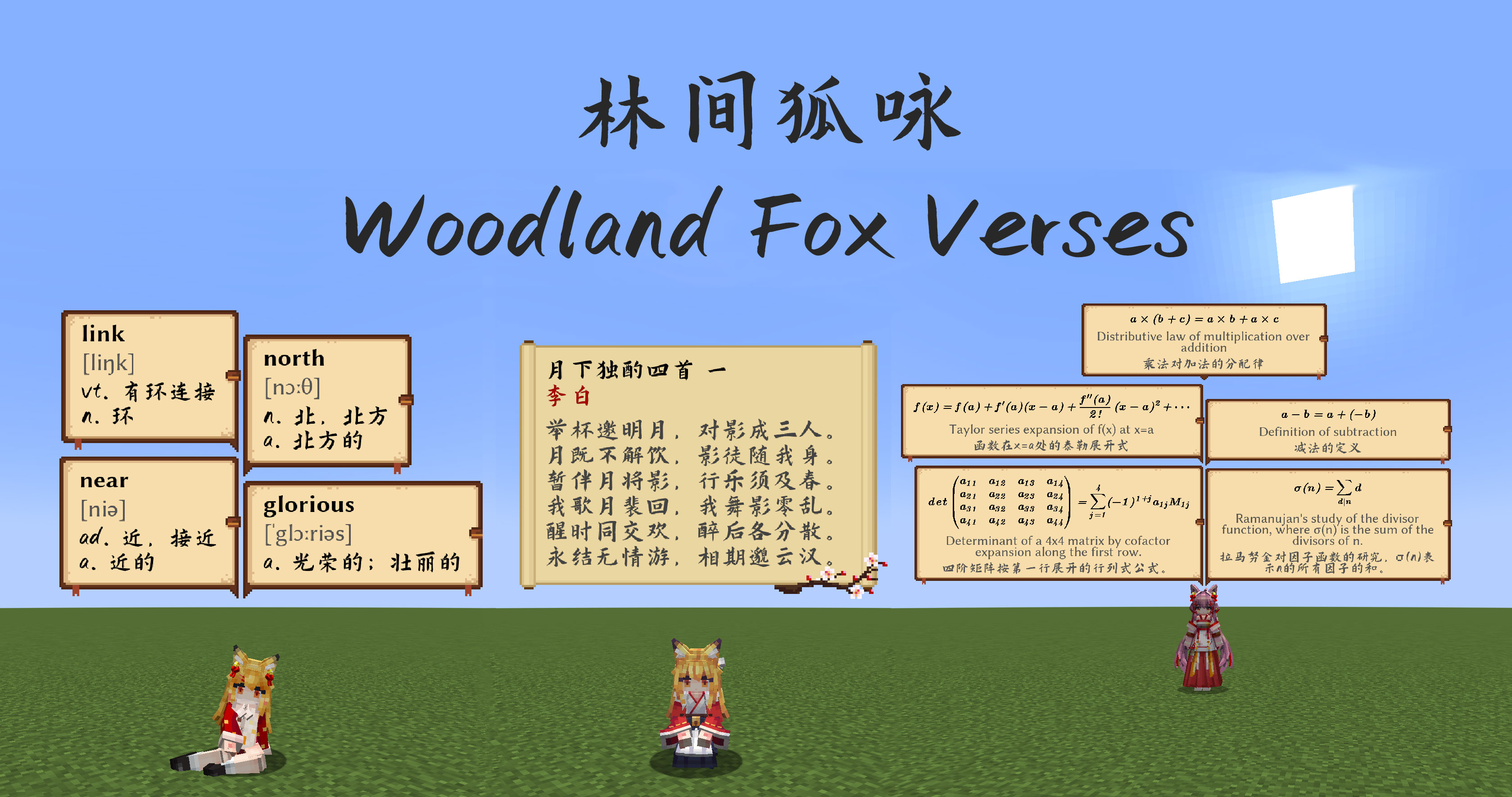
This is an add-on mod for the Minecraft maid mod (Touhou Little Maid Mod) that randomly displays various chat bubbles in-game. Currently integrated content includes:
You can now use KubeJS to add game tips:
// You need to create JS scripts in the server_scripts directory to add tips

// Add tips in all biomes using the addTipInAllBiome method
WoodlandFoxVerses.addTipInAllBiome("Press F3 to view coordinates and biome information")

// You can add \n for line breaks, and the game will automatically wrap long text
WoodlandFoxVerses.addTipInAllBiome("Two roads diverged in a yellow wood,\nAnd sorry I could not travel both")
WoodlandFoxVerses.addTipInAllBiome("To be or not to be, that is the question:\n" +
                                   "Whether 'tis nobler in the mind to suffer the slings and arrows of outrageous fortune,\n" +
                                   "Or to take arms against a sea of troubles and by opposing end them.")

// Add tips in specific biomes using the addTipInBiome method
// The second biome parameter can be a biome ID or biome tag
WoodlandFoxVerses.addTipInBiome("This is the Nether Wastes, featuring vast lava seas and scattered glowstone clusters", "minecraft:nether_wastes")
// Don't forget that tags need to start with #
WoodlandFoxVerses.addTipInBiome("You are in a plains biome where villages can generate", "#minecraft:has_structure/village_plains")

// Of course, the chat bubble background is also customizable. You can reference existing textures for customization (using nine-slice mechanism)
// Textures need the full path with .png extension
WoodlandFoxVerses.addTipInAllBiomeWithBg("This is a tip with custom background", "woodlandfoxverses:textures/verses.png")

// Since the Woodland Fox Verses mod adds math formulas, English words, and classical poetry by default
// Some people might just want to use it for game tips, so we also provide KJS interfaces to forcibly disable these features
WoodlandFoxVerses.showWords(false) // Disable English word display
WoodlandFoxVerses.showPoetry(false) // Disable classical poetry display
WoodlandFoxVerses.showMathFormula(false) // Disable math formula display

// You can also forcibly specify the bubble display duration and frequency
WoodlandFoxVerses.bubbleAddInterval(60) // Attempt to display a bubble every 60 ticks
WoodlandFoxVerses.bubbleShowDuration(40) // Each bubble disappears after displaying for 40 ticks
Project description from Modrinth.
Pick your setup
Choose the version and loader you play, then open the matching release.
Check the dependencies, then try the file in a copied instance before changing a world you care about.
Recent files
woodlandfoxverses-1.2.0-neoforge+mc1.21.1.jar
23 Aug 2025
woodlandfoxverses-1.2.0-forge+mc1.20.1.jar
23 Aug 2025
woodlandfoxverses-1.21.1-neoforge-1.1.2.jar
12 Jul 2025
woodlandfoxverses-1.20.1-forge-1.1.2.jar
12 Jul 2025
woodlandfoxverses-1.21.1-neoforge-1.1.1.jar
3 Jul 2025
woodlandfoxverses-1.20.1-forge-1.1.1.jar
3 Jul 2025
woodlandfoxverses-1.21.1-neoforge-1.1.0.jar
1 Jul 2025
woodlandfoxverses-1.20.1-forge-1.1.0.jar
1 Jul 2025
woodlandfoxverses-1.21.1-neoforge-1.0.0.jar
24 Jun 2025
woodlandfoxverses-1.20.1-forge-1.0.0.jar
23 Jun 2025
Looking for an older file? The official Modrinth project page is in Resources.
 mod
A mod for Minecraft helping control input method
 mod
A bunch of amazing crazy bows with unique abilities!!!
 mod
A mod that makes many improvements to Minecraft and adds lots of new content