Minecraft version
Back to mods 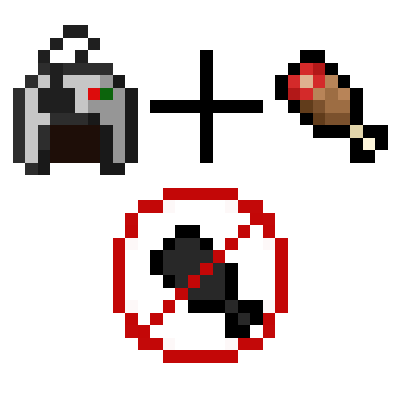
Modrinth · Minecraft mod
Auto Feeder Helmet
Upgrade all your loved helmets, so they feed you while you do nothing
Choose a version Pick your version below, then grab the matching file.
Quick answer
Which Auto Feeder Helmet release should I use?
Latest stable file 26.2.0.1
Game version 26.2
Loader NeoForge
Auto Feeder Helmet 26.2.0.1 targets 26.2 with NeoForge. Installation on the client is optional. Installation on the dedicated server is optional. No extra mods listed for this file.
Where it goes
Is Auto Feeder Helmet required on the client, server, or both?
Installation on the client is optional. Installation on the dedicated server is optional.
Client Optional
Dedicated server Optional
Loader for this release NeoForge
Required install it here Optional supported, not mandatory Not supported do not install here Source doesn’t say do not assume
The source marks this as usable on both the client and server.
What else does Auto Feeder Helmet 26.2.0.1 need?
26.2.0.1. Change the file and its required mods may change too.
This file does not list any required mods. Do not add a library just because a different file uses it.
This file does not list any required or optional mods.
Before you install it
Add Auto Feeder Helmet without breaking your instance.
Built for Auto Feeder Helmet 26.2.0.1. Pick another file and the loader, install side or required mods may change.
- 01
Stick to this file
Use 26.2.0.1. It targets 26.2 with NeoForge; another release may have different loader, side or dependency requirements.
- 02
Bring the mods it needs
This file does not list any required mods. Do not add a library just because a different file uses it.
- 03
Put it on the correct side
Installation on the client is optional. Installation on the dedicated server is optional.
- 04
Pick the file you checked
Use the “Get this file” button beside 26.2.0.1. It opens that exact file at the source.
About this project
What does Auto Feeder Helmet add?
Auto Feeder Helmet
Keeping you saturated!
Support:
| Version | Modloader | Support-Status |
|---|---|---|
| 26.2 | NeoForge | ✅ |
| 26.1.2 | NeoForge | ✅ |
| 1.21.11 | NeoForge | ⚠️ |
| 1.21.10 | NeoForge | ⚠️ |
| 1.21.8 | NeoForge | ❌ |
| 1.21.5 | NeoForge | ❌ |
| 1.21.4 | NeoForge | ❌ |
| 1.21.3 | NeoForge | ❌ |
| 1.21.1 | NeoForge | ⚠️ |
| 1.21 | NeoForge | ❌ |
| 1.20.x | Forge | ❌ |
| 1.19.x | Forge | ❌ |
| 1.18.x | Forge | ❌ |
| 1.17.x | Forge | ❌ |
| 1.16.x | Forge | ❌ |
| 1.12.x | Forge | ❌ |
⚠️: bug fix only
About
Auto Feeder Helmet is a Minecraft mod since version 1.12.2 that adds a simple way off staying saturated.
This is done by a simple item called "Helmet Feeding Module", which can easily be crafted in early game.
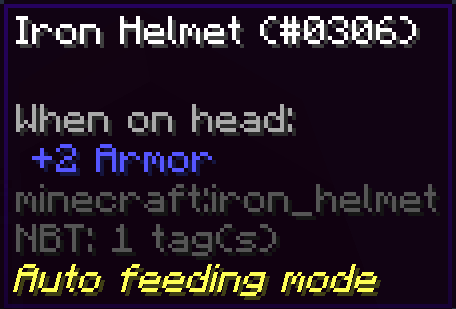
Any helmet with this trait will automatically consume any food items in your inventory when you are hungry.
This way you will never have to deal with eating again, just make sure to always have some food with you.
Since 40.1.0/43.2.0/45.1.0 you craft the helmet and the module together in the smithing table. You now also can uncraft it, by putting the helmet in any crafting grid.
Crafting
| Version | How |
|---|---|
| >= 1.21.2 | Right click with the feeder module, while wearing the desired helmet. |
| 1.19.4 - 1.21.1 | Craft module and helmet together in a smiting table. |
| <= 1.19.4 | Craft module and helmet together in any crafting grid (shapeless). |
Notes
- Some helmets may have different code structures, so it won't work on any helmet, but with most it is fine.
- Since version 1.7.0 every helmet that can be constructed can be found inside the creative tab of this mod.

Project description from Modrinth.
Pick your setup
Auto Feeder Helmet by Minecraft version and loader
Choose the version and loader you play, then open the matching release.
Minecraft version
26.1.2
1 loader buildMinecraft version
1.21.11
1 loader buildMinecraft version
1.21.10
1 loader buildMinecraft version
1.21.8
1 loader buildMinecraft version
1.21.5
1 loader buildMinecraft version
1.21.4
1 loader buildMinecraft version
1.21.3
1 loader buildMinecraft version
1.21.1
1 loader buildMinecraft version
1.21
1 loader buildMinecraft version
1.20.6
1 loader buildMinecraft version
1.20.4
1 loader buildShowing the newest 12 of 21 game versions. Older files are in the list below.
Check the dependencies, then try the file in a copied instance before changing a world you care about.
Recent files
Auto Feeder Helmet versions and loaders
26.2.0.1
FeederHelmet-26.2.0.1.jar
25 Jun 2026
Client Optional Server Optional Dependencies No extras listed Listed on Release listing
Check the 26.2 · NeoForge setup 26.2NeoForge release
26.2.1.1
FeederHelmet-26.2.1.1.jar
25 Jun 2026
Client Optional Server Optional Dependencies No extras listed Listed on Release listing
Check the 26.1.2 · NeoForge setup 26.1.2NeoForge release
21.11.0
FeederHelmet-21.11.0.jar
25 Jun 2026
Client Optional Server Optional Dependencies No extras listed Listed on Release listing
Check the 1.21.11 · NeoForge setup 1.21.11NeoForge release
21.10.0
FeederHelmet-21.10.0.jar
8 Oct 2025
Client Optional Server Optional Dependencies No extras listed Listed on Release listing
Check the 1.21.10 · NeoForge setup 1.21.10NeoForge release
218.0.0
FeederHelmet-218.0.0.jar
29 Sept 2025
Client Optional Server Optional Dependencies No extras listed Listed on Release listing
Check the 1.21.8 · NeoForge setup 1.21.8NeoForge release
215.0.0
FeederHelmet-215.0.0.jar
3 May 2025
Client Optional Server Optional Dependencies No extras listed Listed on Release listing
Check the 1.21.5 · NeoForge setup 1.21.5NeoForge release
214.0.0
FeederHelmet-214.0.0.jar
4 Jan 2025
Client Optional Server Optional Dependencies No extras listed Listed on Release listing
Check the 1.21.4 · NeoForge setup 1.21.4NeoForge release
213.0.0
FeederHelmet-213.0.0.jar
2 Nov 2024
Client Optional Server Optional Dependencies No extras listed Listed on Release listing
Check the 1.21.3 · NeoForge setup 1.21.3NeoForge release
210.0.0
FeederHelmet-210.0.0.jar
18 Jun 2024
Client Optional Server Optional Dependencies No extras listed Listed on Release listing
Check the 1.21.1 · NeoForge setup 1.211.21.1NeoForge release
206.0.0
FeederHelmet-206.0.0.jar
2 May 2024
Client Optional Server Optional Dependencies No extras listed Listed on Release listing
Check the 1.20.6 · NeoForge setup 1.20.6NeoForge release
204.0.0
FeederHelmet-204.0.0.jar
8 Feb 2024
Client Optional Server Optional Dependencies No extras listed Listed on Release listing
Check the 1.20.4 · NeoForge setup 1.20.4NeoForge release
202.0.0
FeederHelmet-202.0.0.jar
6 Dec 2023
Client Optional Server Optional Dependencies No extras listed Listed on Release listing
Check the 1.20.2 · NeoForge setup 1.20.2NeoForge release
Looking for an older file? The official Modrinth project page is in Resources.