Minecraft version
Back to mods 
Modrinth · Minecraft mod
Status4Discord
A discord bot, showing the current status of your server as embed, activity and more.
Choose a version Pick your version below, then grab the matching file.
Quick answer
Which Status4Discord release should I use?
Latest stable file 1.6
Game version 26.1.2
Loader NeoForge
Status4Discord 1.6 targets 26.1.2 with NeoForge. The project page does not say whether this file belongs on the client, dedicated server, or both. No extra mods listed for this file.
Where it goes
Is Status4Discord required on the client, server, or both?
The project page does not say whether this file belongs on the client, dedicated server, or both.
Client Source doesn’t say
Dedicated server Source doesn’t say
Loader for this release NeoForge
Required install it here Optional supported, not mandatory Not supported do not install here Source doesn’t say do not assume
The source does not explicitly classify this release as client-only or server-only.
What else does Status4Discord 1.6 need?
1.6. Change the file and its required mods may change too.
This file does not list any required mods. Do not add a library just because a different file uses it.
This file does not list any required or optional mods.
Before you install it
Add Status4Discord without breaking your instance.
Built for Status4Discord 1.6. Pick another file and the loader, install side or required mods may change.
- 01
Stick to this file
Use 1.6. It targets 26.1.2 with NeoForge; another release may have different loader, side or dependency requirements.
- 02
Bring the mods it needs
This file does not list any required mods. Do not add a library just because a different file uses it.
- 03
Put it on the correct side
The project page does not say whether this file belongs on the client, dedicated server, or both.
- 04
Pick the file you checked
Use the “Get this file” button beside 1.6. It opens that exact file at the source.
About this project
What does Status4Discord add?
Status4Discord
Status4Discord is a dynamic Discord bot for Minecraft servers that provides real-time server stats through embeds and activities. It effortlessly connects your Minecraft server to Discord, keeping your community in the loop and engaged with information ranging from TPS to player counts.
Getting started
https://github.com/LasaJoniHD/Status4DiscordMC/wiki/Setup
Commands
Minecraft
/status4discord reload reload the config/status4discord invite invite the discord bot/status4discord info info about this plugin/status4discord help all commands
Discord
@YourDiscordBot setembed set the embed textchannel@YourDiscordBot setlogs set the logs textchannel
Permissions
Minecraft
status4mc.adminUse /status4discord reload and /status4discord invite
Discord
- Permission.ADMINISTRATOR
Config
Show config
#   _____ _        _             _  _   _____  _                       _
#  / ____| |      | |           | || | |  __ \(_)                     | |
# | (___ | |_ __ _| |_ _   _ ___| || |_| |  | |_ ___  ___ ___  _ __ __| |
#  \___ \| __/ _` | __| | | / __|__   _| |  | | / __|/ __/ _ \| '__/ _` |
#  ____) | || (_| | |_| |_| \__ \  | | | |__| | \__ \ (_| (_) | | | (_| |
# |_____/ \__\__,_|\__|\__,_|___/  |_| |_____/|_|___/\___\___/|_|  \__,_|
#
# Thank you for using Status4Discord by Joni
# To setup Status4Discord, please visit https://github.com/LasaJoniHD/Status4DiscordMC/wiki/Setup

#   _____ ___  _  _____ _  _
# |_   _/ _ \| |/ / __| \| |
#   | || (_) | ' <| _|| .` |
#   |_| \___/|_|\_\___|_|\_|
#
# Please paste your discord bot token here
token: ""

#    _   ___ _____ _____   _____ _______   __
#   /_\ / __|_   _|_ _\ \ / /_ _|_   _\ \ / /
#  / _ \ (__  | |  | | \ V / | |  | |  \ V /
# /_/ \_\___| |_| |___| \_/ |___| |_|   |_|
#
# Available Activities:
# PLAYING, WATCHING, LISTENING, CUSTOM_STATUS, COMPETING
# Available Status:
# ONLINE, IDLE, DO_NOT_DISTURB, INVISIBLE, OFFLINE
# You can use PlaceholderAPI if installed (only placeholders that do not require a player).
# Find placeholders included in Status4Discord at https://github.com/LasaJoniHD/Status4DiscordMC/wiki/Placeholders.
activity: "PLAYING %online_players% / %max_players% Players"
status-activity: "ONLINE"
update-activity: 30 # in seconds

# Activities for server start
server-starting-activity: "CUSTOM_STATUS Server is starting..."
server-starting-status: "IDLE"

# ServerIP
# will replace internal Placeholder %serverip%
# --------------------------------------------------------------------------------------------------------------------
# 'serverIP' sets the server IP shown in activity and in the embed.
# If in server.properties, it will obtain the IP that the server is bound to; if not set, it will display "not set."
serverIP: "server.properties"

#  _    ___   ___ ___
# | |  / _ \ / __/ __|
# | |_| (_) | (_ \__ \
# |____\___/ \___|___/
#
# If enabled, the bot will send a message when the server starts/stops in the specified logs channel.
# If you don't know how to obtain the textChannelID and have admin privileges,
# simply send a message in Discord in the channel like this: @MentionYourDiscordBot setlogs.
logs:
  enabled: true
  textChannelID: ""
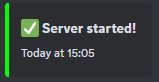
  start:
    color: "GREEN"
    message: ":white_check_mark: **Server started!**"
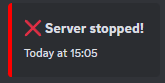
  stop:
    color: "RED"
    message: ":x: **Server stopped!**"

#  ___ __  __ ___ ___ ___
# | __|  \/  | _ ) __|   \
# | _|| |\/| | _ \ _|| |) |
# |___|_|  |_|___/___|___/
#
# If enabled, the bot will send a status embed in the specified channel; this embed will be updated every few seconds.
# If you don't know how to obtain the textChannelID and have admin privileges,
# simply send a message in Discord in the channel like this:
# @MentionYourDiscordBot setembed.
embed:
  enabled: true
  textChannelID: ""
  update: 15 # in seconds

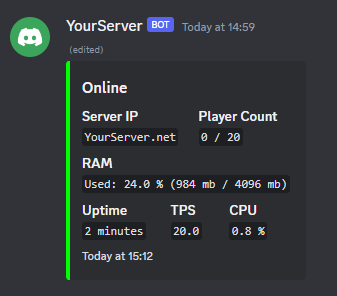
  online:
    title: "Online"
    color: "GREEN" # supports any java.awt.Color enum name (e.g. `RED`, `BLUE`, etc.) or a hex code (e.g. `#FF0000` for red)

    timestamp: true

    footer:
      text: "Uptime: %uptime%"

    fields:
      - name: "Server IP"
        value: "%serverip%"
        inline: true

      - name: "Player Count"
        value: "%online_players% / %max_players%"
        inline: true

      - name: "RAM"
        value: "Used: %usedram_percentage% % (%usedram% mb / %maxram% mb)"
        inline: false

      - name: "Uptime"
        value: "%uptime%"
        inline: true

      - name: "TPS"
        value: "%tps%"
        inline: true

      - name: "CPU"
        value: "%cpu% %"
        inline: true

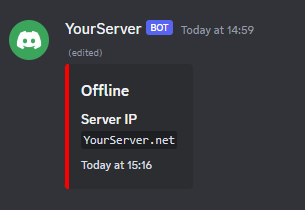
  offline:
    title: "Offline"
    color: "RED"

    fields:
      - name: "Server IP"
        value: "%serverip%"
        inline: true

# Do not touch if you don't know what this setting does
embedMessageID: ""
debug: false
config-version: 4
Examples
Activity

Status Embeds
When server is online
When server is offline
Start/Stop Log Messages
Server Start
Server Stop
Project description from Modrinth.
Pick your setup
Status4Discord by Minecraft version and loader
Choose the version and loader you play, then open the matching release.
Minecraft version
26.2
2 loader buildsMinecraft version
26.1.2
3 loader buildsMinecraft version
26.1.1
1 loader buildMinecraft version
26.1
1 loader buildMinecraft version
1.21.11
1 loader buildMinecraft version
1.21.10
1 loader buildMinecraft version
1.21.9
1 loader buildMinecraft version
1.21.8
1 loader buildMinecraft version
1.21.7
1 loader buildMinecraft version
1.21.6
1 loader buildMinecraft version
1.21.5
1 loader buildShowing the newest 12 of 32 game versions. Older files are in the list below.
Check the dependencies, then try the file in a copied instance before changing a world you care about.
Recent files
Status4Discord versions and loaders
1.6
Status4Discord-1.6-neoforge-26.1.2.jar
15 Sept 2026
Client Source doesn’t say Server Source doesn’t say Dependencies No extras listed Listed on Release listing
Check the 26.1.2 · NeoForge setup 26.1.2NeoForge release
1.6
Status4Discord-1.6-fabric-26.2.jar
15 Sept 2026
Client Source doesn’t say Server Source doesn’t say Dependencies 1 required · 1 unchecked Listed on Release listing
Check the 26.2 · Fabric setup 26.2Fabric release
1.6
Status4Discord-1.6-fabric-26.1.2.jar
15 Sept 2026
Client Source doesn’t say Server Source doesn’t say Dependencies 1 required · 1 unchecked Listed on Release listing
Check the 26.1.2 · Fabric setup 26.1.2Fabric release
1.6
Status4Discord-1.6-bukkit.jar
15 Sept 2026
Client Source doesn’t say Server Source doesn’t say Dependencies No extras listed Listed on Release listing
Check the 26.3 · bukkit setup 1.201.20.11.20.21.20.3 release
1.5
Status4Discord-1.5-bukkit.jar
9 Sept 2026
Client Source doesn’t say Server Source doesn’t say Dependencies No extras listed Listed on Release listing
Check the 26.2 · bukkit setup 1.181.18.11.18.21.19 release
1.4
Status4Discord.jar
25 Jun 2026
Client Source doesn’t say Server Source doesn’t say Dependencies No extras listed Listed on Release listing
Check the 26.2 · bukkit setup 1.181.18.11.18.21.19 release
1.3
Status4Discord.jar
14 Jan 2026
Client Source doesn’t say Server Source doesn’t say Dependencies No extras listed Listed on Release listing
Check the 26.1.2 · bukkit setup 1.181.18.11.18.21.19 release
1.2
Status4Discord.jar
12 Jan 2026
Client Source doesn’t say Server Source doesn’t say Dependencies No extras listed Listed on Release listing
Check the 1.21.11 · bukkit setup 1.181.18.11.18.21.19 release
1.1-beta
Status4Discord.jar
5 Dec 2025
Client Source doesn’t say Server Source doesn’t say Dependencies No extras listed Listed on Release listing
Check the 1.21.11 · bukkit setup 1.181.18.11.18.21.19 beta
1.0.1
Status4Discord-all.jar
24 Sept 2024
Client Source doesn’t say Server Source doesn’t say Dependencies No extras listed Listed on Release listing
Check the 1.21.7 · bukkit setup 1.181.18.11.18.21.19 release
1.0
Status4Discord-all.jar
20 Jan 2024
Client Source doesn’t say Server Source doesn’t say Dependencies No extras listed Listed on Release listing
Check the 1.21.1 · bukkit setup 1.181.18.11.18.21.19 release
Looking for an older file? The official Modrinth project page is in Resources.
 mod
mod Modrinth · Minecraft
Sticky Honey
Use Honey instead of Slimeballs to make Sticky Pistons!
 mod
mod Modrinth · Minecraft
Red Sand Concrete
Allows the use of Red Sand in crafting concrete powder!
 mod
mod Modrinth · Minecraft
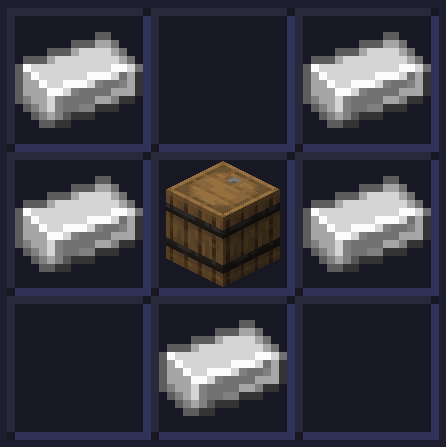
Hopper Barrels
A datapack/mod that makes it possible to use a barrels for crafting Hoppers!