Fabric API Needed by Simple Death Coordinates fabric-26.1.2
requiredMatching file found Matched file: 0.155.3+26.1.2

Modrinth · Minecraft mod
Never lose your items again. Logs your death coordinates and distance in chat, click to copy for quick navigation.
Quick answer
Simple Death Coordinates fabric-26.1.2 targets 26.1.2 with Fabric, Quilt. It must be installed on the client. Do not install it on the dedicated server. All 1 required mods have matching files.
Where it goes
It must be installed on the client. Do not install it on the dedicated server.
This file is marked client-only.
fabric-26.1.2 on 26.1.2. Every mod below is checked against that same setup.
Install Fabric API first. We found matching files for this game-version and loader setup.
We only count dependency files that match this setup. A file for another loader does not fill the gap.
Before you install it
Built for Simple Death Coordinates fabric-26.1.2 on 26.1.2. Pick another file and the loader, install side or required mods may change.
Use fabric-26.1.2. It targets 26.1.2 with Fabric, Quilt; another release may have different loader, side or dependency requirements.
Install Fabric API first. We found matching files for this game-version and loader setup.
It must be installed on the client. Do not install it on the dedicated server.
Use the “Get this file” button beside fabric-26.1.2. It opens that exact file at the source.
About this project
This lightweight mod automatically logs your death coordinates and distance in chat upon respawn, featuring a click-to-copy function for quick and easy navigation.
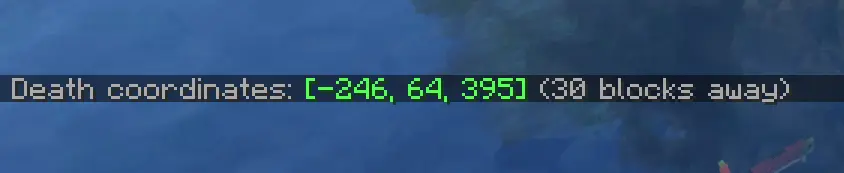
Vanilla Style Integration: The notifications are designed to mimic the look and feel of native /locate or game system messages. Keeping your HUD clean and authentic.
Instant Coordinates: Automatically displays your exact XYZ location the moment you respawn.
Distance Tracker: Shows exactly how far you are from your death point so you can plan your recovery.
Click-to-Copy: Simply click the chat message to copy your coordinates to the clipboard for easy use with waypoints or teleports.
Lightweight: No extra menus, no clutter—just the information you need, exactly when you need it.
Die in the game while exploring or building.
Upon respawning, check your chat for the automatically generated death message, styled just like a standard system notification.
Click on the coordinates in the chat to copy them to your clipboard.
Paste the coordinates into your favorite waypoint mod, map tool, or use them to teleport back if you have the necessary permissions!
Vanilla-Friendly: The UI does not use custom inventory screens or complex pop-ups. It utilizes the standard Minecraft chat component system, ensuring full compatibility with other mods and custom chat interfaces.
Performance: Optimized for minimal resource usage, ensuring zero impact on your FPS or game logic.
Version Support: Works on any server (even if it's not installed on the server-side), making it the perfect tool for survival multiplayer and single-player worlds alike.
Project description from Modrinth.
Pick your setup
Choose the version and loader you play, then open the matching release.
Check the dependencies, then try the file in a copied instance before changing a world you care about.
Recent files
simple_death_coordinates-fabric-26.1.2-1.2.jar
13 Jun 2026
simple_death_coordinates-neoforge-26.1.2-1.2.jar
13 Jun 2026
Looking for an older file? The official Modrinth project page is in Resources.
 mod
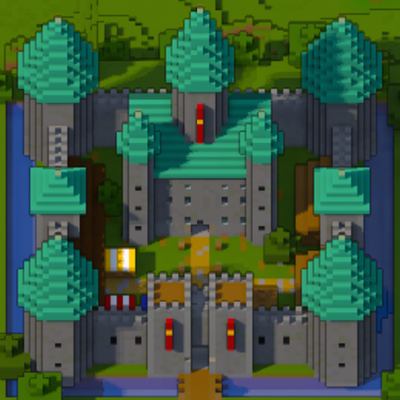
modA minimap and world map drawn at an angle, like a model of your world on a table. Towers stand up, cliffs have faces and trees cast shadows.
 mod
modArcane Realms is a magic and adventure content mod for Minecraft Java Edition. It combines spell progression, custom artifacts, animated magical creatures, boss encounters, and handcrafted structures into a single experience.
 mod
modArcane Realms: Industrialized is an addon that expands Arcane Realms with arcane-powered machinery, resource processing, energy storage, and automated logistics.