
Minecraft version
Back to mods 
Modrinth · Minecraft mod
Enchantment Descriptions Java
This resource pack enhances Minecraft’s enchantment system by providing detailed descriptions of every enchantment directly in-game. Whether you're new or experienced, it helps you make better choices while enchanting your gear.
Choose a version Pick your version below, then grab the matching file.
Quick answer
Which Enchantment Descriptions Java release should I use?
Latest stable file 1.3.0+mod
Game version 1.17, 1.17.1, 1.18
Loader Fabric, Forge, NeoForge
Enchantment Descriptions Java 1.3.0+mod targets 1.17, 1.17.1, 1.18 with Fabric, Forge, NeoForge. Installation on the client is optional. Installation on the dedicated server is optional. No extra mods listed for this file.
Where it goes
Is Enchantment Descriptions Java required on the client, server, or both?
Installation on the client is optional. Installation on the dedicated server is optional.
Client Optional
Dedicated server Optional
Loader for this release Fabric, Forge, NeoForge
Required install it here Optional supported, not mandatory Not supported do not install here Source doesn’t say do not assume
The source marks this as usable on both the client and server.
What else does Enchantment Descriptions Java 1.3.0+mod need?
1.3.0+mod. Change the file and its required mods may change too.
This file does not list any required mods. Do not add a library just because a different file uses it.
This file does not list any required or optional mods.
Before you install it
Add Enchantment Descriptions Java without breaking your instance.
Built for Enchantment Descriptions Java 1.3.0+mod. Pick another file and the loader, install side or required mods may change.
- 01
Stick to this file
Use 1.3.0+mod. It targets 1.17, 1.17.1, 1.18 with Fabric, Forge, NeoForge; another release may have different loader, side or dependency requirements.
- 02
Bring the mods it needs
This file does not list any required mods. Do not add a library just because a different file uses it.
- 03
Put it on the correct side
Installation on the client is optional. Installation on the dedicated server is optional.
- 04
Pick the file you checked
Use the “Get this file” button beside 1.3.0+mod. It opens that exact file at the source.
About this project
What does Enchantment Descriptions Java add?


Enchantment Descriptions
A simple but powerful resource pack that adds detailed enchantment descriptions to tooltips in Minecraft Java Edition. No more guessing what each enchantment does—this pack shows you all relevant information directly in-game.
🎨 Screenshots
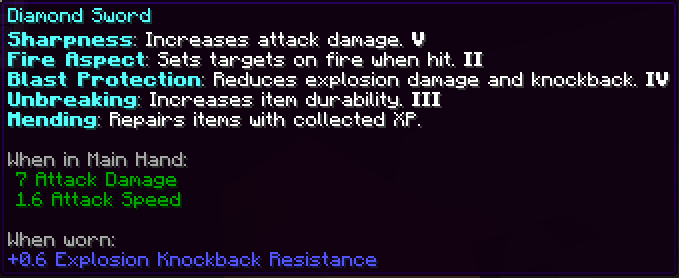
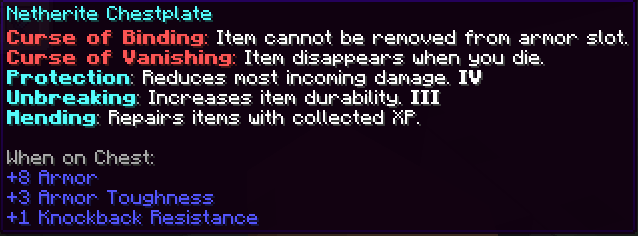
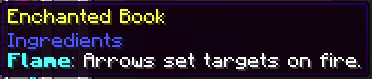


Installation (Resource Pack - .zip)
- Download the
.zipfile. - Place it in your
resourcepacksfolder. - Launch Minecraft → Options → Resource Packs → Enable the pack.
Installation (Mod Version - .jar)
To install the .jar version of Enchantment Descriptions:
- Make sure you have Minecraft Forge or Fabric installed.
- Download the latest
.jarfile from the Files section. - Place the
.jarfile into yourmods/folder, located in:- Windows:
%appdata%\.minecraft\mods - macOS:
~/Library/Application Support/minecraft/mods - Linux:
~/.minecraft/mods
- Windows:
- Launch Minecraft using the appropriate mod loader.
- Enjoy detailed enchantment tooltips in-game!
This is a client-side visual aid only — it does not affect gameplay or servers.
Report if you find any mistranslation or bug
Project description from Modrinth.
Pick your setup
Enchantment Descriptions Java by Minecraft version and loader
Choose the version and loader you play, then open the matching release.
Minecraft version
1.21.8
5 loader buildsMinecraft version
1.21.7
5 loader buildsMinecraft version
1.21.6
5 loader buildsMinecraft version
1.21.5
5 loader buildsMinecraft version
1.21.4
5 loader buildsMinecraft version
1.21.3
5 loader buildsMinecraft version
1.21.2
5 loader buildsMinecraft version
1.21.1
5 loader buildsMinecraft version
1.21
5 loader buildsMinecraft version
1.20.6
5 loader buildsMinecraft version
1.20.5
5 loader buildsShowing the newest 12 of 41 game versions. Older files are in the list below.
Check the dependencies, then try the file in a copied instance before changing a world you care about.
Recent files
Enchantment Descriptions Java versions and loaders
1.3.0+mod
enchantment-descriptions-java-1.3.0.jar
1 Oct 2025
Client Optional Server Optional Dependencies No extras listed Listed on Release listing
Check the 1.21.9 · Fabric setup 1.171.17.11.181.18.1 release
1.3.0
Enchantment_Descriptions.zip
1 Oct 2025
Client Optional Server Optional Dependencies No extras listed Listed on Release listing
Check the 1.21.9 · datapack setup 1.171.17.11.181.18.1 release
1.2.0+mod
enchantment-descriptions-java-1.2.0.jar
18 Jul 2025
Client Optional Server Optional Dependencies No extras listed Listed on Release listing
Check the 1.21.8 · Fabric setup 1.171.17.11.181.18.1 release
1.2.0+mod
enchantment-descriptions-java-1.2.0.jar
20 Jun 2025
Client Optional Server Optional Dependencies No extras listed Listed on Release listing
Check the 1.21.6 · Fabric setup 1.211.21.11.21.21.21.3 release
1.2.0+mod
enchantment-descriptions-java-1.2.0.jar
17 May 2025
Client Optional Server Optional Dependencies No extras listed Listed on Release listing
Check the 1.20.6 · Fabric setup 1.141.14.11.14.21.14.3 release
1.2.0
Enchantment_Java.zip
17 May 2025
Client Optional Server Optional Dependencies No extras listed Listed on Release listing
Check the 1.21.8 · datapack setup 1.141.14.11.14.21.14.3 release
Looking for an older file? The official Modrinth project page is in Resources.
 mod
mod CurseForge + Modrinth · Minecraft
Reliable Gliders
A mod that adds a simple, immersive, and balanced Glider to the game!
 mod
mod CurseForge + Modrinth · Minecraft
Chunks fade in
A simple mod that adds different animations for chunks!
 mod
mod CurseForge · Minecraft
RPG Items Tiers
Adds a rarity system, item leveling, unbreakable items, runic table, and more!