YetAnotherConfigLib (YACL) Needed by Easy Navigator 1.7.0
requiredMatching file found Matched file: 3.9.6+26.3-fabric

Modrinth · Minecraft mod
Navigate coordinates efficiently by having a compass that shows you the way!
Quick answer
Easy Navigator 1.7.0 targets 26.3 with Fabric. It must be installed on the client. Do not install it on the dedicated server. All 2 required mods have matching files.
Where it goes
It must be installed on the client. Do not install it on the dedicated server.
This file is marked client-only.
1.7.0. Change the file and its required mods may change too.
Install YetAnotherConfigLib (YACL), Fabric API first. We found matching files for this game-version and loader setup. 1 comes through another mod in the chain.
1 extra mod was pulled in by another dependency. Indented rows show who needs each one. We only count dependency files that match this setup. A file for another loader does not fill the gap.
Before you install it
Built for Easy Navigator 1.7.0. Pick another file and the loader, install side or required mods may change.
Use 1.7.0. It targets 26.3 with Fabric; another release may have different loader, side or dependency requirements.
Install YetAnotherConfigLib (YACL), Fabric API first. We found matching files for this game-version and loader setup. 1 comes through another mod in the chain.
It must be installed on the client. Do not install it on the dedicated server.
Use the “Get this file” button beside 1.7.0. It opens that exact file at the source.
About this project
Currently not frequently updated
Allows you to easily travel to coordinates by providing a compass that leads the way.
This mod is fully clientside!
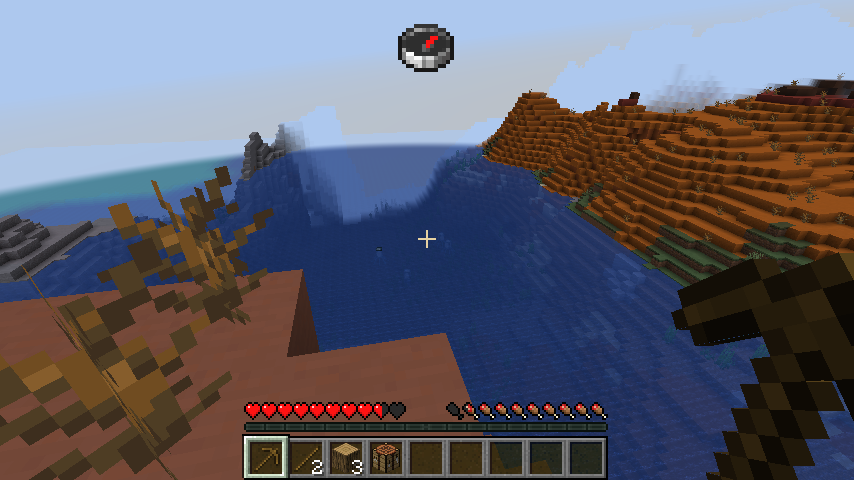
If there is a bug or an incompatibility with another mod please let me know on github issues
There are two different ways you can start the navigation mode. The easiest is by receiving a message with coordinates.
You can simply click the highlighted coordinates to start your journey.

Ingame this would look something like this
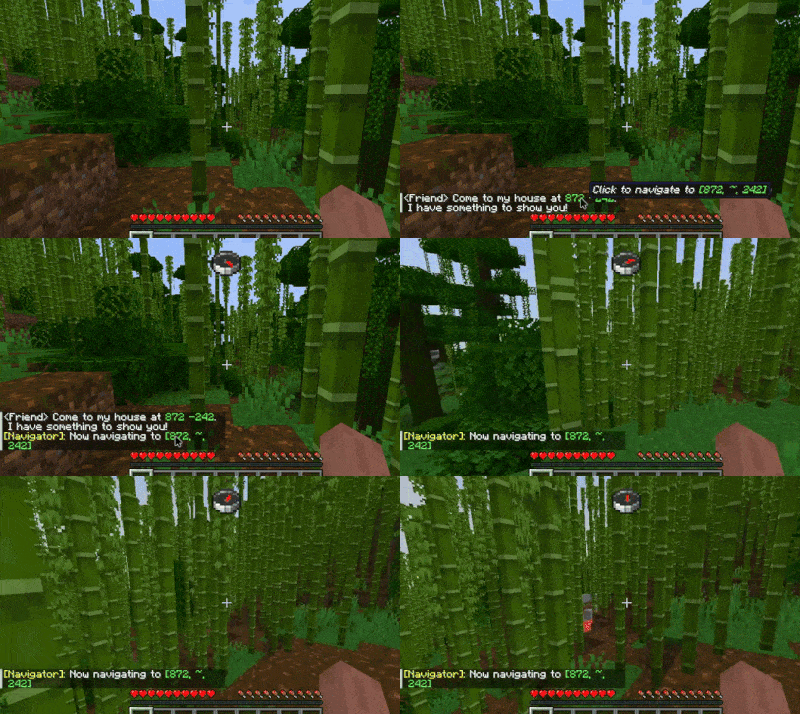
You can also use commands to start and stop your travels. The following two commands are available
/navigate <x> <z> or /navigate <x> <y> <z> to dial in the compass/navigation stop to stop navigatingWhen modmenu is installed you can change a number of settings
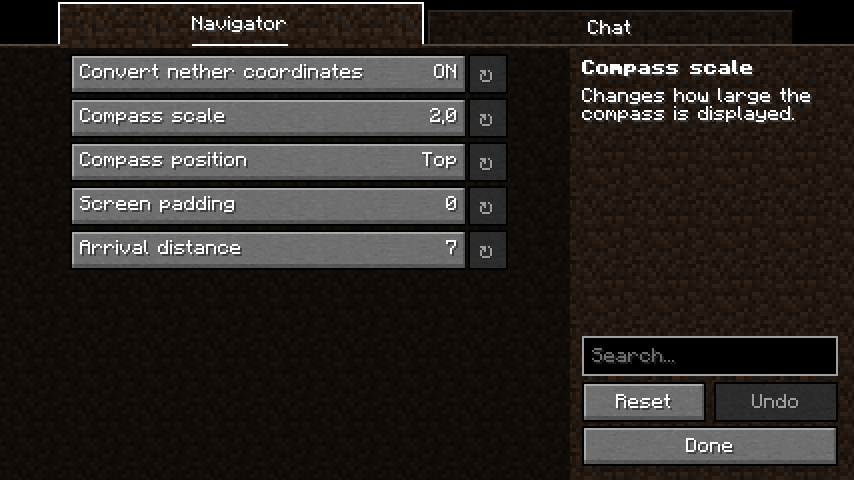
Project description from Modrinth.
Pick your setup
Choose the version and loader you play, then open the matching release.
Showing the newest 12 of 13 game versions. Older files are in the list below.
Check the dependencies, then try the file in a copied instance before changing a world you care about.
Recent files
EasyNavigator+26.3-1.7.0.jar
18 Sept 2026
EasyNavigator+1.21.11-1.6.0.jar
12 Aug 2026
EasyNavigator+1.21.5-1.5.0.jar
5 Jun 2025
EasyNavigator+1.21.4-1.4.0.jar
5 Jun 2025
EasyNavigator+1.21.3-1.3.0.jar
27 Oct 2024
EasyNavigator+1.20.4-1.2.2.jar
21 Jul 2024
EasyNavigator+1.21-1.2.2.jar
14 Jun 2024
EasyNavigator-1.2.1.jar
29 Mar 2024
EasyNavigator-1.2.0.jar
29 Mar 2024
EasyNavigator-1.1.2.jar
23 Dec 2023
EasyNavigator-1.1.1.jar
24 Nov 2023
EasyNavigator-1.1.0.jar
22 Nov 2023
Looking for an older file? The official Modrinth project page is in Resources.
 mod
modLeaves should be soft, lilypads shouldn't block swimming, and bamboo should be climbable. A super configurable vanilla-like mod that softens foliage!!! <3 <3 <3 Also slowdown, dethorned berry bushes and an in game config menu through vanilla options menus.
 mod
modLibrary for creating better server side content!
 mod
modA mod to infinitely fly with an elytra without fireworks.