Minecraft version
Back to mods 
Modrinth · Minecraft mod
Tiled
Adds customizable and craftable Tile Blocks!
Choose a version Pick your version below, then grab the matching file.
Quick answer
Which Tiled release should I use?
Latest stable file 1.3.0-1.21.1
Game version 1.21.1
Loader Fabric
Tiled 1.3.0-1.21.1 targets 1.21.1 with Fabric. Installation on the client is optional. Installation on the dedicated server is optional. No extra mods listed for this file.
Where it goes
Is Tiled required on the client, server, or both?
Installation on the client is optional. Installation on the dedicated server is optional.
Client Optional
Dedicated server Optional
Loader for this release Fabric
Required install it here Optional supported, not mandatory Not supported do not install here Source doesn’t say do not assume
The source marks this as usable on both the client and server.
What else does Tiled 1.3.0-1.21.1 need?
1.3.0-1.21.1. Change the file and its required mods may change too.
This file does not list any required mods. Do not add a library just because a different file uses it.
This file does not list any required or optional mods.
Before you install it
Add Tiled without breaking your instance.
Built for Tiled 1.3.0-1.21.1. Pick another file and the loader, install side or required mods may change.
- 01
Stick to this file
Use 1.3.0-1.21.1. It targets 1.21.1 with Fabric; another release may have different loader, side or dependency requirements.
- 02
Bring the mods it needs
This file does not list any required mods. Do not add a library just because a different file uses it.
- 03
Put it on the correct side
Installation on the client is optional. Installation on the dedicated server is optional.
- 04
Pick the file you checked
Use the “Get this file” button beside 1.3.0-1.21.1. It opens that exact file at the source.
About this project
What does Tiled add?

Have you ever wanted to build custom tiled floors? How about making compact gradients between blocks, or creating your own murals/wallpaper/paintings in a vanilla-friendly way? With Tiled, you can!
Tiled adds optimized and customizable Tile Blocks, Tile Stairs, Tile Slabs, Tile Layers, Small Tile Blocks, Small Tile Stairs, Small Tile Slabs, and Small Tile Layers to the game! The Tile Blocks and Tile Layers have 4 tiles per face, while the Small Tile Blocks and Small Tile Layers have 16 tiles per face, allowing for endless creative possibilities!
Note: There is an optional Dye Depot compatibility to add the 16 new colors! Get Dye Depot here: https://modrinth.com/mod/dye-depot
Tile Blocks
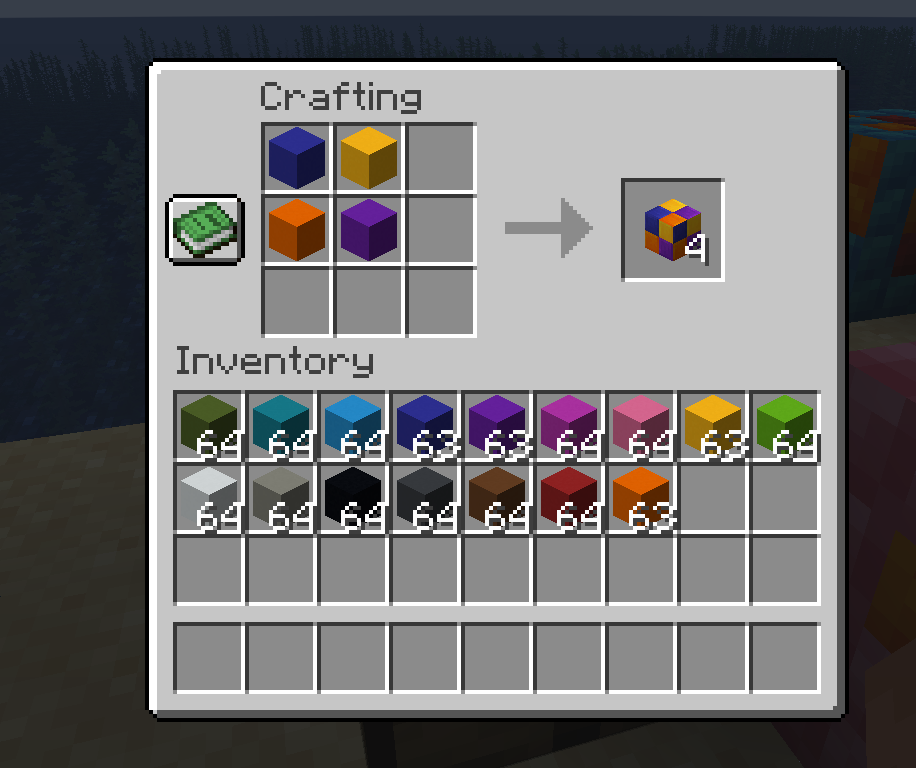
Tile Blocks can be crafted with any combination of concrete blocks placed in a 2x2 square. In total, you can make 65,536 different Tile Blocks through crafting!
Small Tile Blocks
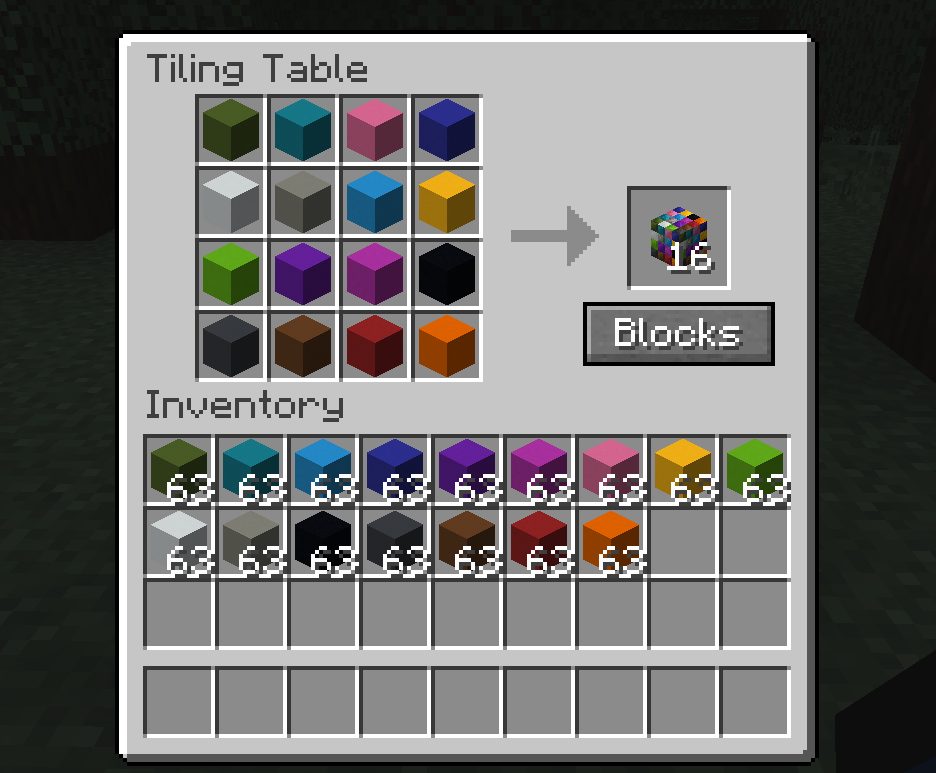
Small Tile Blocks can be crafted with any combination of concrete blocks placed in a 4x4 square! In total, you can make over 18 quintillion different Small Tile Blocks through crafting!
Tiling Table
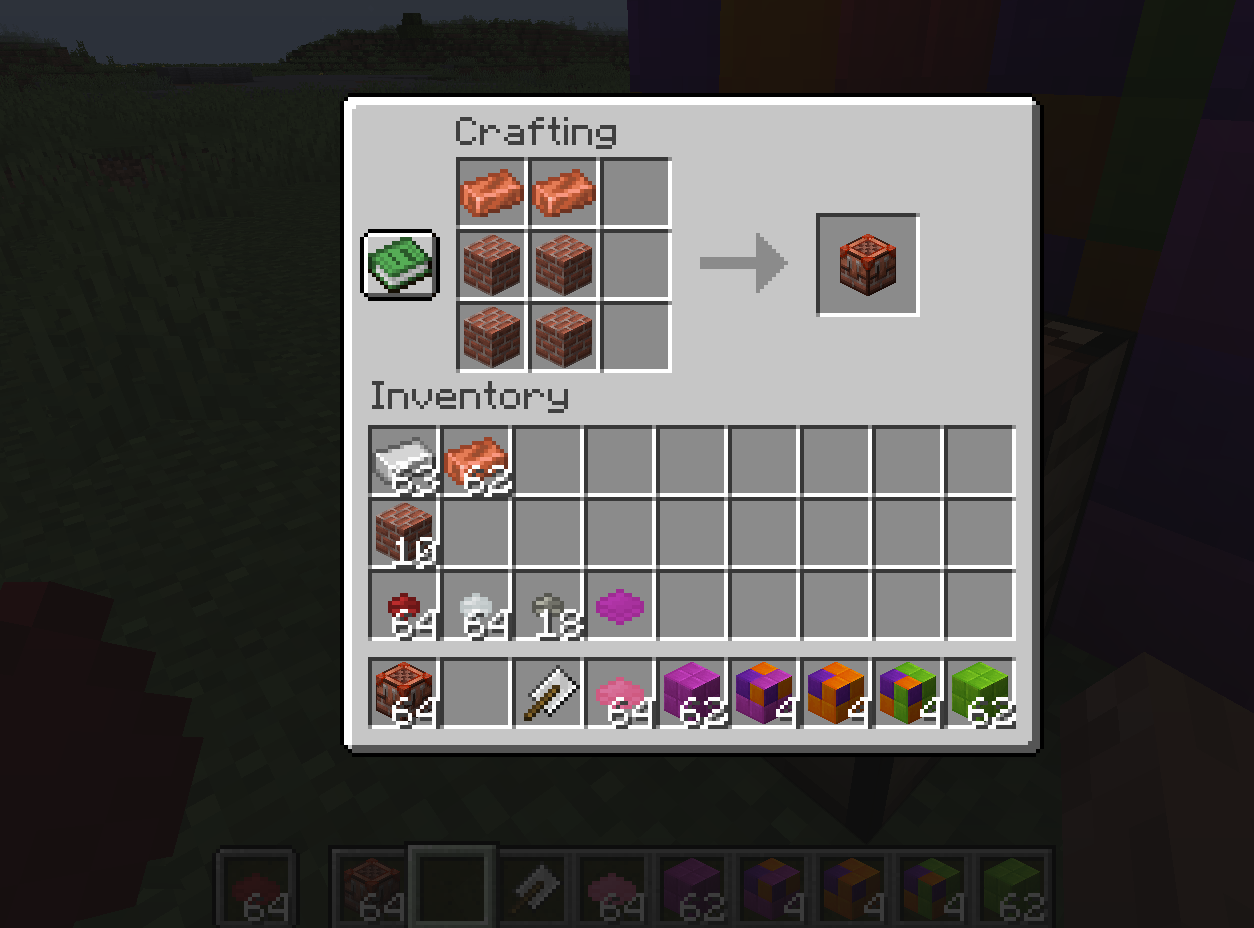
But how do you get the 4x4 crafting, you ask? Well, that's where the Tiling Table comes in! This new workstation allows you to create all the blocks in the mod. It even has its own inventory, so you don't lose your tile layout when you close the UI!
BTW, a solid-color Tile Block or Small Tile Block can replace a concrete block of that color in Tile Block and Small Tile Block crafting recipes!
Tiles and Small Tiles
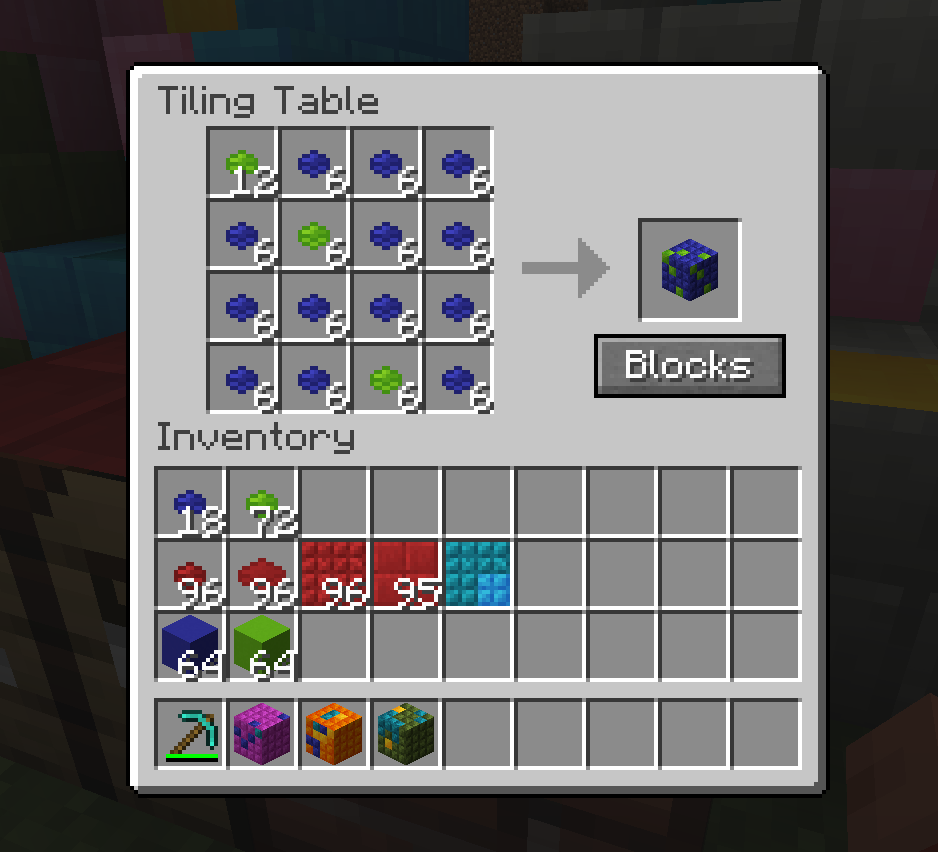
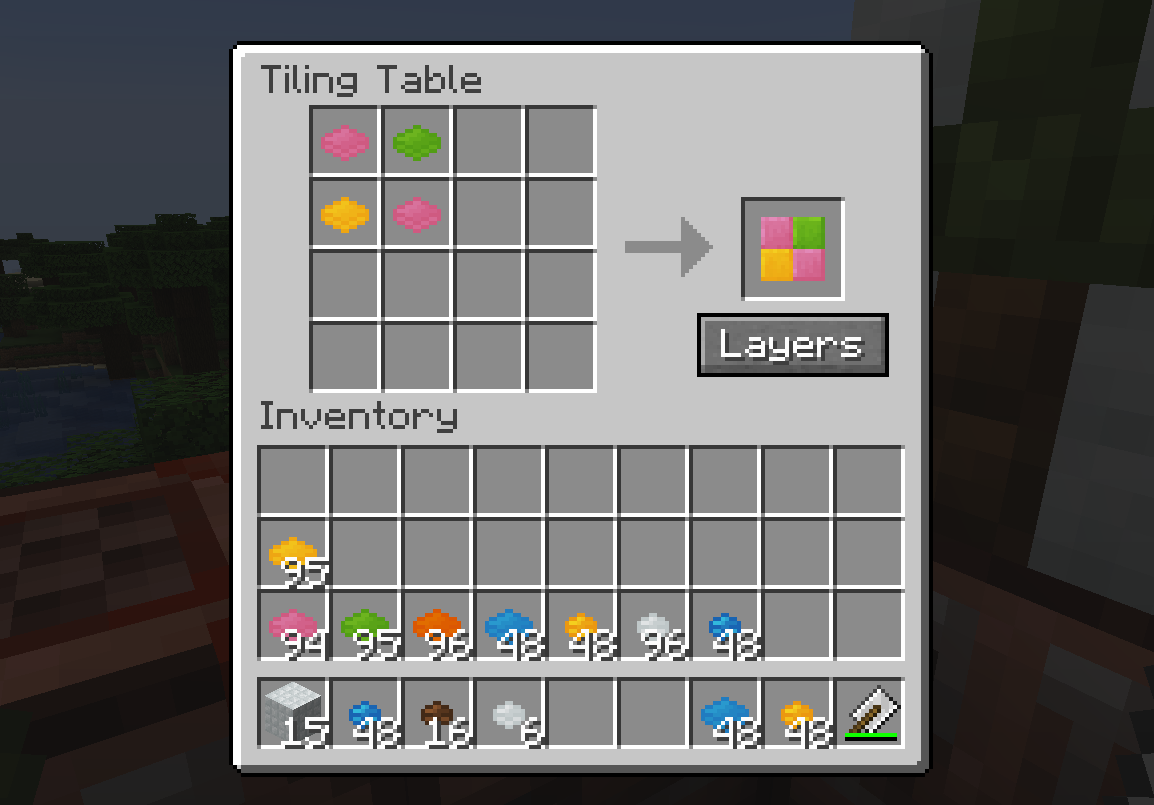
Tiles and Small Tiles are a way to help reduce inventory clutter by allowing you to craft individual tile blocks. A concrete block put in the crafting table gets you 24 Tiles, and a concrete block put in the Tiling Table gets you 96 Small Tiles.
To make a Tile Block, use 6 each of 4 Tiles in the Tiling Table, and to make a Tile Layer block, you only need 1 each of 4 Tiles. To make a Small Tile Block, use 6 each of 16 Small Tile items in the Tiling Table, and to make a Small Tiles block, you only need 1 each of 16 Small Tile items.
Tile Layers and Small Tile Layers
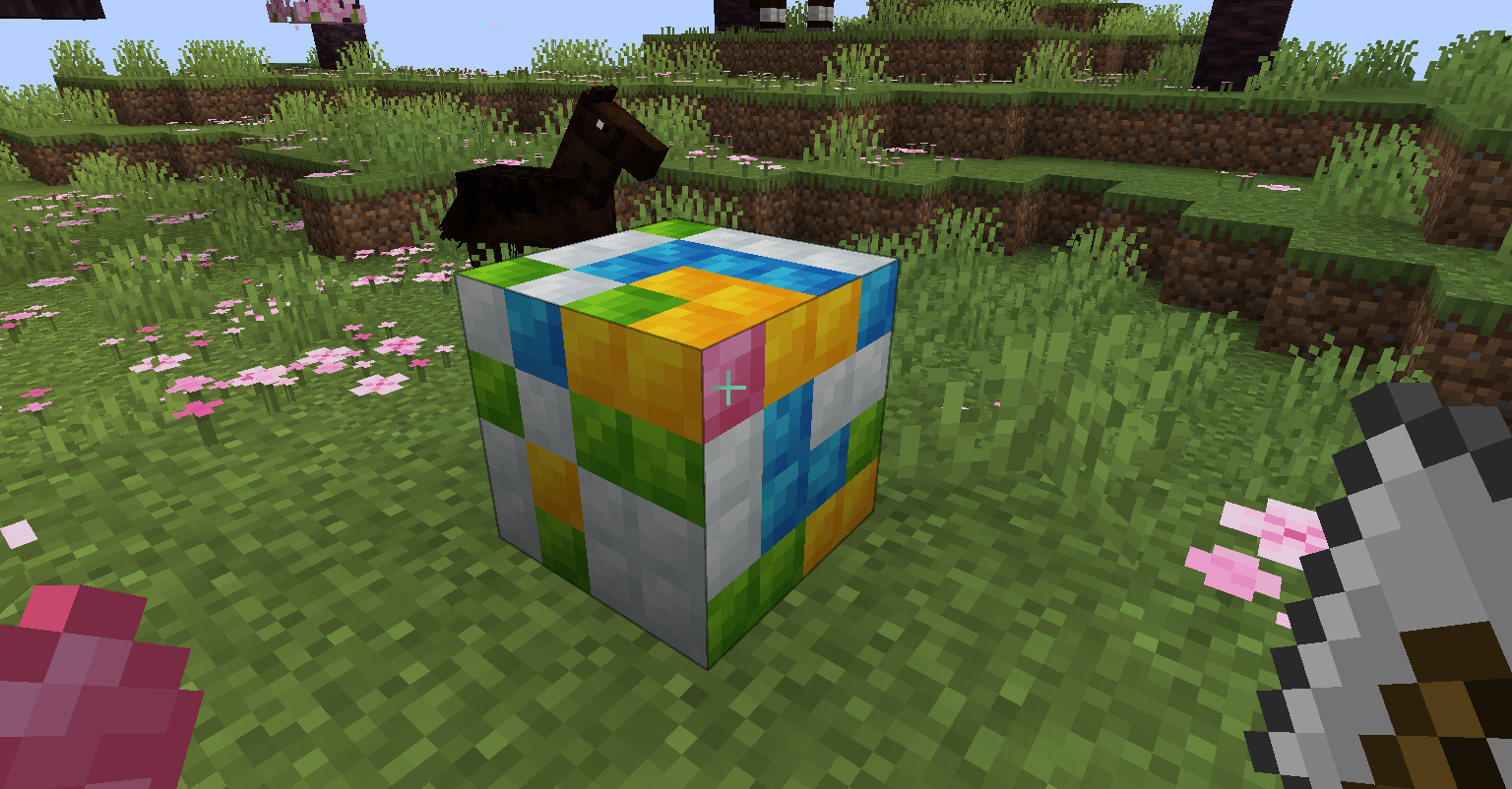
These blocks behave like their full-block counterparts, except that they place like glow lichen, allowing you to effectively tile the side of any full block in the game!
Tile Trowel
This item is crafted with an iron ingot above a stick, and it lets you swap out the tiles on a Tile Block, Tile Layer, Small Tile Block, or Small Tile Layer. To manipulate a Tile Block or Tile Layer, hold the Tile you want to "paint" with in your offhand. To manipulate a Small Tile Block or Small Tile Layer, hold the Small Tile you want to "paint" with in your offhand.
Tile Stairs, Tile Slabs, Small Tile Stairs and Small Tile Slabs
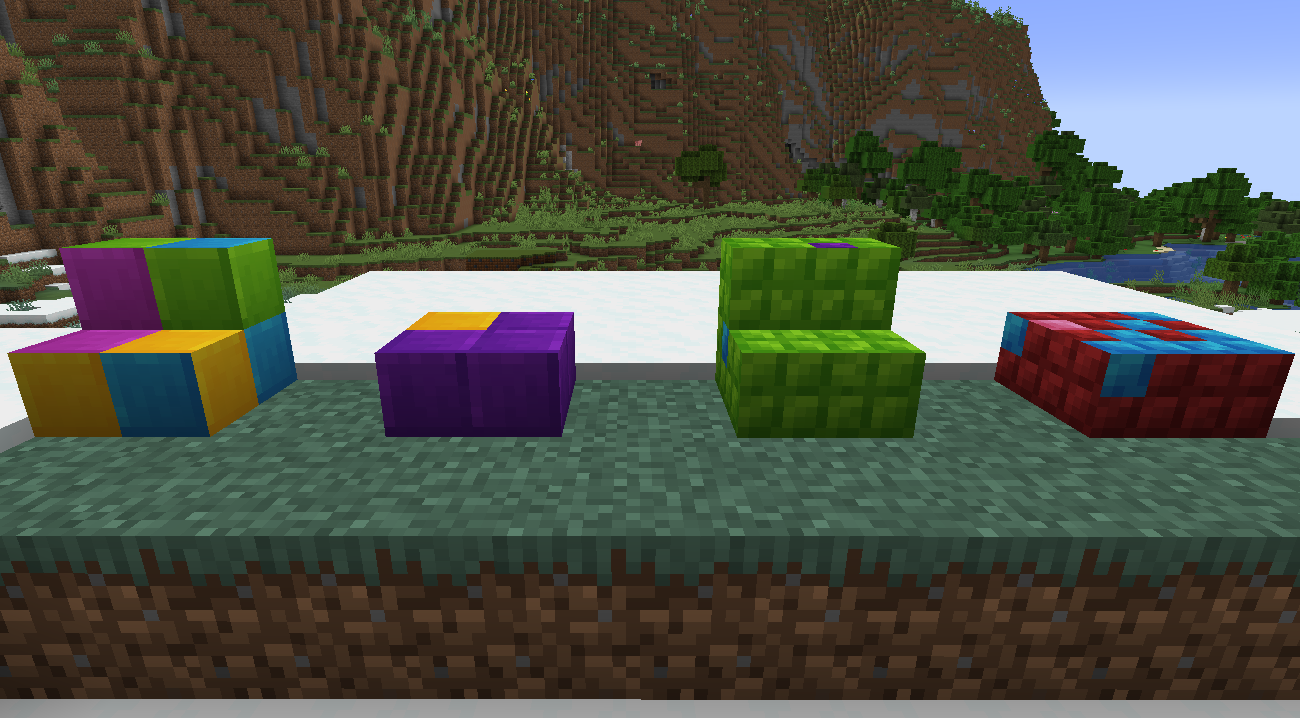
These blocks are crafted with tile blocks/small tile blocks as you would craft regular stairs and slabs. They have the full block texture projected onto them, meaning that from any orientation they can blend into the full blocks!
I hope you all enjoy the mod and the builds you can make with these new blocks!
My other stuff: https://linktr.ee/proctoredgames
Project description from Modrinth.
Pick your setup
Tiled by Minecraft version and loader
Choose the version and loader you play, then open the matching release.
Minecraft version
1.20.1
1 loader buildCheck the dependencies, then try the file in a copied instance before changing a world you care about.
Recent files
Tiled versions and loaders
1.3.0-1.21.1
tiled-1.3.0-1.21.1.jar
31 Aug 2026
Client Optional Server Optional Dependencies No extras listed Listed on Release listing
Check the 1.21.1 · Fabric setup 1.21.1Fabric release
1.2.4-1.21.1
tiled-1.2.4-1.21.1.jar
8 Jul 2026
Client Optional Server Optional Dependencies No extras listed Listed on Release listing
Check the 1.21.1 · Fabric setup 1.21.1Fabric release
1.2.4-1.20.1
tiled-1.2.4-1.20.1.jar
8 Jul 2026
Client Optional Server Optional Dependencies No extras listed Listed on Release listing
Check the 1.20.1 · Fabric setup 1.20.1Fabric release
1.2.3-1.21.1
tiled-1.2.3-1.21.1.jar
7 Jul 2026
Client Optional Server Optional Dependencies No extras listed Listed on Release listing
Check the 1.21.1 · Fabric setup 1.21.1Fabric release
1.2.3-1.20.1
tiled-1.2.3-1.20.1.jar
7 Jul 2026
Client Optional Server Optional Dependencies No extras listed Listed on Release listing
Check the 1.20.1 · Fabric setup 1.20.1Fabric release
1.2.2-1.21.1
tiled-1.2.2-1.21.1.jar
6 Jul 2026
Client Optional Server Optional Dependencies No extras listed Listed on Release listing
Check the 1.21.1 · Fabric setup 1.21.1Fabric release
1.2.2-1.20.1
tiled-1.2.2-1.20.1.jar
6 Jul 2026
Client Optional Server Optional Dependencies No extras listed Listed on Release listing
Check the 1.20.1 · Fabric setup 1.20.1Fabric release
1.2.1-1.20.1
tiled-1.2.1-1.20.1.jar
5 Jul 2026
Client Optional Server Optional Dependencies No extras listed Listed on Release listing
Check the 1.20.1 · Fabric setup 1.20.1Fabric release
1.2.0-1.20.1
tiled-1.2.0-1.20.1.jar
5 Jul 2026
Client Optional Server Optional Dependencies No extras listed Listed on Release listing
Check the 1.20.1 · Fabric setup 1.20.1Fabric release
1.2.0-1.21.1
tiled-1.2.0-1.21.1.jar
5 Jul 2026
Client Optional Server Optional Dependencies No extras listed Listed on Release listing
Check the 1.21.1 · Fabric setup 1.21.1Fabric release
1.1.0-1.20.1
tiled-1.1.0-1.20.1.jar
4 May 2026
Client Optional Server Optional Dependencies No extras listed Listed on Release listing
Check the 1.20.1 · Fabric setup 1.20.1Fabric release
1.1.0
tiled-1.1.0.jar
21 Apr 2026
Client Optional Server Optional Dependencies No extras listed Listed on Release listing
Check the 1.21.1 · Fabric setup 1.21.1Fabric release
Looking for an older file? The official Modrinth project page is in Resources.
 mod
mod CurseForge + Modrinth · Minecraft
Carpet-FGA-Addition
An AI-powered Carpet extension mod packed with practical utilities, including longer player name support and fake-player area mining.
 mod
mod CurseForge + Modrinth · Minecraft
Enchantment Shifter
Enchantment Shifter is a Minecraft mod that allows players to freely move enchantments between items using the anvil. Transfer enchantments to books for storage, shift enchantments between tools, and customize XP costs and limits.
 mod
mod Modrinth · Minecraft
Quiet Place: Hardcore Stealth
Immersive stealth mechanics: sound visualization, heavy armor penalties, and smart AI that reacts to noise.