Minecraft version
Back to mods 
Modrinth · Minecraft mod
More Stacking
Make items stackable with the same data components. Automatically compatible other mods.
Choose a version Pick your version below, then grab the matching file.
Quick answer
Which More Stacking release should I use?
Latest stable file 1.0.0-26.3
Game version 26.3
Loader Fabric
More Stacking 1.0.0-26.3 targets 26.3 with Fabric. Installation on the client is optional. Installation on the dedicated server is optional. No extra mods listed for this file.
Where it goes
Is More Stacking required on the client, server, or both?
Installation on the client is optional. Installation on the dedicated server is optional.
Client Optional
Dedicated server Optional
Loader for this release Fabric
Required install it here Optional supported, not mandatory Not supported do not install here Source doesn’t say do not assume
The source marks this as usable on both the client and server.
What else does More Stacking 1.0.0-26.3 need?
1.0.0-26.3. Change the file and its required mods may change too.
This file does not list any required mods. Do not add a library just because a different file uses it.
This file does not list any required or optional mods.
Before you install it
Add More Stacking without breaking your instance.
Built for More Stacking 1.0.0-26.3. Pick another file and the loader, install side or required mods may change.
- 01
Stick to this file
Use 1.0.0-26.3. It targets 26.3 with Fabric; another release may have different loader, side or dependency requirements.
- 02
Bring the mods it needs
This file does not list any required mods. Do not add a library just because a different file uses it.
- 03
Put it on the correct side
Installation on the client is optional. Installation on the dedicated server is optional.
- 04
Pick the file you checked
Use the “Get this file” button beside 1.0.0-26.3. It opens that exact file at the source.
About this project
What does More Stacking add?
This module allows most items to be stacked up to 64. Ender Pearl, Potion, Undying Totem, Ship, Bed, Water Bucket and all the other items you can think of. And it will automatically be compatible with items in other mods.
Command
If you want to blacklist certain items, you can use the "/morestacking config" command to open the configuration interface. The stacking of items added to the blacklist will not be changed. You can also set the maximum number of stacks on this interface.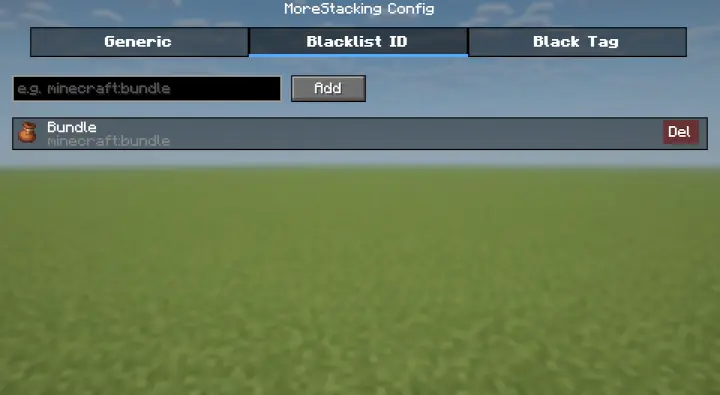
You can also use command "/morestacking blacklist <add/remove>" to add/remove the item in hand to blacklist.
Using command "/morestacking blacklist <add/remove> tag" to add/remove the all tag of item in hand to blacklist tag.
Warning: If you adjust the stacking quantity of an item, make sure that its stacking quantity does not exceed the current maximum stacking quantity before drop it. Otherwise, it will disappear directly.
Project description from Modrinth.
Pick your setup
More Stacking by Minecraft version and loader
Choose the version and loader you play, then open the matching release.
Minecraft version
26.2
1 loader buildMinecraft version
26.1.2
1 loader buildCheck the dependencies, then try the file in a copied instance before changing a world you care about.
Recent files
More Stacking versions and loaders
1.0.0-26.3
more-stacking-1.0.0-26.3.jar
24 Sept 2026
Client Optional Server Optional Dependencies No extras listed Listed on Release listing
Check the 26.3 · Fabric setup 26.3Fabric release
1.0.0-26.3
more_stacking-1.0.0+neoforge-26.3.jar
24 Sept 2026
Client Optional Server Optional Dependencies No extras listed Listed on Release listing
Check the 26.3 · NeoForge setup 26.3NeoForge release
1.0.0-26.2
more-stacking-1.0.0-26.2.jar
21 Jul 2026
Client Optional Server Optional Dependencies No extras listed Listed on Release listing
Check the 26.2 · Fabric setup 26.2Fabric release
1.0.0-26.1.2
more-stacking-1.0.0-26.1.2.jar
21 Jul 2026
Client Optional Server Optional Dependencies No extras listed Listed on Release listing
Check the 26.1.2 · Fabric setup 26.1.2Fabric release
Looking for an older file? The official Modrinth project page is in Resources.
 mod
mod CurseForge + Modrinth · Minecraft
JEIOptimizer
15× faster JEI ingredient filter build — drastically reduces "Joining world..." wait time on big modded servers.
 mod
mod CurseForge + Modrinth · Minecraft
Mycelium Leather
This mod adds an additional way to get leather and ink without harming (passive) mobs.
 mod
mod CurseForge + Modrinth · Minecraft
Create Railways Navigator
A Minecraft Create Mod addon that adds several new features related to train navigation, such as improved display boards, a navigator for searching routes, new schedule entries, and more.