Minecraft version
Back to mods 
Modrinth · Minecraft mod
modl
Streamline administrative duties with AI, dynamic punishments, and a slick web-interface
Choose a version Pick your version below, then grab the matching file.
Quick answer
Which modl release matches 1.19.3?
Best match for your filters 2.3.2
Game version 1.10, 1.10.1, 1.10.2
Loader bukkit, bungeecord, folia
modl 2.3.2 targets 1.10, 1.10.1, 1.10.2 with bukkit, bungeecord, folia. The project page does not say whether this file belongs on the client, dedicated server, or both. No extra mods listed for this file.
Where it goes
Is modl required on the client, server, or both?
The project page does not say whether this file belongs on the client, dedicated server, or both.
Client Source doesn’t say
Dedicated server Source doesn’t say
Loader for this release bukkit, bungeecord, folia
Required install it here Optional supported, not mandatory Not supported do not install here Source doesn’t say do not assume
The source does not explicitly classify this release as client-only or server-only.
What else does modl 2.3.2 need?
2.3.2 on 1.19.3. Every mod below is checked against that same setup.
This file does not list any required mods. Do not add a library just because a different file uses it.
This file does not list any required or optional mods.
Before you install it
Add modl without breaking your instance.
Built for modl 2.3.2 on 1.19.3. Pick another file and the loader, install side or required mods may change.
- 01
Stick to this file
Use 2.3.2. It targets 1.10, 1.10.1, 1.10.2 with bukkit, bungeecord, folia; another release may have different loader, side or dependency requirements.
- 02
Bring the mods it needs
This file does not list any required mods. Do not add a library just because a different file uses it.
- 03
Put it on the correct side
The project page does not say whether this file belongs on the client, dedicated server, or both.
- 04
Pick the file you checked
Use the “Get this file” button beside 2.3.2. It opens that exact file at the source.
About this project
What does modl add?
modl v3
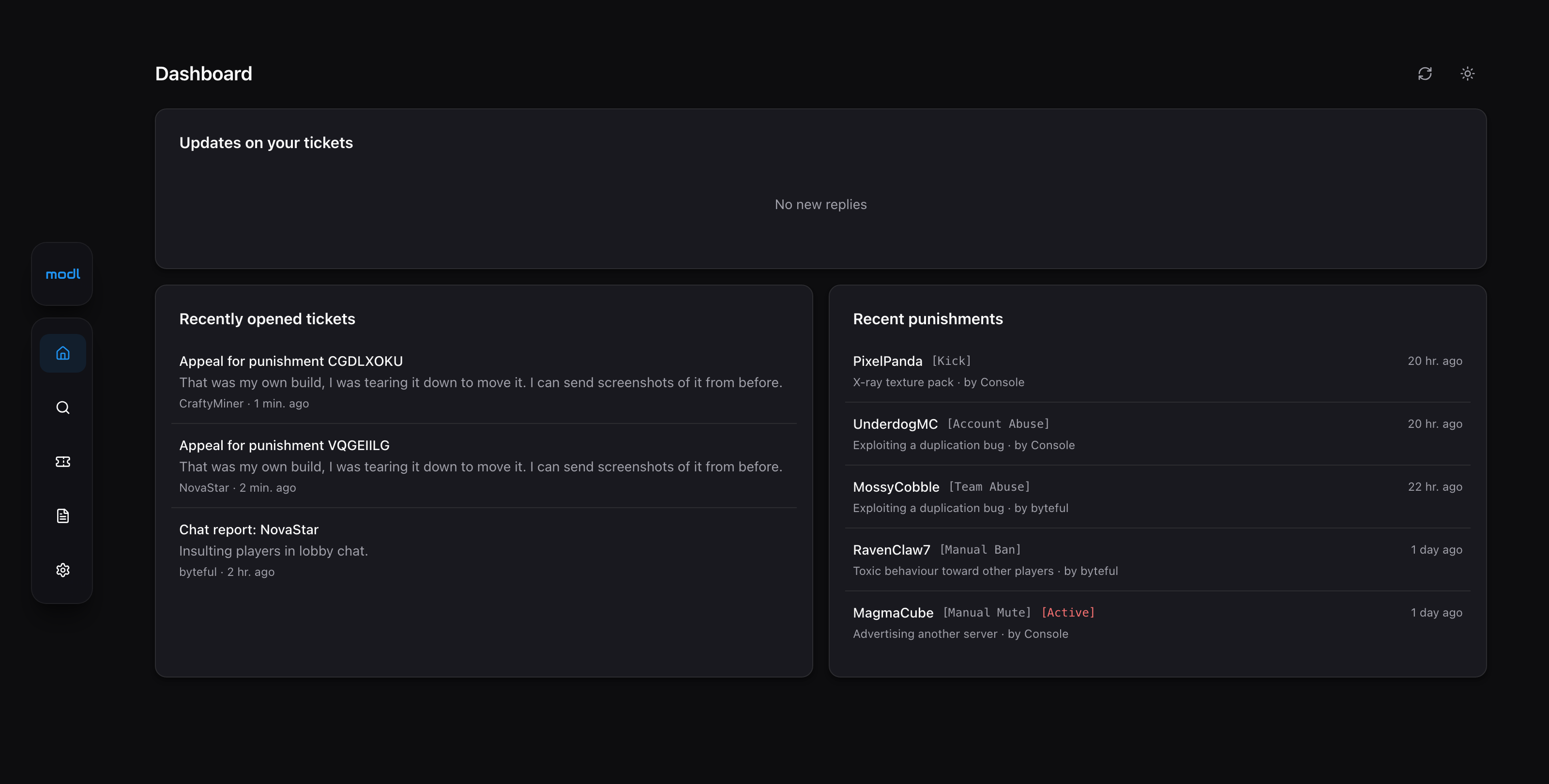
Punishments, reports, tickets, appeals, alt detection, replays, and AI chat review, managed from a web panel that runs inside your own server.
modl is a complete moderation and support system for Minecraft servers. It is free, open source under AGPL-3.0, and entirely yours: the panel runs inside your server or proxy (or on its own with Docker), stores everything in your own database, and needs no account or outside service. Your players and staff only ever see your server's name, logo, and domain.
It runs on Paper, Folia, Spigot, Velocity, and BungeeCord, from 1.8.8 to the latest release, with the same features everywhere.
Source code | Documentation | Downloads | Discord | Locale file | Config file
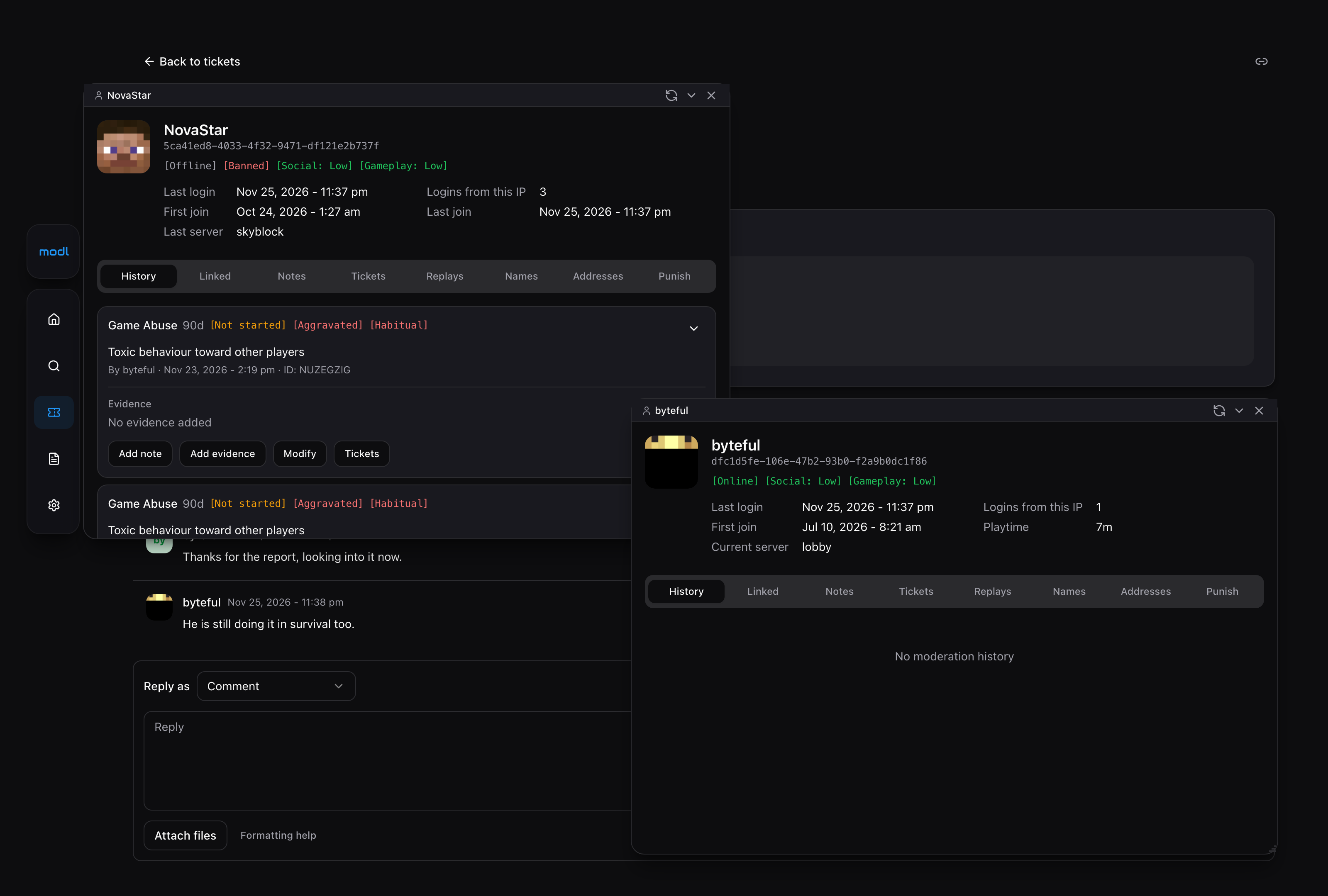
Getting started
- Put PacketEvents and the modl jar in
plugins/and start the server. - Open the setup address printed in the console and follow the setup wizard.
- On a network, install modl on the proxy; the proxy's backend servers are listed in the panel with a one-click key for each.
No free port on your host? With your domain on Cloudflare, the built-in Cloudflare Tunnel publishes the panel without opening one.
Features
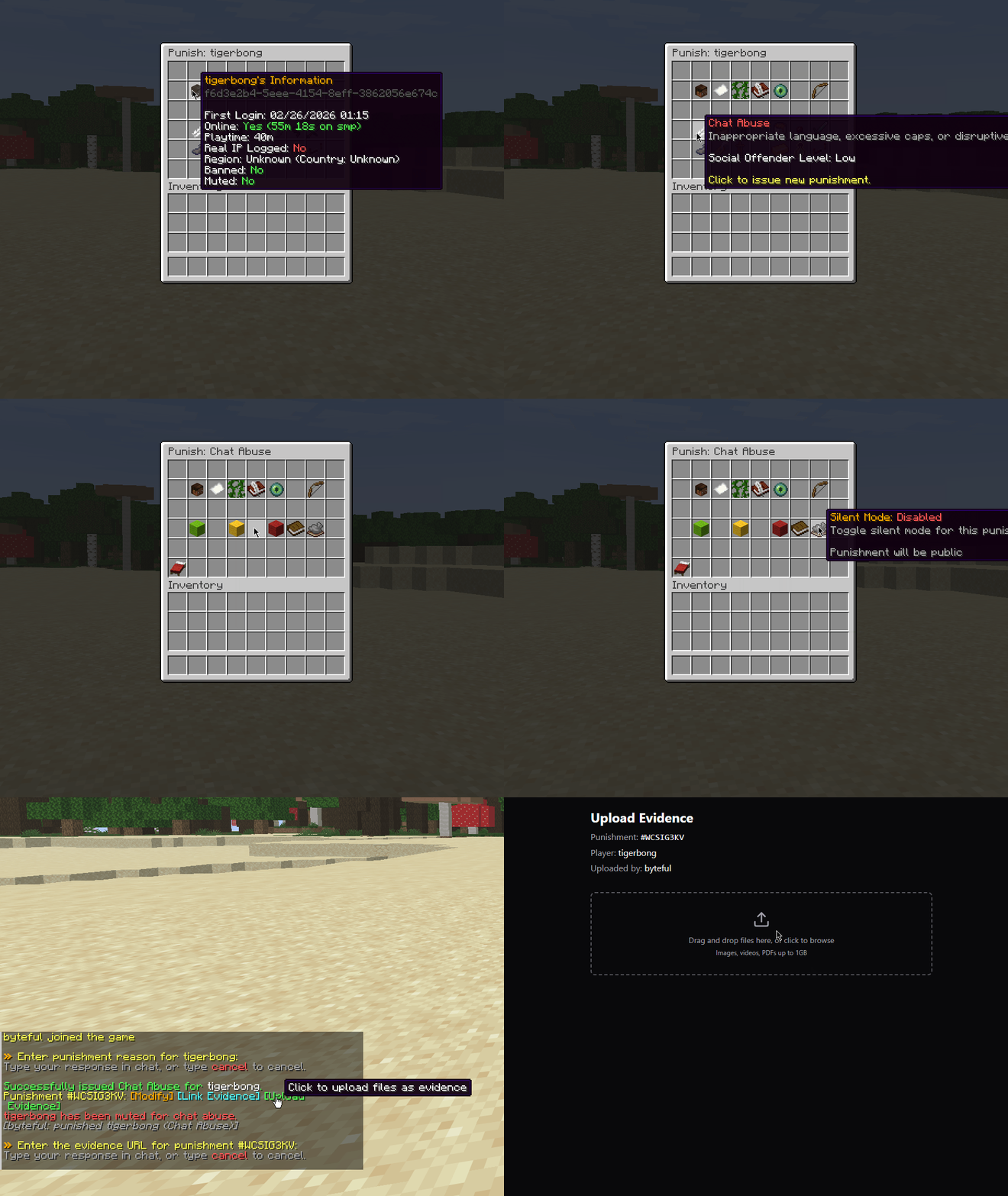
Punishment system
Built to sanction players fairly and consistently while keeping moderator discretion.
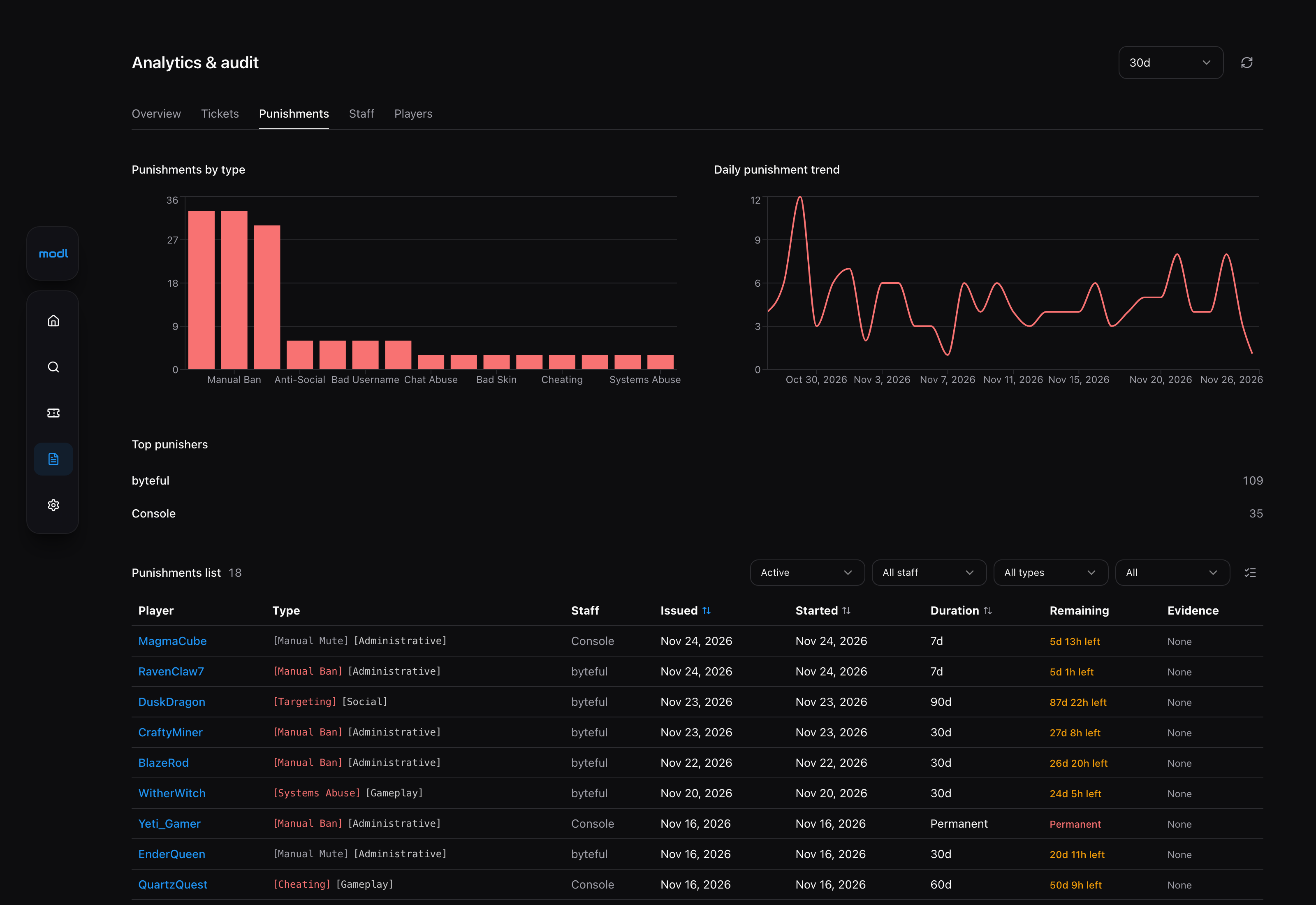
- A customizable point system that marks players as low, medium, or habitual offenders, separately for gameplay and social offenses
- Customizable durations for every severity (lenient, regular, severe) and offender level
- Name and skin punishments that pardon themselves when the player changes their name or skin
- Stat-wiping bans that run a command on your server when they expire (not when pardoned)
- Change durations and pardon (removing the points) without leaving the page
- Evidence uploads and links (YouTube, Imgur, and others) on every punishment
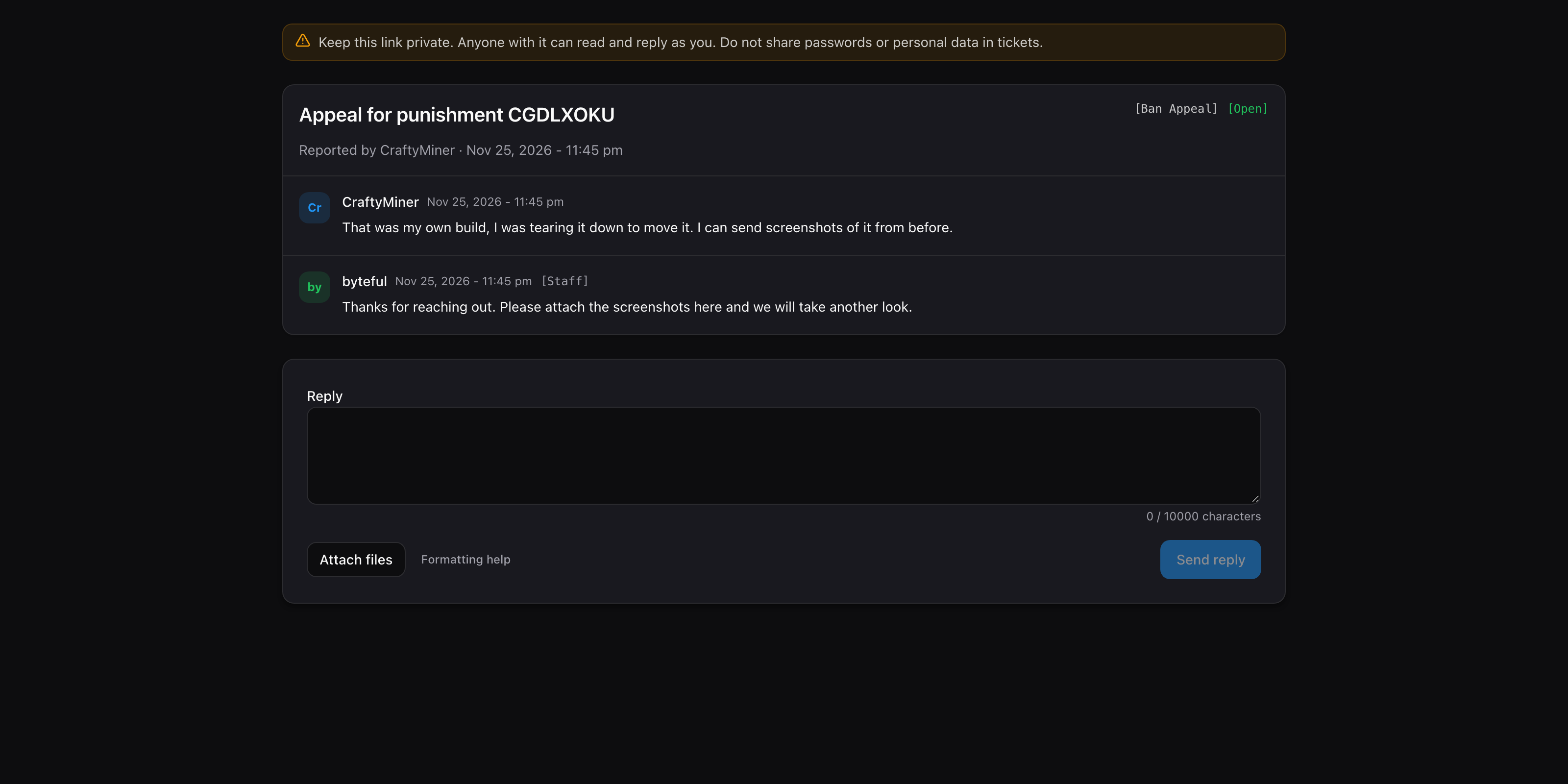
- 8-character punishment IDs for appeals, with an appeal form per punishment type
- Bans on offline players start counting down at their next login
- Several bans or mutes run one after another, each starting when the previous one ends
- Classic manual punishments too: ban, tempban, mute, tempmute, kick, and blacklist
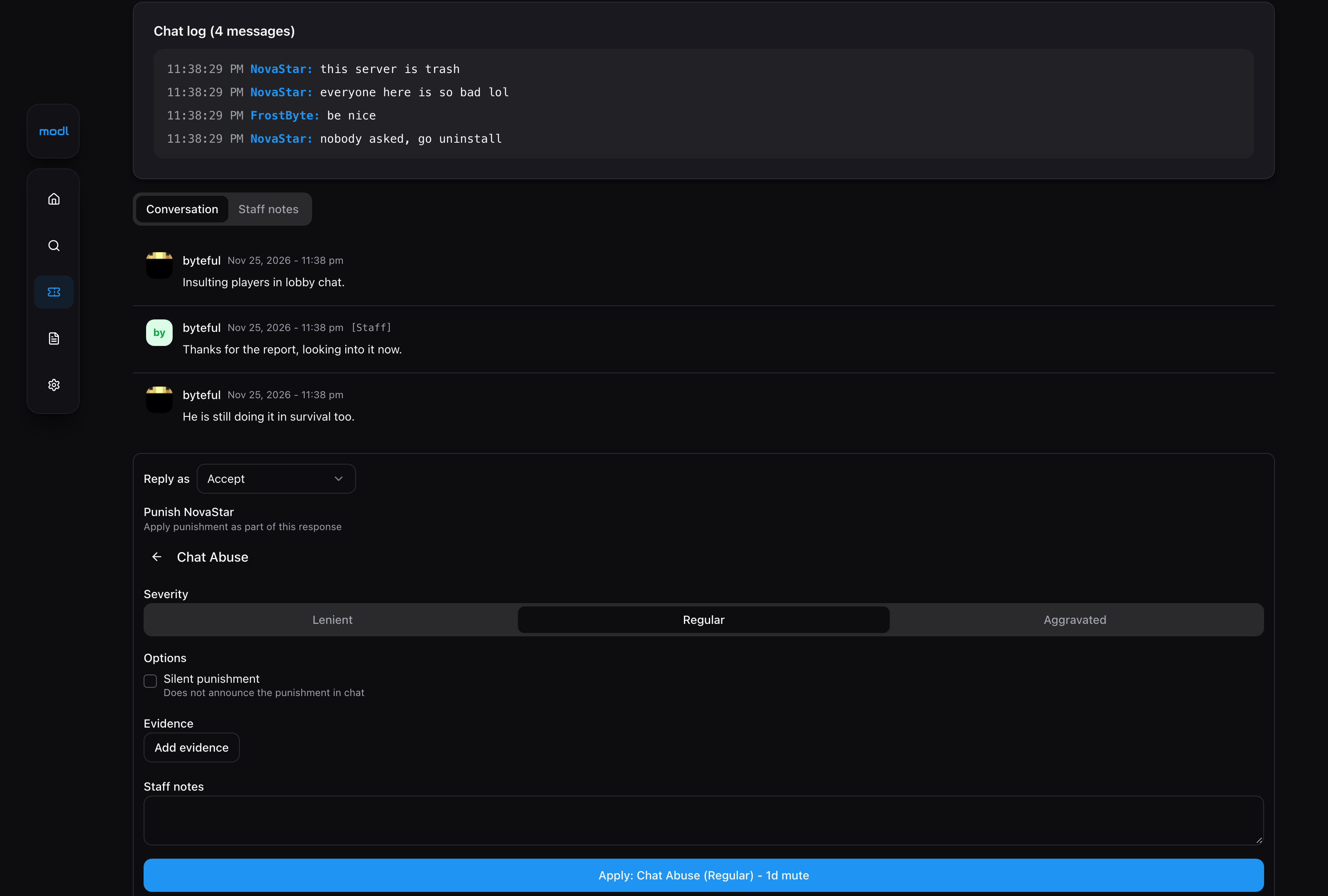
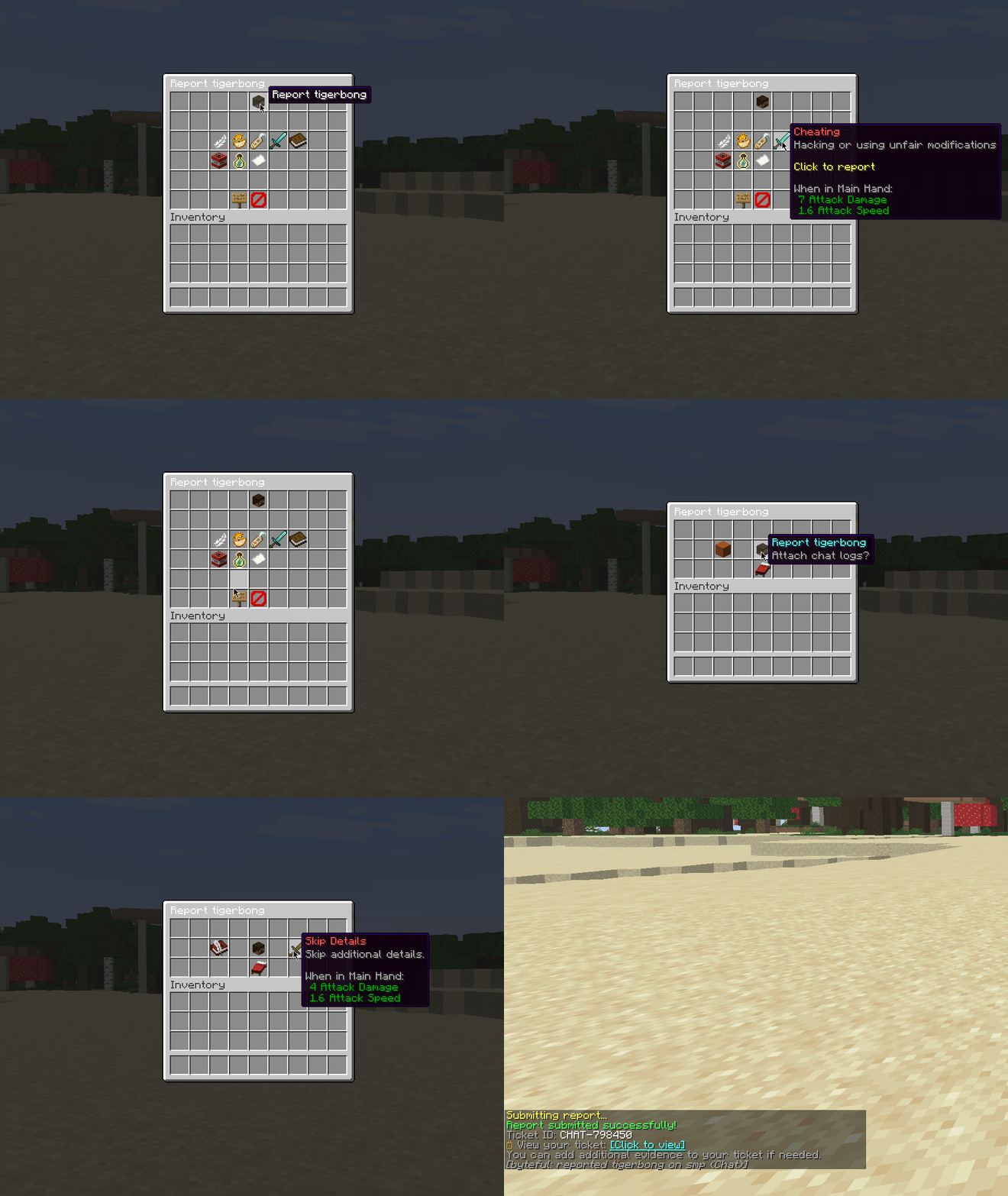
Reports and tickets
- In-game
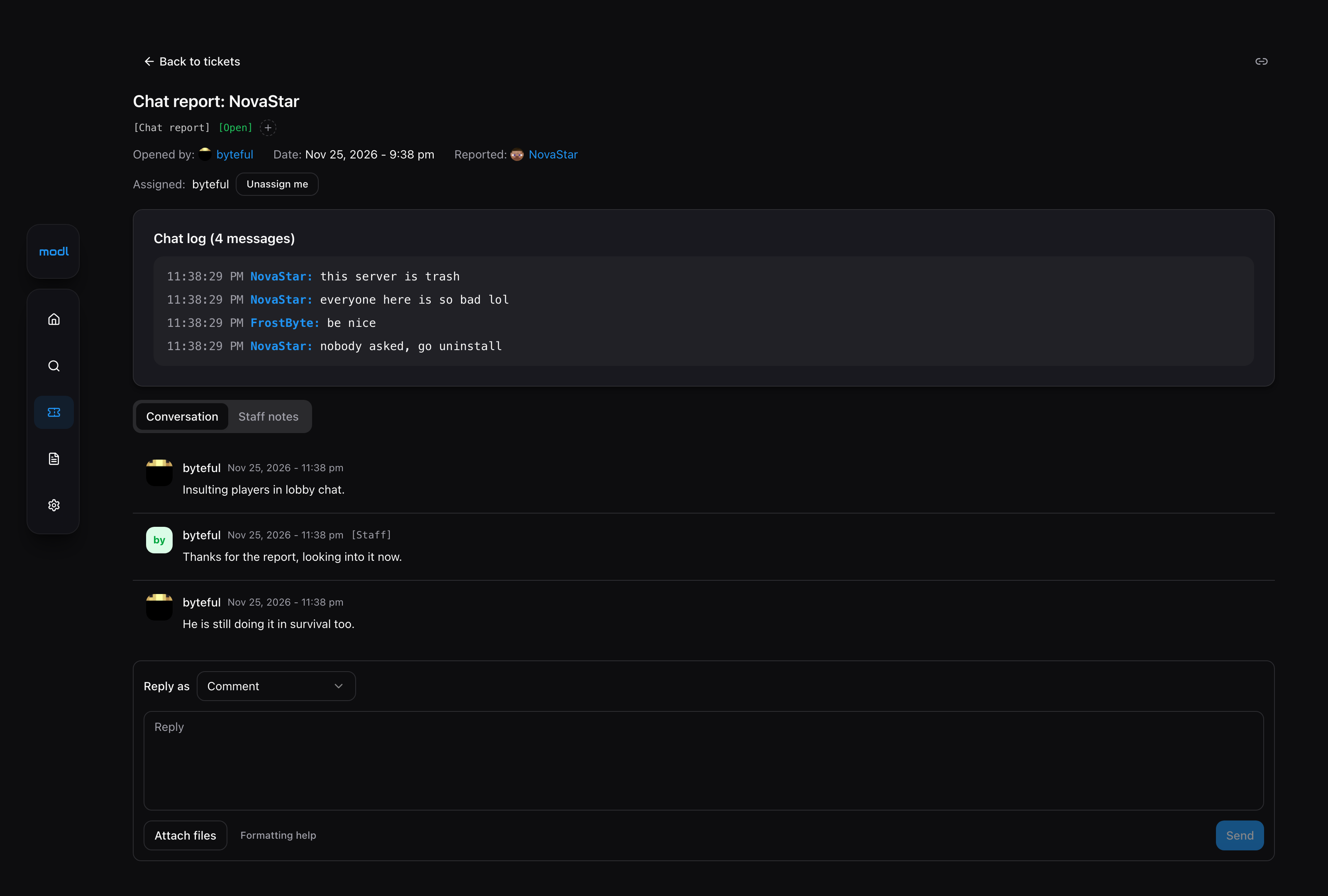
/report,/chatreport, and/hackreportthat attach the chat log or a replay of the reported player - Ticket forms for support, staff applications, bug reports, and anything else you define
- Labels, assignees, quick replies, internal staff notes, and Discord webhooks
- A public page where players follow their ticket or appeal, with email updates when mail is set up
Replays
- Record a player on request or with a report, then watch it in a 3D viewer in the browser
- Punish straight from the replay
AI moderation
- Chat reports reviewed by the AI provider you choose (OpenAI, Anthropic, Google Gemini, or any OpenAI-compatible endpoint), with your own key
- Automatic action only within the limits you set, with hourly and daily budgets
Alt detection
- Accounts linked through shared addresses, with optional VPN and proxy lookups from the provider you pick
- Alt-blocking bans that follow a player to their linked accounts
Staff tools in game
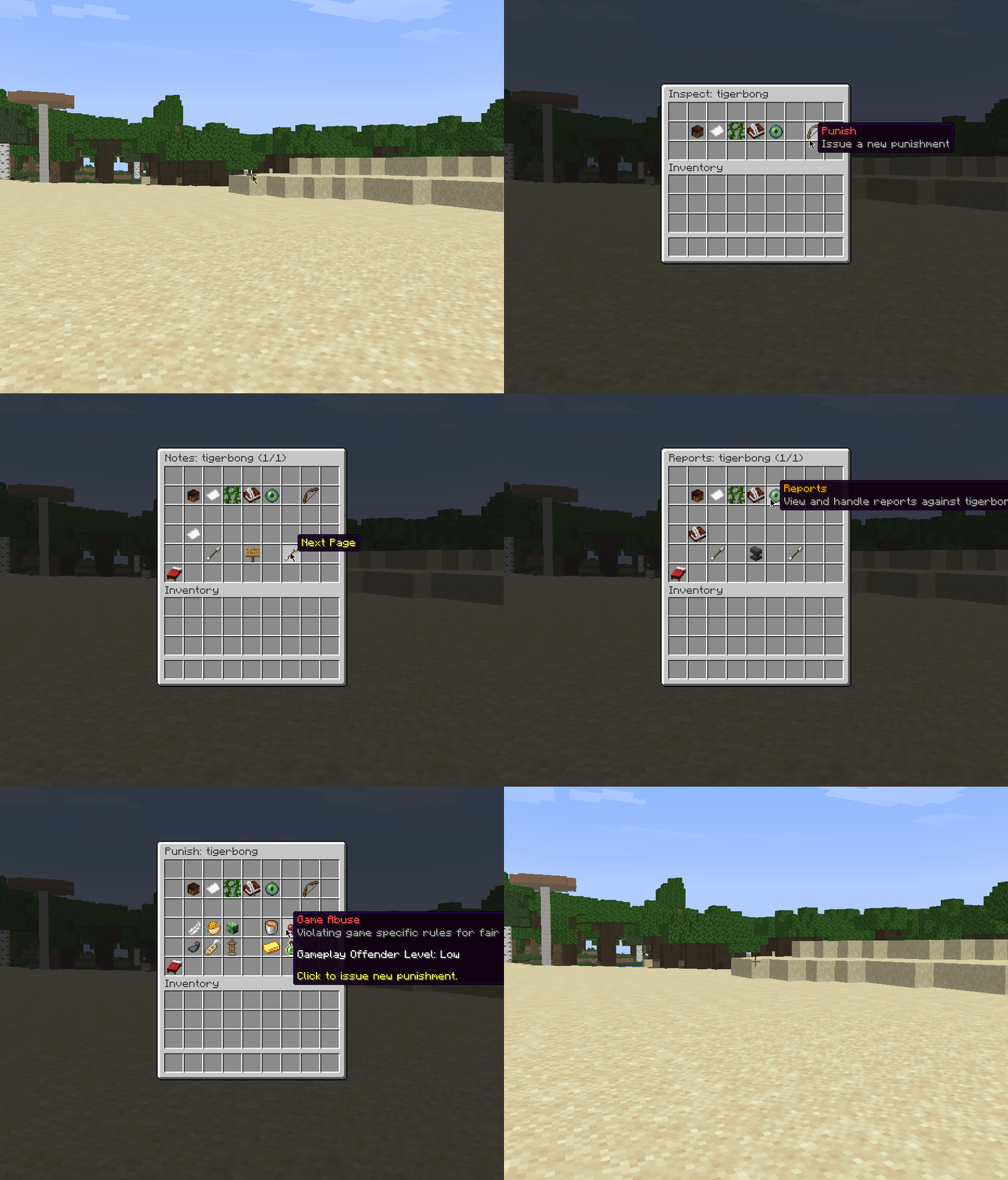
- Staff mode with vanish, freeze, target, and inspection menus, working across a whole network
- Staff chat, slow mode, chat and command logs, and network-wide chat interception
- Punish, inspect, history, notes, and alts menus, plus
/standingfor players
The panel
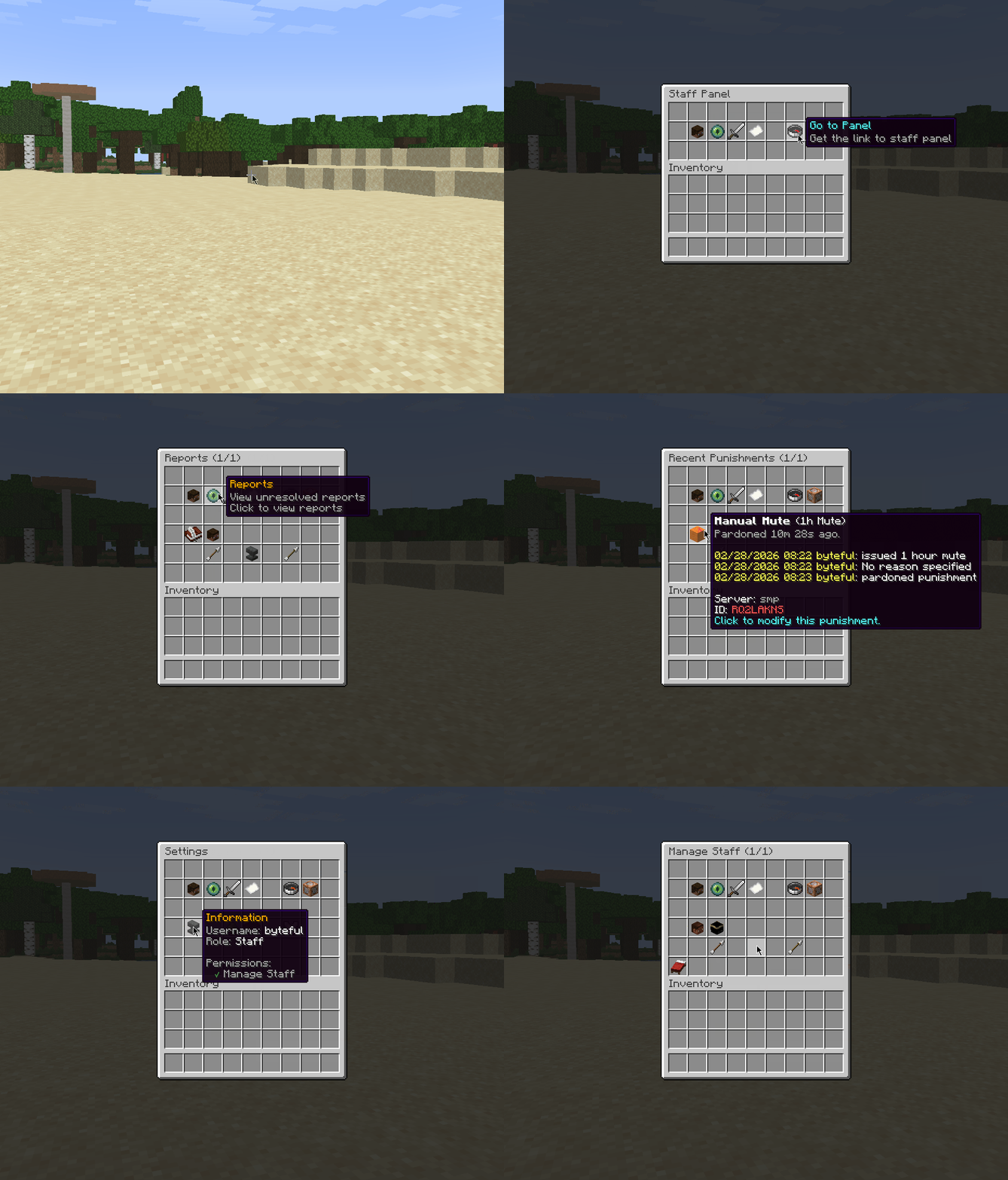
- Dashboard, player profiles with full history, audit log, and analytics
- Roles with fine-grained permissions, staff invitations, two-factor authentication, and passkeys
- Sign in with an emailed code, a password, a passkey, or a one-time link from in game
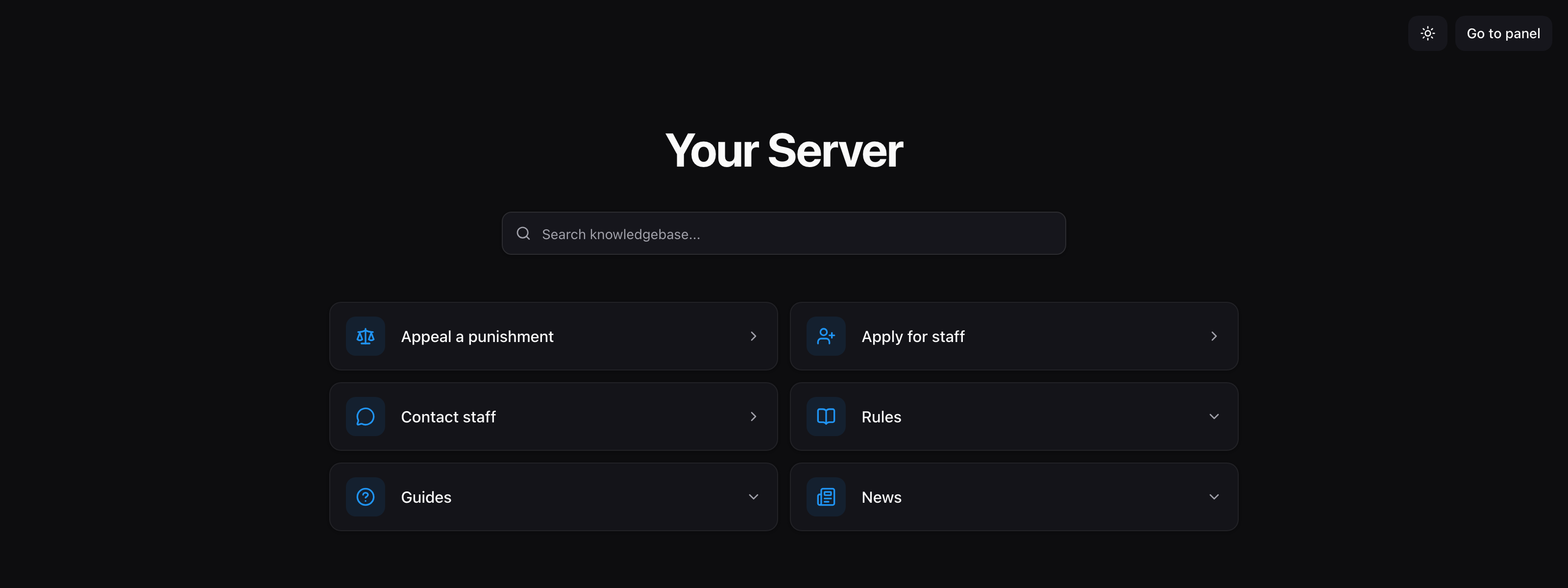
- A public homepage and knowledgebase with your theme, fonts and custom CSS
- Available in 11 languages
Built for self-hosting
- One jar: the panel starts inside your server or proxy, with a setup wizard
- SQLite out of the box, or MySQL, MariaDB, or PostgreSQL, movable from the panel
- Local file storage or any S3-compatible bucket
- Nightly backups, signed releases, and one-click updates with automatic rollback
- Import your history from LiteBans, AdvancedBan, LibertyBans, BanManager, BanSystem, or the vanilla ban lists
Requirements
- Java 21 and 2 GB of memory on the server or proxy that runs the panel (servers behind a proxy run on any Java their Minecraft version needs)
- PacketEvents on every Paper, Folia, and Spigot server
Project description from Modrinth.
Pick your setup
modl by Minecraft version and loader
Choose the version and loader you play, then open the matching release.
Minecraft version
26.1.2
2 loader buildsMinecraft version
26.1.1
2 loader buildsMinecraft version
26.1
2 loader buildsMinecraft version
1.21.11
2 loader buildsMinecraft version
1.21.10
2 loader buildsMinecraft version
1.21.9
2 loader buildsMinecraft version
1.21.8
2 loader buildsMinecraft version
1.21.7
2 loader buildsMinecraft version
1.21.6
2 loader buildsMinecraft version
1.21.5
2 loader buildsMinecraft version
1.21.4
2 loader buildsShowing the newest 12 of 74 game versions. Older files are in the list below.
Check the dependencies, then try the file in a copied instance before changing a world you care about.
Recent files
modl versions and loaders
2.3.2
modl-2.3.2.jar
21 Aug 2026
Client Source doesn’t say Server Source doesn’t say Dependencies No extras listed Listed on Release listing
Check the 1.19.3 · bukkit setup 1.101.10.11.10.21.11 release
2.3.1
modl-2.3.1.jar
29 Jul 2026
Client Source doesn’t say Server Source doesn’t say Dependencies No extras listed Listed on Release listing
Check the 1.19.3 · bukkit setup 1.101.10.11.10.21.11 release
2.3.0
modl-2.3.0.jar
9 Jul 2026
Client Source doesn’t say Server Source doesn’t say Dependencies No extras listed Listed on Release listing
Check the 1.19.3 · bukkit setup 1.101.10.11.10.21.11 release
2.2.3
modl-2.2.3.jar
9 May 2026
Client Source doesn’t say Server Source doesn’t say Dependencies No extras listed Listed on Release listing
Check the 1.19.3 · bukkit setup 1.101.10.11.10.21.11 release
2.2.2
modl-2.2.2.jar
30 Apr 2026
Client Source doesn’t say Server Source doesn’t say Dependencies No extras listed Listed on Release listing
Check the 1.19.3 · bukkit setup 1.101.10.11.10.21.11 release
2.2.1
modl-2.2.1.jar
22 Apr 2026
Client Source doesn’t say Server Source doesn’t say Dependencies No extras listed Listed on Release listing
Check the 1.19.3 · bukkit setup 1.101.10.11.10.21.11 release
2.2.0
modl-2.2.0.jar
19 Apr 2026
Client Source doesn’t say Server Source doesn’t say Dependencies No extras listed Listed on Release listing
Check the 1.19.3 · bukkit setup 1.101.10.11.10.21.11 release
2.1.1
modl-2.1.1.jar
26 Mar 2026
Client Source doesn’t say Server Source doesn’t say Dependencies No extras listed Listed on Release listing
Check the 1.19.3 · bukkit setup 1.101.10.11.10.21.11 release
2.1.0
modl-2.1.0.jar
15 Mar 2026
Client Source doesn’t say Server Source doesn’t say Dependencies No extras listed Listed on Release listing
Check the 1.19.3 · bukkit setup 1.101.10.11.10.21.11 release
2.0.4
modl-2.0.4.jar
1 Mar 2026
Client Source doesn’t say Server Source doesn’t say Dependencies No extras listed Listed on Release listing
Check the 1.19.3 · bukkit setup 1.101.10.11.10.21.11 release
2.0.3
modl-2.0.3.jar
25 Feb 2026
Client Source doesn’t say Server Source doesn’t say Dependencies No extras listed Listed on Release listing
Check the 1.19.3 · bukkit setup 1.101.10.11.10.21.11 release
2.0.2
modl-2.0.2.jar
24 Feb 2026
Client Source doesn’t say Server Source doesn’t say Dependencies No extras listed Listed on Release listing
Check the 1.19.3 · bukkit setup 1.101.10.11.10.21.11 release
Looking for an older file? The official Modrinth project page is in Resources.
 mod
CurseForge + Modrinth · Minecraft
Plague's Chat Timestamps
A Minecraft mod that adds customizable timestamps to chat!
 mod
CurseForge + Modrinth · Minecraft
Health Command
allows you to modifiy the health of entities with a command
mod
Modrinth · Minecraft
Debrand
Convinces Minecraft it is unmodded