Fabric API Needed by Block Meter 20
requiredMatching file found Matched file: 0.155.2+26.1.2

Modrinth · Minecraft mod
A mod to measure block distances
Quick answer
Block Meter 20 targets 26.1, 26.1.1, 26.1.2 with Fabric. Installation on the client is optional. Installation on the dedicated server is optional. All 1 required mods have matching files.
Where it goes
Installation on the client is optional. Installation on the dedicated server is optional.
The source marks this as usable on both the client and server.
20. Change the file and its required mods may change too.
Install Fabric API first. We found matching files for this game-version and loader setup. 1 comes through another mod in the chain.
1 extra mod was pulled in by another dependency. Indented rows show who needs each one. We only count dependency files that match this setup. A file for another loader does not fill the gap.
Before you install it
Built for Block Meter 20. Pick another file and the loader, install side or required mods may change.
Use 20. It targets 26.1, 26.1.1, 26.1.2 with Fabric; another release may have different loader, side or dependency requirements.
Install Fabric API first. We found matching files for this game-version and loader setup. 1 comes through another mod in the chain.
Installation on the client is optional. Installation on the dedicated server is optional.
Use the “Get this file” button beside 20. It opens that exact file at the source.
About this project
This is a continuation mod of the discontinued BlockMeter, forked under MIT license.
It allows you to measure sizes of builds or areas, so you can verify things line up the way you want, or having the distances they're expected to.
To use, hold any item and tap the BlockMeter key. Right click that item anywhere to set a starting point. Right-click the item somewhere else to get a second point. BlockMeter will draw a cuboid and show the lengths of each of the sides.
Tap the key again to deactivate the BlockMeter cubes. Tap Shift and the key to remove the last cube. Tap Ctrl and the key to remove all cubes.
To edit an existing box, right click while crouching to "loosen" one corner and right click again to place it somewhere else.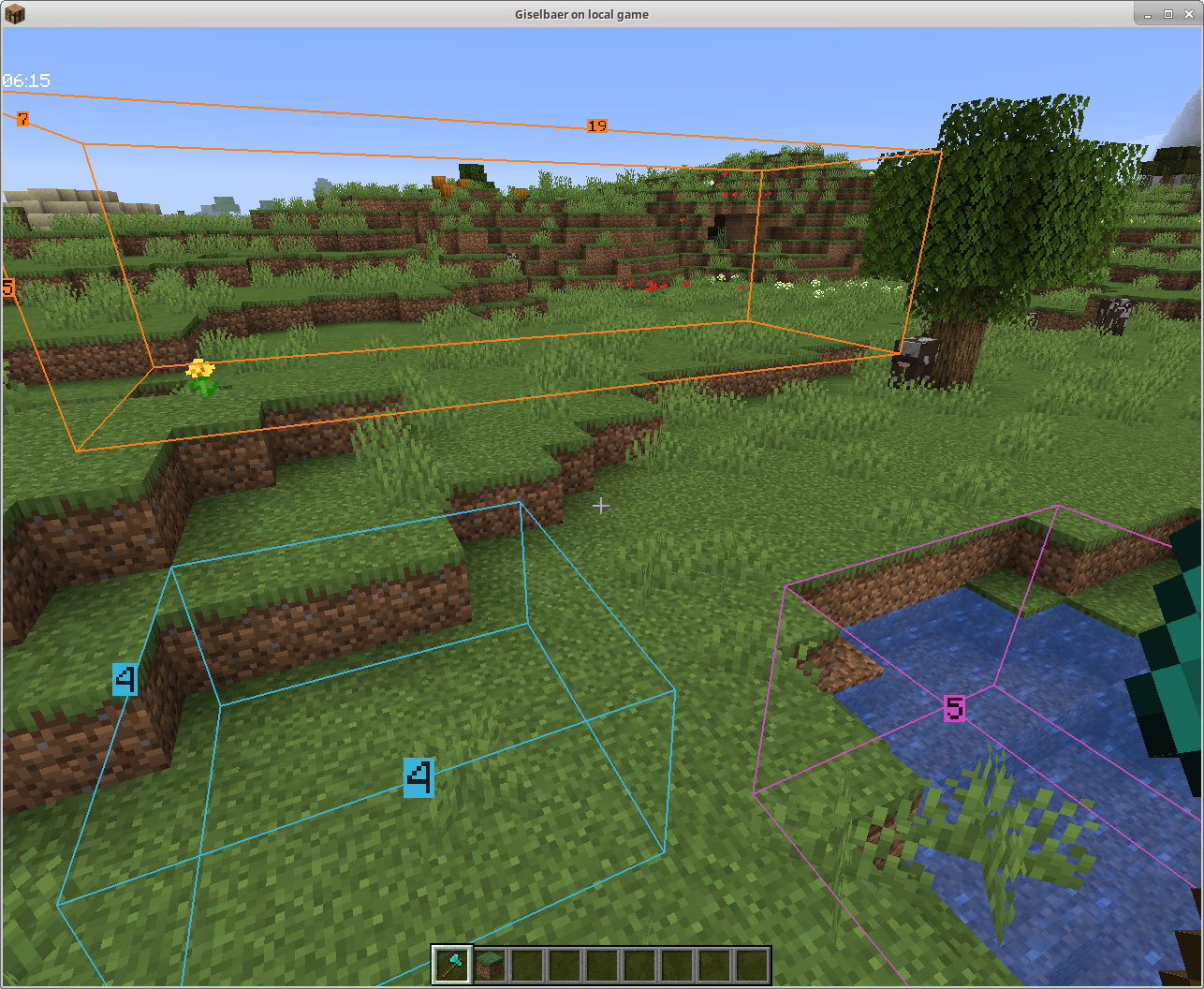
To use this mod, you'll need to:
From version 1.4 on, you can collaborate and see each other's boxes if the mod is installed on the server as well.
The mod will still work client-side only, so you can play on any (vanilla, spigot, paper, ...) servers without the server owner having to do anything.
In a LAN world with the host having the mod, or with a dedicated Fabric server that has the mod, you can see other people's boxes - enable BlockMeter, press the ALT button while holding the BlockMeter block, and toggle the new button. Now you'll see other players' boxes, and each block count will have the name of the player who created the box in front.
Version 1.4.1 works as server part with Bukkit/Spigot/Paper as well. If you want to share block outlines on your favorite server (non-modded, but has plugins), ask your server owner to download the jar file from here and put it in the plugins directory (make sure it's the correct Minecraft version, i.e. 1.15, and at least version 1.4.1 of the mod). The client part is the same as 1.4, so there's no reason to update your client.
Project description from Modrinth.
Pick your setup
Choose the version and loader you play, then open the matching release.
Showing the newest 12 of 26 game versions. Older files are in the list below.
Check the dependencies, then try the file in a copied instance before changing a world you care about.
Recent files
BlockMeter-20-26.1.jar
25 Apr 2026
BlockMeter-1.19-1.21.11.jar
14 Jan 2026
BlockMeter-1.18-1.21.10.jar
20 Nov 2025
blockmeter-1.17-1.21.7.jar
22 Jul 2025
blockmeter-1.16-1.21.5.jar
29 Mar 2025
blockmeter-1.15-1.21.3.jar
23 Nov 2024
blockmeter-1.11.2-1.20.1.jar
19 Oct 2024
blockmeter-1.11.1-1.20.1.jar
29 Sept 2024
blockmeter-1.14-1.21.jar
18 Jun 2024
blockmeter-1.13.1-1.20.6.jar
13 Jun 2024
blockmeter-1.12.0-1.20.4.jar
16 Jan 2024
blockmeter-1.11.0-1.20.1.jar
14 Oct 2023
Looking for an older file? The official Modrinth project page is in Resources.
 mod
modA mod to take full and automated control of your appliances
 mod
modIt adds a GUI which helps you get any trade you want from villagers.
 mod
modA Fabric mod for Minecraft 1.21.1+ that prevents selected players from dying by keeping their health at a minimum of half a heart.