Minecraft version
Back to mods 
Modrinth · Minecraft mod
Oh My Minecraft Client
Make Minecraft Client Great Again!
Choose a version Pick your version below, then grab the matching file.
Quick answer
Which Oh My Minecraft Client release should I use?
Latest stable file 0.5
Game version 1.14.4, 1.15.2, 1.16.5
Loader Fabric
Oh My Minecraft Client 0.5 targets 1.14.4, 1.15.2, 1.16.5 with Fabric. It must be installed on the client. Do not install it on the dedicated server. No extra mods listed for this file.
Where it goes
Is Oh My Minecraft Client required on the client, server, or both?
It must be installed on the client. Do not install it on the dedicated server.
Client Required
Dedicated server Not supported
Loader for this release Fabric
Required install it here Optional supported, not mandatory Not supported do not install here Source doesn’t say do not assume
This file is marked client-only.
What else does Oh My Minecraft Client 0.5 need?
0.5. Change the file and its required mods may change too.
This file does not list any required mods. Do not add a library just because a different file uses it.
This file does not list any required or optional mods.
Before you install it
Add Oh My Minecraft Client without breaking your instance.
Built for Oh My Minecraft Client 0.5. Pick another file and the loader, install side or required mods may change.
- 01
Stick to this file
Use 0.5. It targets 1.14.4, 1.15.2, 1.16.5 with Fabric; another release may have different loader, side or dependency requirements.
- 02
Bring the mods it needs
This file does not list any required mods. Do not add a library just because a different file uses it.
- 03
Put it on the correct side
It must be installed on the client. Do not install it on the dedicated server.
- 04
Pick the file you checked
Use the “Get this file” button beside 0.5. It opens that exact file at the source.
About this project
What does Oh My Minecraft Client add?
Oh My Minecraft Client
Make Minecraft Client Great Again!
Description
Oh My Minecraft Client is a client-side mod, which helps you manage your hands. The mod is written for the Fabric
Loader.
NOTE: My Minecraft Client also requires the MaLiLib library mod by masady:
https://www.curseforge.com/minecraft/mc-mods/malilib
The default hotkey to open the in-game config GUI is O + C
Generic
Don't clear chat history.
Minecraft client will not to clear chat history and input history.
Highlight waypoint
Add command /highlightWaypoint to highlight waypoint.
Auto parse waypoint in chat with voxelmap's format (like [x:1, y:2, z:3],(x:1, y:2, z:3), [1, 2, 3], (1, 2, 3)).
It looks like:

Force Parse Waypoint From Chat
Force parse waypoint from chat (such it will override the clickevent of rtext).
Send Looking At Pos
A hotkey to send looking at pos.
Sort Inventory
Press hotkey to sort inventory.
Sort Inventory Support Empty ShulkerBox Stack
Support empty shulker box stack when sort inventory.
Features
Auto Switch Elytra
Auto Switch elytra and chestplate.
It looks like:
Disable Break Block
You can't break blocks in breakBlockBlackList.
Disable Break Scaffolding
You can break the scaffolding with the items in breakScaffoldingWhiteList.
Disable Move Down In Scaffolding
You can move down in scaffolding when the item of moveDownInScaffoldingWhiteList in your hand.
Forced Break Cooling
Players will have a 5GT cooldown after breaking the block instantaneously, which will prevent you from accidentally
destroying components with the Haste 2 effect.
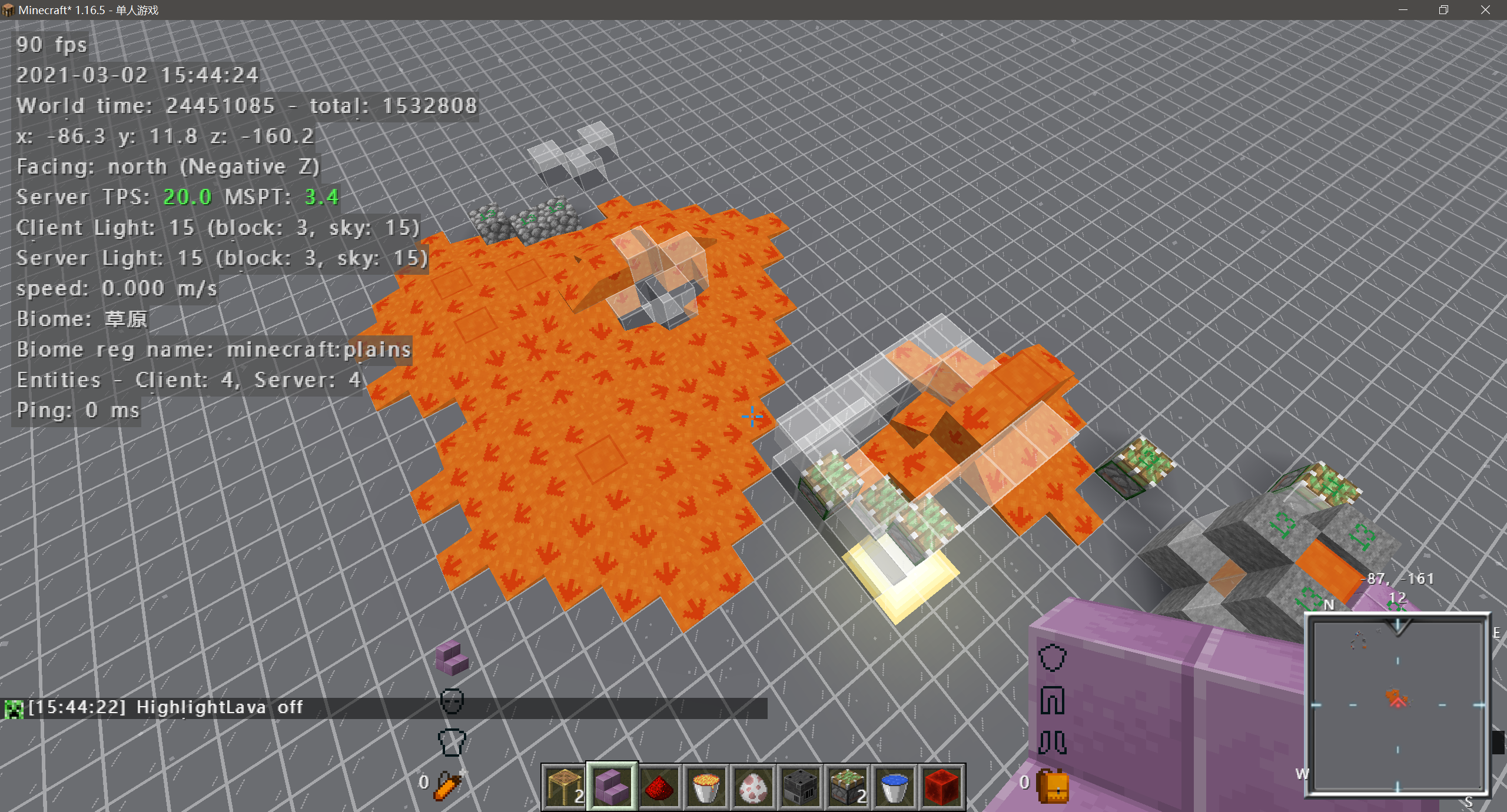
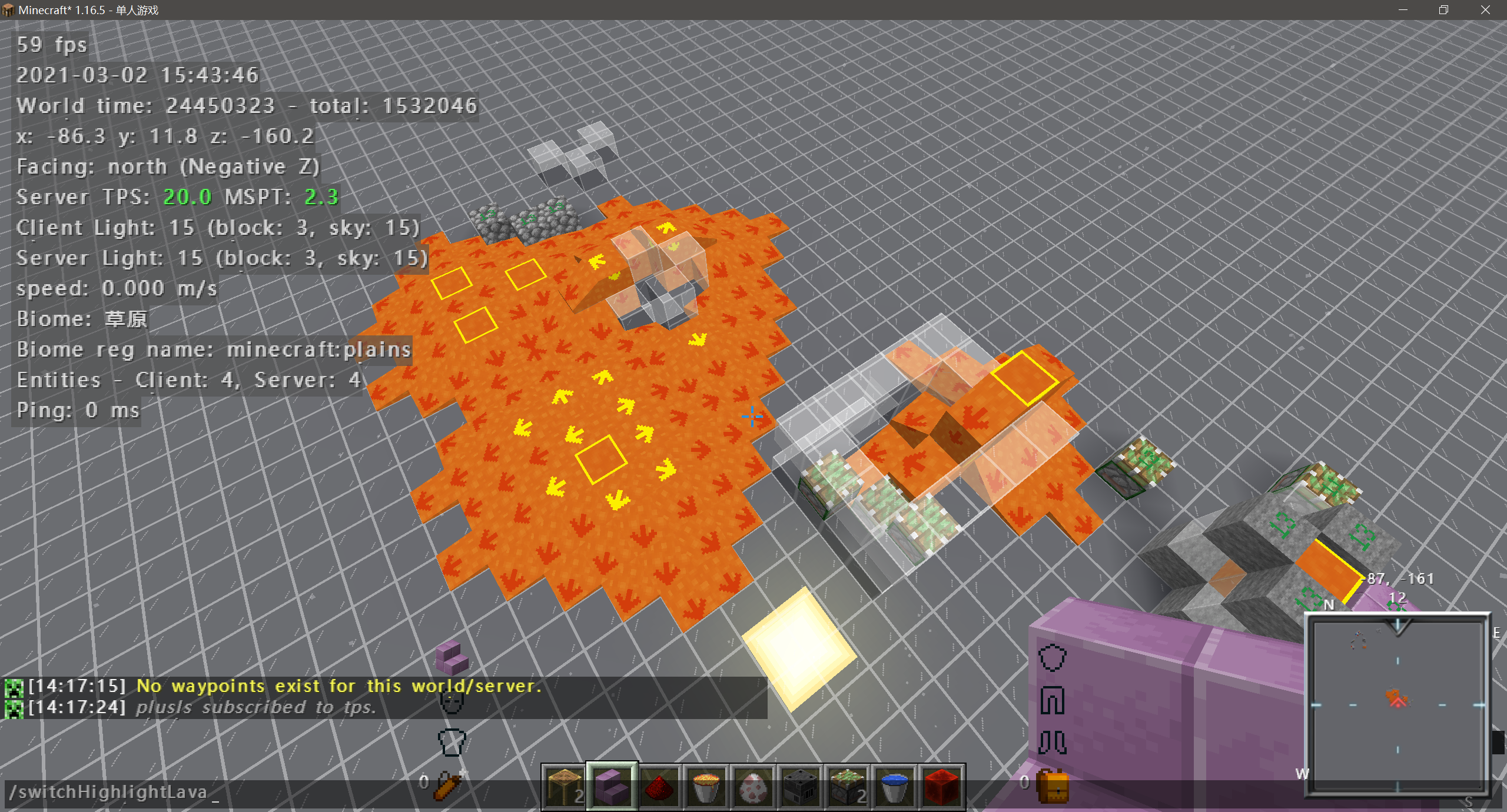
Highlight Lava Sources
Any lava source will be highlighted with a special texture.
It looks like:
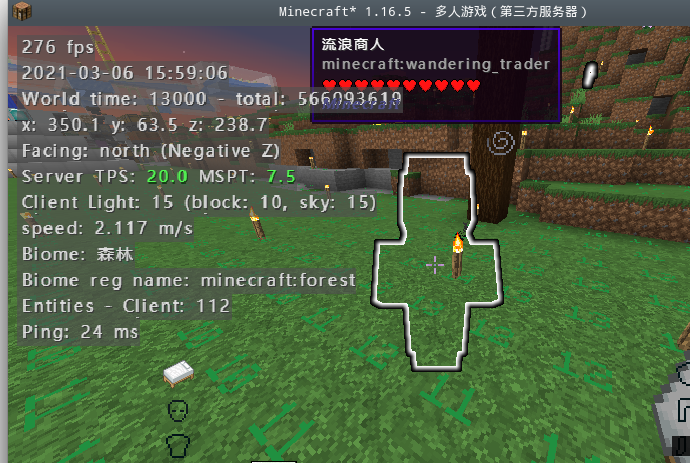
Wandering Trader Glow
The Wandering Trader will have the glowing affect, so it in Invisibility.
Prevent Intentional Game Design
Prevent Intentional Game Design (Bed and Respawn Anchor).
High Light Persistent Mob
Highlight persistent mobs (Mob have item in hand or mob have custom name).
Flat Digger
Which allowed you mine a flat road while digging stone by preventing digging of blocks under your feet while standing,sneak to dig blocks under you.
Real Sneaking
Players cannot ascend or descend when sneaking.
Remove Breaking Cooldown
Remove cooldown after break block (default is 5gt), it will not work when enable forceBreakingCooldown§r.
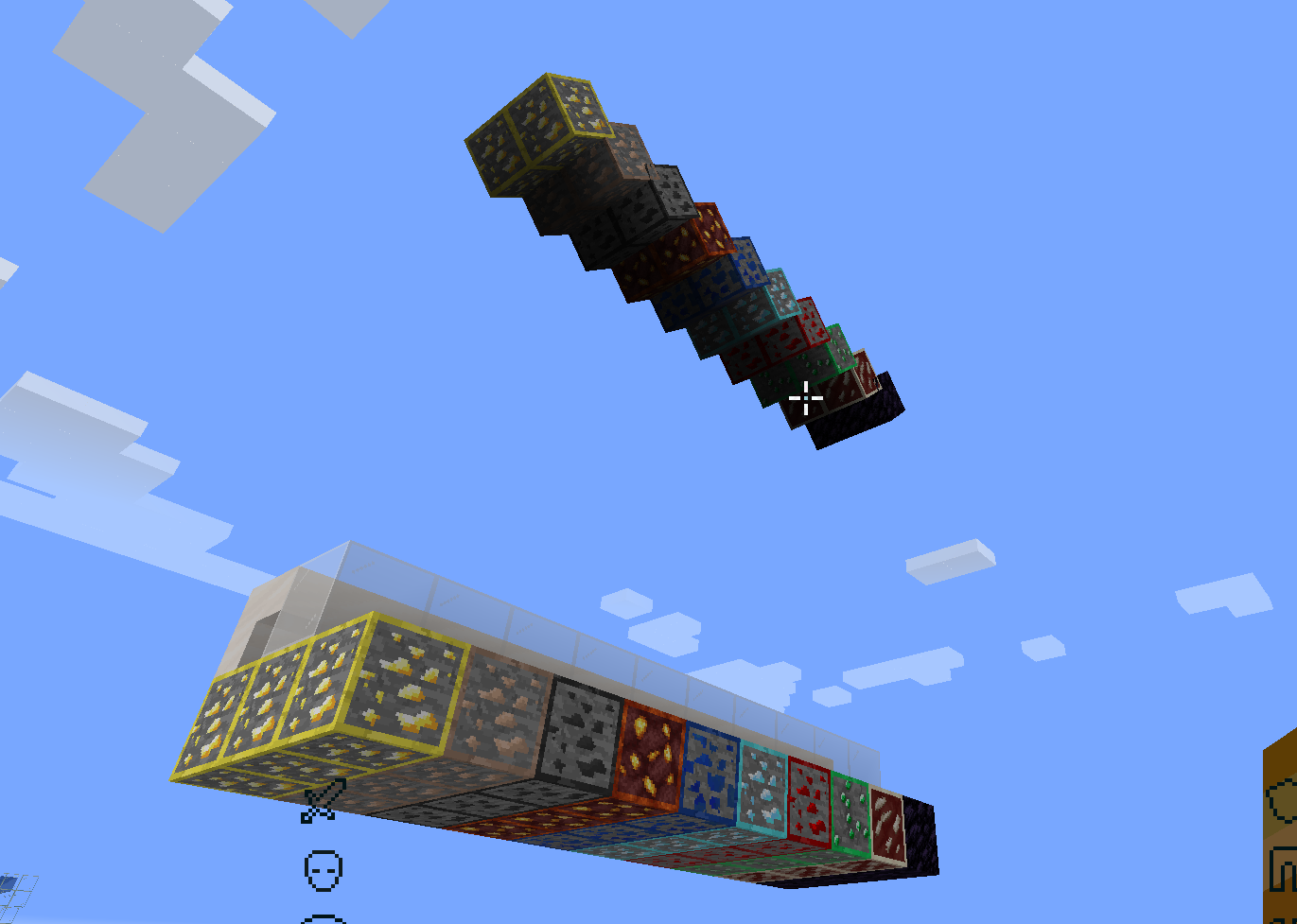
World Eater And Mine Helper
When the blocks in worldEaterMineHelperWhitelist are exposed to the air, the game will render their own mirror image
above them, which is convenient for world eater maintenance and mining.
Lists
Fallback Language List
Fallback language list.
Advanced Integrated Server
Now allow user to change some integrated server setting.
Online Mode
Integrated server use online mode.
pvp
Integrated server enable pvp.
flight
Integrated server enable flight.
port
Integrated server lan port, 0 to use default port.
Acknowledgements
- Thanks to XeKr for the lava eye protection texture.
- Thanks to NextPage for providing the English translation, lava source texture
modification and testing work. - Thanks to 水星嗷 for
providing the idea of highlighting ores and resourcepack. - Thanks to voxelmap for providing the code of highlight waypoint.
Project description from Modrinth.
Pick your setup
Oh My Minecraft Client by Minecraft version and loader
Choose the version and loader you play, then open the matching release.
Minecraft version
1.18.2
1 loader buildMinecraft version
1.18.1
1 loader buildMinecraft version
1.17.1
1 loader buildMinecraft version
1.16.5
1 loader buildMinecraft version
1.15.2
1 loader buildMinecraft version
1.14.4
1 loader buildCheck the dependencies, then try the file in a copied instance before changing a world you care about.
Recent files
Oh My Minecraft Client versions and loaders
0.5
oh-my-minecraft-client-0.5.jar
11 Jun 2022
Client Required Server Not supported Dependencies No extras listed Listed on Release listing
Check the 1.19 · Fabric setup 1.14.41.15.21.16.51.17.1 release
0.4.2-1.15.2
oh-my-minecraft-client-1.15.2-0.4.2.jar
25 Mar 2022
Client Required Server Not supported Dependencies No extras listed Listed on Release listing
Check the 1.15.2 · Fabric setup 1.15.2Fabric release
0.4.2-1.16.5
oh-my-minecraft-client-1.16.5-0.4.2.jar
25 Mar 2022
Client Required Server Not supported Dependencies No extras listed Listed on Release listing
Check the 1.16.5 · Fabric setup 1.16.5Fabric release
0.4.2-1.18.2
oh-my-minecraft-client-1.18.2-0.4.2.jar
25 Mar 2022
Client Required Server Not supported Dependencies No extras listed Listed on Release listing
Check the 1.18.2 · Fabric setup 1.18.2Fabric release
0.4.2-1.17.1
oh-my-minecraft-client-1.17.1-0.4.2.jar
25 Mar 2022
Client Required Server Not supported Dependencies No extras listed Listed on Release listing
Check the 1.17.1 · Fabric setup 1.17.1Fabric release
0.4.1-1.16.5
oh-my-minecraft-client-1.16.5-0.4.1.jar
23 Jan 2022
Client Required Server Not supported Dependencies No extras listed Listed on Release listing
Check the 1.16.5 · Fabric setup 1.16.5Fabric release
0.4.1-1.18.1
oh-my-minecraft-client-1.18.1-0.4.1.jar
23 Jan 2022
Client Required Server Not supported Dependencies No extras listed Listed on Release listing
Check the 1.18.1 · Fabric setup 1.18.1Fabric release
0.4.1-1.17.1
oh-my-minecraft-client-1.17.1-0.4.1.jar
23 Jan 2022
Client Required Server Not supported Dependencies No extras listed Listed on Release listing
Check the 1.17.1 · Fabric setup 1.17.1Fabric release
0.4.1-1.15.2
oh-my-minecraft-client-1.15.2-0.4.1.jar
23 Jan 2022
Client Required Server Not supported Dependencies No extras listed Listed on Release listing
Check the 1.15.2 · Fabric setup 1.15.2Fabric release
0.4.0-1.18.1
oh-my-minecraft-client-1.18.1-0.4.0.jar
16 Jan 2022
Client Required Server Not supported Dependencies No extras listed Listed on Release listing
Check the 1.18.1 · Fabric setup 1.18.1Fabric release
0.4.0-1.16.5
oh-my-minecraft-client-1.16.5-0.4.0.jar
16 Jan 2022
Client Required Server Not supported Dependencies No extras listed Listed on Release listing
Check the 1.16.5 · Fabric setup 1.16.5Fabric release
0.4.0-1.17.1
oh-my-minecraft-client-1.17.1-0.4.0.jar
16 Jan 2022
Client Required Server Not supported Dependencies No extras listed Listed on Release listing
Check the 1.17.1 · Fabric setup 1.17.1Fabric release
Looking for an older file? The official Modrinth project page is in Resources.
 mod
mod Modrinth · Minecraft
Colorful Anvils Unoffical Port
Add colors and formatting to item names in anvils using & codes! Supports &c (red), &l (bold), hex colors, gradients, and more. Unofficial port for 1.21.8+.
 mod
mod Modrinth · Minecraft
Sticky Honey
Use Honey instead of Slimeballs to make Sticky Pistons!
 mod
mod Modrinth · Minecraft
Red Sand Concrete
Allows the use of Red Sand in crafting concrete powder!