Fabric API Needed by Media HUD 1.0.1+mc1.21.11
requiredNo matching file

Modrinth · Minecraft mod
Media HUD is a client-side Fabric mod that adds a draggable media player HUD to Minecraft Java Edition. It supports local audio and video playback from disk, library browsing, saved HUD position, full and compact layouts and multiple visualization modes.
Quick answer
Media HUD 1.0.1+mc1.21.11 targets 1.21.11 with Fabric. It must be installed on the client. Do not install it on the dedicated server. 1 required mod needs a matching file.
Where it goes
It must be installed on the client. Do not install it on the dedicated server.
This file is marked client-only.
1.0.1+mc1.21.11. Change the file and its required mods may change too.
Install Fabric API first, but 1 required mod has no matching file for this setup. Do not mix loader builds to force a match.
We only count dependency files that match this setup. A file for another loader does not fill the gap.
Before you install it
Built for Media HUD 1.0.1+mc1.21.11. Pick another file and the loader, install side or required mods may change.
Use 1.0.1+mc1.21.11. It targets 1.21.11 with Fabric; another release may have different loader, side or dependency requirements.
Install Fabric API first, but 1 required mod has no matching file for this setup. Do not mix loader builds to force a match.
It must be installed on the client. Do not install it on the dedicated server.
Use the “Get this file” button beside 1.0.1+mc1.21.11. It opens that exact file at the source.
About this project
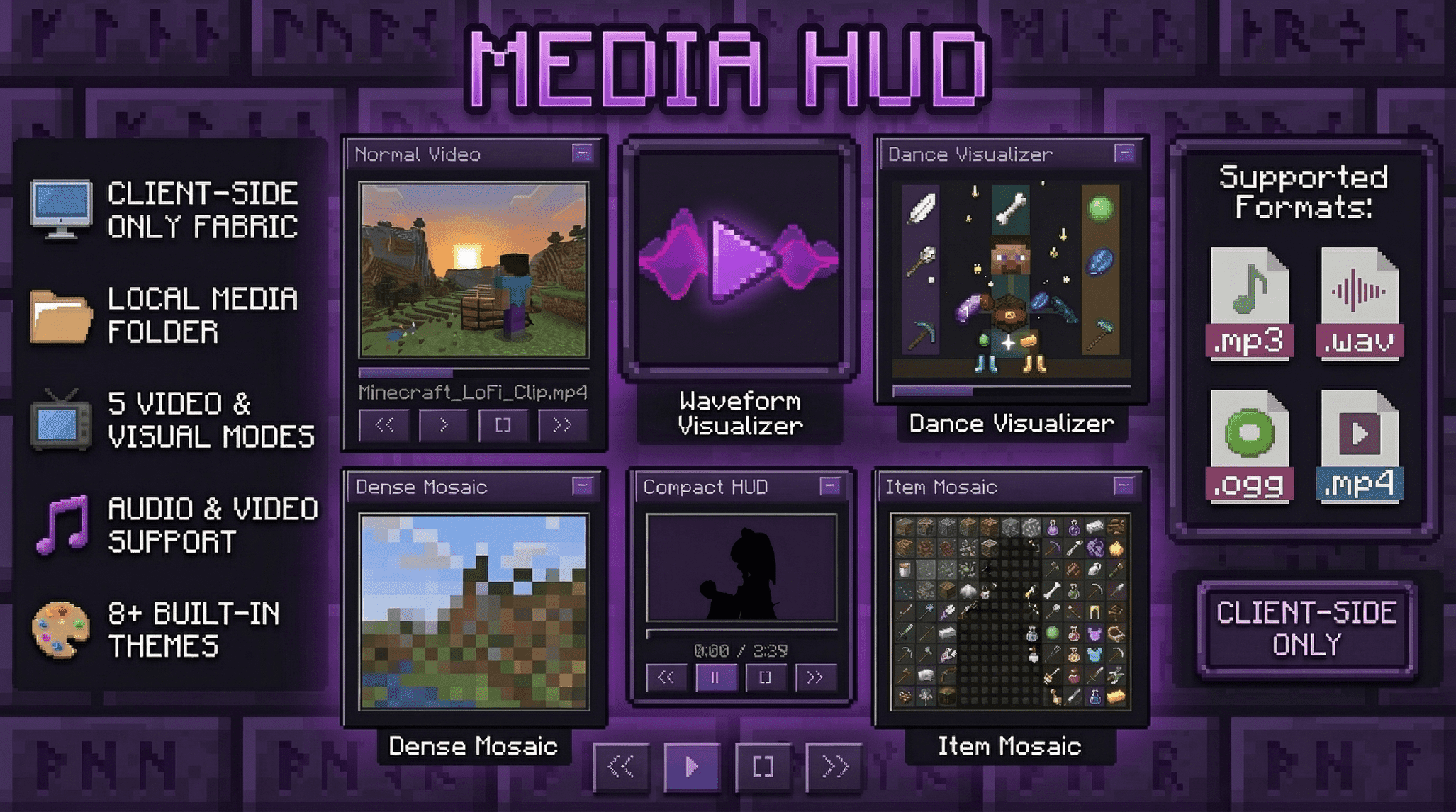
It is built for players who want music, videos, and visualizers inside Minecraft without constantly alt-tabbing. You can scan a local media folder, load files directly, drag the player anywhere on the screen, switch between full and compact layouts, and choose between several visual modes ranging from standard video playback to Minecraft-style mosaic rendering.
This mod is client-side only and local-files only. It does not require server installation, it does not use streaming services, and it does not rely on online playback.
mp3, wav, and oggmp4/media and /m command aliasesmp3, wav, oggmp4Recommended video format for the smoothest results:
H.264 videoAAC audio.mp4 containerMedia HUD currently has working builds for:
1.20.51.20.61.211.21.11.21.21.21.31.21.41.21.51.21.61.21.71.21.81.21.91.21.101.21.11Use the Media HUD jar built for your exact Minecraft version, and match it with the Fabric API version line below:
1.20.5 -> Fabric API 0.97.8+1.20.51.20.6 -> Fabric API 0.100.8+1.20.61.21 -> Fabric API 0.102.0+1.211.21.1 -> Fabric API 0.116.9+1.21.11.21.2 -> Fabric API 0.106.1+1.21.21.21.3 -> Fabric API 0.114.1+1.21.31.21.4 -> Fabric API 0.119.4+1.21.41.21.5 -> Fabric API 0.128.2+1.21.51.21.6 -> Fabric API 0.128.2+1.21.61.21.7 -> Fabric API 0.129.0+1.21.71.21.8 -> Fabric API 0.136.1+1.21.81.21.9 -> Fabric API 0.134.1+1.21.91.21.10 -> Fabric API 0.138.4+1.21.101.21.11 -> Fabric API 0.141.3+1.21.11Recommended:
0.18.4 or newer210.18.4 or newer21mediahud jar in your mods folder/m ui to open the interaction overlayMedia HUD is client-side only. A multiplayer server does not need to install it.
This public build is packaged for Windows x86_64.
No extra FFmpeg or JavaCV download is required for this release file.
This release package includes third-party notice material for bundled runtime components.
You can use either /m or /media.
They are identical aliases.
/m show
Shows the HUD.
/m hide
Hides the HUD.
/m toggle
Toggles the HUD on or off.
/m ui
Opens the drag-and-move interaction overlay.
/m pos reset
Resets the HUD position back to its default location.
/m play
Starts playback of the currently selected media.
/m pause
Pauses playback.
/m stop
Stops playback.
/m next
Selects the next track or video.
/m prev
Selects the previous track or video.
/m seek <seconds>
Seeks to a specific time in seconds.
Example: /m seek 90
/m volume <0-200>
Sets volume from 0 to 200.
Example: /m volume 75
/m folder <path>
Sets the root media folder and scans it.
Example: /m folder C:\Users\Name\Music
/m refresh
Rescans the current media folder.
/m load <path>
Loads a specific local file directly.
Example: /m load C:\Users\Name\Videos\clip.mp4
/m probe <path>
Probes a local file through the media backend.
Useful when checking whether a file is detected correctly.
/m loop
Toggles looping on or off.
/m loop on
Enables looping.
/m loop off
Disables looping.
/m shuffle
Toggles shuffle on or off.
/m shuffle on
Enables shuffle.
/m shuffle off
Disables shuffle.
/m shuffle toggle
Toggles shuffle explicitly.
/m filter audio
Shows only audio files in the library.
/m filter video
Shows only video files in the library.
/m filter both
Shows both audio and video files.
/m mode normal
Standard video preview mode.
/m mode waveform
Audio waveform visualizer mode.
/m mode dance
Dance visualizer mode.
/m mode mosaic
Dense mosaic video mode.
/m mode itemmosaic
Item-based mosaic video mode.
/m wave resolution <3-8>
Sets waveform resolution.
/m video resolution <64-2048>
Sets video preview resolution in pixels.
/m mosaic resolution <4-160>
Sets dense mosaic resolution.
/m itemmosaic resolution <4-160>
Sets item mosaic resolution.
Higher values can look better, but they may also cost more performance.
/m hud mode full
Uses the full HUD layout.
/m hud mode compact
Uses the compact HUD layout.
/m hud scale <50-200>
Sets HUD scale as a percentage.
Example: /m hud scale 125
/m hud transparency <0-80>
Sets HUD transparency as a percentage.
Example: /m hud transparency 25
You can use either /m theme ... or /m hud theme ....
/m theme
Shows the current HUD theme.
/m theme classic
Uses the Classic theme.
/m theme midnightpurple
Uses the Midnight Purple theme.
/m theme bluemoon
Uses the Blue Moon theme.
/m theme hacker
Uses the Hacker theme.
/m theme sunset
Uses the Sunset theme.
/m theme obsidian
Uses the Obsidian theme.
/m theme rosegold
Uses the Rose Gold theme.
/m theme frost
Uses the Frost theme.
/m theme custom
Switches back to your saved custom theme colors.
You can type hex colors without #.
Examples:
FFAABB
/m theme color
Shows your current custom theme colors.
/m theme color gradientprimary <hex>
Sets the first gradient color.
/m theme color gradientsecondary <hex>
Sets the second gradient color.
/m theme color main <hex>
Sets the main accent color.
/m theme color border <hex>
Sets the border color.
/m theme color button <hex>
Sets the button color.
/m theme color text <hex>
Sets the text color.
Notes:
gradientprimary and gradient_primary both work.gradientsecondary and gradient_secondary both work.x86_64 FFmpeg runtime. Linux and macOS builds are not included in this file.MIT.x86_64 FFmpeg runtime via ByteDeco.THIRD_PARTY_NOTICES.md.-gpl artifacts.Project description from Modrinth.
Pick your setup
Choose the version and loader you play, then open the matching release.
Showing the newest 12 of 14 game versions. Older files are in the list below.
Check the dependencies, then try the file in a copied instance before changing a world you care about.
Recent files
mediahud-1.0.0+mc1.21.11.jar
20 Mar 2026
mediahud-1.0.0+mc1.21.10.jar
20 Mar 2026
mediahud-1.0.0+mc1.21.9.jar
20 Mar 2026
mediahud-1.0.0+mc1.21.8.jar
20 Mar 2026
mediahud-1.0.0+mc1.21.7.jar
20 Mar 2026
mediahud-1.0.0+mc1.21.6.jar
20 Mar 2026
mediahud-1.0.0+mc1.21.5.jar
20 Mar 2026
mediahud-1.0.0+mc1.21.4.jar
20 Mar 2026
mediahud-1.0.0+mc1.21.3.jar
20 Mar 2026
mediahud-1.0.0+mc1.21.2.jar
20 Mar 2026
mediahud-1.0.0+mc1.21.1.jar
20 Mar 2026
mediahud-1.0.0+mc1.21.jar
20 Mar 2026
Looking for an older file? The official Modrinth project page is in Resources.
 mod
Define in-world crafting & interactions using JSON recipes. item interaction, burning, touching fluid, anvil, crushing, lightning, exploding...
 mod
⛏️ Transform your resources with the power of Create!
 mod
Rotation-powered energy shields and barrier walls for Create - protect your base and your airship from cannon fire, attacks and enemy Players.