Fabric API Needed by Cape Provider 5.5.0
requiredMatching file found Matched file: [26.2] Fabric API 0.156.0+26.2

Modrinth · Minecraft mod
Provides you with capes! You can choose from various providers or add your own
Quick answer
Cape Provider 5.5.0 targets 26.2 with Fabric. It must be installed on the client. Do not install it on the dedicated server. All 1 required mods have matching files.
Where it goes
It must be installed on the client. Do not install it on the dedicated server.
This file is marked client-only.
5.5.0. Change the file and its required mods may change too.
Install Fabric API first. We found matching files for this game-version and loader setup. 1 comes through another mod in the chain.
1 extra mod was pulled in by another dependency. Indented rows show who needs each one. We only count dependency files that match this setup. A file for another loader does not fill the gap.
Before you install it
Built for Cape Provider 5.5.0. Pick another file and the loader, install side or required mods may change.
Use 5.5.0. It targets 26.2 with Fabric; another release may have different loader, side or dependency requirements.
Install Fabric API first. We found matching files for this game-version and loader setup. 1 comes through another mod in the chain.
It must be installed on the client. Do not install it on the dedicated server.
Use the “Get this file” button beside 5.5.0. It opens that exact file at the source.
About this project

Provides you with capes!
You can choose from various providers or add your own.
Improved/Reworked version of the "Capes" mod:
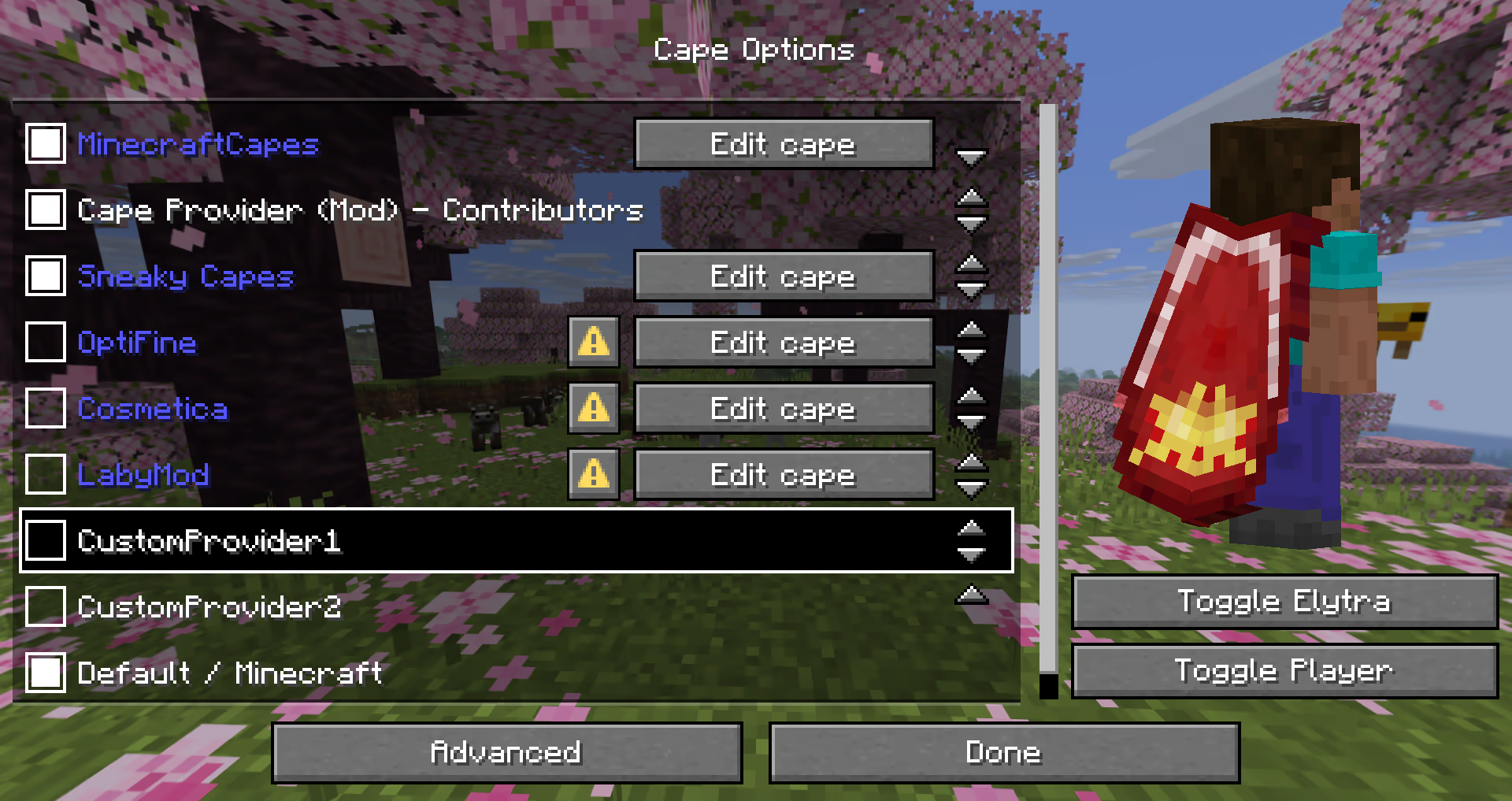
The mod provides many different ways how a provider can be added.
The following possibilities are sorted by simplicity:
Recommended for:
- Users that just want a customizable cape
- Modpacks (using
config/cape-provider/simple-custom)
The simplest way to display a cape is by going into the config/cape-provider directory and creating a cape texture file named cape.png.
Additionally there are the following optional files:
owners.txt - Determines which player names or UUIDs will get the cape displayed. If this file is not present then all players will display with the cape.name.txt - To override the display name of the providerYou can also add more providers by creating corresponding directories in config/cape-provider/simple-custom.
Example: config/cape-provider/simple-custom/my-super-cool-provider/cape.png
Recommended for:
- Users that want to add a custom remote provider
This demo showcases how to apply the capes inside custom-cape-demo.
Open the config file located in config/cape-provider/config.json
In the remoteCustomProviders section add the following entry:
{
  "id": "cp1",
  "name": "CustomProvider1",
  // You can replace uuid with $id, $name or $idNoHyphen to customize the cape per Player
  "uriTemplate": "https://raw.githubusercontent.com/litetex-oss/mcm-cape-provider/refs/heads/dev/custom-cape-demo/uuid.png"
}
{
  "id": "skinmc",
  "name": "SkinMC",
  "uriTemplate": "https://skinmc.net/api/v1/skinmcCape/$id"
}
Restart the game and activate the provider
For more details have a look at RemoteCustomProvider and RemoteCustomProviderConfig
NOTE: Texture resolvers can be selected using the textureResolverId attribute (see below for details).
Recommended for:
- Mods
If you are a mod developer and want to e.g. display a cape for supporters or contributors of your mod, you can provide it using the mod's resources and/or metadata in fabric.mod.json.
The overall behavior is similar to how modmenu handles this.
This approach requires no network communication and is the recommended way.
It works by reading metadata and resources from the cape directory.
Here is an example:
fabric.mod.json{
...
"custom": {
"cape": "Contributors"
}
}
cape directory inside resourcescape/cape.pngcape/owners.txt with their UUIDs or namesfabric.mod.json
{
  "custom": {
    "cape": {
      "name-extra": "Contributors",
      "owners": {
        // You can also used UUIDs
        "names": [
          "Notch"
        ]
      }
    }
  }
}
The mod uses this strategy itself. See the fabric.mod.json or cape directory for details.
Here's an example implementation that shows how a remote cape provider can be added:
fabric.mod.json
{
  ...
  "custom": {
    "cape": "https://raw.githubusercontent.com/litetex-oss/mcm-cape-provider/refs/heads/dev/custom-cape-demo/uuid.png"
  }
}
fabric.mod.json
{
  "custom": {
    "cape": {
      // Gives everyone a christmas cape
      // You can also use variables here, like $uuid. See above for more details
      // You may have to escape the $ with \ or you can alternatively use § instead of $
      // Alternative: "uriTemplate"
      "url": "https://example.org/textures/§uuid.png",
      "changeCapeUrl": "https://...",
      "rateLimitedReqPerSec": 20 // Default is 20
    }
  }
}
You can also create a programmatic cape provider.
Images/Textures should not exceed 10MB. Otherwise they might be ignored.
The following resolvers are currently built-in:
| Resolver-ID | Animated | Format | Example | Notes |
|---|---|---|---|---|
default / null |
❌ | PNG | uuid.png | |
sprite |
✔ | Stacked PNG | animated.png | |
gif |
✔ | GIF | animated.gif | Usage not recommended GIFs require more resources when compared to more modern formats like PNG. |
Please note that animated textures can be frozen or completely disabled in the settings.
Project description from Modrinth.
Pick your setup
Choose the version and loader you play, then open the matching release.
Check the dependencies, then try the file in a copied instance before changing a world you care about.
Recent files
cape-provider-5.5.0.jar
17 Jun 2026
cape-provider-5.4.3.jar
15 Jun 2026
cape-provider-5.4.2.jar
8 Jun 2026
Looking for an older file? The official Modrinth project page is in Resources.
 mod
modAdds 2 new dimensions, new combat mechanics, 4 new ore types, and a heavy emphasis on Copper and Amethyst!
 mod
modReduces the delay between server packets and client ticks. 서버에서 도착한 패킷과 클라이언트 틱 사이의 딜레이를 완화합니다.
 mod
modAllows the addition of new title screen panoramas