Minecraft version
Back to mods 
Modrinth · Minecraft mod
NoEmotecraft
Emotecraft fork with 1.21.x update
Choose a version Pick your version below, then grab the matching file.
Quick answer
Which NoEmotecraft release should I use?
beta file 2.5.2
Game version 1.21, 1.21.1
Loader bukkit, paper, purpur
NoEmotecraft 2.5.2 targets 1.21, 1.21.1 with bukkit, paper, purpur. The project page does not say whether this file belongs on the client, dedicated server, or both. No extra mods listed for this file.
Where it goes
Is NoEmotecraft required on the client, server, or both?
The project page does not say whether this file belongs on the client, dedicated server, or both.
Client Source doesn’t say
Dedicated server Source doesn’t say
Loader for this release bukkit, paper, purpur
Required install it here Optional supported, not mandatory Not supported do not install here Source doesn’t say do not assume
The source does not explicitly classify this release as client-only or server-only.
What else does NoEmotecraft 2.5.2 need?
2.5.2. Change the file and its required mods may change too.
This file does not list any required mods. Do not add a library just because a different file uses it.
This file does not list any required or optional mods.
Before you install it
Add NoEmotecraft without breaking your instance.
Built for NoEmotecraft 2.5.2. Pick another file and the loader, install side or required mods may change.
- 01
Stick to this file
Use 2.5.2. It targets 1.21, 1.21.1 with bukkit, paper, purpur; another release may have different loader, side or dependency requirements.
- 02
Bring the mods it needs
This file does not list any required mods. Do not add a library just because a different file uses it.
- 03
Put it on the correct side
The project page does not say whether this file belongs on the client, dedicated server, or both.
- 04
Pick the file you checked
Use the “Get this file” button beside 2.5.2. It opens that exact file at the source.
About this project
What does NoEmotecraft add?
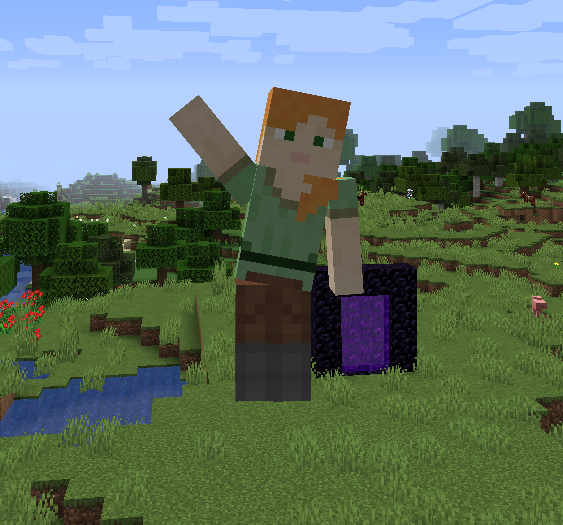
EN: Important Note:
Please be aware that this version of Emotecraft is a fork. This was made for a modern version 1.21 as we wait for official update of Emotecraft by KosmX. There may be bugs and issues that could affect your gameplay. We appreciate your understanding and encourage you to report any problems you encounter.
RU: Важное примечание:
Пожалуйста, обратите внимание, что Emotecraft является форком существующего мода. Он был создан для современной версии 1.21, пока мы ждем обновления Emotecraft от KosmX. Возможны ошибки и проблемы, которые могут повлиять на ваш игровой процесс. Мы благодарны за ваше понимание и призываем вас сообщать о любых возникающих проблемах.
Emotecraft Mod Description
Emotecraft is an innovative Minecraft mod that introduces a variety of expressive emotions to enhance your gameplay experience. With Emotecraft, you can now communicate your feelings in-game through a diverse range of animations and emotive actions, making interactions with other players more immersive and engaging.
Features:
- Diverse Emotions: Choose from a wide array of emotions such as happiness, sadness, anger, and more.
- Custom Animations: Enjoy unique animations that bring your emotions to life.
- User-Friendly Interface: Easily access and select emotions through an intuitive interface.
- Multiplayer Support: Share your emotions with friends in multiplayer mode.
Installation:
- Download the Emotecraft mod file.
- Place the downloaded file into your Minecraft
modsfolder. - If you are using Sodium or Iris, make sure to download and install their respective compatible versions separately.
Custom Emotions:
To use more than just the built-in emotions, you can download additional emotions or create your own. Place these emotion files into the emotes folder in your Minecraft directory. To open the mod menu, press the B key.
Описание мода Emotecraft
Emotecraft — это инновационный мод для Minecraft, который добавляет множество выразительных эмоций, чтобы улучшить ваш игровой опыт. С Emotecraft вы можете выражать свои чувства в игре с помощью разнообразных анимаций и эмоций, делая взаимодействие с другими игроками более увлекательным и погружающим.
Особенности:
- Разнообразие эмоций: Выбирайте из широкого спектра эмоций, таких как радость, грусть, гнев и другие.
- Пользовательский интерфейс: Легко доступ к эмоциям через интуитивно понятный интерфейс.
- Поддержка мультиплеера: Делитесь эмоциями с друзьями в многопользовательском режиме.
Установка:
- Скачайте файл мода Emotecraft.
- Переместите скачанный файл в папку
modsвашей игры Minecraft. - Если вы используете Sodium или Iris, убедитесь, что вы скачали и установили их соответствующие совместимые версии отдельно.
Пользовательские эмоции:
Чтобы использовать не только встроенные эмоции, вы можете скачать дополнительные эмоции или создать свои собственные. Поместите эти файлы эмоций в папку emotes в директории Minecraft. Для открытия меню мода нажмите клавишу B.
Project description from Modrinth.
Pick your setup
NoEmotecraft by Minecraft version and loader
Choose the version and loader you play, then open the matching release.
Minecraft version
1.21
2 loader buildsCheck the dependencies, then try the file in a copied instance before changing a world you care about.
Recent files
NoEmotecraft versions and loaders
2.5.2
noemotecraft-bukkit-2.5.2+mc1.21.1.jar
5 Nov 2024
Client Source doesn’t say Server Source doesn’t say Dependencies No extras listed Listed on Release listing
Check the 1.21.1 · bukkit setup 1.211.21.1bukkitpaper beta
2.5.2
noemotecraft-fabric-2.5.2+mc1.21.1.jar
5 Nov 2024
Client Source doesn’t say Server Source doesn’t say Dependencies No extras listed Listed on Release listing
Check the 1.21.1 · Fabric setup 1.211.21.1Fabric beta
2.5.1
emotecraft-for-MC1.21.1-2.5.1-fabric.jar
26 Aug 2024
Client Source doesn’t say Server Source doesn’t say Dependencies No extras listed Listed on Release listing
Check the 1.21.1 · Fabric setup 1.21.1Fabric beta
2.5.1
emotecraft-2.5.1-velocity.jar
26 Aug 2024
Client Source doesn’t say Server Source doesn’t say Dependencies No extras listed Listed on Release listing
Check the 1.21.1 · velocity setup 1.21.1velocity beta
2.5.1
emotecraft-2.5.1-bungee.jar
26 Aug 2024
Client Source doesn’t say Server Source doesn’t say Dependencies No extras listed Listed on Release listing
Check the 1.21.1 · bungeecord setup 1.21.1bungeecord beta
2.5.1
emotecraft-2.5.1-bukkit.jar
26 Aug 2024
Client Source doesn’t say Server Source doesn’t say Dependencies No extras listed Listed on Release listing
Check the 1.21.1 · bukkit setup 1.21.1bukkitpaperpurpur beta
2.5
emotecraft-for-MC1.21-2.5-fabric.jar
27 Jul 2024
Client Source doesn’t say Server Source doesn’t say Dependencies No extras listed Listed on Release listing
Check the 1.21 · Fabric setup 1.21Fabric alpha
2.5
emotecraft-2.5-velocity.jar
26 Jul 2024
Client Source doesn’t say Server Source doesn’t say Dependencies No extras listed Listed on Release listing
Check the 1.21 · velocity setup 1.21velocity alpha
2.5
emotecraft-2.5-bungee.jar
26 Jul 2024
Client Source doesn’t say Server Source doesn’t say Dependencies No extras listed Listed on Release listing
Check the 1.21 · bungeecord setup 1.21bungeecord alpha
2.5
emotecraft-2.5-bukkit.jar
26 Jul 2024
Client Source doesn’t say Server Source doesn’t say Dependencies No extras listed Listed on Release listing
Check the 1.21 · bukkit setup 1.21bukkitpaperpurpur alpha
Looking for an older file? The official Modrinth project page is in Resources.
 mod
mod CurseForge + Modrinth · Minecraft
Animus
Putting more Magic in your Blood Magic.
 mod
mod Modrinth · Minecraft
Anvilcraft:Alloy Extension
Anvilcraft's subsidiary mods add more alloys, weapons, tools, food, and more convenient recipes to help you play Anvilcraft better.
 mod
mod Modrinth · Minecraft
AcornLib
An API with features to make modding easier, including new Components, Particles, Weapon Skins, and Supporter Perks.