Quick answer
Which EMUtils release matches 26.2 Fabric?
Best match for your filters 0.13.66
Game version 26.1.2, 26.2
Loader Fabric
EMUtils 0.13.66 targets 26.1.2, 26.2 with Fabric. It must be installed on the client. Do not install it on the dedicated server. All 1 required mods have matching files.
Where it goes
Is EMUtils required on the client, server, or both?
It must be installed on the client. Do not install it on the dedicated server.
Client Required
Dedicated server Not supported
Loader for this release Fabric
Required install it here Optional supported, not mandatory Not supported do not install here Source doesn’t say do not assume
This file is marked client-only.
What else does EMUtils 0.13.66 need?
0.13.66 on 26.2 Fabric. Every mod below is checked against that same setup.
Install Fabric API first. We found matching files for this game-version and loader setup.
Matching file found Matched file: 0.160.0+26.2
We only count dependency files that match this setup. A file for another loader does not fill the gap.
Before you install it
Add EMUtils without breaking your instance.
Built for EMUtils 0.13.66 on 26.2 Fabric. Pick another file and the loader, install side or required mods may change.
- 01
Stick to this file
Use 0.13.66. It targets 26.1.2, 26.2 with Fabric; another release may have different loader, side or dependency requirements.
- 02
Bring the mods it needs
Install Fabric API first. We found matching files for this game-version and loader setup.
- 03
Put it on the correct side
It must be installed on the client. Do not install it on the dedicated server.
- 04
Pick the file you checked
Use the “Get this file” button beside 0.13.66. It opens that exact file at the source.
About this project
What does EMUtils add?
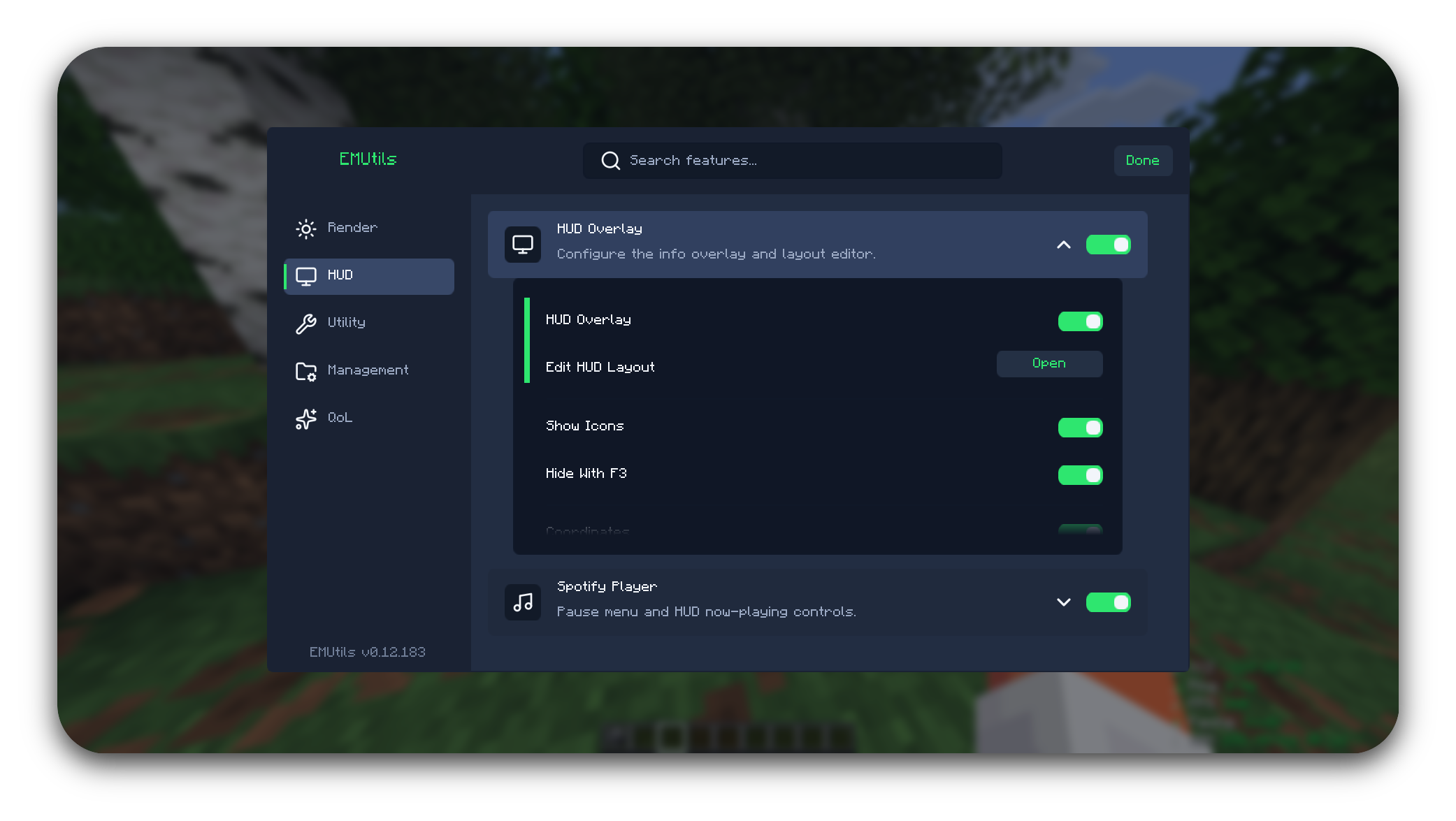
Tired of installing five different mods just to copy a chat message, zoom in, and reconnect after a kick?
EMUtils bundles the small stuff into one lightweight client-side mod for Minecraft on Fabric — so you can stop juggling mods and get back to playing.
Status
EMUtils is in active development. Has a pile of quality-of-life features, and zero interest in getting in your way while you play.
For a full list of features, view the GitHub.
To report a bug, or request a feature visit EMUtils Feedback.
Features
- Render — zoom, fullbright, clear weather, visibility tweaks, beacon radius outlines, light level overlay, custom capes, and visual overlays.
- HUD — info overlay, free camera coordinates, food HUD, layout editor, and Spotify now-playing panels.
- Utility — auto reconnect, screenshot helper, screenshot metadata, and waypoints.
- Management — screenshot gallery, waypoint management, Pack Manager, Script Manager, and command shortcuts.
- QoL — chat tools, inventory tools, Sort Buttons, Hover Transfer, Mass Drop, Auto Tool, Auto Flight Gear, Safe Walk, Free Camera, placement helpers, Fast Place, and Fast Use.
Minecraft Versions
EMUtils supports Minecraft 1.21.9-1.21.11 and Minecraft 26.x.
- Minecraft 26.x is the active development version and receives new features and fixes.
- Minecraft 1.21.9-1.21.11 enters maintenance mode after EMUtils 0.13.0. It will continue receiving bug fixes and compatibility fixes, but new features will target Minecraft 26.x.
Requirements
- Minecraft 1.21.9-1.21.11 or 26.x
- Java 21 or newer for the 1.21.x jar
- Java 25 or newer for the 26.x jar
- Fabric Loader 0.19.2 or newer for 1.21.x, or 0.19.3 or newer for 26.x
- Fabric API
Optional integrations
- Iris — required for Pack Manager shader apply/disable actions
- Minescript — required for Script Manager browsing, editing, running, and EMUtils script keybinds
- Xaero's Minimap / Xaero's World Map — optional support for showing Beacon Radius Outline boundaries on Xaero maps
Installation
- Install Fabric Loader for the supported versions.
- Download the EMUtils jar matching your Minecraft version.
- Place the jar in your
mods folder.
- Launch the game.
License
EMUtils is licensed under the Apache License 2.0.
Copyright 2026 Palethea. If you use, fork, modify, or redistribute EMUtils, keep the original license and attribution notices.
AI Notice
This mod was made with heavy help from Artificial Intelligence. I was simply just tired of having a million mods to do specific things, and wanted an all-in-one mod.
Project description from Modrinth.
Pick your setup
EMUtils by Minecraft version and loader
Choose the version and loader you play, then open the matching release.
Minecraft version
26.2
1
loader build Minecraft version
26.1.2
1
loader build Minecraft version
26.1.1
1
loader build Minecraft version
26.1
1
loader build Minecraft version
1.21.11
1
loader build Minecraft version
1.21.10
1
loader build Minecraft version
1.21.9
1
loader build Check the dependencies, then try the file in a copied instance before changing a world you care about.
Recent files
EMUtils versions and loaders
EMUtils-26.x.jar
10 Sept 2026
Client Required Server Not supported Dependencies 1 required · matched Listed on Release listing
Check the 26.2 · Fabric setup → EMUtils-26.x.jar
29 Jun 2026
Client Required Server Not supported Dependencies 1 required · 1 unchecked Listed on Release listing
Check the 26.2 · Fabric setup → 26.126.1.126.1.226.2 release
EMUtils-26.x.jar
24 Jun 2026
Client Required Server Not supported Dependencies 1 required · 1 unchecked Listed on Release listing
Check the 26.2 · Fabric setup → 26.126.1.126.1.226.2 release
EMUtils-26.x.jar
18 Jun 2026
Client Required Server Not supported Dependencies 1 required · 1 unchecked Listed on Release listing
Check the 26.2 · Fabric setup → 26.126.1.126.1.226.2 release
EMUtils-26.x.jar
17 Jun 2026
Client Required Server Not supported Dependencies 1 required · 1 unchecked Listed on Release listing
Check the 26.2 · Fabric setup → 26.126.1.126.1.226.2 release
EMUtils-26.x.jar
17 Jun 2026
Client Required Server Not supported Dependencies 1 required · 1 unchecked Listed on Release listing
Check the 26.2 · Fabric setup → 26.126.1.126.1.226.2 release