





Minecraft version
Back to mods 
Modrinth · Minecraft mod
Easy Trading
A server-friendly economy plugin with personal player accounts and streamlined trading through intuitive GUIs and commands.
Choose a version Pick your version below, then grab the matching file.
Quick answer
Which Easy Trading release should I use?
Latest stable file 1.21.x-11.26.02
Game version 1.21.11, 1.21.10, 1.21.9
Loader bukkit, folia, paper
Easy Trading 1.21.x-11.26.02 targets 1.21.11, 1.21.10, 1.21.9 with bukkit, folia, paper. Installation on the client is optional. Installation on the dedicated server is optional. No extra mods listed for this file.
Where it goes
Is Easy Trading required on the client, server, or both?
Installation on the client is optional. Installation on the dedicated server is optional.
Client Optional
Dedicated server Optional
Loader for this release bukkit, folia, paper
Required install it here Optional supported, not mandatory Not supported do not install here Source doesn’t say do not assume
The source marks this as usable on both the client and server.
What else does Easy Trading 1.21.x-11.26.02 need?
1.21.x-11.26.02. Change the file and its required mods may change too.
This file does not list any required mods. Do not add a library just because a different file uses it.
This file does not list any required or optional mods.
Before you install it
Add Easy Trading without breaking your instance.
Built for Easy Trading 1.21.x-11.26.02. Pick another file and the loader, install side or required mods may change.
- 01
Stick to this file
Use 1.21.x-11.26.02. It targets 1.21.11, 1.21.10, 1.21.9 with bukkit, folia, paper; another release may have different loader, side or dependency requirements.
- 02
Bring the mods it needs
This file does not list any required mods. Do not add a library just because a different file uses it.
- 03
Put it on the correct side
Installation on the client is optional. Installation on the dedicated server is optional.
- 04
Pick the file you checked
Use the “Get this file” button beside 1.21.x-11.26.02. It opens that exact file at the source.
About this project
What does Easy Trading add?

⚠️ The Fabric and NeoForge mod is discontinued as of version 0.9.
Please use Easy Trading Plugin for Paper, Bukkit, Spigot, Purpur, and Folia.
Easy Trading
Easy Trading is a lightweight economy plugin for multiplayer Minecraft servers. It is designed to provide a reliable, secure, and server-friendly trading system with a strong focus on usability, administrative control, and abuse prevention.
The plugin includes a complete in-game economy ecosystem consisting of:
- Personal player balances
- A player-driven marketplace
- A server-controlled bank
- A secure player-to-player trading system
Detailed setup and usage instructions are available in the Easy Trading Wiki.

Core Features
- Server-stored personal balances for all players
- Multiple trading methods:
- Player marketplace
- Server bank
- Direct player-to-player trading
- Built-in taxes, limits, and confirmation steps
- Optional balance HUD displayed via BossBar
- Designed for clarity, stability, and anti-abuse protection
Direct Player Trading
Easy Trading includes a secure real-time trading system that allows players to exchange items and currency safely without dropping items on the ground.
How It Works
To initiate a trade:
/market trade <player>

The target player receives interactive Accept and Decline options.
Once accepted, a shared trade interface is opened.
Trade System
- 16 trade slots per player
- Real-time item synchronization
- Money can be added or removed using interface buttons
- Both players must confirm the trade
- A 3-second countdown is started before execution
Safety Mechanisms
Any modification to the trade automatically resets both confirmations.
A trade is cancelled automatically if a player:
- Disconnects
- Dies
- Teleports
- Closes the trade interface
Additional protections include:
- Balance verification at execution time
- No item loss; items are safely dropped if inventory space is insufficient
- Anti-duplication protection through session locking
- Trade requests expire after 60 seconds
Player Marketplace
The marketplace allows players to list and purchase items through a simple GUI-based system.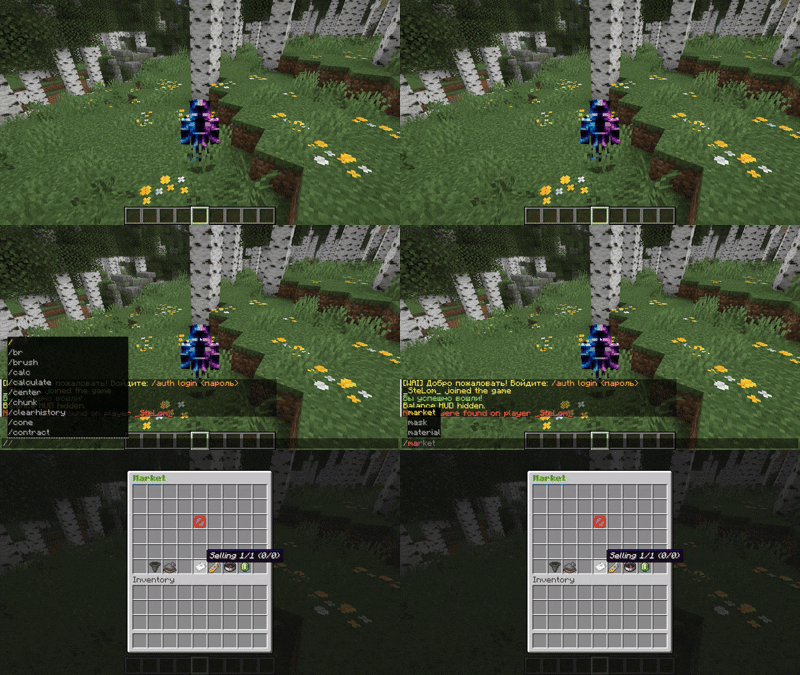
Commands
| Command | Description |
|---|---|
/market |
Open the marketplace |
/market sell <price> |
List the item in hand for sale |
Features
- Confirmation before listing an item
- Configurable minimum and maximum prices
- Soft and hard listing limits
- Listing fees with base and progressive cost options
- Market updates shown to players after rejoining
Bank (Server Shop)
The bank provides a server-controlled trading system for buying and selling predefined resources.
Commands
| Command | Description |
|---|---|
/market sellto <amount> |
Sell items to the bank |
/market buyfrom <resource> <amount> |
Buy items from the bank |
/market limits |
View daily limits |
Features
- Daily buy and sell limits per resource
- Configurable tax rate (default:
12%) - Transactions require sufficient balance and available inventory space
Default Resources
- Coal
- Redstone
- Lapis
- Copper
- Iron
- Gold
- Diamond
- Emerald
- Netherite
Commands
Player Commands
| Command | Description |
|---|---|
/market |
Open the market |
/market help |
Show help |
/market sell <price> |
List an item for sale |
/market sellto <amount> |
Sell to the bank |
/market buyfrom <resource> <amount> |
Buy from the bank |
/market trade <player> |
Start a direct trade |
/market trade accept |
Accept a trade request |
/market trade decline |
Decline a trade request |
/market balance |
Show current balance |
/market send <player> <amount> |
Transfer money to another player |
/market team [name] |
View team balance |
/market history |
Show the last 10 transactions |
/market limits |
View daily limits |
/market hide |
Hide the HUD |
/market show |
Show the HUD |
/market pur |
Create purchasing order |
/market purchase |
Create purchasing order |
Admin Commands
| Command | Description |
|---|---|
/market bankreload |
Reload bank configuration |
/market clearlimits |
Reset daily limits |
/market change <percent> |
Set the tax rate |
/market add <player> <amount> |
Add money to a player |
/market take <player> <amount> |
Remove money from a player |
/checkbalance <player> |
Check a player’s balance |
/market ads <amount> |
Change the amount of promoted lots per player |
Configuration
| File | Description |
|---|---|
easytrading-market.json |
Marketplace prices, fees, and limits |
easytrading-bank.json |
Bank rates, limits, and elasticity settings |
Safety and Reliability
Easy Trading is built with stability and protection in mind.
- Confirmation steps for risky actions
- Inventory validation and safe item handling
- Anti-duplication protection
- Timeout handling for pending actions
- Full transaction logging
- Individual player transaction history
Compatibility
- Works without Vault as a soft dependency
- Designed for performance and stability
- Suitable for survival, economy, and political servers
Summary
Easy Trading is a complete economy solution for multiplayer servers. It combines:
- A player marketplace
- A server-controlled bank
- Secure real-time player trading
All features are provided in a single lightweight and practical plugin.
License
This project is licensed under the MIT License.
You may use, modify, and distribute the code in accordance with the terms of that license.
Project description from Modrinth.
Pick your setup
Easy Trading by Minecraft version and loader
Choose the version and loader you play, then open the matching release.
Minecraft version
1.21.10
1 loader buildMinecraft version
1.21.9
1 loader buildMinecraft version
1.21.8
1 loader buildMinecraft version
1.21.7
1 loader buildMinecraft version
1.21.6
1 loader buildMinecraft version
1.21.5
2 loader buildsMinecraft version
1.21.4
2 loader buildsMinecraft version
1.21.3
2 loader buildsMinecraft version
1.21.2
2 loader buildsMinecraft version
1.21.1
3 loader buildsMinecraft version
1.21
1 loader buildCheck the dependencies, then try the file in a copied instance before changing a world you care about.
Recent files
Easy Trading versions and loaders
1.21.x-11.26.02
EasyTrading-Universal-1.21.x-11.26.02.jar
9 Nov 2026
Client Optional Server Optional Dependencies No extras listed Listed on Release listing
Check the 1.21.11 · bukkit setup 1.21.111.21.101.21.91.21.8 release
1.21.x-11.26.01
EasyTrading-Universal-1.21.x-11.26.01.jar
29 Oct 2026
Client Optional Server Optional Dependencies No extras listed Listed on Release listing
Check the 1.21.11 · bukkit setup 1.211.21.11.21.101.21.11 release
1.21.x-09.26.02
EasyTrading-Folia-1.21.x-09.26.02.jar
3 Oct 2026
Client Optional Server Optional Dependencies No extras listed Listed on Release listing
Check the 1.21.11 · folia setup 1.211.21.11.21.101.21.11 release
1.21.x-09.26.02
EasyTrading-Universal-1.21.x-09.26.02.jar
3 Oct 2026
Client Optional Server Optional Dependencies No extras listed Listed on Release listing
Check the 1.21.11 · bukkit setup 1.211.21.11.21.101.21.11 release
1.21.x-09.26.01
EasyTrading-Universal-09.26.01.jar
12 Sept 2026
Client Optional Server Optional Dependencies No extras listed Listed on Release listing
Check the 1.21.11 · bukkit setup 1.211.21.11.21.101.21.11 release
1.21.x-07.26.01
EasyTrading-Universal-1.21.x-07.26.01.jar
20 Jul 2026
Client Optional Server Optional Dependencies No extras listed Listed on Release listing
Check the 1.21.11 · bukkit setup 1.211.21.11.21.101.21.11 release
1.21.x-06.26.02
EasyTrading-Folia-1.21.x-06.26.02.jar
10 Jun 2026
Client Optional Server Optional Dependencies No extras listed Listed on Release listing
Check the 1.21.11 · folia setup 1.211.21.11.21.101.21.11 release
1.21.x-06.26.02
EasyTrading-Bukkit-1.21.x-06.26.02.jar
9 Jun 2026
Client Optional Server Optional Dependencies No extras listed Listed on Release listing
Check the 1.21.11 · bukkit setup 1.211.21.11.21.101.21.11 release
1.21.x-06.26.01
EasyTrading-Folia-1.21.x-06.26.01.jar
9 Jun 2026
Client Optional Server Optional Dependencies No extras listed Listed on Release listing
Check the 1.21.11 · folia setup 1.211.21.11.21.101.21.11 release
1.21.x-06.26.01
EasyTrading-Bukkit-1.21.x-06.26.01.jar
9 Jun 2026
Client Optional Server Optional Dependencies No extras listed Listed on Release listing
Check the 1.21.11 · bukkit setup 1.211.21.11.21.101.21.11 release
1.21.x-06.26.01
EasyTrading-Paper-1.21.x-06.26.01.jar
9 Jun 2026
Client Optional Server Optional Dependencies No extras listed Listed on Release listing
Check the 1.21.11 · paper setup 1.211.21.11.21.101.21.11 release
1.21.x-04.26.01
EasyTrading-Spigot-1.21.x-04.26.01.jar
11 Apr 2026
Client Optional Server Optional Dependencies No extras listed Listed on Release listing
Check the 1.21.11 · bukkit setup 1.211.21.11.21.101.21.11 release
Looking for an older file? The official Modrinth project page is in Resources.
 mod
CurseForge + Modrinth · Minecraft
Tech Extensions
An add-on for Tech Reborn that adds new useful tools, mainly for mid/end game.
 mod
Modrinth · Minecraft
SRPMixins
Tweaks and Fixes for SRParasites
 mod
Modrinth · Minecraft
Glyphs N Owls
A 'The Owl House' mod made by the fans, for the fans, with the fans!