Minecraft version
Back to mods 
CurseForge · Minecraft mod
TNTTime
Displays time left to the TNT explosion.
Choose a version Pick your version below, then grab the matching file.
Quick answer
Which TNTTime release should I use?
Latest stable file TNTTime for Fabric 1.20 and 1.20.1
Game version 1.20.1, 1.20
Loader Fabric
TNTTime for Fabric 1.20 and 1.20.1 targets 1.20.1, 1.20 with Fabric. The project page does not say whether this file belongs on the client, dedicated server, or both. No extra mods listed for this file.
Where it goes
Is TNTTime required on the client, server, or both?
The project page does not say whether this file belongs on the client, dedicated server, or both.
Client Source doesn’t say
Dedicated server Source doesn’t say
Loader for this release Fabric
Required install it here Optional supported, not mandatory Not supported do not install here Source doesn’t say do not assume
The source does not explicitly classify this release as client-only or server-only.
What else does TNTTime for Fabric 1.20 and 1.20.1 need?
TNTTime for Fabric 1.20 and 1.20.1 . Change the file and its required mods may change too.
This file does not list any required mods. Do not add a library just because a different file uses it.
This file does not list any required or optional mods.
Before you install it
Add TNTTime without breaking your instance.
Built for TNTTime for Fabric 1.20 and 1.20.1. Pick another file and the loader, install side or required mods may change.
- 01
Stick to this file
Use TNTTime for Fabric 1.20 and 1.20.1 . It targets 1.20.1, 1.20 with Fabric; another release may have different loader, side or dependency requirements.
- 02
Bring the mods it needs
This file does not list any required mods. Do not add a library just because a different file uses it.
- 03
Put it on the correct side
The project page does not say whether this file belongs on the client, dedicated server, or both.
- 04
Pick the file you checked
Use the “Get this file” button beside TNTTime for Fabric 1.20 and 1.20.1 . It opens that exact file at the source.
About this project
What does TNTTime add?
TNTTime
Displays time left to the TNT explosion above primed TNT. No complex configuration, lightweight mod that does a thing!
Fabric API is not required.
Issues, suggestions
Also on Modrinth
Secrets
- Known incopatibilities may be the ones that modify Minecraft FontRenderer, EntityRenderer or DataTracker in harmful ways.
- You can change the display of the text between color and non-color, by changing "Chat Colors" option.
Images
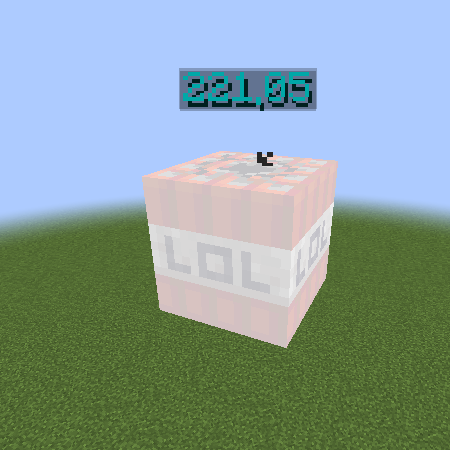
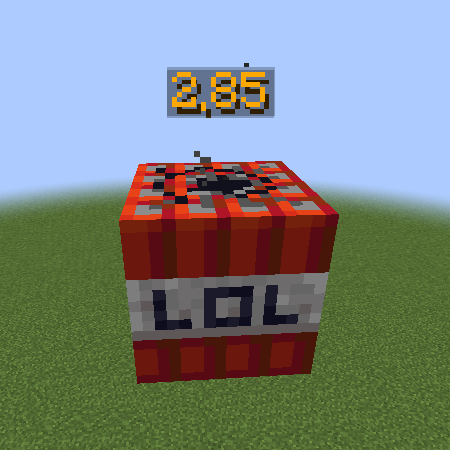
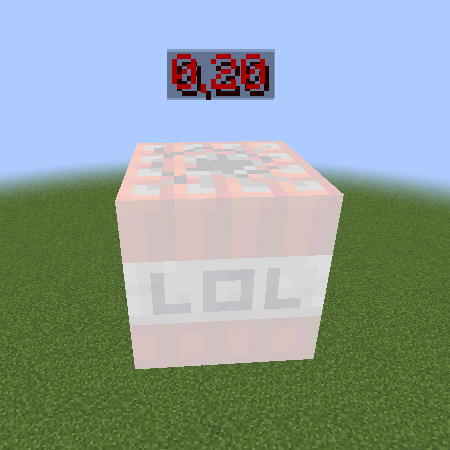
Project description from CurseForge.
Pick your setup
TNTTime by Minecraft version and loader
Choose the version and loader you play, then open the matching release.
Minecraft version
1.20
1 loader buildMinecraft version
1.19.3
1 loader buildMinecraft version
1.19.2
1 loader buildMinecraft version
1.19.1
1 loader buildMinecraft version
1.19
1 loader buildMinecraft version
1.18.2
1 loader buildMinecraft version
1.18.1
1 loader buildMinecraft version
1.18
1 loader buildMinecraft version
1.17.1
1 loader buildMinecraft version
1.17
1 loader buildCheck the dependencies, then try the file in a copied instance before changing a world you care about.
Recent files
TNTTime versions and loaders
TNTTime for Fabric 1.20 and 1.20.1
tnttime-mc1.20.1-1.3.0.jar
30 Jul 2023
Client Source doesn’t say Server Source doesn’t say Dependencies No extras listed Listed on Release listing
Check the 1.20.1 · Fabric setup Fabric1.20.11.20 release
TNT Time 1.2.0 for MC 1.19.3
tnttime-mc1.19.3-1.2.0.jar
17 Jan 2023
Client Source doesn’t say Server Source doesn’t say Dependencies No extras listed Listed on Release listing
Check the 1.19.3 · Fabric setup 1.19.3Fabric release
TNTTime 1.1.0 for 1.19.2
tnttime-mc1.19.2-1.1.0.jar
24 Nov 2022
Client Source doesn’t say Server Source doesn’t say Dependencies No extras listed Listed on Release listing
Check the 1.19.2 · Fabric setup Fabric1.19.21.19.11.19 release
1.1.0 for MC 1.18.2
tnttime-mc1.18.2-1.1.0.jar
24 Nov 2022
Client Source doesn’t say Server Source doesn’t say Dependencies No extras listed Listed on Release listing
Check the 1.18.2 · Fabric setup 1.18.1Fabric1.18.21.18 release
TNTTime-mc1.18.1-1.0.0.jar
31 Dec 2021
Client Source doesn’t say Server Source doesn’t say Dependencies No extras listed Listed on Release listing
Check the 1.18.1 · Fabric setup 1.18.1Fabric1.181.17.1 release
TNTTime-mc1.17.1-1.0.0.jar
31 Dec 2021
Client Source doesn’t say Server Source doesn’t say Dependencies No extras listed Listed on Release listing
Check the 1.17.1 · Fabric setup 1.17.11.17Fabric release
Secondly seen
tnttime-fabric-1.0.0.jar
25 Sept 2021
Client Source doesn’t say Server Source doesn’t say Dependencies No extras listed Listed on Release listing
Check the 1.17.1 · Fabric setup 1.17.1Fabric alpha
Looking for an older file? The official CurseForge project page is in Resources.
 mod
CurseForge · Minecraft
DragonMine Z - Mutant SSJ Visuals
A Dragon Mine Z addon inspired by Broly’s mutation, with customizable Saiyan visuals, green transformations, gradual power release, and form-specific bonuses.
 mod
CurseForge + Modrinth · Minecraft
Forestry: CE
Forestry bees, trees, and more on modern Minecraft.
 mod
CurseForge + Modrinth · Minecraft
kogtyv-Towny and Village
Changes the generation of villages to the generation of cities.