Minecraft version
Back to mods 
Modrinth · Minecraft mod
Effect Tooltips
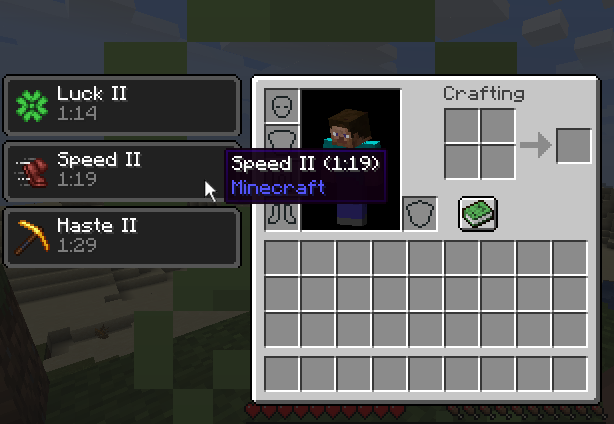
Adds hover tooltips to the status effects region of the player inventory screen.
Choose a version Pick your version below, then grab the matching file.
Quick answer
Which Effect Tooltips release should I use?
Latest stable file 26.3.0.1
Game version 26.3
Loader NeoForge
Effect Tooltips 26.3.0.1 targets 26.3 with NeoForge. Installation on the client is optional. Installation on the dedicated server is optional. No extra mods listed for this file.
Where it goes
Is Effect Tooltips required on the client, server, or both?
Installation on the client is optional. Installation on the dedicated server is optional.
Client Optional
Dedicated server Optional
Loader for this release NeoForge
Required install it here Optional supported, not mandatory Not supported do not install here Source doesn’t say do not assume
The source marks this as usable on both the client and server.
What else does Effect Tooltips 26.3.0.1 need?
26.3.0.1. Change the file and its required mods may change too.
This file does not list any required mods. Do not add a library just because a different file uses it.
This file does not list any required or optional mods.
Before you install it
Add Effect Tooltips without breaking your instance.
Built for Effect Tooltips 26.3.0.1. Pick another file and the loader, install side or required mods may change.
- 01
Stick to this file
Use 26.3.0.1. It targets 26.3 with NeoForge; another release may have different loader, side or dependency requirements.
- 02
Bring the mods it needs
This file does not list any required mods. Do not add a library just because a different file uses it.
- 03
Put it on the correct side
Installation on the client is optional. Installation on the dedicated server is optional.
- 04
Pick the file you checked
Use the “Get this file” button beside 26.3.0.1. It opens that exact file at the source.
About this project
What does Effect Tooltips add?
This mod adds a tooltip to status effects displayed in the player inventory. The tooltip contains useful information about the effect such as the name of the mod that added it to the game. The mod also provides an event based API that allows other mods to add new tooltip entries or modify the tooltip in other ways.
Provided Information
- The name of the effect.
- The level/amplifier of the effect.
- The remaining duration of the effect.
- The name of the mod that added the effect.
- The registry ID of the effect (Only when f3+H debug mode is enabled)
Like the mod and want to support me?
This project is sponsored by Nodecraft. Use code DARKHAX for 30% off your first month of service!
Project description from Modrinth.
Pick your setup
Effect Tooltips by Minecraft version and loader
Choose the version and loader you play, then open the matching release.
Minecraft version
26.2
2 loader buildsMinecraft version
26.1.2
2 loader buildsMinecraft version
26.1.1
2 loader buildsMinecraft version
26.1
2 loader buildsMinecraft version
1.20.4
3 loader buildsMinecraft version
1.20.3
3 loader buildsMinecraft version
1.20.2
3 loader buildsMinecraft version
1.20.1
2 loader buildsMinecraft version
1.20
2 loader buildsMinecraft version
1.19.4
2 loader buildsMinecraft version
1.19.3
1 loader buildShowing the newest 12 of 19 game versions. Older files are in the list below.
Check the dependencies, then try the file in a copied instance before changing a world you care about.
Recent files
Effect Tooltips versions and loaders
26.3.0.1
EffectTooltips-neoforge-MC26.3-26.3.0.1.jar
27 Sept 2026
Client Optional Server Optional Dependencies No extras listed Listed on Release listing
Check the 26.3 · NeoForge setup 26.3NeoForge release
26.3.0.1
EffectTooltips-fabric-MC26.3-26.3.0.1.jar
27 Sept 2026
Client Optional Server Optional Dependencies 1 required · 1 unchecked Listed on Release listing
Check the 26.3 · Fabric setup 26.3Fabric release
26.2.0.1
EffectTooltips-fabric-MC26.2-26.2.0.1.jar
8 Jul 2026
Client Optional Server Optional Dependencies 1 required · 1 unchecked Listed on Release listing
Check the 26.2 · Fabric setup 26.2Fabric release
26.2.0.1
EffectTooltips-neoforge-MC26.2-26.2.0.1.jar
8 Jul 2026
Client Optional Server Optional Dependencies No extras listed Listed on Release listing
Check the 26.2 · NeoForge setup 26.2NeoForge release
26.1.2.1
EffectTooltips-fabric-MC26.1.2-26.1.2.1.jar
8 Jul 2026
Client Optional Server Optional Dependencies 1 required · 1 unchecked Listed on Release listing
Check the 26.1.2 · Fabric setup 26.126.1.126.1.2Fabric release
26.1.2.1
EffectTooltips-neoforge-MC26.1.2-26.1.2.1.jar
8 Jul 2026
Client Optional Server Optional Dependencies No extras listed Listed on Release listing
Check the 26.1.2 · NeoForge setup 26.126.1.126.1.2NeoForge release
9.0.3
EffectTooltips-Fabric-1.20.1-9.0.3.jar
12 Feb 2026
Client Optional Server Optional Dependencies 1 required · 1 unchecked Listed on Release listing
Check the 1.20.1 · Fabric setup 1.20.1Fabric release
9.0.3
EffectTooltips-Forge-1.20.1-9.0.3.jar
12 Feb 2026
Client Optional Server Optional Dependencies No extras listed Listed on Release listing
Check the 1.20.1 · Forge setup 1.20.1Forge release
12.0.2
EffectTooltips-NeoForge-1.20.4-12.0.2.jar
1 Feb 2024
Client Optional Server Optional Dependencies No extras listed Listed on Release listing
Check the 1.20.4 · NeoForge setup 1.20.4NeoForge release
12.0.2
EffectTooltips-Forge-1.20.4-12.0.2.jar
1 Feb 2024
Client Optional Server Optional Dependencies No extras listed Listed on Release listing
Check the 1.20.4 · Forge setup 1.20.4Forge release
12.0.2
EffectTooltips-Fabric-1.20.4-12.0.2.jar
1 Feb 2024
Client Optional Server Optional Dependencies 1 required · 1 unchecked Listed on Release listing
Check the 1.20.4 · Fabric setup 1.20.4Fabric release
12.0.1
EffectTooltips-NeoForge-1.20.4-12.0.1.jar
13 Jan 2024
Client Optional Server Optional Dependencies No extras listed Listed on Release listing
Check the 1.20.4 · NeoForge setup 1.20.4NeoForge release
Looking for an older file? The official Modrinth project page is in Resources.
 mod
CurseForge + Modrinth · Minecraft
PolyCrosshair
An extremely customizable crosshair mod. By Polyfrost, best with OneClient.
 mod
CurseForge + Modrinth · Minecraft
Safra
Don’t mess with the server Play Minecraft with your friends in 2 clicks via P2P
 mod
CurseForge + Modrinth · Minecraft
More Rail Variants (MStV+)
All Rail Blocks for every kind of wood - A 'More Stick Variants' Add-On