Minecraft version
Back to mods 
Modrinth · Minecraft mod
Safe Offhand
Introduces lockable hotbar slots to prevent accidental offhanding.
Choose a version Pick your version below, then grab the matching file.
Quick answer
Which Safe Offhand release should I use?
Latest stable file 1.1.0
Game version 26.1.2
Loader Fabric
Safe Offhand 1.1.0 targets 26.1.2 with Fabric. It must be installed on the client. Do not install it on the dedicated server. No extra mods listed for this file.
Where it goes
Is Safe Offhand required on the client, server, or both?
It must be installed on the client. Do not install it on the dedicated server.
Client Required
Dedicated server Not supported
Loader for this release Fabric
Required install it here Optional supported, not mandatory Not supported do not install here Source doesn’t say do not assume
This file is marked client-only.
What else does Safe Offhand 1.1.0 need?
1.1.0. Change the file and its required mods may change too.
This file does not list any required mods. Do not add a library just because a different file uses it.
This file does not list any required or optional mods.
Before you install it
Add Safe Offhand without breaking your instance.
Built for Safe Offhand 1.1.0. Pick another file and the loader, install side or required mods may change.
- 01
Stick to this file
Use 1.1.0. It targets 26.1.2 with Fabric; another release may have different loader, side or dependency requirements.
- 02
Bring the mods it needs
This file does not list any required mods. Do not add a library just because a different file uses it.
- 03
Put it on the correct side
It must be installed on the client. Do not install it on the dedicated server.
- 04
Pick the file you checked
Use the “Get this file” button beside 1.1.0. It opens that exact file at the source.
About this project
What does Safe Offhand add?
Safe Offhand
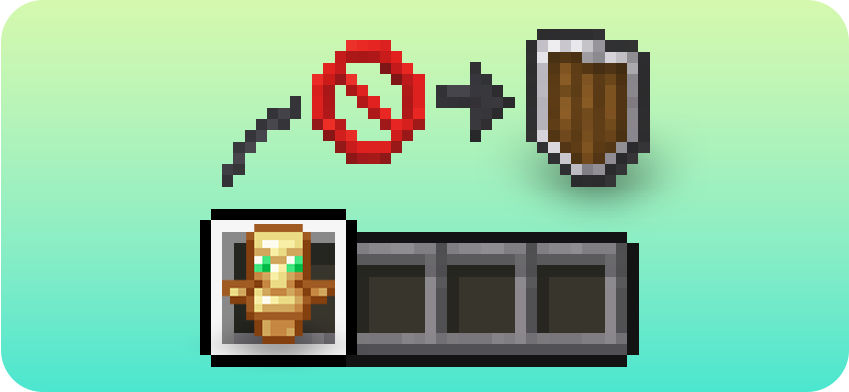
Safe Offhand is a lightweight client-side Fabric mod that prevents accidental swaps to the offhand.
The mod adds lockable hotbar slots. When a locked hotbar slot is selected, pressing the offhand swap key will be blocked. Unlocked slots still work normally, and inventory-based offhand swaps are left untouched.
Features
- Lock or unlock each hotbar slot individually
- Block the offhand swap key for locked hotbar slots
- Allow offhand swaps from unlocked hotbar slots
- Keep normal inventory interactions unchanged
- Show an actionbar message when a swap is blocked
- Configure everything through Mod Menu
- Client-side only
How it works
If you select a locked hotbar slot and press your offhand swap key, Safe Offhand prevents that item from being moved to your offhand.
If the selected hotbar slot is unlocked, the offhand swap works normally.
Opening your inventory and using the offhand swap key on hovered items still works like vanilla Minecraft.

Configuration
Safe Offhand can be configured through Mod Menu.
You can configure:
- Whether the mod is enabled
- Whether actionbar messages are shown
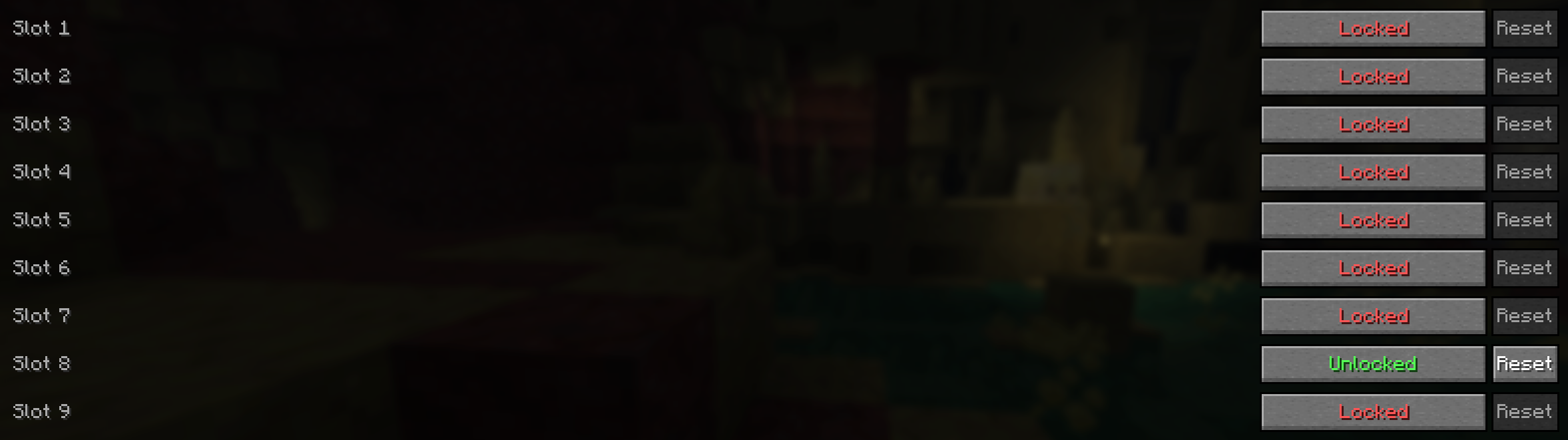
- Which hotbar slots are locked or unlocked

Slot States
Each hotbar slot can be set to one of two states:
- Locked: pressing the offhand swap key while this slot is selected will be blocked
- Unlocked: pressing the offhand swap key while this slot is selected will work normally
This makes it easy to protect important hotbar slots while still allowing offhand swaps from selected slots.
Requirements
- Fabric Loader
- Fabric API
- Cloth Config
Optional
- Mod Menu, recommended for in-game configuration
Project description from Modrinth.
Pick your setup
Safe Offhand by Minecraft version and loader
Choose the version and loader you play, then open the matching release.
Minecraft version
26.2
1 loader buildMinecraft version
26.1.2
1 loader buildMinecraft version
26.1.1
1 loader buildMinecraft version
26.1
1 loader buildMinecraft version
1.21.11
1 loader buildMinecraft version
1.21.10
1 loader buildMinecraft version
1.21.9
1 loader buildMinecraft version
1.21.8
1 loader buildCheck the dependencies, then try the file in a copied instance before changing a world you care about.
Recent files
Safe Offhand versions and loaders
1.1.0
safeoffhand-1.1.0+mc26.1.2.jar
6 Oct 2026
Client Required Server Not supported Dependencies No extras listed Listed on Release listing
Check the 26.1.2 · Fabric setup 26.1.2Fabric release
1.1.0
safeoffhand-1.1.0+mc26.1.1.jar
6 Oct 2026
Client Required Server Not supported Dependencies 2 required · 2 unchecked Listed on Release listing
Check the 26.1.1 · Fabric setup 26.1.1Fabric release
1.1.0
safeoffhand-1.1.0+mc1.21.8.jar
6 Oct 2026
Client Required Server Not supported Dependencies 2 required · 2 unchecked Listed on Release listing
Check the 1.21.8 · Fabric setup 1.21.8Fabric release
1.1.0
safeoffhand-1.1.0+mc1.21.9.jar
6 Oct 2026
Client Required Server Not supported Dependencies 2 required · 2 unchecked Listed on Release listing
Check the 1.21.9 · Fabric setup 1.21.9Fabric release
1.1.0
safeoffhand-1.1.0+mc1.21.10.jar
6 Oct 2026
Client Required Server Not supported Dependencies 2 required · 2 unchecked Listed on Release listing
Check the 1.21.10 · Fabric setup 1.21.10Fabric release
1.1.0
safeoffhand-1.1.0+mc1.21.11.jar
6 Oct 2026
Client Required Server Not supported Dependencies 2 required · 2 unchecked Listed on Release listing
Check the 1.21.11 · Fabric setup 1.21.11Fabric release
1.1.0
safeoffhand-1.1.0+mc26.1.jar
6 Oct 2026
Client Required Server Not supported Dependencies 2 required · 2 unchecked Listed on Release listing
Check the 26.1 · Fabric setup 26.1Fabric release
1.1.0
safeoffhand-1.1.0+mc26.2.jar
6 Oct 2026
Client Required Server Not supported Dependencies 2 required · 2 unchecked Listed on Release listing
Check the 26.2 · Fabric setup 26.2Fabric release
1.1.0
safeoffhand-1.1.0+mc26.3.jar
6 Oct 2026
Client Required Server Not supported Dependencies 2 required · 2 unchecked Listed on Release listing
Check the 26.3 · Fabric setup 26.3Fabric release
1.0.1
safeoffhand-1.0.1-mc26.2.jar
6 Oct 2026
Client Required Server Not supported Dependencies 2 required · 2 unchecked Listed on Release listing
Check the 26.2 · Fabric setup 26.2Fabric release
1.0.0
safeoffhand-1.0.0-mc26.2.jar
29 Jun 2026
Client Required Server Not supported Dependencies 2 required · 2 unchecked Listed on Release listing
Check the 26.2 · Fabric setup 26.2Fabric release
Looking for an older file? The official Modrinth project page is in Resources.