Minecraft version
Back to mods 
Modrinth · Minecraft mod
QuickPOT / PVP Potion / PVP Potion Optimizer
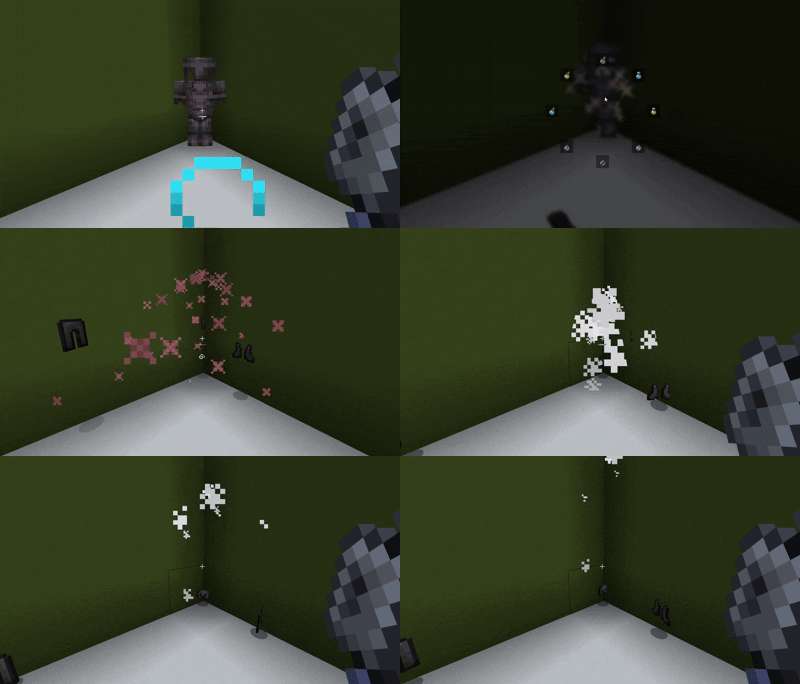
PvP/combat potion switching made easy with a fast radial menu, supporting drinkable, splash, and lingering potions with 8 customizable slots.
Choose a version Pick your version below, then grab the matching file.
Quick answer
Which QuickPOT / PVP Potion / PVP Potion Optimizer release matches 1.21.6 NeoForge?
Best match for your filters QickPOT_NEOFORGE-1.1
Game version 1.21.1, 1.21.10, 1.21.2
Loader NeoForge
QuickPOT / PVP Potion / PVP Potion Optimizer QickPOT_NEOFORGE-1.1 targets 1.21.1, 1.21.10, 1.21.2 with NeoForge. It must be installed on the client. Do not install it on the dedicated server. No extra mods listed for this file.
Where it goes
Is QuickPOT / PVP Potion / PVP Potion Optimizer required on the client, server, or both?
It must be installed on the client. Do not install it on the dedicated server.
Client Required
Dedicated server Not supported
Loader for this release NeoForge
Required install it here Optional supported, not mandatory Not supported do not install here Source doesn’t say do not assume
This file is marked client-only.
What else does QuickPOT / PVP Potion / PVP Potion Optimizer QickPOT_NEOFORGE-1.1 need?
QickPOT_NEOFORGE-1.1 on 1.21.6 NeoForge. Every mod below is checked against that same setup.
This file does not list any required mods. Do not add a library just because a different file uses it.
This file does not list any required or optional mods.
Before you install it
Add QuickPOT / PVP Potion / PVP Potion Optimizer without breaking your instance.
Built for QuickPOT / PVP Potion / PVP Potion Optimizer QickPOT_NEOFORGE-1.1 on 1.21.6 NeoForge. Pick another file and the loader, install side or required mods may change.
- 01
Stick to this file
Use QickPOT_NEOFORGE-1.1. It targets 1.21.1, 1.21.10, 1.21.2 with NeoForge; another release may have different loader, side or dependency requirements.
- 02
Bring the mods it needs
This file does not list any required mods. Do not add a library just because a different file uses it.
- 03
Put it on the correct side
It must be installed on the client. Do not install it on the dedicated server.
- 04
Pick the file you checked
Use the “Get this file” button beside QickPOT_NEOFORGE-1.1. It opens that exact file at the source.
About this project
What does QuickPOT / PVP Potion / PVP Potion Optimizer add?
[QUICKPOT] is a PvP-focused potion management mod that lets you instantly
access and use your favorite potions during combat — no more digging
through your inventory mid-fight.
⚠️ Disclaimer
Some servers may consider this mod an unfair advantage or cheating.
Please ask server admins before using it in multiplayer.
Use at your own risk.
⚔️ How It Helps in Combat
- Faster reactions — use healing, strength, speed, fire resistance, or
any other potion instantly during intense fights. - No inventory switching — stay focused on combat instead of opening
your inventory or scrolling through hotbar slots. - Quick access — a radial menu lets you select a potion in a split
second: hold your keybind, aim, release. - Supports all potion types — works with drinkable, splash, and
lingering potions alike. - Custom combat setup — keep your most important PvP potions always
ready, exactly where you expect them.
🎯 Potion Customization
- Configure up to 8 potion slots in the radial menu (2–8, your choice).
- The wheel fills itself automatically from whatever potions you're
carrying — nothing to set up to get started. - Hide potions you never want to see. Hover a slot and press X to
remove that potion type from the wheel. Press U anytime to restore
everything you've hidden, in one press. - Lock your go-to potions in place. Hover a slot and press L to pin
that potion type permanently. A locked potion:- Always keeps its slot, even when you run out mid-fight
- Shows a greyed-out "?" placeholder when you're empty, so you can
see it at a glance without losing your muscle memory for where it sits - Can't be misclicked or wasted while empty
- Snaps back to normal the moment you restock, or the moment you unlock
it — hover + L again works even on an empty slot
- Locked slots always take priority, so your core PvP loadout never gets
bumped by whatever else happens to be in your inventory. - Every change saves instantly and persists between sessions — set your
loadout up once, and it's there every time you log in.
🔧 Controls
| Action | Key |
|---|---|
| Open radial menu | your configured keybind |
| Hide/show hovered potion | X |
| Lock/unlock hovered potion | L |
| Unhide all potions | U |
Project description from Modrinth.
Pick your setup
QuickPOT / PVP Potion / PVP Potion Optimizer by Minecraft version and loader
Choose the version and loader you play, then open the matching release.
Minecraft version
26.2
1 loader buildMinecraft version
26.1.2
1 loader buildMinecraft version
26.1.1
1 loader buildMinecraft version
26.1
1 loader buildMinecraft version
1.21.11
1 loader buildMinecraft version
1.21.10
2 loader buildsMinecraft version
1.21.9
2 loader buildsMinecraft version
1.21.8
2 loader buildsMinecraft version
1.21.7
2 loader buildsMinecraft version
1.21.6
2 loader buildsMinecraft version
1.21.5
2 loader buildsShowing the newest 12 of 16 game versions. Older files are in the list below.
Check the dependencies, then try the file in a copied instance before changing a world you care about.
Recent files
QuickPOT / PVP Potion / PVP Potion Optimizer versions and loaders
QickPOT_NEOFORGE-1.1
QuickPOT-1.1.jar
12 Jul 2026
Client Required Server Not supported Dependencies No extras listed Listed on Release listing
Check the 1.21.6 · NeoForge setup 1.21.11.21.101.21.21.21.3 release
QickPOT_NEOFORGE-1.0
QuickPOT-1.0.jar
10 Jul 2026
Client Required Server Not supported Dependencies No extras listed Listed on Release listing
Check the 1.21.6 · NeoForge setup 1.21.11.21.101.21.21.21.3 release
Looking for an older file? The official Modrinth project page is in Resources.
 mod
CurseForge + Modrinth · Minecraft
GeckoLib
A 3D animation library for entities, blocks, items, armor, and more!
 mod
Modrinth · Minecraft
Ultimate Companion Mod
An intelligent, customizable companion with a Gacha system, custom Meme sounds, and a Jojo-style Ghost Stand! Never adventure alone again.
 mod
Modrinth · Minecraft
RPG Series + Aether's Altar Repair Compat
Repair RPG Series items with the Aether's Altar!