Minecraft version
Back to mods 
Modrinth · Minecraft mod
KeyBind Bundles
Do you have too many keybinds but not enough physical keys for all of them? Are you tired of constantly changing rarely used keys to other bindings? Is it too hard to remember what each key does? Then this mod is for you.
Choose a version Pick your version below, then grab the matching file.
Quick answer
Which KeyBind Bundles release should I use?
Latest stable file 2.1.1
Game version 26.1.2
Loader NeoForge
KeyBind Bundles 2.1.1 targets 26.1.2 with NeoForge. It must be installed on the client. Do not install it on the dedicated server. No extra mods listed for this file.
Where it goes
Is KeyBind Bundles required on the client, server, or both?
It must be installed on the client. Do not install it on the dedicated server.
Client Required
Dedicated server Not supported
Loader for this release NeoForge
Required install it here Optional supported, not mandatory Not supported do not install here Source doesn’t say do not assume
This file is marked client-only.
What else does KeyBind Bundles 2.1.1 need?
2.1.1. Change the file and its required mods may change too.
This file does not list any required mods. Do not add a library just because a different file uses it.
This file does not list any required or optional mods.
Before you install it
Add KeyBind Bundles without breaking your instance.
Built for KeyBind Bundles 2.1.1. Pick another file and the loader, install side or required mods may change.
- 01
Stick to this file
Use 2.1.1. It targets 26.1.2 with NeoForge; another release may have different loader, side or dependency requirements.
- 02
Bring the mods it needs
This file does not list any required mods. Do not add a library just because a different file uses it.
- 03
Put it on the correct side
It must be installed on the client. Do not install it on the dedicated server.
- 04
Pick the file you checked
Use the “Get this file” button beside 2.1.1. It opens that exact file at the source.
About this project
What does KeyBind Bundles add?
Do you have too many keybinds but not enough physical keys for all of them? Are you tired of constantly changing rarely used keys to other bindings? Is it too hard to remember what each key does? Then this mod is for you.
This mod adds key bundles, which are basically multiple keybinds in one key.
Creating bundles
To create a new bundle, open the keybinds screen and under the KeyBind Bundles category (which should be the first) click the Add key bundle button, and then enter a name for your bundle.
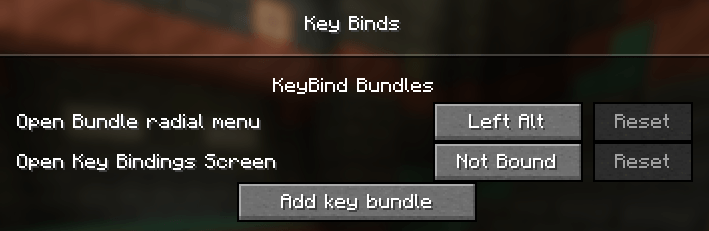
After that, click the Edit button on the bundle. In the new screen hover over the radial menu in the middle and click on Add entry. This will open the keybinds screen again but now each keybind has a select button. Here you can select the bindings you want to add to the bundle.
After selecting the bindings you may edit each entry in the radial menu and give it a custom name and item icon.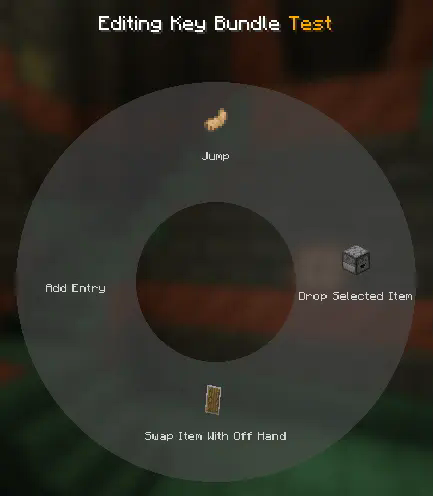
Using bundles
Exit the edit menu by pressing escape and bind the bundle to a key. Afterwards, while in-game you can press and hold the key you assigned to bring up the radial menu. Hover and left click over an entry to trigger that keybind. It's that simple!
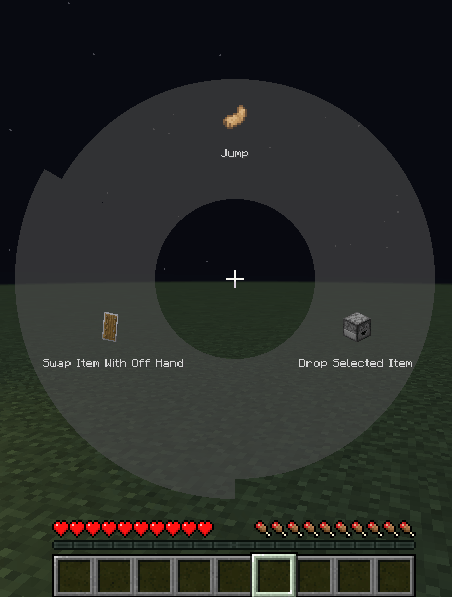
You can also bookmark a key mapping by right clicking it. Once bookmarked, pressing the key assigned to the bundle will immediately trigger that mapping without opening the radial menu. When a key is bookmarked, the radial menu can be opened again by holding the Radial menu modifier, which is Left alt by default. The current bookmarked key will be highlighted red in the radial menu.
This mod is compatible with Controlling
Project description from Modrinth.
Pick your setup
KeyBind Bundles by Minecraft version and loader
Choose the version and loader you play, then open the matching release.
Minecraft version
1.21.1
1 loader buildMinecraft version
1.20.4
1 loader buildMinecraft version
1.20.3
1 loader buildMinecraft version
1.20.2
1 loader buildMinecraft version
1.20.1
1 loader buildCheck the dependencies, then try the file in a copied instance before changing a world you care about.
Recent files
KeyBind Bundles versions and loaders
2.1.1
keybindbundles-2.1.1.jar
3 Nov 2026
Client Required Server Not supported Dependencies No extras listed Listed on Release listing
Check the 26.1.2 · NeoForge setup 26.1.2NeoForge release
1.5.0
keybindbundles-1.5.0.jar
3 Nov 2026
Client Required Server Not supported Dependencies No extras listed Listed on Release listing
Check the 1.21.1 · NeoForge setup 1.21.1NeoForge release
2.1.0
keybindbundles-2.1.0.jar
3 Nov 2026
Client Required Server Not supported Dependencies No extras listed Listed on Release listing
Check the 26.1.2 · NeoForge setup 26.1.2NeoForge release
1.3.1
keybindbundles-1.3.1.jar
17 Aug 2025
Client Required Server Not supported Dependencies No extras listed Listed on Release listing
Check the 1.21.1 · NeoForge setup 1.21.1NeoForge release
1.20.1-1.0.0
keybindbundles-1.20.1-1.0.0.jar
23 Feb 2025
Client Required Server Not supported Dependencies No extras listed Listed on Release listing
Check the 1.20.4 · Forge setup 1.20.11.20.21.20.31.20.4 release
1.2.0
keybindbundles-1.2.0.jar
23 Feb 2025
Client Required Server Not supported Dependencies No extras listed Listed on Release listing
Check the 1.21.1 · NeoForge setup 1.21.1NeoForge release
Looking for an older file? The official Modrinth project page is in Resources.
 mod
CurseForge + Modrinth · Minecraft
Roundabout: The JoJo Mod
A Jojo's Bizarre Adventure mod that interprets the world and power system of the anime into the world of Minecraft. ( JJBA )
 mod
CurseForge + Modrinth · Minecraft
AE2 Utility
AE2 Utility enhances JEI integration by allowing direct item pulling from the ME network into machine interfaces and providing one-click pattern encoding with seamless provider uploads.
 mod
CurseForge + Modrinth · Minecraft
Custom Recipes (In Game Editor)
Create custom crafting recipes and custom crafts in-game with a Fabric recipe editor. Manage vanilla/modded recipes, worlds, recipe books, and servers. Now supports custom items (NBTs).