Minecraft version
Back to mods 
Modrinth · Minecraft mod
Animated Typing
A mod that adds animation when typing in chat or else text field widget
Choose a version Pick your version below, then grab the matching file.
Quick answer
Which Animated Typing release should I use?
Latest stable file 1.21.11+1.0.0
Game version 1.21.11
Loader Fabric
Animated Typing 1.21.11+1.0.0 targets 1.21.11 with Fabric. It must be installed on the client. Do not install it on the dedicated server. No extra mods listed for this file.
Where it goes
Is Animated Typing required on the client, server, or both?
It must be installed on the client. Do not install it on the dedicated server.
Client Required
Dedicated server Not supported
Loader for this release Fabric
Required install it here Optional supported, not mandatory Not supported do not install here Source doesn’t say do not assume
This file is marked client-only.
What else does Animated Typing 1.21.11+1.0.0 need?
1.21.11+1.0.0. Change the file and its required mods may change too.
This file does not list any required mods. Do not add a library just because a different file uses it.
This file does not list any required or optional mods.
Before you install it
Add Animated Typing without breaking your instance.
Built for Animated Typing 1.21.11+1.0.0. Pick another file and the loader, install side or required mods may change.
- 01
Stick to this file
Use 1.21.11+1.0.0. It targets 1.21.11 with Fabric; another release may have different loader, side or dependency requirements.
- 02
Bring the mods it needs
This file does not list any required mods. Do not add a library just because a different file uses it.
- 03
Put it on the correct side
It must be installed on the client. Do not install it on the dedicated server.
- 04
Pick the file you checked
Use the “Get this file” button beside 1.21.11+1.0.0. It opens that exact file at the source.
About this project
What does Animated Typing add?
✨ Chat Typing Animations — Анимации текста в чате
🧩 ENG: This mod adds cool typing animations to the Minecraft chat!
🧩 RUS: Этот мод добавляет красивые анимации появления текста в чате Minecraft!
🛠 Settings / Настройки
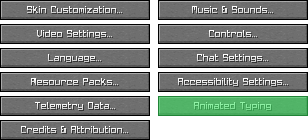
🧩 ENG: You can change animation style in-game via the settings menu:
🇷🇺 Вы можете изменить стиль анимации прямо в игре через меню настроек:
📍 ENG: Go to Options → Animated Typing
🇷🇺 Перейдите в Настройки → Animated Typing
🎨 ENG: Choose from different animation types like Fade, Grow, Scroll, etc.
🇷🇺 Выберите тип анимации: Затухание, Рост, Прокрутка и другие
💾 ENG: Your preferences are saved automatically
🇷🇺 Настройки сохраняются автоматически
🎬 Animation Showcase — Демонстрация анимаций
| 🌫️ Fade Затухание |
🌱 Grow Рост |
| 🔍 Scaling Масштабирование |
📜 Scroll Прокрутка |
| 🧵 Stretch Растяжение |
|
⚙️ Features / Возможности
- ✨ Smooth typing animations / Плавные анимации набора
- 🎨 Multiple styles / Несколько визуальных стилей
- 💬 Works in chat / Работает в чате Minecraft
📦 Installation / Установка
🧩 ENG: Download and install Fabric API
🇷🇺 Скачайте и установите Fabric API📥 ENG: Download
.jarfile of the mod
🇷🇺 Скачайте.jarфайл мода📂 ENG: Move both files to your
modsfolder
🇷🇺 Переместите оба файла в папкуmods🚀 ENG: Launch Minecraft and enjoy!
🇷🇺 Запустите Minecraft и наслаждайтесь!
❤️ Support / Поддержка
⭐ ENG: If you like this mod, please star it on GitHub!
🇷🇺 Если вам понравился мод — поставьте ⭐ на GitHub!
📣 ENG: Share it with friends or make a video showcase!
🇷🇺 Поделитесь модом с друзьями или сделайте видео-обзор!
Project description from Modrinth.
Pick your setup
Animated Typing by Minecraft version and loader
Choose the version and loader you play, then open the matching release.
Minecraft version
1.21.10
1 loader buildMinecraft version
1.21.9
1 loader buildMinecraft version
1.21.8
1 loader buildMinecraft version
1.21.7
1 loader buildMinecraft version
1.21.6
1 loader buildMinecraft version
1.21.5
1 loader buildMinecraft version
1.21.4
1 loader buildCheck the dependencies, then try the file in a copied instance before changing a world you care about.
Recent files
Animated Typing versions and loaders
1.21.11+1.0.0
AnimatedTyping-1.21.11+1.0.0.jar
25 Feb 2026
Client Required Server Not supported Dependencies No extras listed Listed on Release listing
Check the 1.21.11 · Fabric setup 1.21.11Fabric release
1.21.10+1.0.0
AnimatedTyping-1.21.10+1.0.0.jar
25 Feb 2026
Client Required Server Not supported Dependencies 1 required · 1 unchecked Listed on Release listing
Check the 1.21.10 · Fabric setup 1.21.101.21.9Fabric release
1.0.0+1.21.4
AnimatedTyping-1.0.0+1.21.4.jar
25 Jul 2025
Client Required Server Not supported Dependencies No extras listed Listed on Release listing
Check the 1.21.5 · Fabric setup 1.21.41.21.5Fabric release
1.0.0+1.21.8
AnimatedTyping-1.0.0+1.21.8.jar
25 Jul 2025
Client Required Server Not supported Dependencies 1 required · 1 unchecked Listed on Release listing
Check the 1.21.8 · Fabric setup 1.21.61.21.71.21.8Fabric release
Looking for an older file? The official Modrinth project page is in Resources.
 mod
Modrinth · Minecraft
ViaBackwards
Allow older Java Edition clients to connect to newer servers.
 mod
Modrinth · Minecraft
Reimagined Anvils
Rethought and tweaked Anvil usage to have more fair prices
 mod
Modrinth · Minecraft
Take Your Stream Chat
Live chat from Twitch, YouTube, Kick & TikTok — right inside your Minecraft world.