Minecraft version
Back to mods 
Modrinth · Minecraft mod
ResourcePackSettings
Add individual settings to the texture
Choose a version Pick your version below, then grab the matching file.
Quick answer
Which ResourcePackSettings release matches 26.1.2?
Best match for your filters 1.2.31+26.1.2
Game version 26.1.2
Loader Fabric
ResourcePackSettings 1.2.31+26.1.2 targets 26.1.2 with Fabric. It must be installed on the client. Do not install it on the dedicated server. No extra mods listed for this file.
Where it goes
Is ResourcePackSettings required on the client, server, or both?
It must be installed on the client. Do not install it on the dedicated server.
Client Required
Dedicated server Not supported
Loader for this release Fabric
Required install it here Optional supported, not mandatory Not supported do not install here Source doesn’t say do not assume
This file is marked client-only.
What else does ResourcePackSettings 1.2.31+26.1.2 need?
1.2.31+26.1.2 on 26.1.2. Every mod below is checked against that same setup.
This file does not list any required mods. Do not add a library just because a different file uses it.
This file does not list any required or optional mods.
Before you install it
Add ResourcePackSettings without breaking your instance.
Built for ResourcePackSettings 1.2.31+26.1.2 on 26.1.2. Pick another file and the loader, install side or required mods may change.
- 01
Stick to this file
Use 1.2.31+26.1.2. It targets 26.1.2 with Fabric; another release may have different loader, side or dependency requirements.
- 02
Bring the mods it needs
This file does not list any required mods. Do not add a library just because a different file uses it.
- 03
Put it on the correct side
It must be installed on the client. Do not install it on the dedicated server.
- 04
Pick the file you checked
Use the “Get this file” button beside 1.2.31+26.1.2. It opens that exact file at the source.
About this project
What does ResourcePackSettings add?
Resource Pack Settings
Brief description: You can use only the specific parts of the resource pack that you want.
without editing or unzipping the pack.
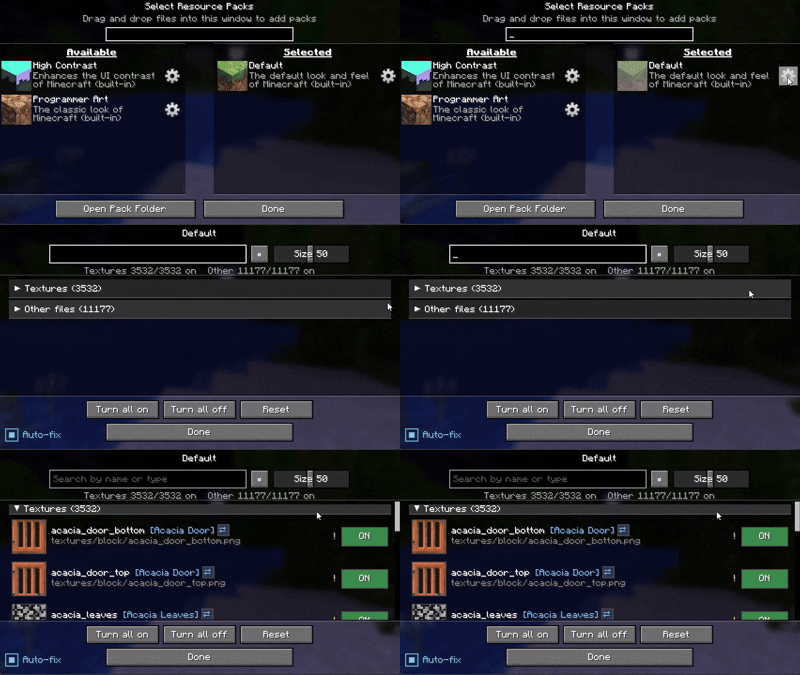
Usage example
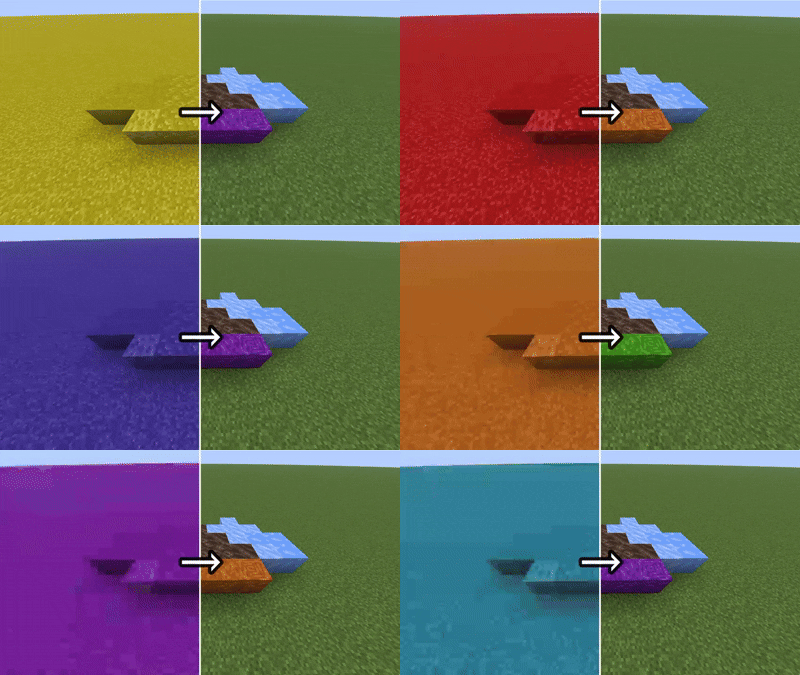
An example of applying the setting only to the specific blocks you want to target.An example of applying the setting only to the specific blocks you want to target.(All gaming textures used in this image)
If possible, I recommend using a mod such as Remove Reloading Screen alongside it.
ーーーーーーーーーーーーーーーーーーーーーーーーーーーーーーー
Others
Features (click to expand)
- 📁 All Supported — It can handle more than just textures
- ⚙️ Gear button on every resource pack (available and selected lists alike)
- 🖼️ Per-file ON / OFF with a live thumbnail and the file name
- 🔎 Search by file name
- ⚠️ warnings — it reads how textures and JSON files reference each other, and only warns you when a change would actually break rendering (the purple-and-black missing texture)
- 🔗 Jump between related files, review all current warnings, and reset with a confirmation step
How it works (click to expand)
Disabling a file never modifies the pack. The mod hides that file so the game falls back to the pack below it (or vanilla). Changes apply on the next resource reload.
Available languages (click to expand)
Follows your game language automatically, with translations in English, 日本語, Deutsch, Français, Português, हिन्दी and 中文. Any other language falls back to English.
License (click to expand)
All Rights Reserved. Personal use and unmodified inclusion in modpacks (with credit and a link back) are allowed. Re-uploading elsewhere or distributing modified versions is not permitted.
Project description from Modrinth.
Pick your setup
ResourcePackSettings by Minecraft version and loader
Choose the version and loader you play, then open the matching release.
Minecraft version
26.1.2
1 loader buildMinecraft version
26.1.1
1 loader buildMinecraft version
26.1
1 loader buildMinecraft version
1.21.11
1 loader buildMinecraft version
1.21.10
1 loader buildMinecraft version
1.21.9
1 loader buildMinecraft version
1.21.8
1 loader buildMinecraft version
1.21.7
1 loader buildMinecraft version
1.21.6
1 loader buildMinecraft version
1.21.5
1 loader buildMinecraft version
1.21.4
1 loader buildShowing the newest 12 of 17 game versions. Older files are in the list below.
Check the dependencies, then try the file in a copied instance before changing a world you care about.
Recent files
ResourcePackSettings versions and loaders
1.2.31+26.1.2
resourcepacksettings-1.2.31+26.1.2.jar
30 Aug 2026
Client Required Server Not supported Dependencies No extras listed Listed on Release listing
Check the 26.1.2 · Fabric setup 26.1.2Fabric release
1.0.3+26.1.2
resourcepacksettings-1.0.3+26.1.2.jar
20 Jul 2026
Client Required Server Not supported Dependencies No extras listed Listed on Release listing
Check the 26.1.2 · Fabric setup 26.1.2Fabric release
Looking for an older file? The official Modrinth project page is in Resources.