Cloth Config API Needed by LUMP: Less Ugly Mob Proofing 26.3-0.3.1
requiredMatching file found Matched file: 26.3.159+fabric

Modrinth · Minecraft mod
Adds a block that prevents mob spawns in a large area at night without torch spam. (sky light based)
Quick answer
LUMP: Less Ugly Mob Proofing 26.3-0.3.1 targets 26.3 with Fabric. Installation on the client is optional. Installation on the dedicated server is optional. All 1 required mods have matching files.
Where it goes
Installation on the client is optional. Installation on the dedicated server is optional.
The source marks this as usable on both the client and server.
26.3-0.3.1. Change the file and its required mods may change too.
Install Cloth Config API first. We found matching files for this game-version and loader setup.
We only count dependency files that match this setup. A file for another loader does not fill the gap.
Before you install it
Built for LUMP: Less Ugly Mob Proofing 26.3-0.3.1. Pick another file and the loader, install side or required mods may change.
Use 26.3-0.3.1. It targets 26.3 with Fabric; another release may have different loader, side or dependency requirements.
Install Cloth Config API first. We found matching files for this game-version and loader setup.
Installation on the client is optional. Installation on the dedicated server is optional.
Use the “Get this file” button beside 26.3-0.3.1. It opens that exact file at the source.
About this project
LUMP aims to eradicate torch spam around your base,
without affecting your mob grinders or other farms.
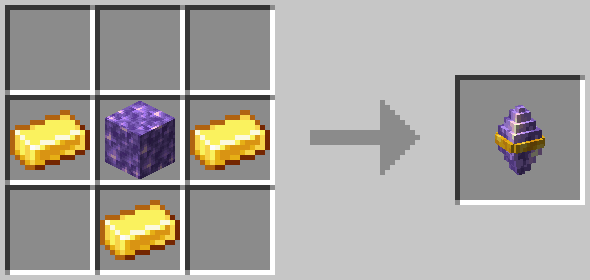
It achieves this by adding a craftable block, called the Amethyst Beacon, which prevents mob spawns within its range, but only for blocks that would be otherwise safe during the day (it is skylight based).
This means:
✅ you only need to light up the interiors of your base
✅ your mob farms should still work (as long as they are dark)
✅ caves are still dangerous until you light them up
✨ This mod also includes a color-coded light overlay to see which blocks are spawnable and which are safe,
the overlay is always displayed when you have the fashionable Amethyst Goggles equipped on your head.
⛏️ This mod aims to be 100% survival friendly.

Prevents most hostile mob spawns within it's range of 128 blocks (horizontally) from where it is placed .
You can craft Amethyst Beacons from:

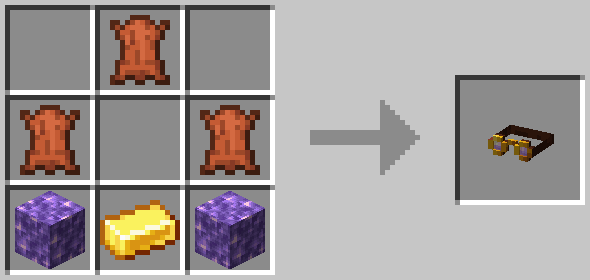
These goggles add a color-coded light overlay to the game, in an immersive & survival friendly way.
You can craft Amethyst Goggles from:
They do not stack, but can be equipped on the head.
When advanced tooltips are enabled (F3 + H), the item shows the legend for the light overlay: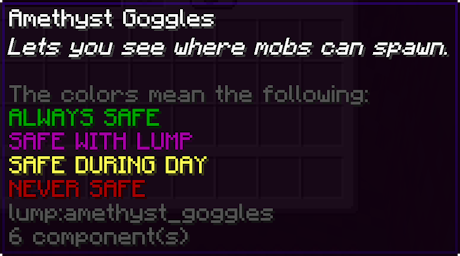
For More Technical Details see: GitHub README
If you found a bug, or have a feature you think the mod is missing: Open An Issue
Project description from Modrinth.
Pick your setup
Choose the version and loader you play, then open the matching release.
Showing the newest 12 of 18 game versions. Older files are in the list below.
Check the dependencies, then try the file in a copied instance before changing a world you care about.
Recent files
lump-fabric-26.3-0.3.1.jar
15 Nov 2026
lump-fabric-26.2-0.3.1.jar
21 Aug 2026
lump-fabric-26.1-0.3.1.jar
31 Mar 2026
lump-fabric-1.21.11-0.3.1.jar
31 Mar 2026
lump-fabric-26.1-0.3.0.jar
28 Mar 2026
lump-fabric-1.21.11-0.3.0.jar
27 Mar 2026
lump-fabric-1.21.11-0.3.0-cloth.jar
29 Dec 2025
lump-fabric-1.21.9-0.3.0.jar
15 Dec 2025
lump-fabric-1.21.6-0.3.0.jar
2 Sept 2025
lump-fabric-1.21.5-0.3.0.jar
2 Sept 2025
lump-fabric-1.21.4-0.3.0.jar
2 Sept 2025
lump-fabric-1.21.2-0.3.0.jar
2 Sept 2025
Looking for an older file? The official Modrinth project page is in Resources.
 mod
Functional Storage is an alternative take on the drawer storage solution, with an updated look and additional functionalities!
 mod
Inspired by War of the Worlds, tripods invaded your planet !
 mod
A comprehensive Fairy Maid expansion: equipment GUI, skins, combat skills, AI chat, affection and evolution. Maids are 50% smaller, and once tamed they'll ask for food, bring flowers, steal food to show off, dance, and respond to what you say.