Nirvana Library Needed by Loot Beams: Refork fabric-1.21.8-3.4.7
requiredMatching file found Matched file: fabric-1.21.8-2.2.0

Modrinth · Minecraft mod
Loot items, guided by light!
Quick answer
Loot Beams: Refork fabric-1.21.8-3.4.7 targets 1.21.8 with Fabric. It must be installed on the client. Do not install it on the dedicated server. 1 required mod needs a matching file.
Where it goes
It must be installed on the client. Do not install it on the dedicated server.
This file is marked client-only.
fabric-1.21.8-3.4.7. Change the file and its required mods may change too.
Install Nirvana Library, Fzzy Config, Common Network, Fabric Language Kotlin and 1 more first, but 1 required mod has no matching file for this setup. Do not mix loader builds to force a match. 4 come through another mod in the chain.
4 extra mods were pulled in by other dependencies. Indented rows show who needs each one. We only count dependency files that match this setup. A file for another loader does not fill the gap.
Before you install it
Built for Loot Beams: Refork fabric-1.21.8-3.4.7. Pick another file and the loader, install side or required mods may change.
Use fabric-1.21.8-3.4.7. It targets 1.21.8 with Fabric; another release may have different loader, side or dependency requirements.
Install Nirvana Library, Fzzy Config, Common Network, Fabric Language Kotlin and 1 more first, but 1 required mod has no matching file for this setup. Do not mix loader builds to force a match. 4 come through another mod in the chain.
It must be installed on the client. Do not install it on the dedicated server.
Use the “Get this file” button beside fabric-1.21.8-3.4.7. It opens that exact file at the source.
About this project
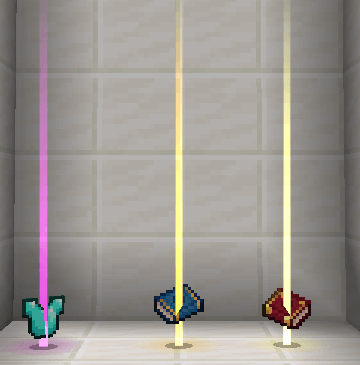
a client-side mod that adds a beam of light effect to items dropped in the world, making them more noticeable and guiding players to loot with ease.
This mod is a fork of Loot Beams: Relooted!. but its code has been overwritten totally. The aim of rewriting the code is to provide more compatibility and extension possibilities.
Great Compatibility: The mod doesn’t rely on custom shaders, ensuring compatibility with popular shaders. It also works well with other mods, while addressing and fixing compatibility issues found in the original mod.
Developer-Friendly: Provide several events that can be listened to.
Highly Configurable: Provide many configurations to let you fully control the mod function. It's advisable to edit the config in GUI instead of toml.
Feel free to contact me on GitHub if you find any mod that needs special compatibility!
Project description from Modrinth.
Pick your setup
Choose the version and loader you play, then open the matching release.
Check the dependencies, then try the file in a copied instance before changing a world you care about.
Recent files
Loot Beams Refork-fabric-1.21.8-3.4.7.jar
2 Jul 2026
Loot Beams Refork-neoforge-1.21.8-3.4.7.jar
2 Jul 2026
Loot Beams Refork-fabric-1.21.4-3.4.7.jar
2 Jul 2026
Loot Beams Refork-neoforge-1.21.4-3.4.7.jar
2 Jul 2026
Loot Beams Refork-neoforge-1.21.11-3.4.7.jar
2 Jul 2026
Loot Beams Refork-fabric-1.21.11-3.4.7.jar
2 Jul 2026
Loot Beams Refork-forge-1.20.1-3.4.7.jar
2 Jul 2026
Loot Beams Refork-neoforge-1.21.10-3.4.7.jar
2 Jul 2026
Loot Beams Refork-fabric-1.21.10-3.4.7.jar
2 Jul 2026
Loot Beams Refork-fabric-1.21.1-3.4.7.jar
2 Jul 2026
Loot Beams Refork-fabric-1.20.1-3.4.7.jar
2 Jul 2026
Loot Beams Refork-neoforge-1.21.1-3.4.7.jar
2 Jul 2026
Looking for an older file? The official Modrinth project page is in Resources.
 mod
modLDLib is a libarary mod for custom rendering, modular gui.
 mod
modAdventure time inspired dungeon crawler on a train. Procedurally generated carriages on a infinite sable physics train. Rich narrative, with custom made mods for a completely unique experience.
 mod
modA mod that improves Minecraft's spiders!