Minecraft version
Back to mods 
CurseForge · Minecraft mod
Camera Utils
Helpful camera utilities
Choose a version Pick your version below, then grab the matching file.
Quick answer
Which Camera Utils release should I use?
Latest stable file fabric-1.20.2-1.0.5
Game version 1.20.2
Loader Fabric
Camera Utils fabric-1.20.2-1.0.5 targets 1.20.2 with Fabric. It must be installed on the client. Do not install it on the dedicated server. No extra mods listed for this file.
Where it goes
Is Camera Utils required on the client, server, or both?
It must be installed on the client. Do not install it on the dedicated server.
Client Required
Dedicated server Not supported
Loader for this release Fabric
Required install it here Optional supported, not mandatory Not supported do not install here Source doesn’t say do not assume
This file is marked client-only.
What else does Camera Utils fabric-1.20.2-1.0.5 need?
fabric-1.20.2-1.0.5. Change the file and its required mods may change too.
This file does not list any required mods. Do not add a library just because a different file uses it.
This file does not list any required or optional mods.
Before you install it
Add Camera Utils without breaking your instance.
Built for Camera Utils fabric-1.20.2-1.0.5. Pick another file and the loader, install side or required mods may change.
- 01
Stick to this file
Use fabric-1.20.2-1.0.5. It targets 1.20.2 with Fabric; another release may have different loader, side or dependency requirements.
- 02
Bring the mods it needs
This file does not list any required mods. Do not add a library just because a different file uses it.
- 03
Put it on the correct side
It must be installed on the client. Do not install it on the dedicated server.
- 04
Pick the file you checked
Use the “Get this file” button beside fabric-1.20.2-1.0.5. It opens that exact file at the source.
About this project
What does Camera Utils add?
FAQ | Credits
Camera Utils is a client side Fabric mod that adds convenient features related to the players camera.
Features
- Dynamic zoom
- Camera detaching
- Adjustable third person distance
- Two customizable third person perspectives
- Advanced cinematic camera controls
- Movement smoothing
Dynamic Zoom
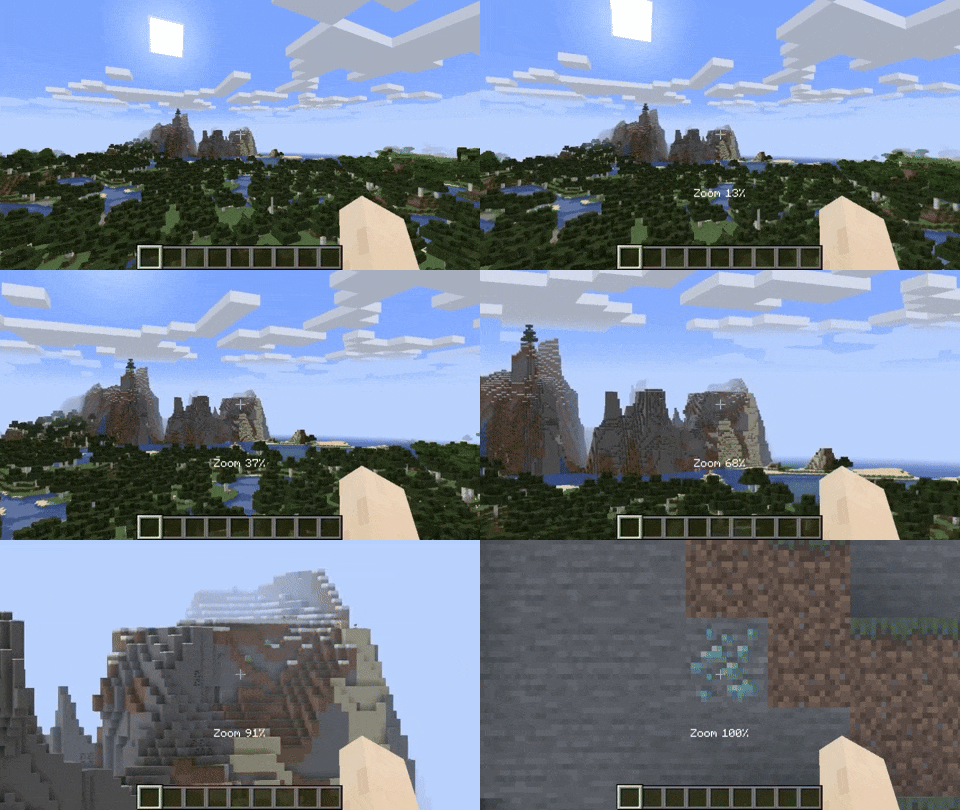
By default the zoom key is bound to Z. Holding the zoom key and scrolling dynamically adjusts the zoom value.
Camera Detaching
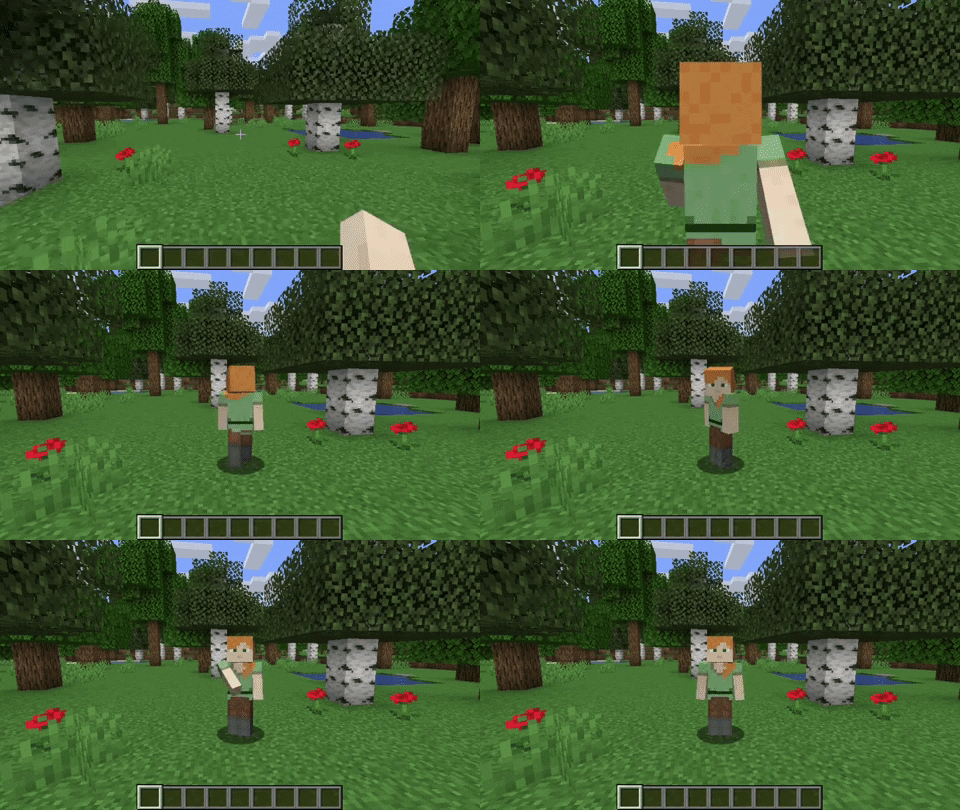
By hitting the detach camera button, the players camera is locked to the current position. You can still control the player like before, just from another point of view. By pressing RIGHT ALT in combination with the detach camera key, the camera goes back to the position, the camera was last detached.
Adjustable Third Person Distance
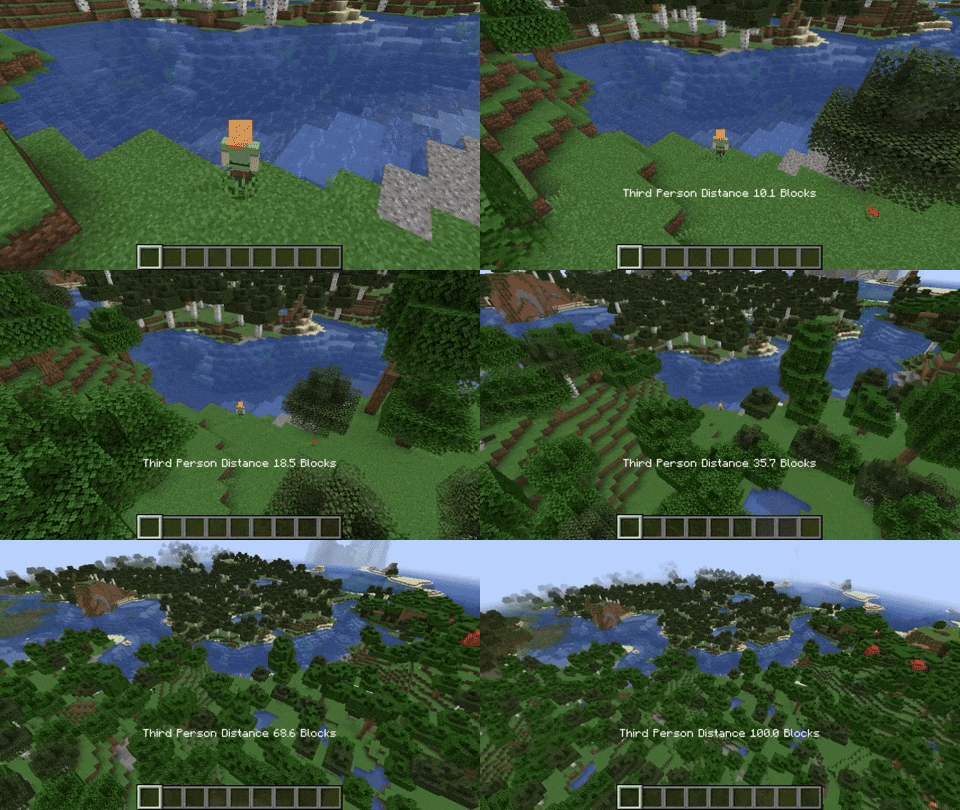
When holding the third person distance modifier in third person, you are able to scroll out up to 100 blocks away from the player.
Customizable Third Person Perspectives
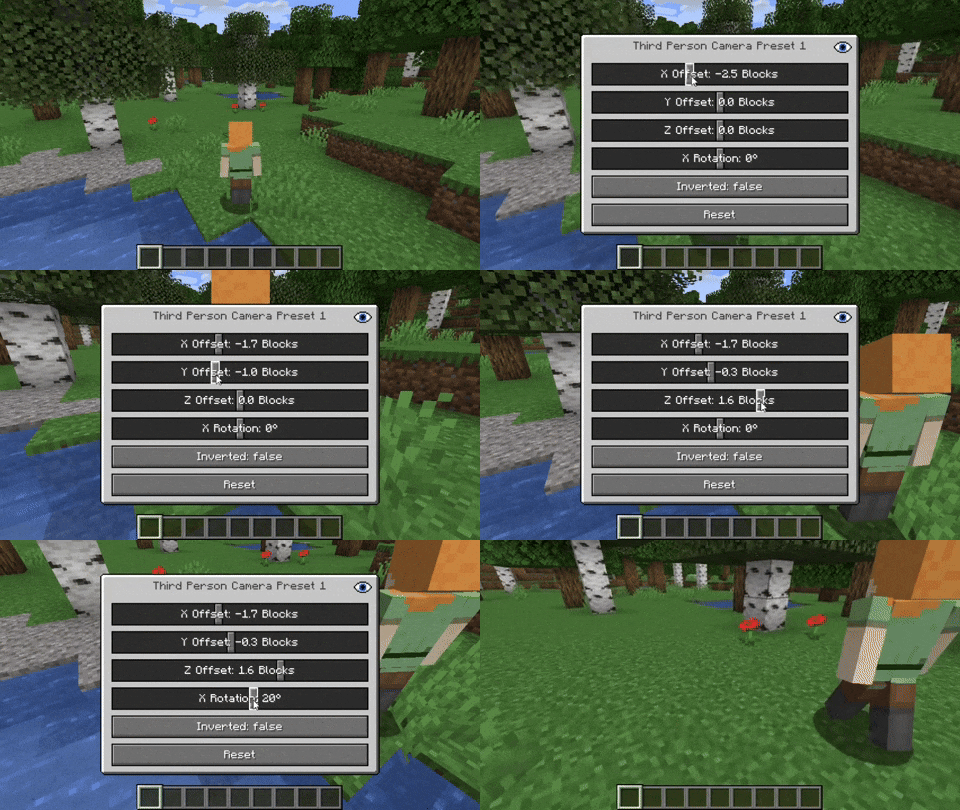
This mod allows for two custom third person perspectives. These are bound to F6 and F7 by default. These can be modified by pressing RIGHT ALT and F6 or F7 respectively.
Advanced Cinematic Camera Controls
By pressing RIGHT ALT and the cinematic camera button, you can adjust the properties of the cinematic camera.
Additional Information
Pressing any key related to the camera utils mod in combination with RIGHT ALT will open a settings GUI which allows you to change properties or to reset them back to their default values.
Note that this mod is not compatible with OptiFine.
Project description from CurseForge.
Pick your setup
Camera Utils by Minecraft version and loader
Choose the version and loader you play, then open the matching release.
Minecraft version
26.1.2
2 loader buildsMinecraft version
26.1.1
2 loader buildsMinecraft version
26.1
2 loader buildsMinecraft version
1.21.11
2 loader buildsMinecraft version
1.21.10
2 loader buildsMinecraft version
1.21.9
2 loader buildsMinecraft version
1.21.8
2 loader buildsMinecraft version
1.21.7
2 loader buildsMinecraft version
1.21.6
2 loader buildsMinecraft version
1.21.5
2 loader buildsMinecraft version
1.21.4
2 loader buildsShowing the newest 12 of 28 game versions. Older files are in the list below.
Check the dependencies, then try the file in a copied instance before changing a world you care about.
Recent files
Camera Utils versions and loaders
[FABRIC][26.2] Camera Utils 1.1.2+26.2
camerautils-fabric-1.1.2+26.2.jar
16 Jun 2026
Client Source doesn’t say Server Source doesn’t say Dependencies No extras listed Listed on Release listing
Check the 26.2 · Fabric setup FabricQuilt26.2 beta
[FABRIC][26.1.2] Camera Utils 1.1.2+26.1.2
camerautils-fabric-1.1.2+26.1.2.jar
10 Apr 2026
Client Source doesn’t say Server Source doesn’t say Dependencies No extras listed Listed on Release listing
Check the 26.1.2 · Fabric setup FabricQuilt26.126.1.1 beta
[FABRIC][26.1.1] Camera Utils 1.1.2+26.1.1
camerautils-fabric-1.1.2+26.1.1.jar
1 Apr 2026
Client Source doesn’t say Server Source doesn’t say Dependencies No extras listed Listed on Release listing
Check the 26.1.2 · Fabric setup FabricQuilt26.126.1.1 beta
[FABRIC][26.1] Camera Utils 1.1.2+26.1
camerautils-fabric-1.1.2+26.1.jar
24 Mar 2026
Client Source doesn’t say Server Source doesn’t say Dependencies No extras listed Listed on Release listing
Check the 26.1 · Fabric setup FabricQuilt26.1 beta
[FABRIC][1.21.11] Camera Utils 1.21.11-1.1.2
camerautils-fabric-1.21.11-1.1.2.jar
9 Dec 2025
Client Source doesn’t say Server Source doesn’t say Dependencies No extras listed Listed on Release listing
Check the 1.21.11 · Fabric setup FabricQuilt1.21.11 beta
[FABRIC][1.21.10] Camera Utils 1.21.10-1.1.2
camerautils-fabric-1.21.10-1.1.2.jar
24 Oct 2025
Client Source doesn’t say Server Source doesn’t say Dependencies No extras listed Listed on Release listing
Check the 1.21.10 · Fabric setup Fabric1.21.10Quilt beta
[FABRIC][1.21.8] Camera Utils 1.21.8-1.1.2
camerautils-fabric-1.21.8-1.1.2.jar
24 Oct 2025
Client Source doesn’t say Server Source doesn’t say Dependencies No extras listed Listed on Release listing
Check the 1.21.8 · Fabric setup Fabric1.21.8Quilt beta
[FABRIC][1.21.10] Camera Utils 1.21.10-1.1.1
camerautils-fabric-1.21.10-1.1.1.jar
7 Oct 2025
Client Source doesn’t say Server Source doesn’t say Dependencies No extras listed Listed on Release listing
Check the 1.21.10 · Fabric setup Fabric1.21.91.21.10Quilt beta
[FABRIC][1.21.9] Camera Utils 1.21.9-1.1.1
camerautils-fabric-1.21.9-1.1.1.jar
30 Sept 2025
Client Source doesn’t say Server Source doesn’t say Dependencies No extras listed Listed on Release listing
Check the 1.21.9 · Fabric setup Fabric1.21.9Quilt beta
[FABRIC][1.21.8] Camera Utils 1.21.8-1.1.1
camerautils-fabric-1.21.8-1.1.1.jar
17 Sept 2025
Client Source doesn’t say Server Source doesn’t say Dependencies No extras listed Listed on Release listing
Check the 1.21.8 · Fabric setup Fabric1.21.8Quilt beta
[FABRIC][1.21.8] Camera Utils 1.21.8-1.1.0
camerautils-fabric-1.21.8-1.1.0.jar
17 Jul 2025
Client Source doesn’t say Server Source doesn’t say Dependencies No extras listed Listed on Release listing
Check the 1.21.8 · Fabric setup Fabric1.21.8Quilt beta
[FABRIC][1.21.7] Camera Utils 1.21.7-1.1.0
camerautils-fabric-1.21.7-1.1.0.jar
6 Jul 2025
Client Source doesn’t say Server Source doesn’t say Dependencies No extras listed Listed on Release listing
Check the 1.21.7 · Fabric setup Fabric1.21.7Quilt beta
Looking for an older file? The official CurseForge project page is in Resources.
 mod
mod CurseForge · Minecraft
Candyverse
Sweet new dimensions, entities, decorations, blocks and food!
 mod
mod CurseForge · Minecraft
XZONEwollcpg Legacy
XZONEwollcpg Legacy is a high-performance Minecraft Forge 1.20.1 New ores, armor, weapons, mobs and more for Minecraft!
 mod
mod CurseForge · Minecraft
Everything Japanese
A Mod that adds everything Japanese. Available for Forge(Original) and NeoForge