Create Needed by Create: Colored Connections 1.20.1-0.5.0
requiredMatching file found Matched file: mc1.20.1-6.0.8

Modrinth · Minecraft mod
Colorize Factory Gauge recipe links with the 16 vanilla dyes to keep crossed connections readable.
Quick answer
Create: Colored Connections 1.20.1-0.5.0 targets 1.20.1 with Forge. Installation on the client is optional. Installation on the dedicated server is optional. All 1 required mods have matching files.
Where it goes
Installation on the client is optional. Installation on the dedicated server is optional.
The source marks this as usable on both the client and server.
1.20.1-0.5.0. Change the file and its required mods may change too.
Install Create first. We found matching files for this game-version and loader setup. 1 comes through another mod in the chain.
1 extra mod was pulled in by another dependency. Indented rows show who needs each one. We only count dependency files that match this setup. A file for another loader does not fill the gap.
Before you install it
Built for Create: Colored Connections 1.20.1-0.5.0. Pick another file and the loader, install side or required mods may change.
Use 1.20.1-0.5.0. It targets 1.20.1 with Forge; another release may have different loader, side or dependency requirements.
Install Create first. We found matching files for this game-version and loader setup. 1 comes through another mod in the chain.
Installation on the client is optional. Installation on the dedicated server is optional.
Use the “Get this file” button beside 1.20.1-0.5.0. It opens that exact file at the source.
About this project
Colorize the recipe-mode connection lines of Create's Factory Gauges with the 16 vanilla dyes, so that heavily crossed networks stay readable at a glance.
Client + server addon — in multiplayer, install it on both sides; the server stores the colors and syncs them to everyone.
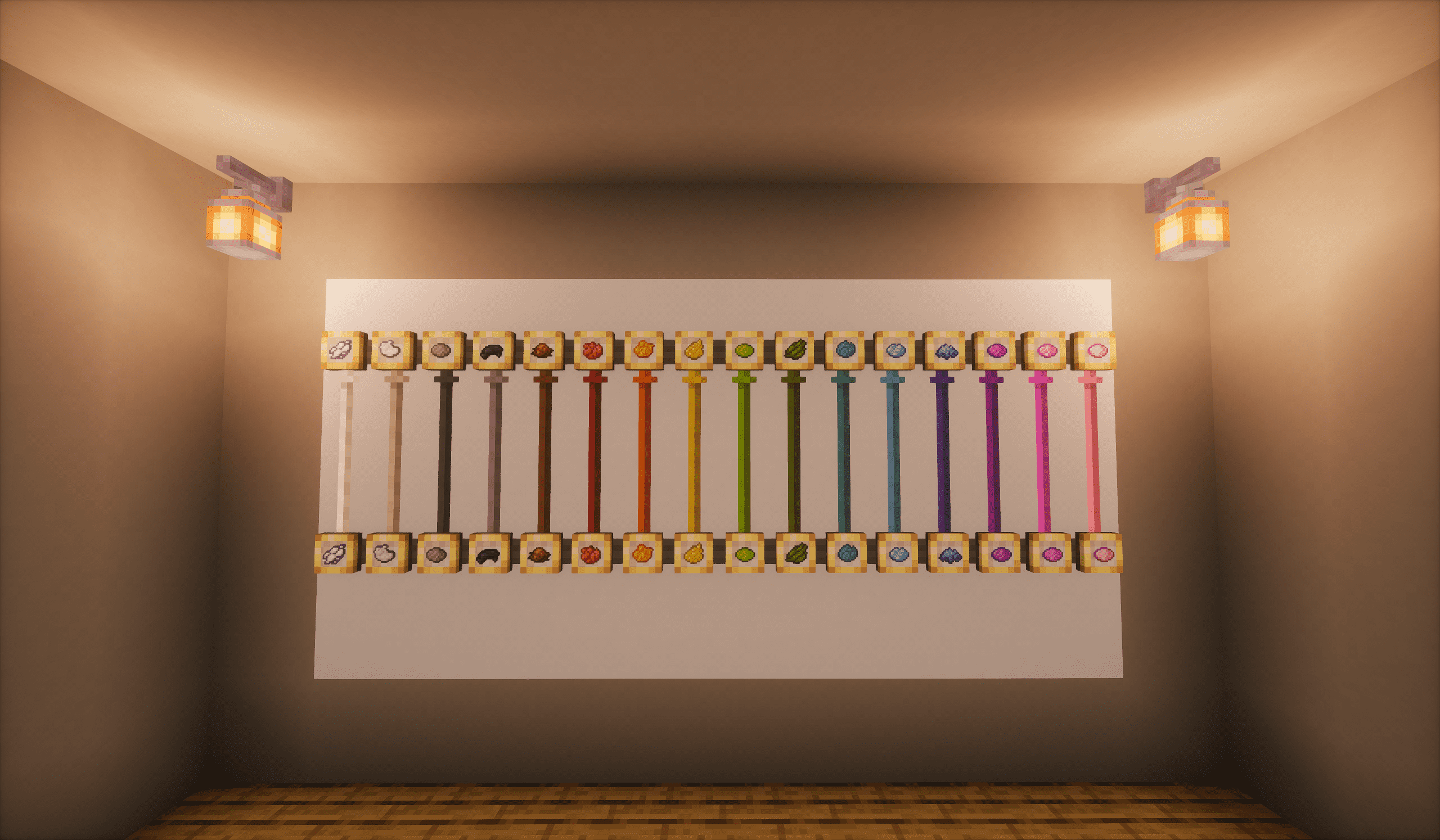
Features
Colors are stored per dimension in the world save, survive panel relocation, and sync to every player automatically — on login, dimension change, and chunk load. An optional config file covers the extras: dye consumption (off by default), the one-time first-gauge hint, the feedback effects, and the hover lift. Nothing to set up, no commands — just vanilla dye mechanics.
This page ships two branches. Pick the file that matches your game version.
Install on both client and server for multiplayer.
The 1.20.1 Forge build is a port of the 1.21.1 NeoForge original, at feature parity: dyeing, path dyeing, hover lift, sticky hover, status-color preservation, color inheritance, and per-dimension color storage with multiplayer sync. Colors live in the world save per dimension, so each branch reads the worlds it created. The only differences are the loader, the required Create build (6.0.10+ on 1.21.1; 6.0.0 – 6.0.8 on 1.20.1, see the Factory Controller note above), and the Java version (21 vs 17).
Project description from Modrinth.
Pick your setup
Choose the version and loader you play, then open the matching release.
Check the dependencies, then try the file in a copied instance before changing a world you care about.
Recent files
create_colored_connections-1.20.1-0.5.0-all.jar
27 Sept 2026
create-colored-connections-0.5.0.jar
24 Sept 2026
create-colored-connections-0.4.1.jar
13 Sept 2026
create-colored-connections-0.3.0.jar
3 Sept 2026
create-colored-connections-0.2.0.jar
25 Aug 2026
create-colored-connections-0.1.1.jar
24 Aug 2026
create-colored-connections-0.1.0.jar
23 Aug 2026
Looking for an older file? The official Modrinth project page is in Resources.
 mod
modJINZAI Traffic lights adds nearly 160 varied‑style traffic lights, indicator lights and decorative pole blocks.
 mod
modOfficial core engine & security framework for Pirates of Heaven MMO (Aeronautics, PocketSpheres & Captain bindings).
 mod
modA technology mod centered around anvils