Minecraft version
Back to mods 
Modrinth · Minecraft mod
Painted Blocks
Painted Blocks – Custom Mini Blocks Made Easy!
Choose a version Pick your version below, then grab the matching file.
Quick answer
Which Painted Blocks release matches 26.1 NeoForge?
Best match for your filters 2.3+mod
Game version 26.1
Loader Fabric, Forge, NeoForge
Painted Blocks 2.3+mod targets 26.1 with Fabric, Forge, NeoForge. Installation on the client is optional. Installation on the dedicated server is optional. No extra mods listed for this file.
Where it goes
Is Painted Blocks required on the client, server, or both?
Installation on the client is optional. Installation on the dedicated server is optional.
Client Optional
Dedicated server Optional
Loader for this release Fabric, Forge, NeoForge
Required install it here Optional supported, not mandatory Not supported do not install here Source doesn’t say do not assume
The source marks this as usable on both the client and server.
What else does Painted Blocks 2.3+mod need?
2.3+mod on 26.1 NeoForge. Every mod below is checked against that same setup.
This file does not list any required mods. Do not add a library just because a different file uses it.
This file does not list any required or optional mods.
Before you install it
Add Painted Blocks without breaking your instance.
Built for Painted Blocks 2.3+mod on 26.1 NeoForge. Pick another file and the loader, install side or required mods may change.
- 01
Stick to this file
Use 2.3+mod. It targets 26.1 with Fabric, Forge, NeoForge; another release may have different loader, side or dependency requirements.
- 02
Bring the mods it needs
This file does not list any required mods. Do not add a library just because a different file uses it.
- 03
Put it on the correct side
Installation on the client is optional. Installation on the dedicated server is optional.
- 04
Pick the file you checked
Use the “Get this file” button beside 2.3+mod. It opens that exact file at the source.
About this project
What does Painted Blocks add?
⚠️ IMPORTANT: USAGE GUIDELINES
If you're planning to use this on a server or modpack,
please refer to:
https://gamedash43.github.io/dash-mcl-licenses/#usage

This datapack provides a simple, vanilla-friendly way to create custom mini blocks using a crafting table.
🛠️Crafting Recipes
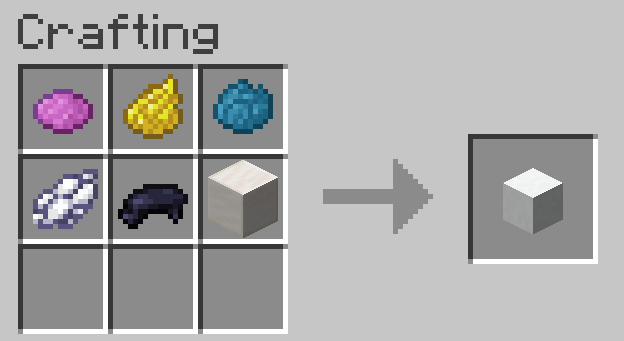
- Shapeless Quartz Block Recipe.
- Player Head Recipe (same as the quartz block recipe but replaces the quartz block with a player head).
📜How to Use
- Get a Book and Quill.
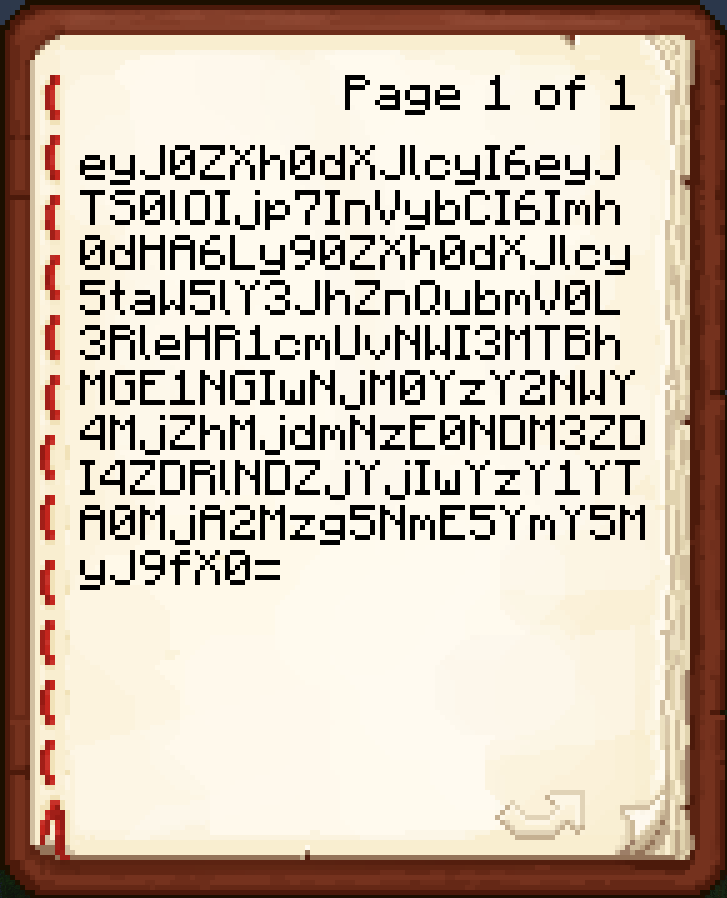
- Paste a Base64 texture value on the first page of the book from a site like https://minecraft-heads.com/.
- Hold the unsigned Book and Quill in your main hand.
- Craft the recipe to get a player head with the given texture.
❓FAQ
The painted block is either blank or displays a Steve/Alex/etc. skin.
This means either you weren't holding a Book and Quill, or you were holding one but the pasted value was not valid. If rewriting the value does not work, join the Discord to ask for help.How do I report a bug?
Join the discord and DM me or write a message in the reports channel.Do I need a resource pack?
No, this datapack uses the vanilla player head functionality, so no resource pack is needed.How does this datapack impact performance?
This datapack has no ticking functions, so it should have no performance impact.How do I uninstall this datapack?
*Just run the command "/function dash.chead:uninstall" *This is only needed pre V2.0Project description from Modrinth.
Pick your setup
Painted Blocks by Minecraft version and loader
Choose the version and loader you play, then open the matching release.
Minecraft version
1.21.11
5 loader buildsMinecraft version
1.21.10
5 loader buildsMinecraft version
1.21.9
5 loader buildsMinecraft version
1.21.5
5 loader buildsMinecraft version
1.21.4
5 loader buildsCheck the dependencies, then try the file in a copied instance before changing a world you care about.
Recent files
Painted Blocks versions and loaders
2.3+mod
painted-blocks-2.3.jar
25 Mar 2026
Client Optional Server Optional Dependencies No extras listed Listed on Release listing
Check the 26.1 · NeoForge setup 26.1FabricForgeNeoForge release
Looking for an older file? The official Modrinth project page is in Resources.
 mod
Modrinth · Minecraft
Just Enough Book
Just Enough Book (JEB) – Minecraft Recipe Book Mod
 mod
Modrinth · Minecraft
Pets Mod
Adds completely client-sided pets to your game. Supports every vanilla mob, some custom ones, and will work on any server, including in singleplayer!
 mod
Modrinth · Minecraft
ZMusic
Cross-platform Music System for Minecraft