Minecraft version
Back to mods 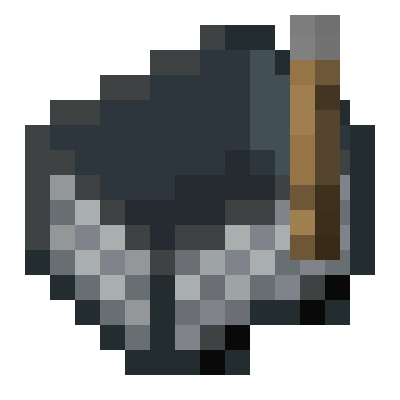
Modrinth · Minecraft mod
Controllable Carts
Adds player controllable Minecarts.
Choose a version Pick your version below, then grab the matching file.
Quick answer
Which Controllable Carts release should I use?
Latest stable file 1.0.0+26.3
Game version 26.1, 26.1.1, 26.1.2
Loader Fabric
Controllable Carts 1.0.0+26.3 targets 26.1, 26.1.1, 26.1.2 with Fabric. Installation on the client is optional. Installation on the dedicated server is optional. No extra mods listed for this file.
Where it goes
Is Controllable Carts required on the client, server, or both?
Installation on the client is optional. Installation on the dedicated server is optional.
Client Optional
Dedicated server Optional
Loader for this release Fabric
Required install it here Optional supported, not mandatory Not supported do not install here Source doesn’t say do not assume
The source marks this as usable on both the client and server.
What else does Controllable Carts 1.0.0+26.3 need?
1.0.0+26.3. Change the file and its required mods may change too.
This file does not list any required mods. Do not add a library just because a different file uses it.
This file does not list any required or optional mods.
Before you install it
Add Controllable Carts without breaking your instance.
Built for Controllable Carts 1.0.0+26.3. Pick another file and the loader, install side or required mods may change.
- 01
Stick to this file
Use 1.0.0+26.3. It targets 26.1, 26.1.1, 26.1.2 with Fabric; another release may have different loader, side or dependency requirements.
- 02
Bring the mods it needs
This file does not list any required mods. Do not add a library just because a different file uses it.
- 03
Put it on the correct side
Installation on the client is optional. Installation on the dedicated server is optional.
- 04
Pick the file you checked
Use the “Get this file” button beside 1.0.0+26.3. It opens that exact file at the source.
About this project
What does Controllable Carts add?
Controllable Carts
This mod adds the Minecart with Controls, a new type of Minecart which is controllable by the player.
How to use it
Crafting
Craft the Minecart with Controls by combining a Furnace Minecart with a lever.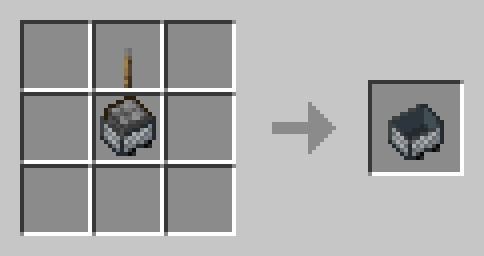
Fueling
First, you add fuel to the cart via Coal, Charcoal, or Coal Blocks. Coal and Charcoal add one fuel point, and coal blocks add 9.
Carts can hold a maximum of 100 fuel points.
When no fuel is remaining, you can no longer accelerate the cart.
Controls
To control the cart, by default use W to accelerate and S to decelerate. These keys are based on whatever keys you have set for the forward and backward actions.
HUD
When riding the cart, a small HUD will appear above your hotbar.
This includes the speed of the cart in blocks per second (bl/s) and the amount of fuel remaining.
Enjoy!
Project description from Modrinth.
Pick your setup
Controllable Carts by Minecraft version and loader
Choose the version and loader you play, then open the matching release.
Minecraft version
26.2
1 loader buildMinecraft version
26.1.2
1 loader buildMinecraft version
26.1.1
1 loader buildMinecraft version
26.1
1 loader buildMinecraft version
1.21.11
1 loader buildMinecraft version
1.21.10
1 loader buildCheck the dependencies, then try the file in a copied instance before changing a world you care about.
Recent files
Controllable Carts versions and loaders
1.0.0+26.3
controllablecarts-1.0.0+26.3.jar
4 Oct 2026
Client Optional Server Optional Dependencies No extras listed Listed on Release listing
Check the 26.3 · Fabric setup 26.126.1.126.1.226.2 release
1.0.0+26.1
controllablecarts-1.0.0+26.1.jar
30 Mar 2026
Client Optional Server Optional Dependencies No extras listed Listed on Release listing
Check the 26.1.2 · Fabric setup 26.126.1.126.1.2Fabric release
1.0.0+1.21.11
controllablecarts-1.0.0+1.21.11.jar
9 Dec 2025
Client Optional Server Optional Dependencies 1 required · 1 unchecked Listed on Release listing
Check the 1.21.11 · Fabric setup 1.21.11Fabric release
1.0.0
controllablecarts-1.0.0.jar
8 Dec 2025
Client Optional Server Optional Dependencies 1 required · 1 unchecked Listed on Release listing
Check the 1.21.10 · Fabric setup 1.21.10Fabric release
Looking for an older file? The official Modrinth project page is in Resources.
 mod
CurseForge + Modrinth · Minecraft
Reach Display
A configurable visual representation of your reach and hit distances
 mod
Modrinth · Minecraft
Strength SMP - Season IV
Ever wanted to try the Season IV version of the strength smp?
 mod
Modrinth · Minecraft
Dungeon Train: A Lore-Rich Roguelite RPG Adventure
Adventure time inspired dungeon crawler on a train. Procedurally generated carriages on a infinite sable physics train. Rich narrative, with custom made mods for a completely unique experience.