Forge Config API Port Needed by Ohmega 1.5.22
requiredMatching file found Matched file: 26.3.1

Modrinth · Minecraft mod
A modernised and lightweight data-driven accessory API for Minecraft
Quick answer
Ohmega 1.5.22 targets 26.3 with Fabric. Installation on the client is optional. Installation on the dedicated server is optional. All 2 required mods have matching files.
Where it goes
Installation on the client is optional. Installation on the dedicated server is optional.
The source marks this as usable on both the client and server.
1.5.22. Change the file and its required mods may change too.
Install Forge Config API Port, Fabric API first. We found matching files for this game-version and loader setup. 2 come through another mod in the chain.
2 extra mods were pulled in by other dependencies. Indented rows show who needs each one. We only count dependency files that match this setup. A file for another loader does not fill the gap.
Before you install it
Built for Ohmega 1.5.22. Pick another file and the loader, install side or required mods may change.
Use 1.5.22. It targets 26.3 with Fabric; another release may have different loader, side or dependency requirements.
Install Forge Config API Port, Fabric API first. We found matching files for this game-version and loader setup. 2 come through another mod in the chain.
Installation on the client is optional. Installation on the dedicated server is optional.
Use the “Get this file” button beside 1.5.22. It opens that exact file at the source.
About this project
A modernised and lightweight data-driven, loader-agnostic accessory API for Minecraft, versions 1.18+
This mod aims to be a performant and stable alternative to other accessory API mods, while maintaining a plentiful amount of useful features both for users and developers
If you know another language and have some free time, consider helping to translate the mod here. There aren't too many translations needed per language, and your contributions will be extremely helpful.
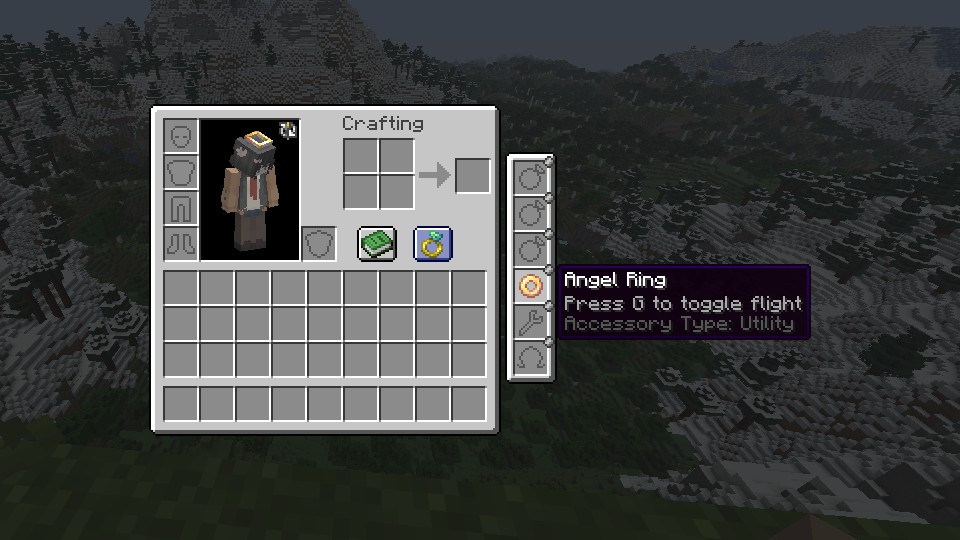
The following table describes features and the mod's version requirement in which they can be used. I am very open to feature requests, simply join the Discord and leave a message detailing what you would like to see added/changed, or create an issue report on the GitHub issue tracker.
| Feature | Version | Support / detail | Documentation |
|---|---|---|---|
| Multi-loader | >=1.4 | Fabric, Forge, NeoForge | N/A |
| Accessory rendering | >=1.6 | Broad (exp) | Yes |
| Custom slot types | >=1.3 | Full, data-driven | Yes |
| Data generation | >=1.5.8 | Accessory types, lang | Yes |
| Key-bound slots | Any | Built-in, dynamic | No |
| Accessory events | >=1.1 | Full (>=1.6) | Partial |
| Attribute modifiers | >=1.1 | Full, conditional | Yes |
| Custom screens | >=1.6 | Full (exp) | Yes |
| Configs | >=1.3 | Client & server config | N/A |
| UI Edit Screen | >=1.6 | Complete widget editing | N/A |
The Fabric version depends on the 'Fabric API' and 'Forge Config API Port' mods to function, whereas the Forge and NeoForge versions are standalone
Read the wiki to learn how to mod with Ohmega, and create your own functional accessories. If you have any questions or need support, join the Discord and leave a message with what you would like to know or need guidance with
Project description from Modrinth.
Pick your setup
Choose the version and loader you play, then open the matching release.
Check the dependencies, then try the file in a copied instance before changing a world you care about.
Recent files
ohmega-1.5.22-fabric-mc26.3.jar
9 Oct 2026
ohmega-1.5.22-forge-mc26.3.jar
9 Oct 2026
ohmega-1.5.22-neoforge-mc26.3.jar
9 Oct 2026
ohmega-1.5.21-neoforge-mc26.3.jar
15 Sept 2026
ohmega-1.5.21-fabric-mc26.3.jar
15 Sept 2026
ohmega-neoforge-1.6.0-beta.19-mc26.2.jar
7 Sept 2026
ohmega-forge-1.6.0-beta.19-mc26.2.jar
7 Sept 2026
ohmega-fabric-1.6.0-beta.19-mc26.2.jar
7 Sept 2026
ohmega-1.5.21-neoforge+1.21.1.jar
30 Aug 2026
ohmega-1.5.21-forge+1.21.1.jar
30 Aug 2026
ohmega-1.5.21-fabric+1.21.1.jar
30 Aug 2026
ohmega-1.5.21-neoforge+1.21.11.jar
30 Aug 2026
Looking for an older file? The official Modrinth project page is in Resources.
 mod
modHide or adjust the transparency of armor, glint, and offhand items - with full multiplayer sync. No dependencies required.
 mod
modDisposable public fixture for testing the Modpacks.ch GitHub catalogue flow
 mod
modFace the deadliest bosses ever forged combat, fights, and chaos await!