Minecraft version
Back to mods 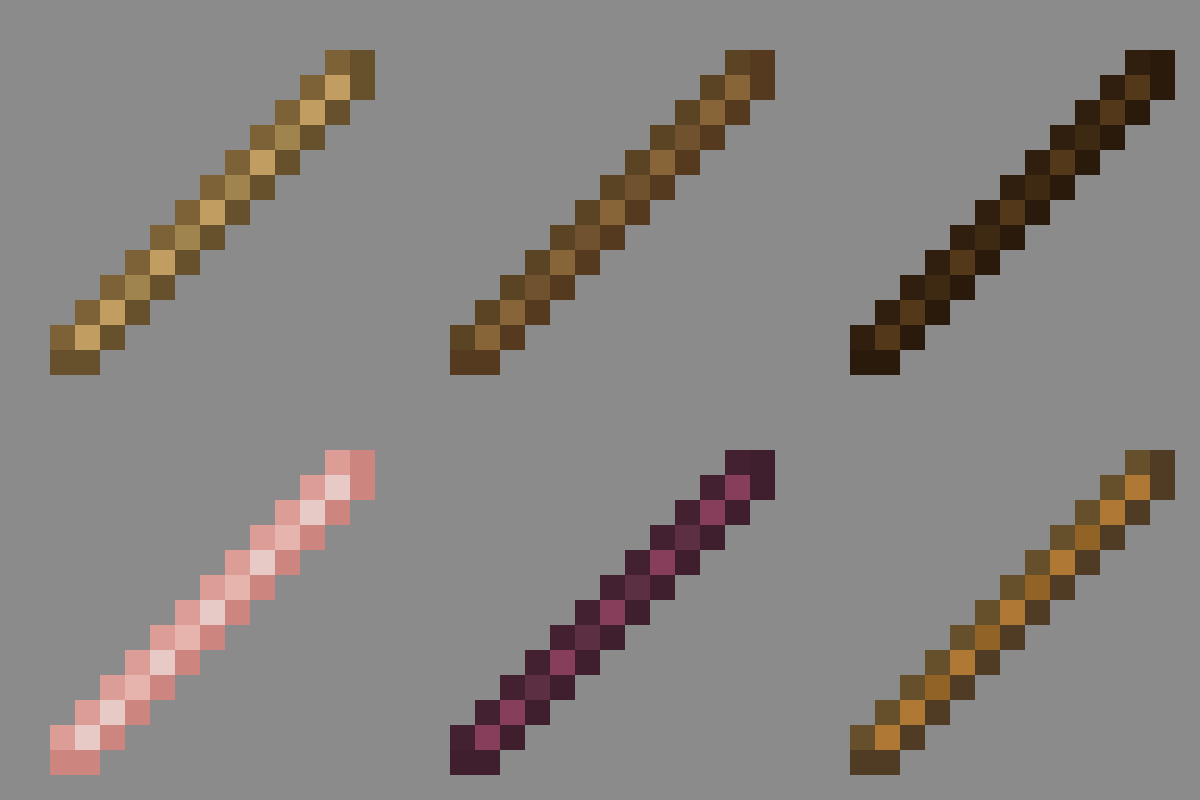
Modrinth · Minecraft mod
Vanilla Materials Expanded
Matches every stick to its source wood texture. Lightweight and vanilla friendly. Make your world feel more consistent!
Choose a version Pick your version below, then grab the matching file.
Quick answer
Which Vanilla Materials Expanded release should I use?
Latest stable file 1.2+mod
Game version 26.3
Loader Fabric, Forge, NeoForge
Vanilla Materials Expanded 1.2+mod targets 26.3 with Fabric, Forge, NeoForge. Installation on the client is optional. Installation on the dedicated server is optional. No extra mods listed for this file.
Where it goes
Is Vanilla Materials Expanded required on the client, server, or both?
Installation on the client is optional. Installation on the dedicated server is optional.
Client Optional
Dedicated server Optional
Loader for this release Fabric, Forge, NeoForge
Required install it here Optional supported, not mandatory Not supported do not install here Source doesn’t say do not assume
The source marks this as usable on both the client and server.
What else does Vanilla Materials Expanded 1.2+mod need?
1.2+mod. Change the file and its required mods may change too.
This file does not list any required mods. Do not add a library just because a different file uses it.
This file does not list any required or optional mods.
Before you install it
Add Vanilla Materials Expanded without breaking your instance.
Built for Vanilla Materials Expanded 1.2+mod. Pick another file and the loader, install side or required mods may change.
- 01
Stick to this file
Use 1.2+mod. It targets 26.3 with Fabric, Forge, NeoForge; another release may have different loader, side or dependency requirements.
- 02
Bring the mods it needs
This file does not list any required mods. Do not add a library just because a different file uses it.
- 03
Put it on the correct side
Installation on the client is optional. Installation on the dedicated server is optional.
- 04
Pick the file you checked
Use the “Get this file” button beside 1.2+mod. It opens that exact file at the source.
About this project
What does Vanilla Materials Expanded add?
Vanilla Materials Expanded
Matches every stick to its source wood texture. Lightweight, vanilla friendly, and 100% mod compatible! Resource pack included!
I have a lot more planned for this project!
HOW TO INSTALL AS A DATAPACK
Just put the zipped file into your worlds datapacks folder AND your resource pack folder. If it says it is outdated, ignore the message. As long as you are on the version you put in when downloading it will work. The datapack will show up as incompatible but it will work anyway.
Variety of Sticks

FAQ
Does this work on a server?
Yes. For the datapack version go into your servers folders and go to world -> datapacks and put the datapack there. This datapack works multiplayer so play with however many people you would like! Keep in mind every player needs the resource pack or mod to see the items correctly.
Incompatibles
- Some resource packs might override the new stick textures, to fix this put the resource pack at the top.
Support us!
Join my Minecraft server ZoneRush.minekeep.gg for a unique PvP gamemode!
Try my other datapacks! Here are some that you might like.


Join the discord to get updates, support me, and report issues

Project description from Modrinth.
Pick your setup
Vanilla Materials Expanded by Minecraft version and loader
Choose the version and loader you play, then open the matching release.
Minecraft version
26.2
5 loader buildsMinecraft version
26.1.2
5 loader buildsMinecraft version
26.1.1
5 loader buildsMinecraft version
26.1
5 loader buildsMinecraft version
1.21.11
5 loader buildsMinecraft version
1.21.10
5 loader buildsMinecraft version
1.21.9
5 loader buildsCheck the dependencies, then try the file in a copied instance before changing a world you care about.
Recent files
Vanilla Materials Expanded versions and loaders
2.0-beta6+mod
ve-materials-2.0-beta6.jar
3 Oct 2026
Client Optional Server Optional Dependencies No extras listed Listed on Release listing
Check the 26.3 · Fabric setup 26.3FabricForgeNeoForge beta
2.0-beta6
VE-Materials-2.0-beta6.zip
3 Oct 2026
Client Optional Server Optional Dependencies No extras listed Listed on Release listing
Check the 26.3 · datapack setup 26.3datapack beta
1.2+mod
ve-materials-1.2.jar
2 Oct 2026
Client Optional Server Optional Dependencies No extras listed Listed on Release listing
Check the 26.3 · Fabric setup 26.3FabricForgeNeoForge release
1.2
VE-Materials-1.2.zip
2 Oct 2026
Client Optional Server Optional Dependencies No extras listed Listed on Release listing
Check the 26.3 · datapack setup 26.3datapack release
1.2-beta+mod
ve-materials-1.2-beta.jar
1 Oct 2026
Client Optional Server Optional Dependencies No extras listed Listed on Release listing
Check the 26.3 · Fabric setup 26.3FabricForgeNeoForge beta
1.2-beta
VE-Materials-1.2-beta.zip
1 Oct 2026
Client Optional Server Optional Dependencies No extras listed Listed on Release listing
Check the 26.3 · datapack setup 26.3datapack beta
1.2-alpha2+mod
ve-materials-1.2-alpha2.jar
30 Sept 2026
Client Optional Server Optional Dependencies No extras listed Listed on Release listing
Check the 26.3 · Fabric setup 26.3FabricForgeNeoForge alpha
1.2-alpha2
VE-Materials-1.2-alpha2.zip
30 Sept 2026
Client Optional Server Optional Dependencies No extras listed Listed on Release listing
Check the 26.3 · datapack setup 26.3datapack alpha
1.2-alpha+mod
ve-materials-1.2-alpha.jar
29 Sept 2026
Client Optional Server Optional Dependencies No extras listed Listed on Release listing
Check the 26.3 · Fabric setup 26.3FabricForgeNeoForge alpha
1.2-alpha
VE-Materials-1.2-alpha.zip
29 Sept 2026
Client Optional Server Optional Dependencies No extras listed Listed on Release listing
Check the 26.3 · datapack setup 26.3datapack alpha
2.0-beta5+mod
ve-materials-2.0-beta5.jar
26 Jun 2026
Client Optional Server Optional Dependencies No extras listed Listed on Release listing
Check the 26.2 · Fabric setup 26.2FabricForgeNeoForge beta
2.0-beta5
VE-Materials-beta5.zip
23 Jun 2026
Client Optional Server Optional Dependencies No extras listed Listed on Release listing
Check the 26.2 · datapack setup 26.2datapack beta
Looking for an older file? The official Modrinth project page is in Resources.
 mod
mod CurseForge + Modrinth · Minecraft
Mar Mar's Enhanced Ore Variety
Bored of finding always the same ores? You just found a solucion. This mod adds a Granite, Diorite, Andesite and Tuff variant to all the vanilla ores.
 mod
mod CurseForge + Modrinth · Minecraft
Forged Lead
Makes leads (leashes) unbreakable in Minecraft. No more leads snapping when your animals wander too far!
 mod
mod CurseForge + Modrinth · Minecraft
ScreenshotMetadata
A Minecraft Fabric mod that automatically adds comprehensive metadata to your screenshots, making them easier to organize and search.