Fabric API Needed by Rollback 0.8.0
requiredNo matching file

Modrinth · Minecraft mod
This mod improves the backup system. (Automatic backups, GUI, etc.)
Quick answer
Rollback 0.8.0 targets 1.19.4 with Fabric. It must be installed on the client. Do not install it on the dedicated server. 1 required mod needs a matching file.
Where it goes
It must be installed on the client. Do not install it on the dedicated server.
This file is marked client-only.
0.8.0. Change the file and its required mods may change too.
Install Fabric API first, but 1 required mod has no matching file for this setup. Do not mix loader builds to force a match.
We only count dependency files that match this setup. A file for another loader does not fill the gap.
Before you install it
Built for Rollback 0.8.0. Pick another file and the loader, install side or required mods may change.
Use 0.8.0. It targets 1.19.4 with Fabric; another release may have different loader, side or dependency requirements.
Install Fabric API first, but 1 required mod has no matching file for this setup. Do not mix loader builds to force a match.
It must be installed on the client. Do not install it on the dedicated server.
Use the “Get this file” button beside 0.8.0. It opens that exact file at the source.
About this project
This Minecraft mod improves the backup system. (Automatic backups, GUI, etc.)
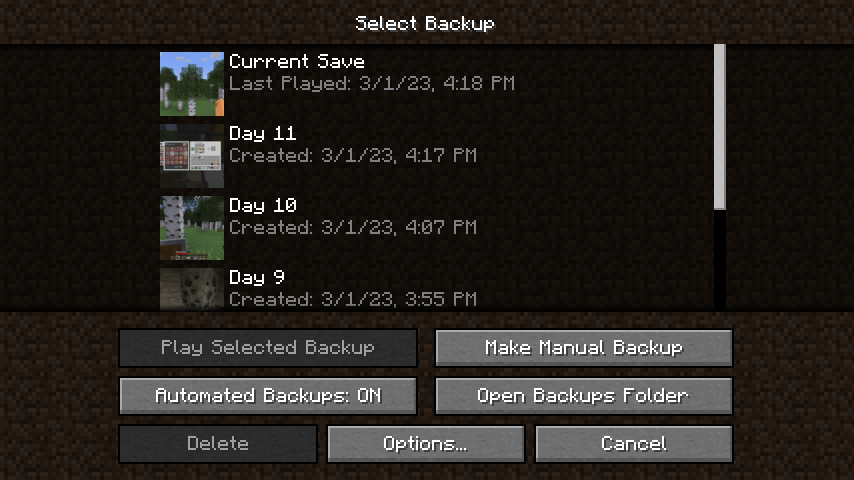
Shows a list of the automated backups available for this world.
Creates an automated backup. You can provide a name for the said backup. The name must be wrapped in quotations " if it consists of multiple worlds. It can be at most 32 characters long.
Deletes the corresponding backup. If "latest" or "oldest" is provided, the latest/oldest backup gets deleted. If an index is provided, the backup with that index gets deleted.
Changes the configuration, similar to the /gamerule command.
Project description from Modrinth.
Pick your setup
Choose the version and loader you play, then open the matching release.
Check the dependencies, then try the file in a copied instance before changing a world you care about.
Recent files
rollback-0.8.0.jar
25 Apr 2023
rollback-0.6.0.jar
6 Mar 2023
Looking for an older file? The official Modrinth project page is in Resources.
 mod
A library that allows players to make fully functional guns with next to no setup and coding knowledge.
 mod
Fixes and integrations for Thirst was Reclaimed
 mod
This datapack ports the 26.4 jukebox playlist system to older versions and is compatible with AudioPlayer!