Minecraft version
Back to mods 
Modrinth · Minecraft mod
Easy Building
Quickly build walls and floors without mistakes, completely Clientside.
Choose a version Pick your version below, then grab the matching file.
Quick answer
Which Easy Building release should I use?
Latest stable file 1.0.1
Game version 26.1.2
Loader Fabric
Easy Building 1.0.1 targets 26.1.2 with Fabric. It must be installed on the client. Do not install it on the dedicated server. No extra mods listed for this file.
Where it goes
Is Easy Building required on the client, server, or both?
It must be installed on the client. Do not install it on the dedicated server.
Client Required
Dedicated server Not supported
Loader for this release Fabric
Required install it here Optional supported, not mandatory Not supported do not install here Source doesn’t say do not assume
This file is marked client-only.
What else does Easy Building 1.0.1 need?
1.0.1. Change the file and its required mods may change too.
This file does not list any required mods. Do not add a library just because a different file uses it.
This file does not list any required or optional mods.
Before you install it
Add Easy Building without breaking your instance.
Built for Easy Building 1.0.1. Pick another file and the loader, install side or required mods may change.
- 01
Stick to this file
Use 1.0.1. It targets 26.1.2 with Fabric; another release may have different loader, side or dependency requirements.
- 02
Bring the mods it needs
This file does not list any required mods. Do not add a library just because a different file uses it.
- 03
Put it on the correct side
It must be installed on the client. Do not install it on the dedicated server.
- 04
Pick the file you checked
Use the “Get this file” button beside 1.0.1. It opens that exact file at the source.
About this project
What does Easy Building add?
Choose a vertical or horizontal plane, then you can click and drag to quickly and neatly place blocks on that plane. Use this to easily extend walls, floors, bridges or roofs.
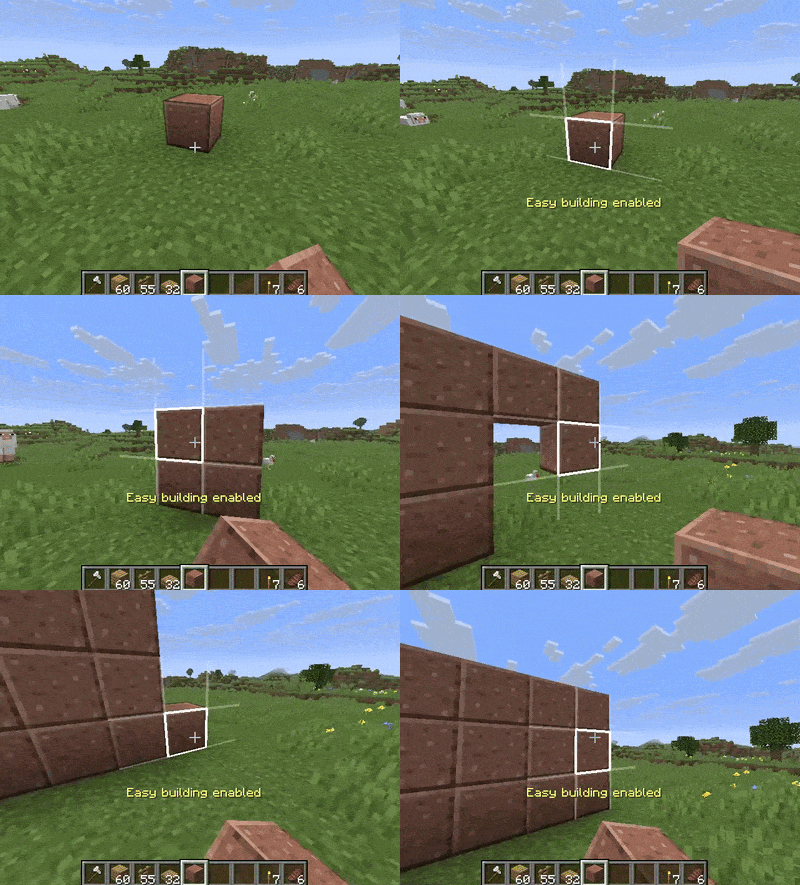
Instructions
Press Left Alt (can be rebound to any key) to toggle Easy Building Mode. The building plane gets set to whatever face you were looking when you pressed the button, so if you want to extend a wall, look at that wall and press the button. If you want to extend a bridge, look at the floor and press the button. Same for a roof, railing, scaffolding, anything.
Slabs and Stairs
When you press the Easy Building Mode key while looking at a slab or stair block, it will try to match that block when placing others. This means that if you start Easy Building Mode while looking at a top slab, you will place top slabs. If you were looking at a bottom slab, you will place bottom slabs.
Server usage
This is a clientside mod, meaning you can use it even if its not installed in the server. This mod might not be allowed on multiplayer servers and could result in a ban. Please consult with server authorities before using in multiplayer.
Impossible blocks
This mod doesn't allow you to place blocks in impossible positions. It requires a neighbor to place the block against. This means that you cant place a floating top slab by placing a slab above a lone block, and you cant place blocks in the air. That said, you can place blocks you couldn't normally place (i.e. extending a bridge without peeking past the edge).
Open source
I welcome any fixes, improvements or ports. The source is available in github.
Showcase
Project description from Modrinth.
Pick your setup
Easy Building by Minecraft version and loader
Choose the version and loader you play, then open the matching release.
Minecraft version
1.21.1
1 loader buildMinecraft version
1.20.6
1 loader buildMinecraft version
1.20.5
1 loader buildMinecraft version
1.20.4
1 loader buildMinecraft version
1.20.3
1 loader buildMinecraft version
1.20.2
1 loader buildMinecraft version
1.20.1
1 loader buildCheck the dependencies, then try the file in a copied instance before changing a world you care about.
Recent files
Easy Building versions and loaders
1.0.1
easy-building-fabric-26.1.2-v1.0.1.jar
3 Jul 2026
Client Required Server Not supported Dependencies No extras listed Listed on Release listing
Check the 26.1.2 · Fabric setup 26.1.2Fabric release
1.0.1
EasyBuilding-fabric-1.20.1-v1.0.1.jar
29 Jun 2026
Client Required Server Not supported Dependencies No extras listed Listed on Release listing
Check the 1.20.6 · Fabric setup 1.20.11.20.21.20.31.20.4 release
1.1.0
easybuilding-neoforge-1.21.1-v1.1.jar
15 Jun 2026
Client Required Server Not supported Dependencies No extras listed Listed on Release listing
Check the 1.21.1 · NeoForge setup 1.21.1NeoForge release
1.1.0
easybuilding-neoforge-26.1.2-v1.1.jar
15 Jun 2026
Client Required Server Not supported Dependencies No extras listed Listed on Release listing
Check the 26.1.2 · NeoForge setup 26.1.2NeoForge release
1.0.0
easybuilding-neoforge-26.1.2-v1.jar
13 Jun 2026
Client Required Server Not supported Dependencies No extras listed Listed on Release listing
Check the 26.1.2 · NeoForge setup 26.1.2NeoForge beta
1.0.0
easybuilding-neoforge-1.21.1-v1.jar
13 Jun 2026
Client Required Server Not supported Dependencies No extras listed Listed on Release listing
Check the 1.21.1 · NeoForge setup 1.21.1NeoForge beta
1.0.0
easy-building-fabric-26.1.2-v1.jar
11 Jun 2026
Client Required Server Not supported Dependencies 1 required · 1 unchecked Listed on Release listing
Check the 26.1.2 · Fabric setup 26.1.2Fabric beta
1.0.0
easy-building-fabric-1.20.1-v1.jar
11 Jun 2026
Client Required Server Not supported Dependencies 1 required · 1 unchecked Listed on Release listing
Check the 1.20.6 · Fabric setup 1.20.11.20.21.20.31.20.4 beta
Looking for an older file? The official Modrinth project page is in Resources.
 mod
CurseForge + Modrinth · Minecraft
Adventure Item Names
Unique names for weapons, tools, armour and items found throughout your world.
 mod
Modrinth · Minecraft
Enhanced Operator Utilities
Puts the items only /give can get into the creative inventory: boss spawn eggs, elemental paintings, base potions and more, in the tabs you choose.
 mod
Modrinth · Minecraft
Durability Digits
Shows the exact durability left on your tools, weapons and armor, as a number or a percentage, right on their slots.